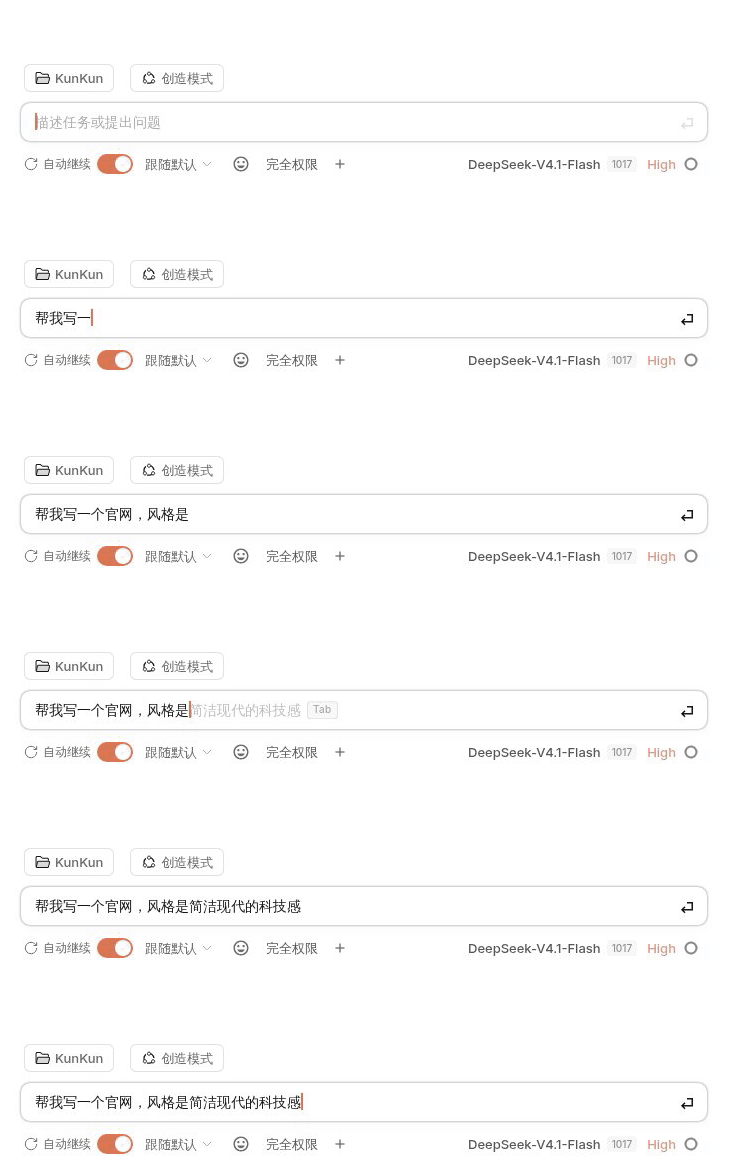
Inline autocomplete in the composer: pause after half a sentence and the session's own model finishes it in faint grey behind a small Tab key cap; Tab accepts, Escape or further typing dismisses. On phones, tap the grey text instead.
Install
# from a prebuilt release tarball
dsh plugin --profile web add -w "https://github.com/KunKun24/dsh-ghost-input/releases/download/v0.2.3/dsh-ghost-input-0.2.3.tgz"
# from GitHub (first run asks for allowBuilds approval — follow the hint, retry)
dsh plugin --profile web add github:KunKun24/dsh-ghost-input
Any plugin you install runs third-party code with your own permissions — it can read your files, use your credentials, and reach the network, and tool approvals don’t sandbox it. GitHub-sourced plugins also run build scripts at install time — pnpm blocks those until you allow them, so an install can stop with ERR_PNPM_GIT_DEP_PREPARE_NOT_ALLOWED or ERR_PNPM_IGNORED_BUILDS; dsh prints the exact key to add under allowBuilds in your profile’s pnpm-workspace.yaml, and the install works on the next run. Allowing a build is a trust decision: only install sources you trust, and pin a commit (github:owner/repo#sha).
README
Stop typing for a moment and the model finishes your sentence in grey — press Tab to keep it.
A DeepSeek Harness (DSH) plugin for DSH 0.2.0 or newer.
What it does
Write half a sentence in the composer, pause for about 0.6 s, and the plugin continues it in light grey using the model already selected for the session. Accept with Tab, or just keep typing to discard.
It continues your sentence, not the next thing you should ask, and it reads the last few turns plus the workspace name to stay in your vocabulary.
Features
- Inline continuation at the caret, up to ~80 characters, truncated to the line width
- Subtle hint: a small
Tabkey cap after the ghost text (the label is configurable) - Accept / dismiss:
Tabaccepts and moves the caret to the end;Esc, typing, moving the caret or switching sessions discards - Only when it makes sense: caret at the end, no selection, no IME composition; skipped when the draft starts with
/or@ - Works on phones: switch accept mode to "phone (tap)" — tap the grey text, or use the
⇥ 补全chip (tap accepts, long-press dismisses) - Can be turned off: one switch in settings stops every request
- Cached: the same draft reuses its result for 45 seconds
Installation
Option 1 — release tarball (recommended)
dsh plugin --profile web add https://github.com/KunKun24/dsh-ghost-input/releases/download/v0.2.3/dsh-ghost-input-0.2.3.tgz
Option 2 — local source
dsh plugin --profile web add link:/path/to/dsh-ghost-input
Option 3 — plugin marketplace
Submitted (PR #18779); once merged, search dsh-ghost-input in the marketplace.
Reload the page afterwards.
Usage
- Type half a sentence and pause
- Wait for the grey text (about 0.6 s plus the model's first token)
- Press
Tabto accept, or keep typing / pressEsc
Configuration
Sidebar → "More → 参数设置" (settings). Changes apply immediately and persist to ~/.dsh/ghost-input/settings.json.
| Option | Default | Meaning |
|---|---|---|
| Enabled | on | Off stops every model request |
| Pause delay | 600 ms | Idle time before asking (200–1500) |
| Max shown characters | 80 | Longest visible continuation (20–200) |
| Output cap | 96 tokens | Per-completion limit (16–512) |
| Temperature | 0.30 | Lower is steadier (0–1) |
| Timeout | 4500 ms | Give up silently after this (500–10000) |
| Key cap label | Tab |
Text shown on the tiny key cap |
| Accept mode | Desktop (Tab) | Desktop / phone (tap) / auto |
| Use conversation context | on | Off sends only the draft: cheaper, blunter |
Limits
- Every pause sends a very short model request (cached 45 s); rapid typing in a long session adds up
- Only one line is shown, so long continuations are clipped on screen but accepted in full
- On phones, the grey strip accepts instead of moving the caret
- Depends on the composer's DOM; a major DSH redesign may need an update
Data & privacy
- The draft is sent to the model provider you already selected, over the normal chat path
- Cached in memory for 45 s only; nothing is written to disk or sent elsewhere
- The plugin itself collects nothing
Version & author
Contains AIGC-assisted code, reviewed line by line and verified on a real instance (desktop and phone viewports).
Links
More in this category
zhu1090093659/dsh-web#packages/dsh-task-board★ 10645
Task board for the dsh web GUI: a sidebar multi-column kanban whose cards run in real DSH agent sessions and can also be scheduled with cron expressions, executed host-side even with the browser closed.
zhu1090093659/dsh-web#packages/dsh-web-all★ 10645
Plugin and skin collection for the DSH Web UI: task board, Git graph, right-side panel, remote mobile UI, pet, live token stats, and a skin center.
ccch1mneyyy/dsh-TUI★ 8283
Claude Code-style full-screen terminal UI: pixel-whale header, live status line, and streaming thought expansion.
MeteorNOX/DeepSeek-Balance-Whale-Widget★ 7472
A fixed-corner whale widget for the DSH web GUI — balance, today's usage and per-turn cost with peak/off-peak pricing, editable balance-alert and daily-budget bubbles, a module-based custom bubble queue with A/B weighted choices and random lines or images, 30+ vendor templates (OpenAI, OpenRouter, Kimi, SiliconFlow, Ark, Zhipu, MiniMax and more) with per-model balance and subscription quota, plus task-end sound, imported audio, custom roles and a resource manager. Local-only, no telemetry.
omdsh-dev/DSH-better-sidebar★ 5336
Full sidebar workbench with file rendering and editing, terminal, Git, and subagents; third-party plugins can register new tabs.
omdsh-dev/dsh-genui★ 1060
Interactive UI components rendered inline in replies: layout, charts, forms, quizzes, mermaid, 3D scenes, and an action event loop back to the model.
Community comments
Comments are public GitHub Discussions. Loading them connects to GitHub and Giscus; a GitHub account is required to post.