Analyzes conversation images through mode-specific prompts (caption, UI, document, grounding, topology, etc.) and injects structured evidence with coordinate primitives (boxes, points, refs) as text, with session-level caching for reuse across replay and compaction.
Install
# from npm (prebuilt)
dsh plugin --profile web add dsh-tool-visual-primitives
# from GitHub (first run asks for allowBuilds approval — follow the hint, retry)
dsh plugin --profile web add github:InkshadeWoods/dsh-tool-visual-primitives
Any plugin you install runs third-party code with your own permissions — it can read your files, use your credentials, and reach the network, and tool approvals don’t sandbox it. GitHub-sourced plugins also run build scripts at install time — pnpm blocks those until you allow them, so an install can stop with ERR_PNPM_GIT_DEP_PREPARE_NOT_ALLOWED or ERR_PNPM_IGNORED_BUILDS; dsh prints the exact key to add under allowBuilds in your profile’s pnpm-workspace.yaml, and the install works on the next run. Allowing a build is a trust decision: only install sources you trust, and pin a commit (github:owner/repo#sha).
README
A DeepSeek Harness (DSH) plugin that gives text-only chat models a visual capability. It sends an image to an external vision model, then returns plain-text visual evidence—optionally with spatial references—to the original chat model. The chat model itself does not need native image input.
The design is inspired by DeepSeek's Thinking with Visual Primitives: normalized coordinates and referenceable objects turn image understanding into evidence that later reasoning can inspect and use.
The package is published on npm. The official DSH one-command install below is recommended; local source mounting remains available for development and local debugging.
What's New in 1.5.3
- Declares compatibility with DSH
0.2.0-rc.2: verified end-to-end in real Web and desktop sessions (conversation-enhancement bridging, thevision_analyzetool, credential reads/writes, and the settings panel all work). Since 0.2.0 the version gate checks bothengines.dshandpeerDependencies; this plugin's open-ended>=0.1.2-rc.1floors on both sides pass without any exemption. - Fixed
Invalid schema for function 'vision_analyze'when chatting through official models: the tool's parameter declaration is now a standard JSON Schema with anobjectroot, matching what the host'sdefineToolcompiles to. The host projects tool parameters verbatim to the model API, and DeepSeek official endpoints strictly require an object-rooted schema — the previous property-map shape was rejected. Custom models are unaffected. - Fixed 403 on the desktop settings panel: the desktop front end loads through an Electron custom protocol without a
Referer, so the same-origin check now allows loopback requests that lack a source header or carry a non-http/https protocol origin; malicious web pages always send an http/https Origin and cannot enter the new branches, so security is not weakened. - Requirements updated: DSH
0.1.2-rc.1or newer is required, verified up to0.2.0-rc.2.
What's New in 1.5.2
- Declares compatibility with DSH
0.1.7-rc.2: the host contract surface between 0.1.5-rc.2 and 0.1.7-rc.2 was fully compared (ctx.llmadapter and routing,ctx.credentials,ctx.attachments.readImage,ctx.fs, thectx.remote.credentialsRPC,webServerroute registration, and all four client injection points are compatible) and verified in a real session. - Fixes two SSRF-guard defects (
vision/image-source.mjs): ① the::ffff:0:0/96block rule was removed — Node's BlockList stores every IPv4 address internally in IPv4-mapped form, so that rule rejected every public IPv4 host (the IPv4 rules already cover the mapped form); ② thenet.connectcustomlookupcallback now uses theall: truearray contract and reports an explicit error when every resolved address is blocked — previously a single-address string was silently dropped by Node and an empty result passedundefined, both surfacing asERR_INVALID_IP_ADDRESS. - Attachment read error codes now carry the original message (
vision/analysis-core.mjs): non-ATTACHMENT_*failures (e.g. the plain Error raised by the SSRF guard) are no longer collapsed into a bareATTACHMENT_READ_ERROR; the stable suffix stays for machine matching while the real cause becomes diagnosable. - Notes on the new 0.1.7 host capabilities: the host adds an
IMAGE_OFFLOAD_REQUIREDimage-budget mechanism and text-only image projection helpers, but the bridge model declaresimageinput, so the host forwards images to the bridge adapter unchanged, where the plugin converts them into visual-evidence text before forwarding to the underlying model — no conflict with the host mechanisms. - GUI model selection in 0.1.7 filters by catalog membership: the plugin's
listModelsdynamically lists every enabled route's bridge model, so configured bridges appear and can be selected normally.
What's New in 1.5.1
- Declares compatibility with DSH
0.1.5-rc.2: verified end-to-end in a real session (conversation-enhancement bridge calls, credential read/write, settings and model-catalog routes, and attachment reads all work). - Adds an explicit
@deepseek-ai/dshpeer dependency (>=0.1.2-rc.1), matching the existing engine declaration, so npm install resolution checks the host version.
What's New in 1.5.0
- Fixed "DSH credential service unavailable" when saving settings on DSH 0.1.2-rc.1: credential reads/writes moved to the new
ctx.remote.credentialsAPI, with a compatibility path for older hosts. - The "Conversation enhancement" model picker now greys out models that already support image input natively (they need no bridging) and labels them accordingly.
- Gateway image rejections (e.g. "Model do not support image input") and empty vision-model responses now produce clear error messages instead of injecting raw gateway JSON into the conversation.
- Fixed persisted settings being overwritten by
nullvalues and unbounded model-catalog response reads. - Stability polish: retry-path diagnostics, empty-response interception, and concurrency-dedup documentation.
What's New in 1.4.0
- The "Chat visual models" list in settings now reads through the new model-catalog API of DSH
0.1.2-rc.1, matching the new host. - The minimum supported DSH version is raised to
0.1.2-rc.1(engine declarations indsh.plugin.jsonandpackage.jsontightened accordingly). - Client injection dependencies trimmed:
@deepseek-ai/dsh-client-runtimeis no longer injected.
What's New in 1.3.0
- Compatible with the new DSH host adapter interface (0.1.1-rc.8 and above).
- Auxiliary session calls (title generation, context compaction) no longer trigger duplicate visual analyses, reducing quota usage and occasional failures.
- Concurrent analyses of the same image and prompt are merged into a single upstream request.
- New "Diagnostics log" setting (off by default) to output plugin runtime logs for troubleshooting.
- Connection test improvements: uses the real token budget, and failures include an upstream response summary in the error message.
- Install commands updated to the direct
dshform (requires DSH installed globally).
What's New in 1.2.0
- Reworked the settings hierarchy and connection flow: completed connections collapse by default, with full editing and Save & Test Connection available when expanded.
- Improved vision-model selection, model discovery, custom model IDs, connection status, and error feedback.
- Optimized multi-turn image conversations: text-only follow-ups no longer repeat vision requests, while explicit references to earlier images can reuse cached visual evidence.
- Added a clear, provider-neutral error message for image-content protocol incompatibility.
Highlights
- Two entry points backed by one
vision_analyzecore: an explicit tool and[vision]chat-model variants. - Automatic detection of 11 visual tasks: captioning, inventory, multi-subject, counting, grounding, spatial relation, comparison, path tracing, topology, UI, and document visual analysis.
- Three output-detail levels:
brief,standard(default), andverbose. - Three visual-primitive policies:
auto(default),on, andoff. Primitives use<ref>,<box>, and<point>with normalized0–999coordinates. - Appends
[vision]variants only for the text-only chat models you choose; original models stay unchanged. - Session-scoped evidence caching: a follow-up reuses evidence only when it covers the new question; otherwise the image is read again.
- Native settings page for secure credential storage, connection checks, searchable
/modelsdiscovery, custom model IDs, and collapsible provider/model selection (native image models are greyed out).
How It Works
Image + user question
        │
        ▼
detectVisionMode() → shouldUsePrimitives() → buildVisionPrompt()
        │
        ▼
External vision model (OpenAI-compatible Chat Completions)
        │
        ▼
Plain-text visual evidence (optionally with primitives)
        │
        ▼
Original text model continues the answer
Mode and Detail are orthogonal: Mode selects the task, while Detail controls information density. Primitives decides whether structured spatial evidence is required.
Requirements
- A working DSH Web Profile (DSH
0.1.2-rc.1or newer is required, verified up to0.2.0-rc.2). - Node.js
>= 20and pnpm. - An accessible vision-model service. By default the plugin uses OpenAI-compatible endpoints:
POST <Base URL>/chat/completions- Optional model discovery:
GET <Base URL>/models
The vision provider and the enhanced text-model provider may be different.
Installation
One-command npm install
Run this in PowerShell or a terminal (the dsh command below assumes DSH is installed globally via npm install -g @deepseek-ai/dsh; without a global install, replace dsh with npx @deepseek-ai/dsh):
dsh plugin --profile web add dsh-tool-visual-primitives@latest
The command invokes DSH's official plugin manager and installs the package into the web Profile. After installation, DSH detects this package's dsh.bundle.patch declaration, adds the plugin to dsh.profile.bundles, and applies the package's own cordis.patch.yml during boot.
It is safe to run repeatedly: it does not duplicate the bundle and does not directly change the Profile's own cordis.patch.yml or other plugin settings, so it can coexist with plugins such as dsh-better-sidebar.
If you use a Profile other than web, replace --profile with that Profile name:
dsh plugin --profile <your-profile-name> add dsh-tool-visual-primitives@latest
Restart DSH completely after installation, then configure API Key, Base URL, and the vision model under Settings → Visual Analysis.
Install from a Local GitHub Clone
This is the installation path verified for the current release. You may use another source directory if you also update $source.
$source = 'D:\DSH\dsh-tool-visual-primitives'
git clone https://github.com/InkshadeWoods/dsh-tool-visual-primitives.git $source

Set-Location $source
pnpm install
pnpm run build

dsh plugin --profile web add $source
The official DSH CLI adds the local package to the Profile dependencies and maintains dsh.profile.bundles from the package's dsh.bundle.patch declaration. No manual edit of the Profile's package.json or cordis.patch.yml is needed.
Restart DSH completely:
dsh web
When the client UI changes for the first time, force-refresh the browser with Ctrl+Shift+R.
Uninstall
If you also want to remove the saved API key, select Clear API Key in the plugin settings first. Then run DSH's official uninstall command:
dsh plugin --profile web remove dsh-tool-visual-primitives
DSH removes the package dependency and automatically removes its bundle from dsh.profile.bundles. Restart DSH when it completes.
First-Time Setup
Open Settings → Vision Analysis in DSH, then:
- Enter the API Key, Base URL, and vision model.
- Select Load models to retrieve
<Base URL>/models; the list is searchable. - If the service does not expose a model directory, enter a Custom model ID instead.
- Select Test connection.
- Configure analysis parameters, then choose the text-only chat models that should receive a
[vision]variant.
Saved API keys are never shown again when the page is reopened. Entering a new value replaces the old key; Clear API Key removes it.
API and Model Discovery
| Item | Behavior |
|---|---|
| Vision request | POST <Base URL>/chat/completions with Authorization: Bearer <API Key> |
| Model discovery | GET <Base URL>/models with Accept: application/json and the same API key |
| Discovery failure | A custom model ID remains available and does not prevent vision analysis |
| Xiaomi Mimo URLs | The plugin automatically uses the api-key header |
Analysis Parameters
| Setting | Options / default | Purpose |
|---|---|---|
| Visual primitives | auto / on / off (default: auto) |
auto decides from Mode and Detail; on forces coordinate-based evidence; off requests plain-text evidence only. |
| Analysis detail | brief / standard / verbose (default: standard) |
Controls output density; it does not alter task detection. |
| Retry mode | off / on / format-only (default: off) |
When required primitives are missing, on re-reads the image; format-only preserves conclusions where possible and repairs formatting. |
| Maximum image size | 10 MB |
Applies to local files, remote images, and chat attachments. |
| Timeout | 180000 ms |
Maximum wait for one vision-model request. |
| Output-token budget | auto or manual (default: auto) |
auto follows Detail: brief 1024, standard 2048, verbose 4096. |
| Diagnostics log | off / on (default: off) |
When enabled, plugin runtime logs are printed to the DSH console for troubleshooting. |
The 11 Auto-Detected Modes
| Mode | Best for | Evidence focus |
|---|---|---|
caption |
"What is this image?" | Overall summary and key objects |
object_inventory |
"What objects are present?" | Main-object list and positions |
multi_subject |
"Who is shown left to right?" | Subject ordering, features, and positions |
counting |
"How many buttons?" | Candidates, exclusions, and count |
grounding |
"Where is the red button?" | Target and candidate locations |
spatial_relation |
"Which side is A on?" | Relative position, occlusion, containment |
comparison |
"Compare these two areas" | Dimensions and visible evidence for each side |
path_tracing |
"How does the route go?" | Start, key points, end, uncertainty |
topology |
"Is the maze solvable?" | Connectivity, blockers, and conclusion |
ui_analysis |
"How do I use this screen?" | UI elements, state, location, next step |
document_visual |
"Explain this chart/poster" | Headings, text blocks, tables, reading order |
The highest-priority keyword match wins; caption is used when nothing matches. For example, "How many buttons are on this screen?" selects ui_analysis and then applies the selected Detail level.
Usage
Option 1: Chat with a [vision] Model
- In Chat visual models settings, enable a text-only model.
- Reopen the model list and select the new
Model name [vision]entry. - Upload, paste, or drop an image, then ask your question normally.
The plugin replaces only image blocks with visual-evidence text. The selected original text model still produces the final answer.
For a follow-up that explicitly refers to the latest image, the plugin checks whether cached evidence covers the new task, detail level, and requested objects/locations. It re-analyzes the image when coverage is insufficient rather than treating an incomplete previous answer as fact.
Option 2: Explicit vision_analyze Tool
The tool accepts exactly one image source: a local absolute path or an HTTP(S) URL.
{
  "image_path": "D:/images/dashboard.png",
  "prompt": "Count the main clickable buttons and identify their positions"
}
{
  "url": "https://example.com/chart.png",
  "prompt": "Explain the chart trend and identify unreadable labels"
}
Remote URLs cannot target localhost, private-network addresses, or include credentials. Redirects are rejected to reduce server-side request forgery risk.
Evidence Format
When primitives are enabled, the external vision model is instructed to return evidence under these headings:
[Mode]
[Visual Primitives]
[Observations]
[Relations]
[Uncertainty]
[Answer]
Location evidence looks like this:
<ref>submit_button</ref><box>[[742, 861, 900, 930]]</box>
<point>[[125, 430], [210, 430], [300, 510]]</point>
All coordinates are relative 0–999 values, not source-image pixels.
Verified End-to-End Scenarios
All assets and results are in test/.
| Scenario | Verified outcome |
|---|---|
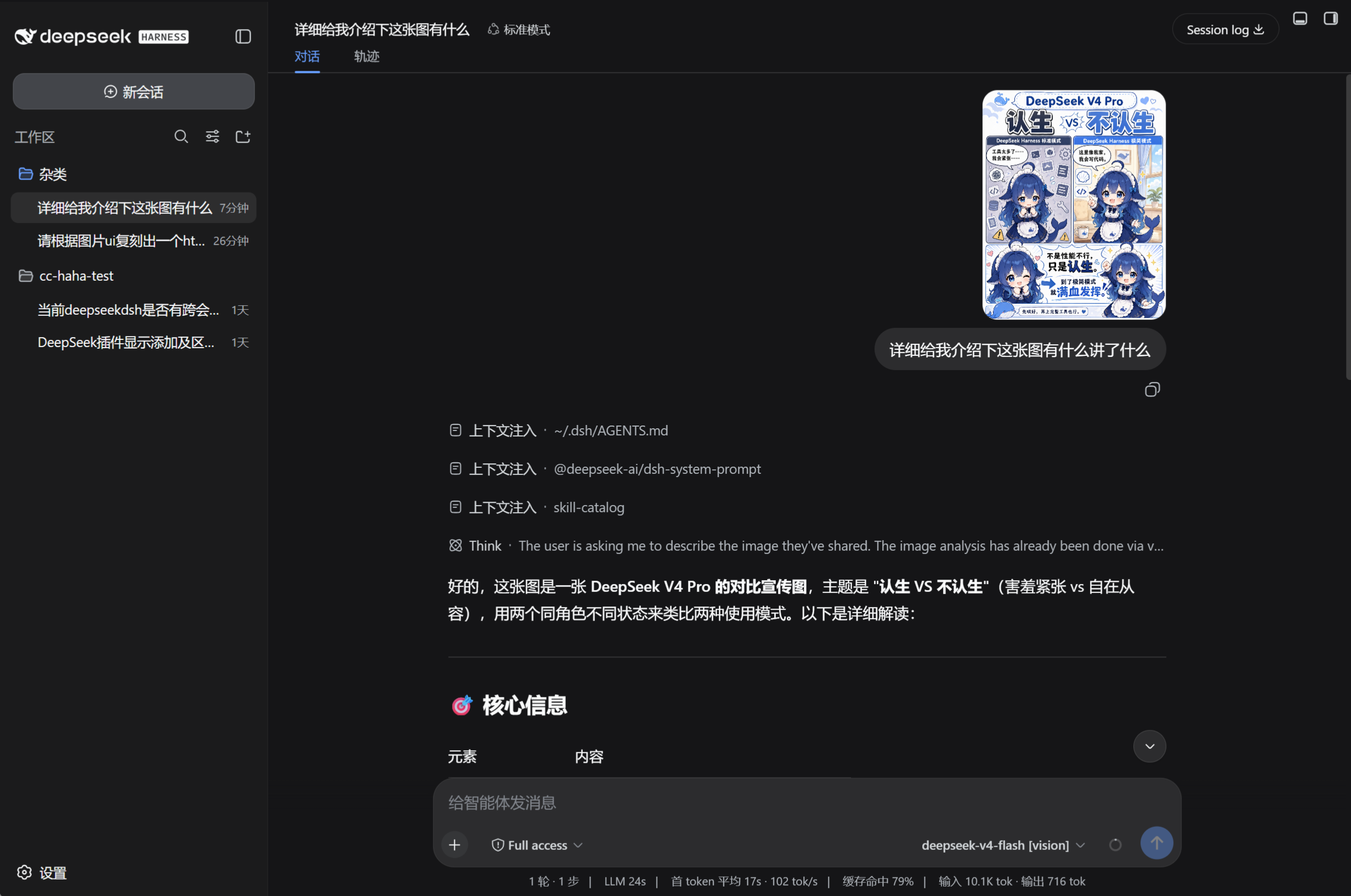
| Chat image understanding | A [vision] model successfully read a DSH usage-mode comparison image and supplied a structured description to the text model. |
| Screenshot-driven UI recreation | A [vision] model interpreted a Bilibili home-page screenshot; the text model then generated an independent Bilibili-style HTML page from that evidence. |
Image-understanding result
UI recreation flow and result
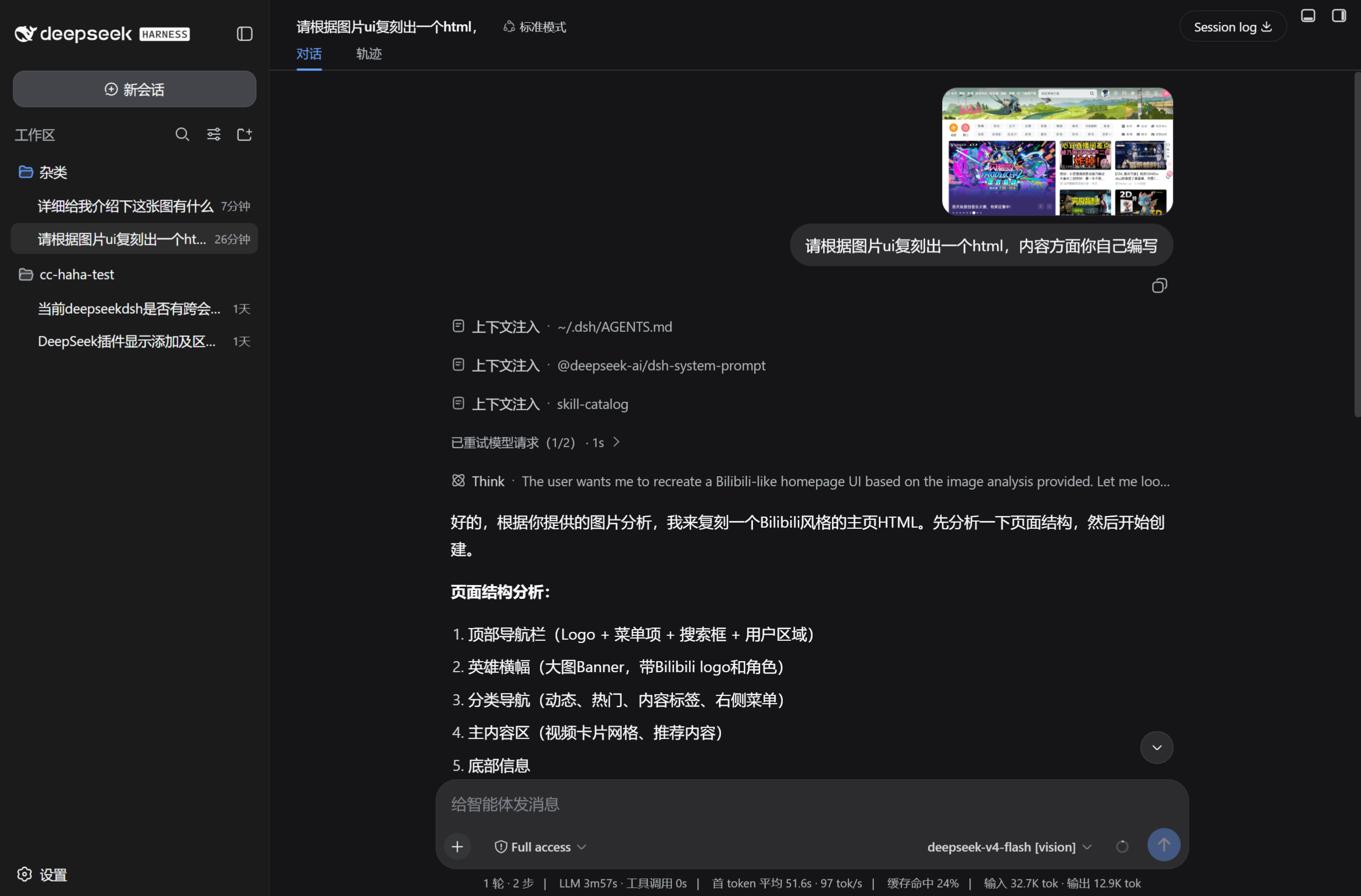
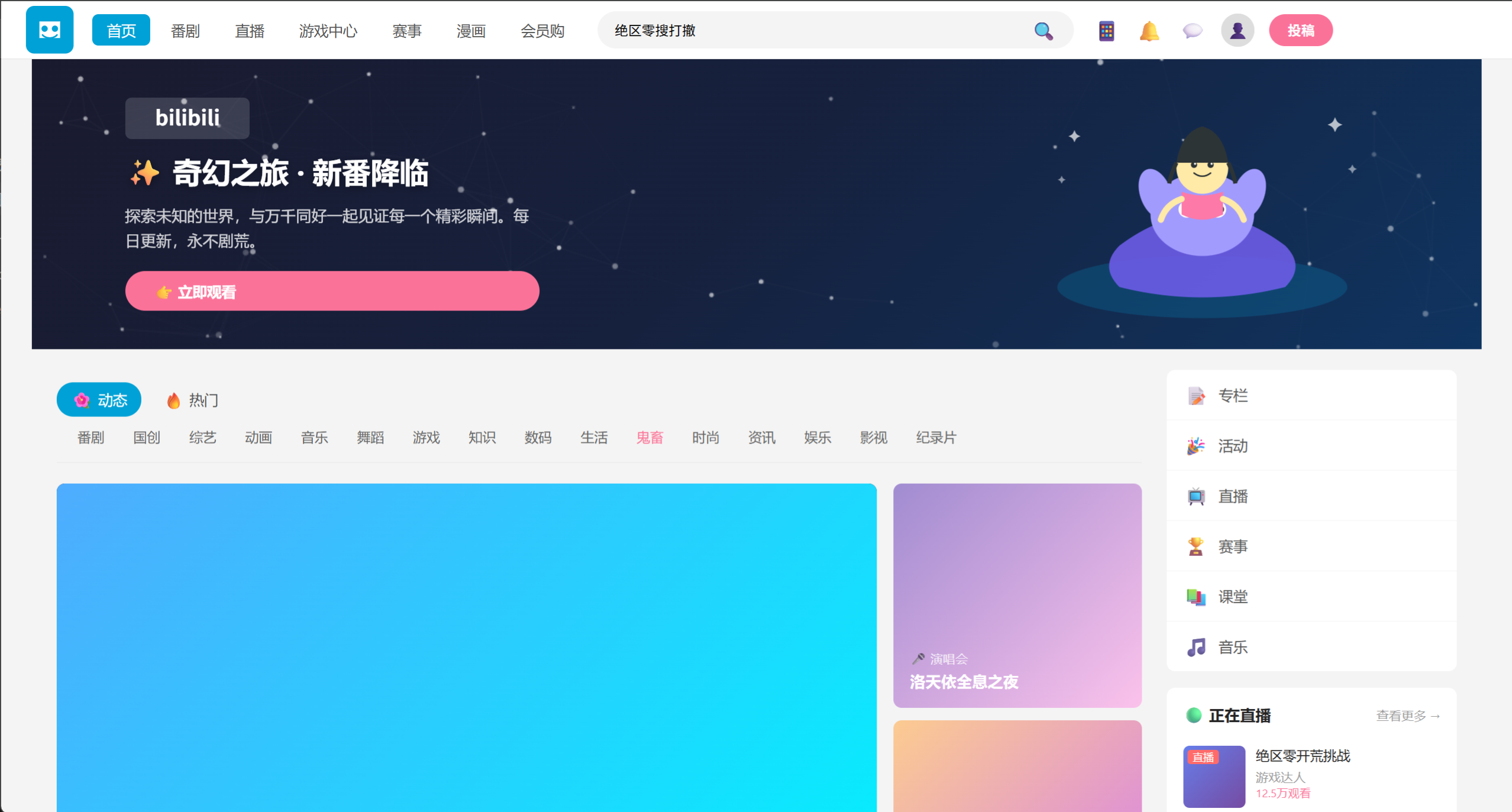
These outcomes validate the current end-to-end chain. Generated results still depend on the external vision model, text model, prompt, and image quality.
Development
pnpm install
pnpm run build
pnpm run build generates the client bundle at lib/client.js.
- The server entry is
index.mjs; restart DSH after changing it. - After changing the client UI, rebuild the package and force-refresh the browser page.
License
Acknowledgements and References
- Thinking with Visual Primitives
- DeepSeek Harness
- The provider-bridge design draws inspiration from modlens
Links
More in this category
liustack/modlens★ 4192
Vision bridge for text-only models: paste an image, get structured JSON evidence (OCR, layout, semantics).
ysr666/dsh-vision-router★ 1141
Free vision for text-only agents: built-in keyless vision chain plus pixel tools (Q&A, grounding, crop, pixel diff, colors, OCR, SVG trace, cutout, screenshots); paste an image to use it.
Anionex/dsh-vision-toolkit★ 887
Vision for text-only models: paste an image and the model switches to a Vision Toolkit variant for image Q&A, multi-image comparison, long-screenshot OCR, screenshot-to-UI reproduction, element grounding, and pixel diff. No API key by default — images are processed by the author-hosted free service, 100 per machine per day; configurable to your own provider.
fandc520/dsh-comfyui★ 105
Drive a local or remote ComfyUI server from DeepSeek Harness: comfyui_run / comfyui_object_info / comfyui_workflow tools generate and edit images and videos, with a workflow library (graph extraction: per component / main flow / all), a load area with resolution auto-match, a live queue, SDXL and Wan 2.1 templates, a companion skill, and a same-origin media proxy.
dickpy/dsh-imagegen★ 104
AI image generation for the DSH Web GUI: text-to-image and image-to-image through a configurable OpenAI-compatible endpoint (gpt-image-2 / gpt-image-1 / dall-e-3), with an api_url/api_key settings card and a sidebar split-pane generation studio.
sunxin-ai/dsh-design-qa★ 44
Design-fidelity QA for text-only models: a `deepseek_vision` tool borrows an eye from any OpenAI-compatible vision route, so the model can judge whether an implementation matches its mock — shipped with the benchmark behind that judgement (four fixtures, 23 injected defects, raw transcripts) and the questioning discipline it depends on.
Community comments
Comments are public GitHub Discussions. Loading them connects to GitHub and Giscus; a GitHub account is required to post.