UI butler for every plugin UI: official/plugin categories, per-widget toggles, drag move/resize, collision avoidance and one-click auto arrange.
Install
# from GitHub (first run asks for allowBuilds approval — follow the hint, retry)
dsh plugin --profile web add github:Han-1413141/dsh-ui-hub
Any plugin you install runs third-party code with your own permissions — it can read your files, use your credentials, and reach the network, and tool approvals don’t sandbox it. GitHub-sourced plugins also run build scripts at install time — pnpm blocks those until you allow them, so an install can stop with ERR_PNPM_GIT_DEP_PREPARE_NOT_ALLOWED or ERR_PNPM_IGNORED_BUILDS; dsh prints the exact key to add under allowBuilds in your profile’s pnpm-workspace.yaml, and the install works on the next run. Allowing a build is a trust decision: only install sources you trust, and pin a commit (github:owner/repo#sha).
README
 English | 中文
A DSH web client plugin: UI Hub. It enumerates every UI contribution from every plugin — panels, buttons, icons, charts, fields — and lets you toggle each one, position each one, avoid floating collisions, and auto-arrange them into a tidy column.

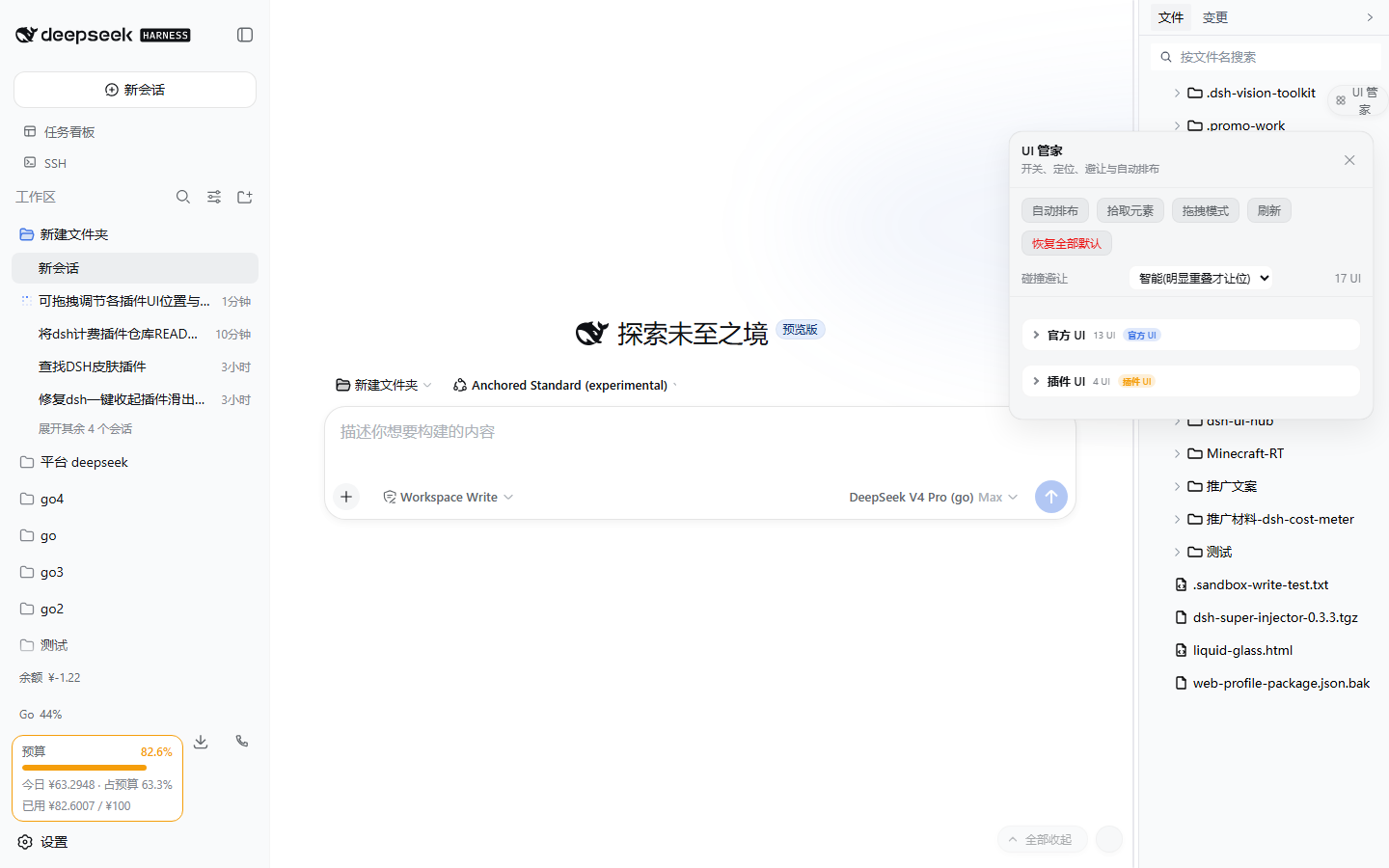
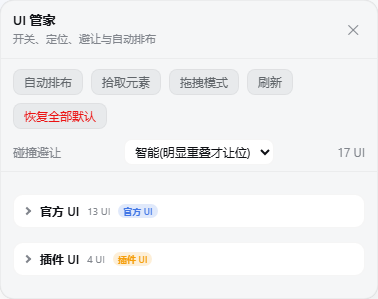
✨ Features
| Feature | Description |
|---|---|
| 🔍 Full discovery | Enumerates every UI inside the platform's [data-slot] anchors plus floating widgets outside slots (dsh-sticky-disclosure pills, dsh-mingli-chart views, ...); unknown widgets can be captured with Pick element |
| 🗂️ Official vs plugin | The panel is split into Official UI and Plugin UI categories (every row also carries an official/plugin tag) |
| 📁 Collapsible groups | Two-level collapse (category → slot group), all collapsed by default so only category/group names + counts show; expand step by step, state is remembered |
| 🎚️ Per-widget control | Each UI root has its own switch; expand a root to toggle its inner buttons / icons / charts / fields individually |
| 📐 Three position modes | Default (restore), Nudge (translate without leaving the layout), Float (fixed positioning with exact x/y) |
| 🖱️ Direct drag mode | Enable Drag mode and drag any UI directly to move it (slot-mounted UIs use nudge and keep their layout; loose widgets float) or drag its bottom-right grip to resize; Esc exits |
| 🛡️ Collision avoidance | Off (report only) / Smart (clear overlaps) / Strict (any overlap); locked items stay put and push others away |
| ✨ One-click arrange | Packs every floating UI into right-aligned vertical columns anchored to the conversation scrollport |
| 💾 Persistent | Toggles, positions, sizes, and collapse state live in localStorage and are restored across refreshes |
| 🧹 Non-invasive & reversible | No plugin code is modified; only additive data-uihub-* attributes plus the hub's own !important stylesheet. Disposal removes every trace |
Why
DSH is a plugin ecosystem and every plugin adds a bit of chrome: header buttons, composer badges, sidebar cards, bottom-right pills, floating charts. Plugins do not know each other's geometry, so overlap is the default. UI Hub keeps one roster and one floor plan for all of them:
- Discover every UI and group it by slot;
- Toggle, move, and lock each item;
- Separate floating widgets that overlap;
- Arrange scattered widgets into one aligned column in a click.
📸 UI gallery
Full captioned walkthrough: docs/GALLERY.md.
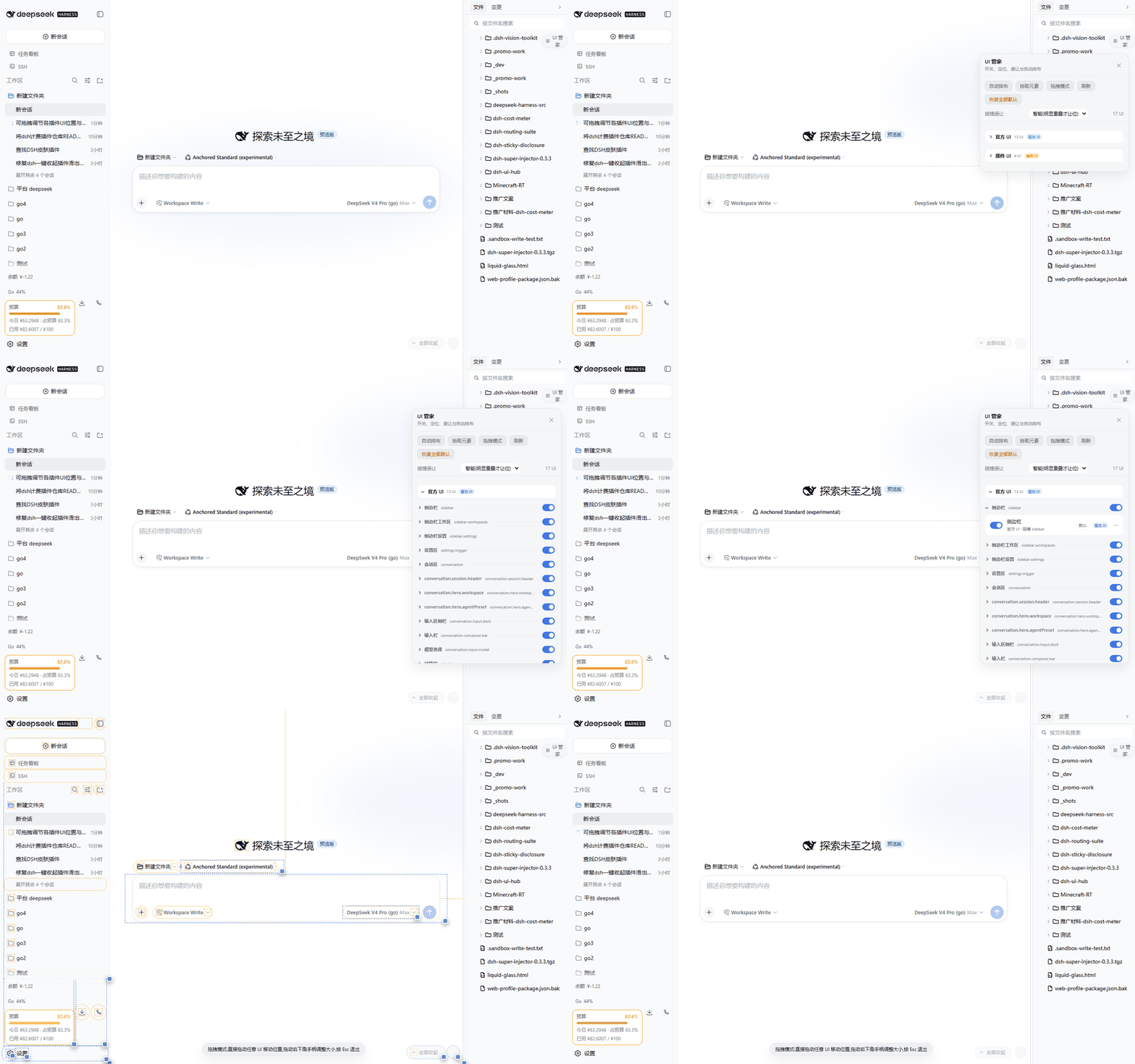
30-second demo: default collapsed → official UI expanded → group expanded → drag mode
| Screen | Caption |
|---|---|
 |
The panel opens with only the two collapsed categories: Official UI / Plugin UI |
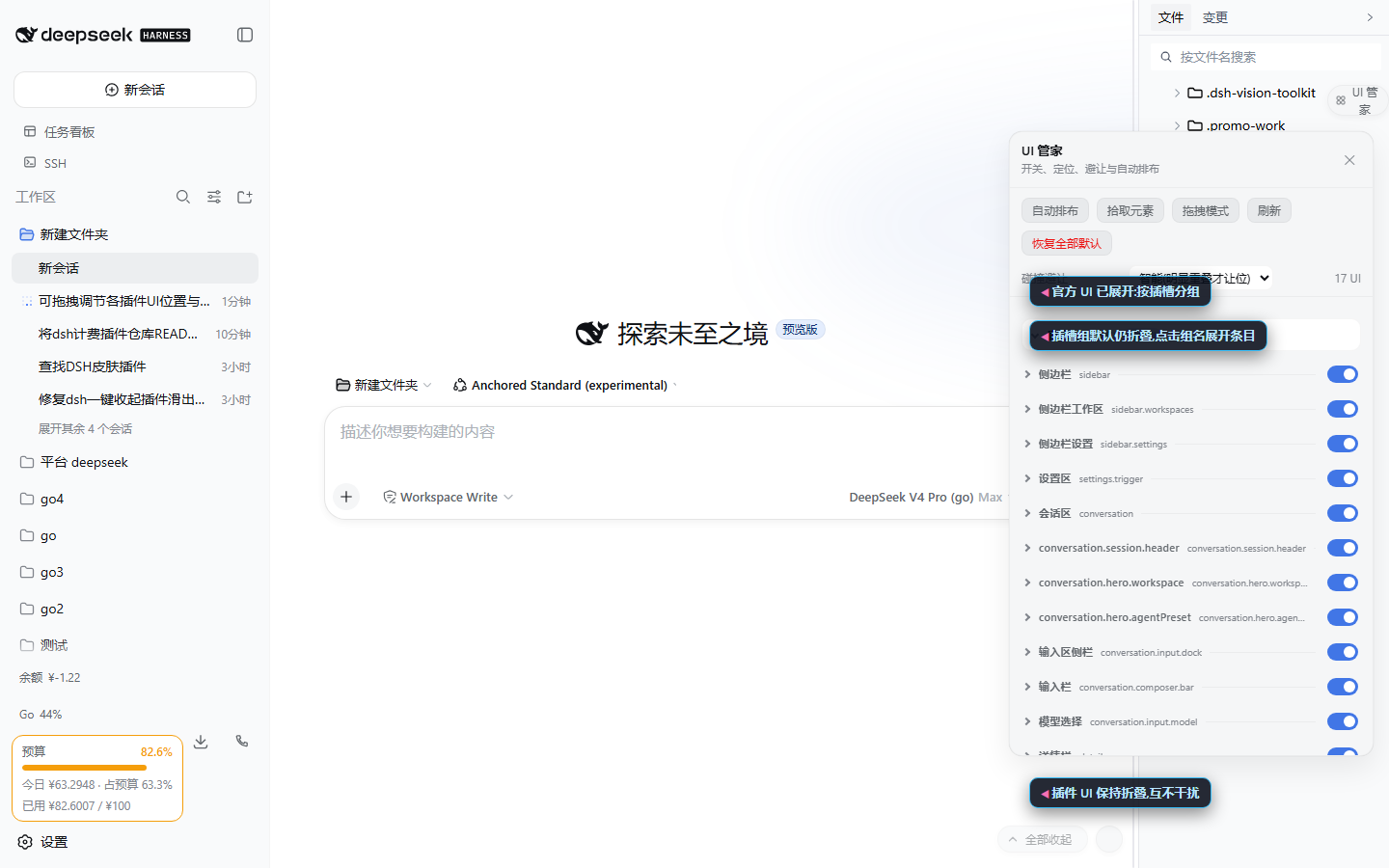 |
Official UI expanded: slot groups appear, each still collapsed |
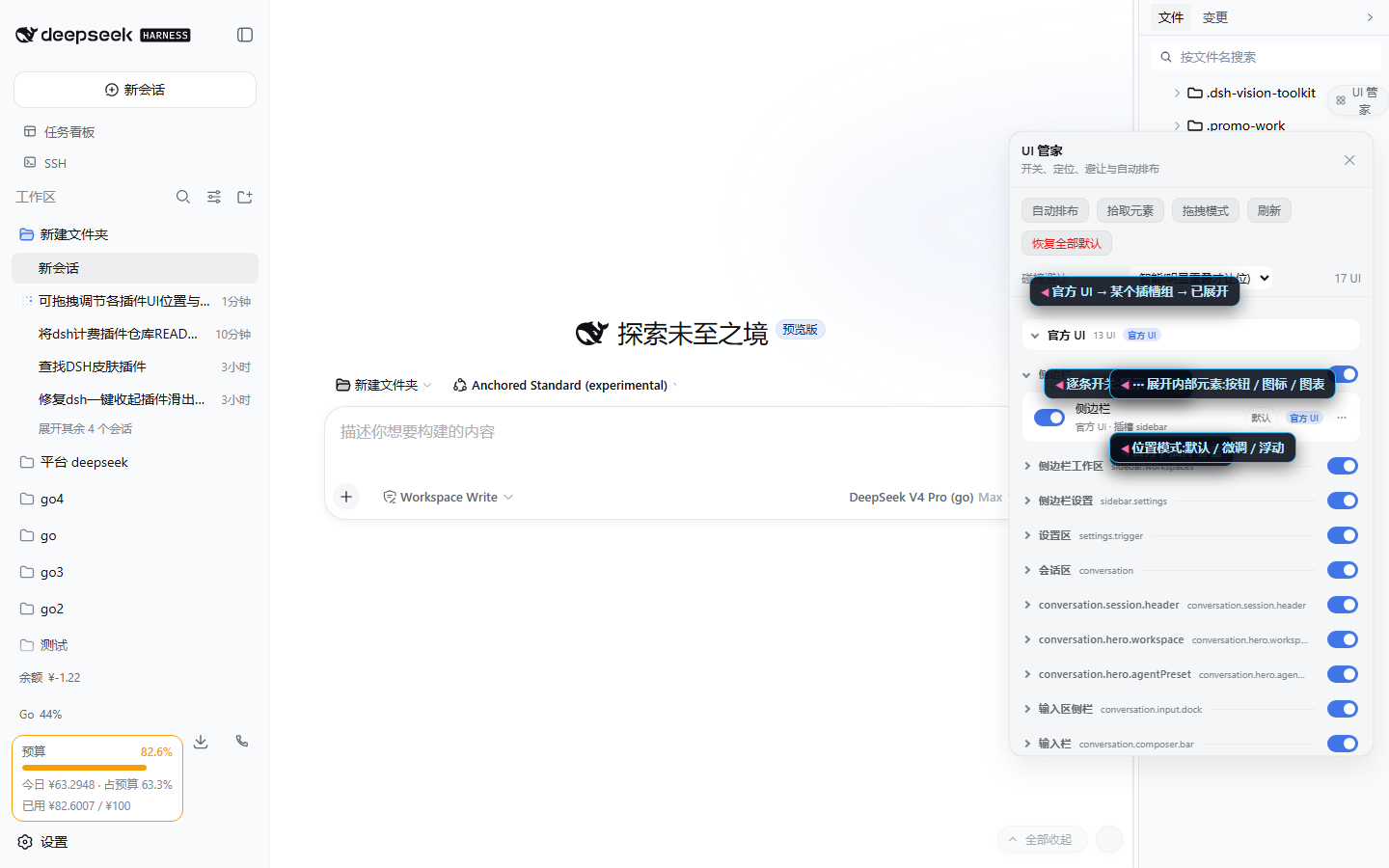 |
One group expanded: per-row switches, official tag, position mode, ⋯ inner elements |
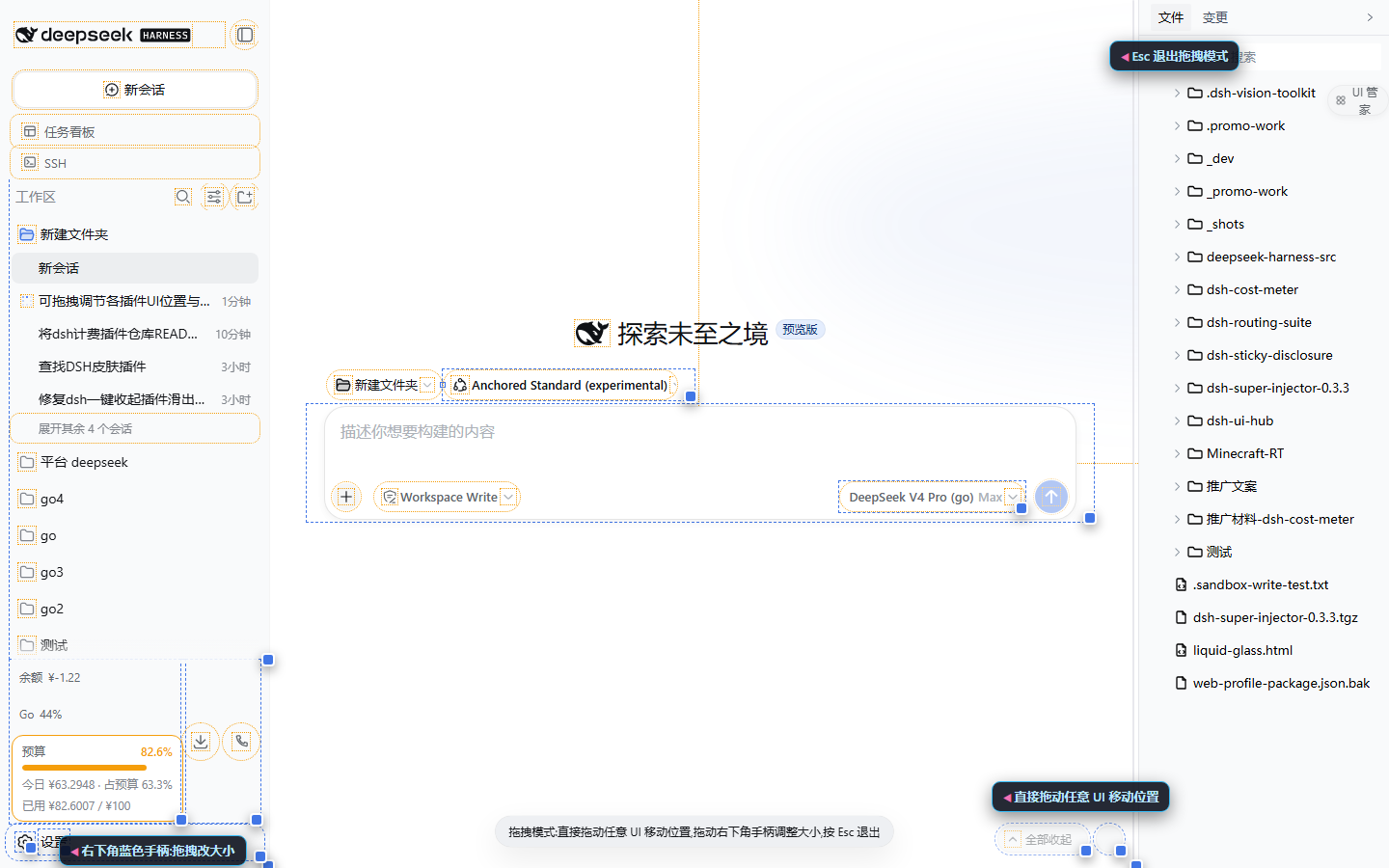 |
Drag mode: dashed outlines for direct dragging, bottom-right grips for resizing, Esc to exit |
Usage
- Restart
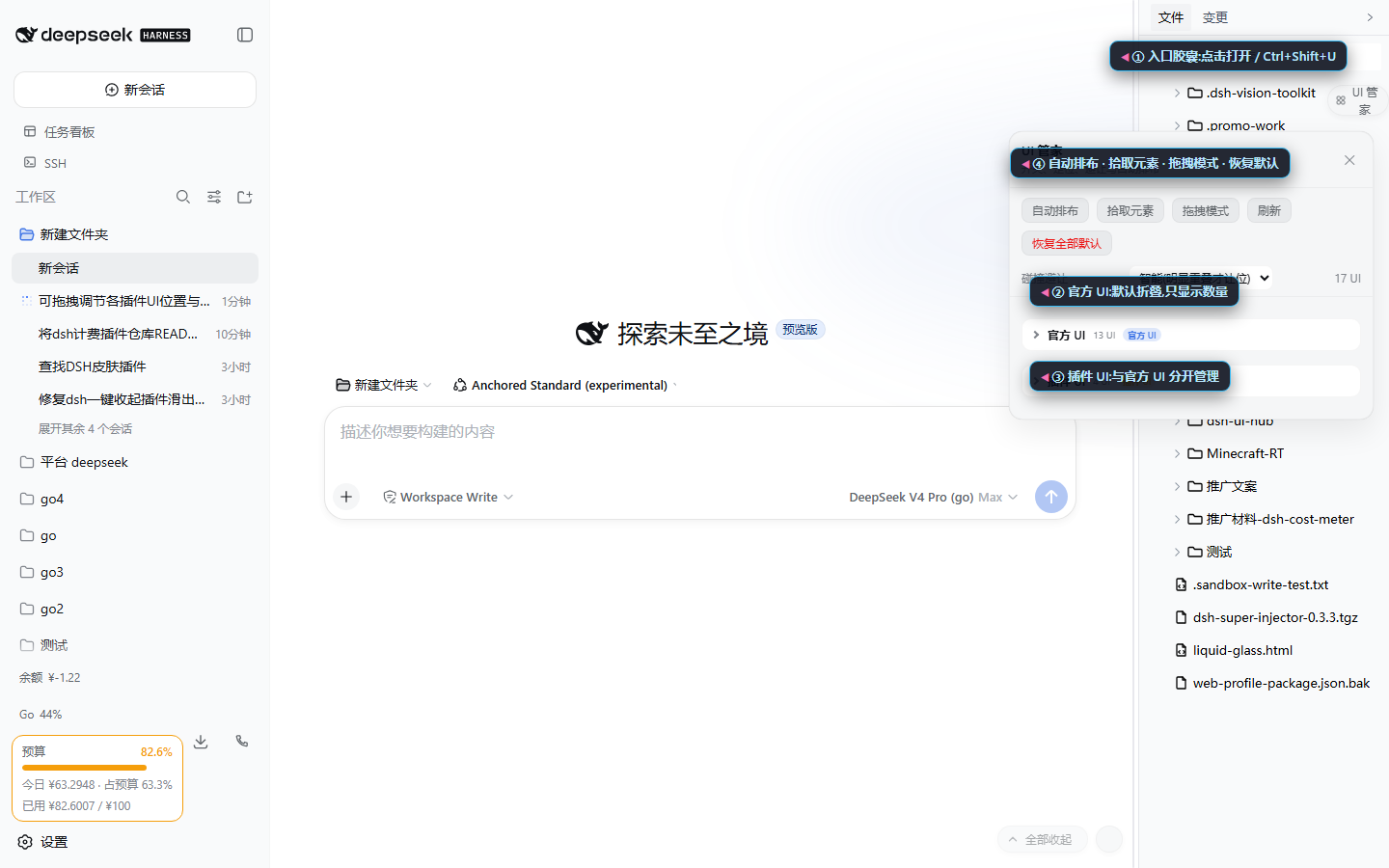
dsh webafter installing. A UI Hub pill appears in the top-right corner (hotkeyCtrl+Shift+U, macOS⌘⇧U); click it to open the panel. - The panel opens with the two collapsed categories Official UI / Plugin UI (all collapsed by default). Click a category to reveal its slot groups, then click a group to list its UIs.
- Each row: left switch shows/hides the item,
⋯expands its detail. - Detail pane:
- Position mode: default / nudge / float;
- X/Y in float mode, DX/DY in nudge mode;
- Drag to move: a grab handle appears at the widget corner;
- Lock: collision avoidance never moves this item;
- Inner elements: toggle buttons, icons, charts, and fields separately.
- Toolbar:
- Drag mode: drag any UI directly to move it, drag its corner grip to resize, Esc to exit;
- Auto arrange: packs all float-mode UIs into right-aligned columns;
- Pick element: click any element on the page (even unmarked ones) to manage it;
- Reset all: clear every toggle, position, and size.
API
window.dshUiHub.items()                 // [{ key, label, plugin, category, slot, on, mode, x, y, sw, sh, children: [...] }]
window.dshUiHub.setConfig(key, { on: false })
window.dshUiHub.setConfig(key, { mode: "float", x: 300, y: 200 })
window.dshUiHub.setConfig(key, { sw: 360, sh: 240 })     // set size
window.dshUiHub.setConfig("child:...", { on: false })
window.dshUiHub.arrange()               // one-click auto arrange
window.dshUiHub.collisionMode("strict") // off | smart | strict
window.dshUiHub.dragMode(true)          // enable/disable direct drag mode
window.dshUiHub.open() / close() / reset()
Behavior notes
- Stable identity: slot UIs are keyed
slot:<slot>@<index>and re-attach across React re-renders; floating widgets are keyed by theirdata-*marker; picked elements by a structural path hash. - No style fights: positions are enforced through
data-uihub-float+ CSS variables +!importantrules, so other plugins' inlineleft/topwrites cannot override them. Removing the attribute restores the plugin's own styles. - Dispose restores everything: all
data-uihub-*attributes, CSS variables, stylesheet, and hub chrome are removed. - Direct drag: drag mode intercepts pointers only while enabled. Dragging a slot-mounted UI uses nudge (it stays inside the layout, so anchored popups follow it), while loose floating widgets move with float coordinates; the bottom-right grip resizes (float: resizes the floating box; default/nudge: pins an in-place size override). Ending a drag never re-fires the button's click; a plain click still reaches the plugin normally. Reset item restores the original; Esc exits.
- Floated popup follower: when an explicitly floated UI opens a popup that still appears at the original spot, the hub shifts it with the independent CSS
translateproperty (only popups anchored at the original spot; centered full-page dialogs are untouched). - Locked items win: arrange and avoidance skip locked items and route others around them.
- Panel and handles use z-index 80/86: above plugin floats, below app dialogs (100+).
Install
Requires Node.js ≥ 20 and DeepSeek Harness with the
dsh plugincommand.
One-liner (PowerShell):
irm https://raw.githubusercontent.com/Han-1413141/dsh-ui-hub/main/install.ps1 | iex
Or:
dsh plugin --profile web add github:Han-1413141/dsh-ui-hub
Local development (run from the parent directory of this repo):
dsh plugin --profile web add link:./dsh-ui-hub
Remove: dsh plugin --profile web remove dsh-ui-hub.
Tests
python test/verify.py # Playwright chromium over test/mock.html
Covers discovery, official/plugin classification, default-collapsed categories with stepwise expansion, root/child toggles, float positioning, arrange alignment, strict collision avoidance, panel, hotkey, pick mode, direct drag move + drag resize, persistence across reload, and teardown.
Known limitations
- Float coordinate system: float mode uses
position:fixed. If a UI's ancestor carries a CSStransform, fixed positions resolve against that ancestor; use Nudge for such items. - Platform DOM changes: discovery relies on the public
[data-slot]anchors and plugindata-*markers. If the platform renames them, items reappear under new keys (old configs stay local). - Child identity: inner elements are numbered in DOM order, so configs can follow a reordered neighbor after a plugin restructures its subtree.
- No forced reflow inside slots: default/nudge modes respect the original slot layout; for a full-page rearrangement, switch items to Float and use Auto arrange.
Links
More in this category
zhu1090093659/dsh-web#packages/dsh-task-board★ 8121
Task board for the dsh web GUI: a sidebar multi-column kanban whose cards run in real DSH agent sessions and can also be scheduled with cron expressions, executed host-side even with the browser closed.
zhu1090093659/dsh-web#packages/dsh-web-all★ 8121
Plugin and skin collection for the DSH Web UI: task board, Git graph, right-side panel, remote mobile UI, pet, live token stats, and a skin center.
omdsh-dev/DSH-better-sidebar★ 3868
Full sidebar workbench with file rendering and editing, terminal, Git, and subagents; third-party plugins can register new tabs.
ccch1mneyyy/dsh-TUI★ 3734
Claude Code-style full-screen terminal UI: pixel-whale header, live status line, and streaming thought expansion.
MeteorNOX/DeepSeek-Balance-Whale-Widget★ 3369
A fixed-corner whale widget for the DSH web GUI — balance, today's usage and per-turn cost with peak/off-peak pricing, editable balance-alert and daily-budget bubbles, a module-based custom bubble queue with A/B weighted choices and random lines or images, 30+ vendor templates (OpenAI, OpenRouter, Kimi, SiliconFlow, Ark, Zhipu, MiniMax and more) with per-model balance and subscription quota, plus task-end sound, imported audio, custom roles and a resource manager. Local-only, no telemetry.
Devin-AXIS/deepseek-design#deepseek-idesign★ 1665
Visual design studio for websites, app prototypes, posters, cards, reports, and magazines, with templates, direct element editing, selection-aware AI draft handoff, and export.
Community comments
Comments are public GitHub Discussions. Loading them connects to GitHub and Giscus; a GitHub account is required to post.