One-click collapse of every expanded section (Think rows, tool cards) with a live-count pill and a customizable hotkey.
Install
# from GitHub (first run asks for allowBuilds approval — follow the hint, retry)
dsh plugin --profile web add github:Han-1413141/dsh-sticky-disclosure
Any plugin you install runs third-party code with your own permissions — it can read your files, use your credentials, and reach the network, and tool approvals don’t sandbox it. GitHub-sourced plugins also run build scripts at install time — pnpm blocks those until you allow them, so an install can stop with ERR_PNPM_GIT_DEP_PREPARE_NOT_ALLOWED or ERR_PNPM_IGNORED_BUILDS; dsh prints the exact key to add under allowBuilds in your profile’s pnpm-workspace.yaml, and the install works on the next run. Allowing a build is a trust decision: only install sources you trust, and pin a commit (github:owner/repo#sha).
README
 English | 中文
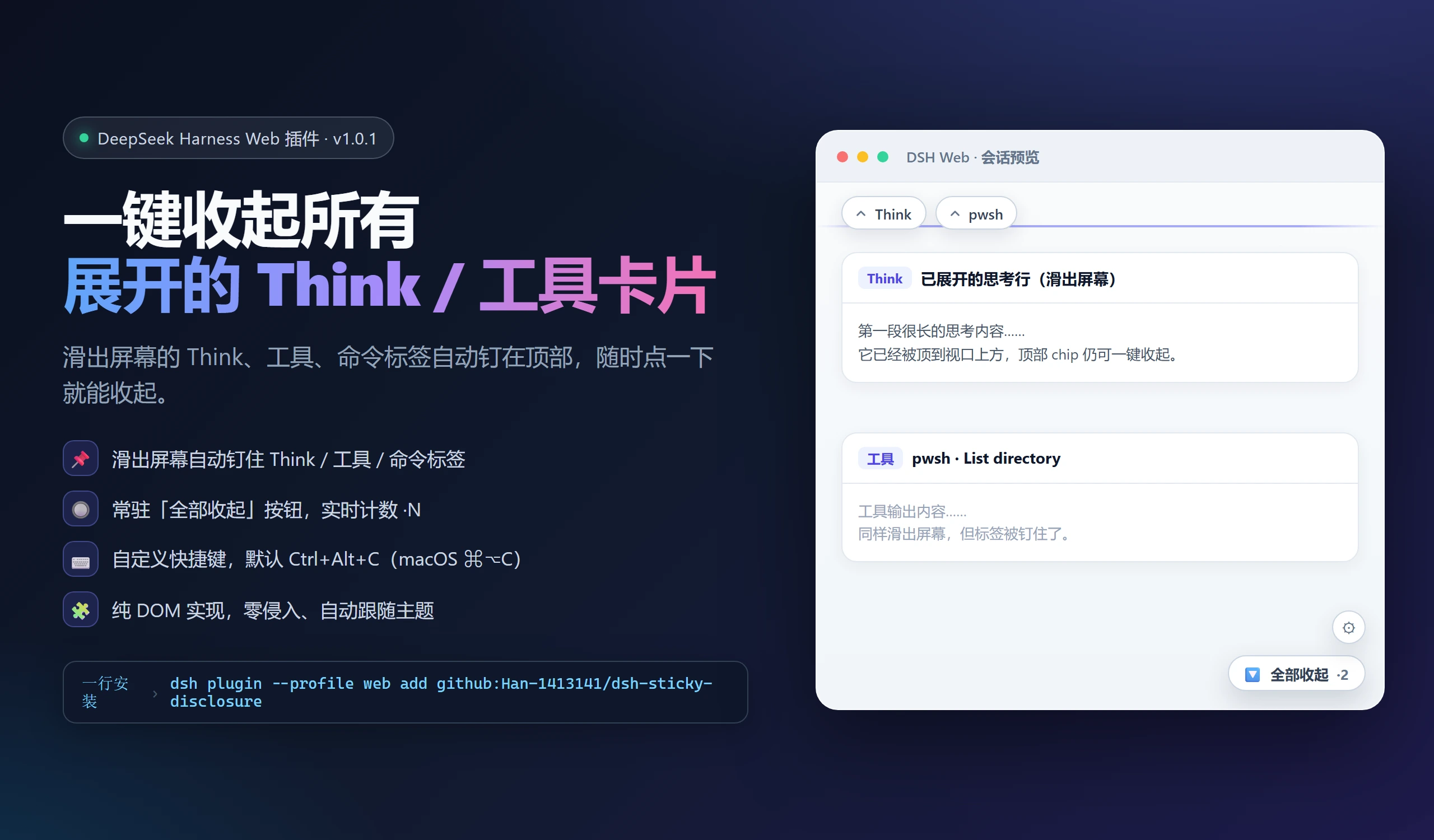
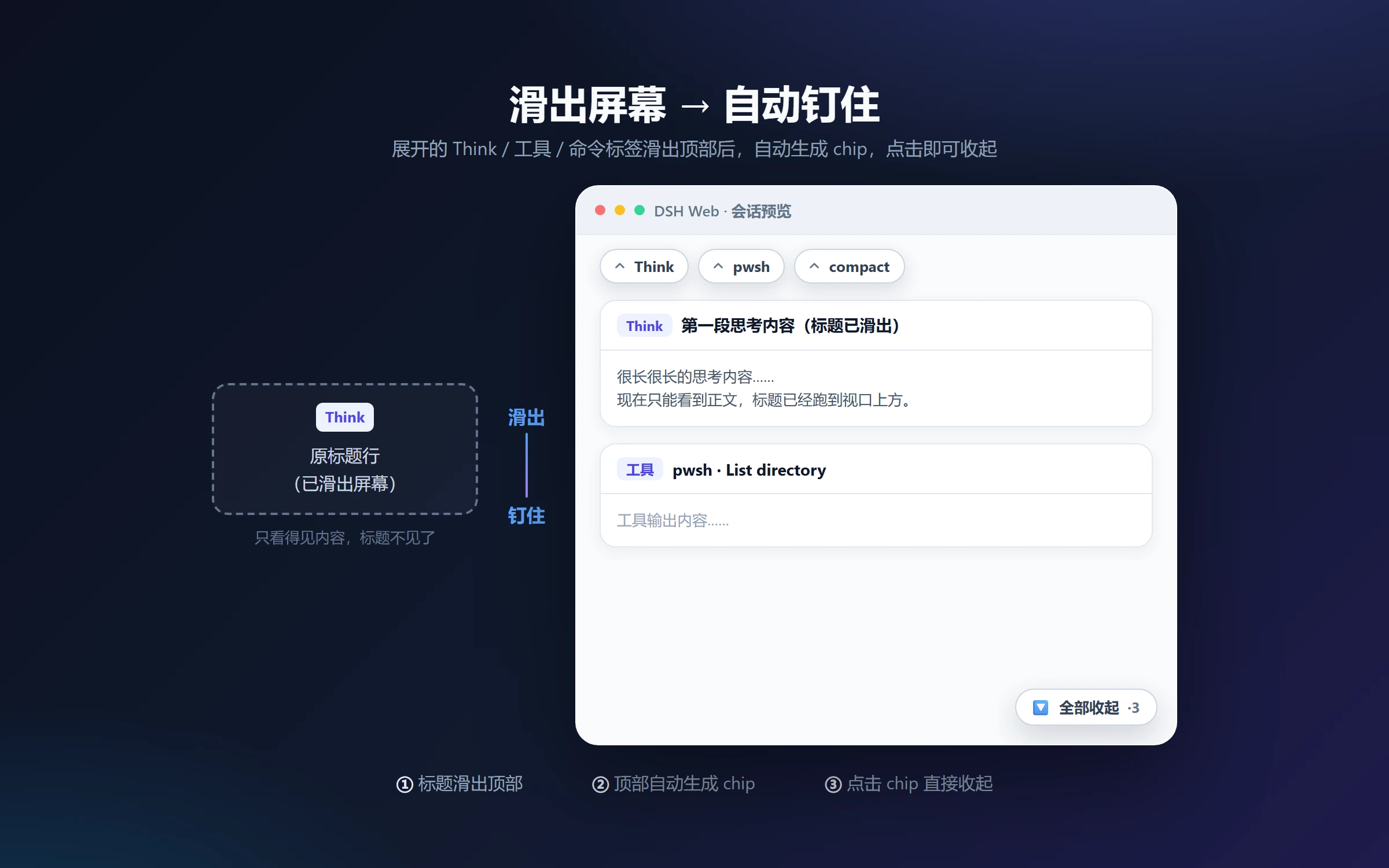
A DeepSeek Harness (DSH) Web client plugin: collapse every expanded collapsible section in the conversation in one click — Think reasoning rows, tool-call cards, command cards, context-injection rows, i.e. every DisclosureRow — via an always-visible pill with a live count and a customizable hotkey. When an expanded section scrolls off the top, its header is pinned to the top of the conversation so you can still collapse it.
✨ Features
| Feature | Description |
|---|---|
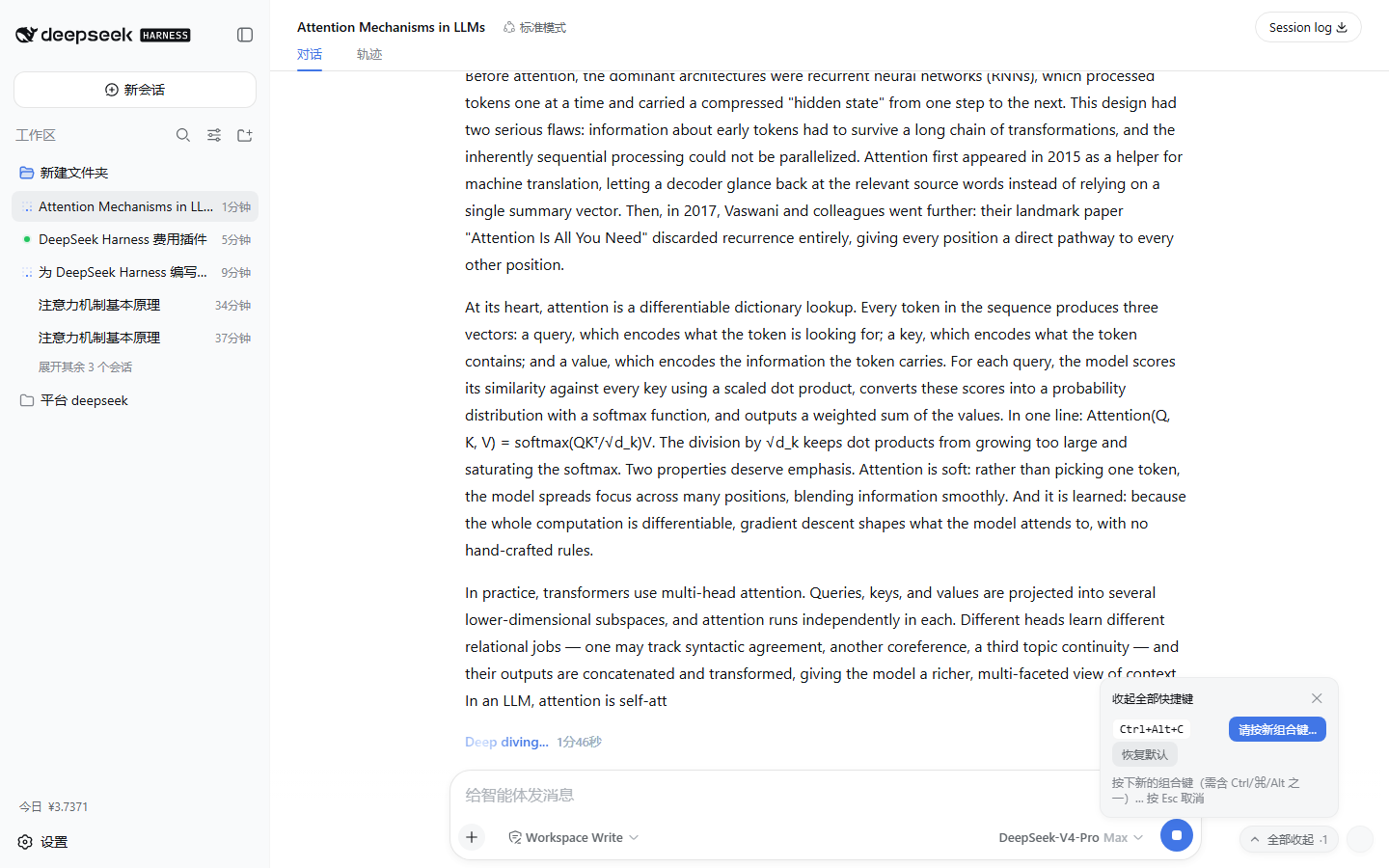
| 📌 Pin off-screen labels | Expanded Think / tool / command labels that slide off the top get pinned as chips; click a chip to collapse the original section |
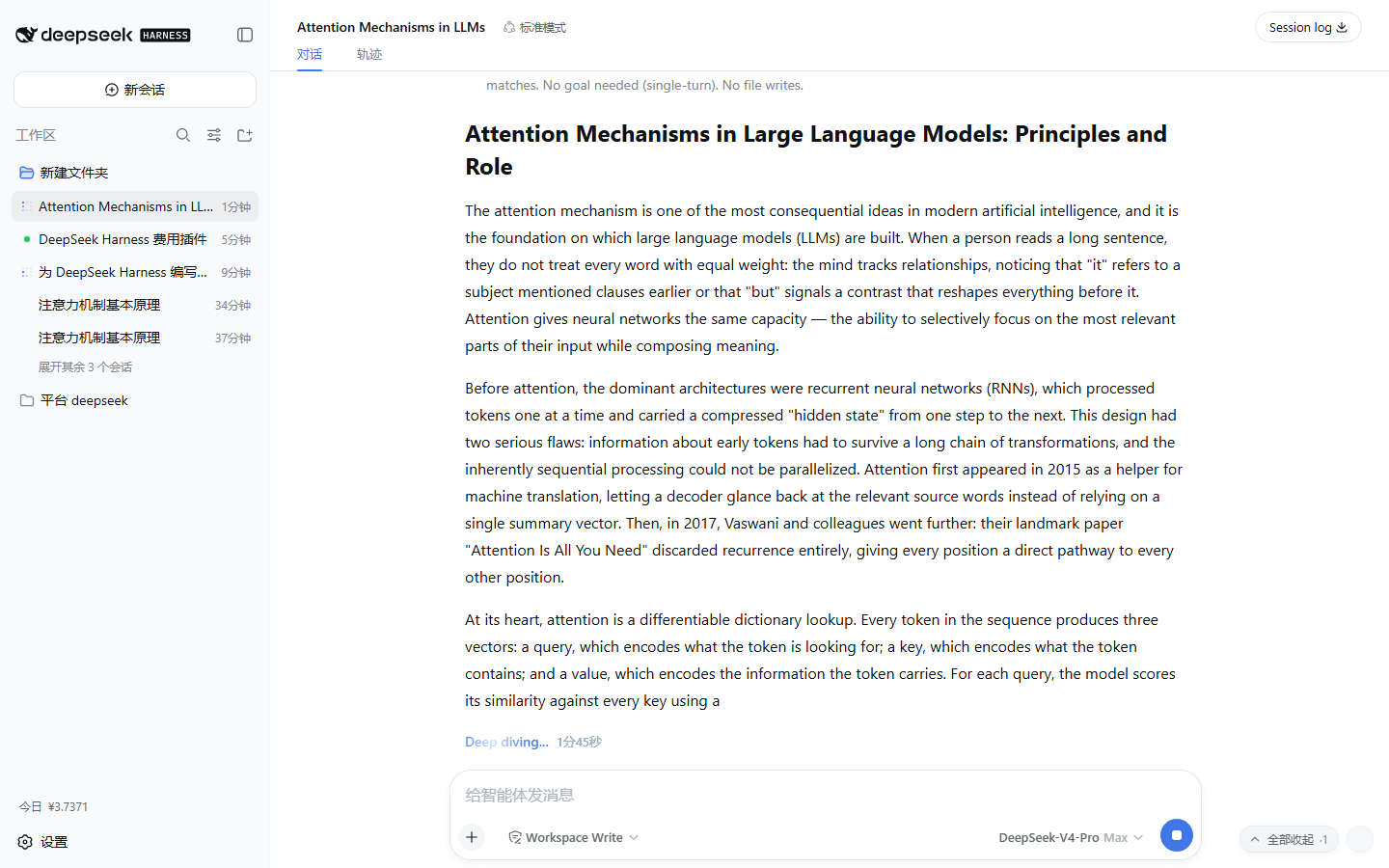
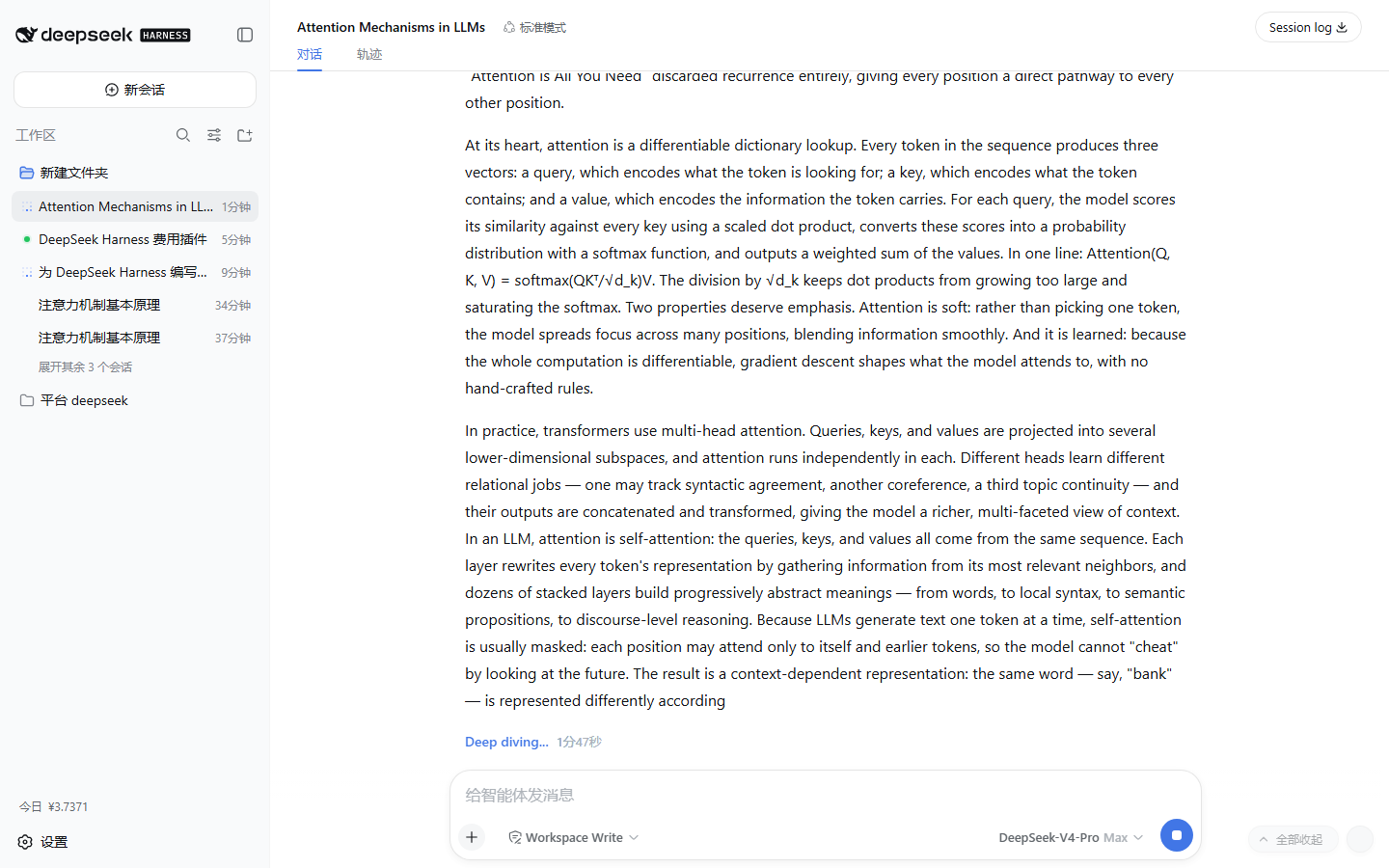
| 🔘 Collapse-all pill | Always-visible pill at the bottom-right of the chat with a live count (·N = expanded sections); one click collapses them all |
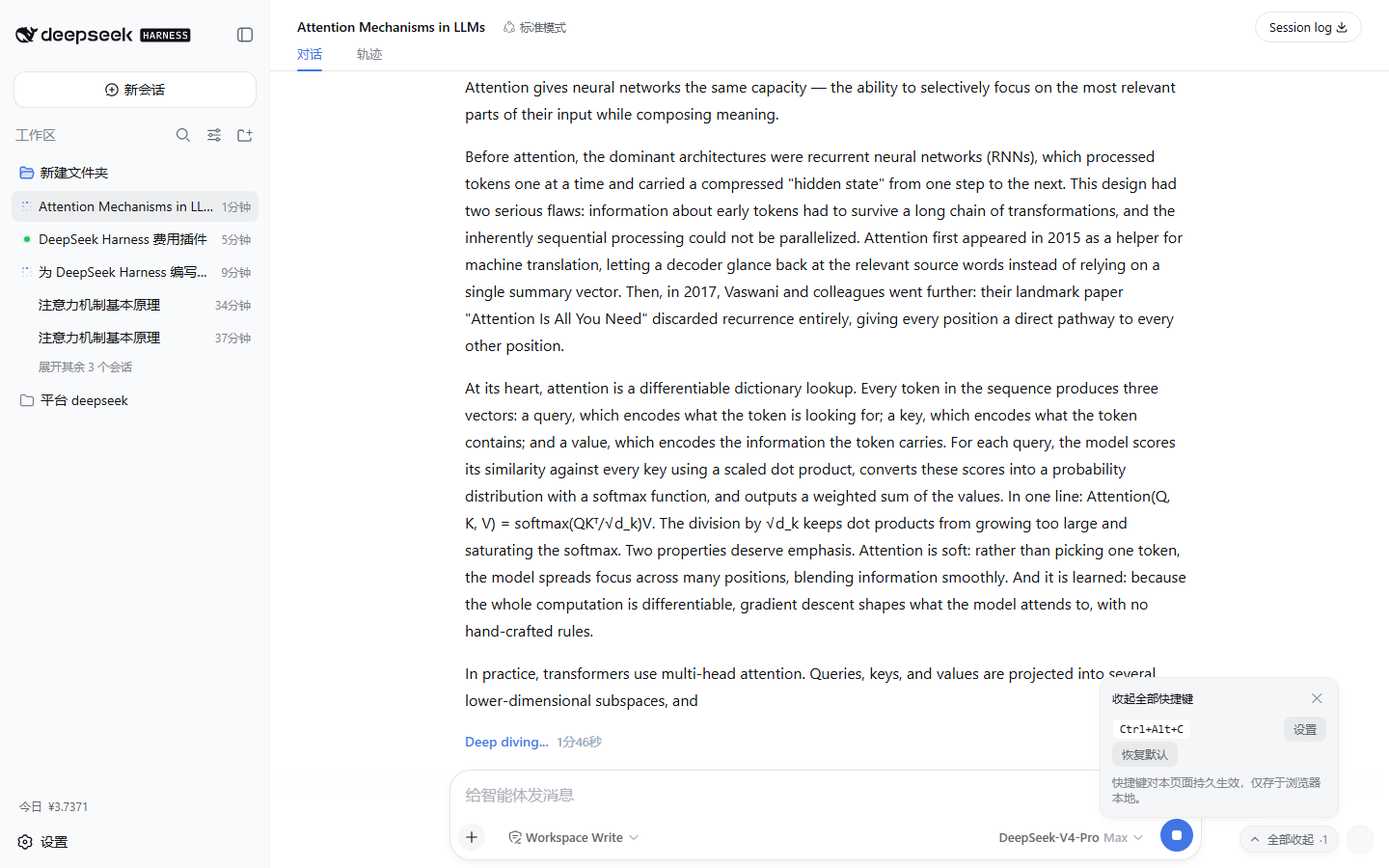
| ⌨️ Customizable hotkey | Default Ctrl+Alt+C (macOS ⌘⌥C); press the gear, press a new combo, done — persisted locally |
| 🎨 Native look | Styled entirely with the app's --dsw-* design tokens; follows dark/light themes |
| 🪶 Non-invasive | Pure DOM implementation — no app code touched; full cleanup on unload |
Real screenshots (live DSH Web instance)
Expanded Think row + the collapse-all pill with its live count:
Hotkey settings popover (gear → set → press the new combo):
After one click — the count drops to zero:
Why
Long conversations accumulate expanded Think rows and tool cards, and collapsing them means hunting down each header one by one — often after it has already scrolled out of view. This plugin puts a permanent "collapse all" pill at the bottom-right of the chat — with a live count of how many sections are expanded — plus a customizable hotkey: one click or one keystroke returns the conversation to its clean, collapsed view. When a section scrolls off the top, its header is pinned at the top of the conversation so you never lose the collapse control.
Behavior
- Off-screen pinning: once an expanded header fully slides past the top edge of the conversation scrollport, a chip appears at the top labelled with the section title (
Think, tool name, …); clicking the chip collapses the original section, and the chip disappears when the header scrolls back into view or the section is collapsed. - The collapse-all pill sits at the bottom-right of the conversation scrollport with a live count (
·N); clicking it collapses every expanded disclosure in the conversation. - The hotkey (default
Ctrl+Alt+C, macOS⌘⌥C) does the same thing, so pressing it always has an immediately observable effect. - Expand/collapse state, streaming output, and session switches are tracked via
MutationObserver+ scroll/resize listening so the count stays accurate; plugin disposal (HMR/stop) restores everything. - On apply, the plugin logs
console.info("[dsh-sticky-disclosure] applied …")and exposeswindow.dshStickyDisclosure(expanded()/hotkey()/setHotkey(spec)).
⌨️ Custom hotkey
- Click the keyboard gear next to the collapse-all pill to open the settings popover;
- Click Set — the popover enters capture mode;
- Press the new combo (it must include
Ctrl/⌘/Alt, e.g.Ctrl+Shift+K) — applied immediately and persisted in the browser'slocalStorage(nothing leaves your machine); Esccancels capture; Reset default restoresCtrl+Alt+C.
Programmatic access:
window.dshStickyDisclosure.setHotkey({ ctrl: true, shift: true, code: "KeyK" }) // Ctrl+Shift+K
window.dshStickyDisclosure.hotkey()                                              // "Ctrl+Shift+K"
Hotkey design
- Deliberately not Escape: the app's dialogs and popups already own
Escape(the plugin only uses Esc to cancel its own capture, which never interferes); - it works while an input is focused — the most common state, since focus usually stays in the composer;
- it backs off during IME composition (
isComposing); - it backs off on AltGr (
getModifierState("AltGraph")— on some keyboard layouts AltGr is reported as Ctrl+Alt and must never intercept the characters it types).
Stacking
- The collapse-all pill and the gear are fixed to the scrollport's bottom-right corner.
z-index: 15(popover: 16): above chat content, below the app's overlay layer (20) and all dialogs/popups (100/1000-tier) — it never covers permission prompts, settings panels, or onboarding masks.- Everything uses the app's design tokens (
--dsw-*: background, border, shadow, type), so it follows dark/light themes and fonts automatically, with an entrance animation that respectsprefers-reduced-motion.
Install
Requires: Node.js ≥ 20 + DeepSeek Harness (a version with the
dsh plugincommand;npm install -g @deepseek-ai/dsh). The plugin activates withdsh web.
Option 0: one-click (recommended, no clone needed)
PowerShell one-click script (copy the whole line and paste; pnpm is provisioned automatically, git is auto-detected):
irm https://raw.githubusercontent.com/Han-1413141/dsh-sticky-disclosure/main/install.ps1 | iex
Or a plain command line (machine must already have pnpm and git):
dsh plugin --profile web add github:Han-1413141/dsh-sticky-disclosure
Without git, use the GitHub archive tarball (update by remove-then-add):
dsh plugin --profile web add https://github.com/Han-1413141/dsh-sticky-disclosure/archive/refs/heads/main.tar.gz
Option 1: local development (dsh plugin + symlink)
From this repository's parent directory (relative paths get anchored to the invoking directory):
git clone https://github.com/Han-1413141/dsh-sticky-disclosure.git
cd <parent of the clone>
# symlink; edit lib/client.js, refresh the page, done:
dsh plugin --profile web add link:./dsh-sticky-disclosure
# or a fixed install:
# dsh plugin --profile web add file:./dsh-sticky-disclosure
Option 2: manual (no pnpm)
- In
<DSH_HOME>\profiles\web\package.json(default%USERPROFILE%\.dsh\profiles\web\package.json):- add
"dsh-sticky-disclosure": "link:<absolute path of this repo>"todependencies - append
"dsh-sticky-disclosure"todsh.profile.bundles
- add
- Create a directory junction in the profile's node_modules (the same shape a pnpm
link:dependency leaves behind):New-Item -ItemType Junction ` -Path "$env:USERPROFILE\.dsh\profiles\web\node_modules\dsh-sticky-disclosure" ` -Target "<absolute path of this repo>"
Activate
Plugin-set changes take effect on restart (a running server keeps its old graph). The bundle itself is served no-cache: after editing lib/client.js, a page refresh (Ctrl+F5) is enough to pick up the new code — no server restart needed.
# after the initial install: stop the current dsh web, then start it again
dsh web
Verify it entered the plugin graph (expect id: sticky-disclosure and name: dsh-sticky-disclosure):
dsh --profile web --dump-config | findstr sticky-disclosure
On the page, the "collapse all" pill at the bottom-right of the chat area means the plugin is active.
Update / Uninstall
dsh plugin --profile web update dsh-sticky-disclosure  # update to the latest commit (git form; or re-run the one-click script)
dsh plugin --profile web remove dsh-sticky-disclosure  # uninstall
Manual: remove the entries from package.json (dependencies/bundles) and delete the profiles\web\node_modules\dsh-sticky-disclosure junction, then restart dsh web.
Tuning
All behavior parameters live in the constants block at the top of lib/client.js:
| Constant | Default | Meaning |
|---|---|---|
DEFAULT_HOTKEY |
Ctrl+Alt+C |
Default hotkey (changeable in the settings popover, persisted) |
STORAGE_KEY |
dsh-sticky-disclosure:hotkey |
localStorage key for the persisted hotkey spec |
DOCK_Z_INDEX |
15 |
Stacking level of the pill/gear (must stay below the app overlay layer at z-20) |
PANEL_Z_INDEX |
16 |
Settings popover level (above the pill, below app overlays) |
CONTROL_INSET |
16 |
Inset of the collapse-all pill from the scrollport's bottom-right corner |
Tests
python test/verify.py # needs Python 3 + playwright (python -m playwright install chromium)
test/ contains:
mock.html— a static harness reproducing the DSH DOM contract (DisclosureRowstructure + the[data-conversation-scroll]scrollport);verify.py— a Playwright verification script (48 assertions);capture.py— a script that captures the demo screenshots/GIF against a live instance.
Coverage: pill presence and count, one-click collapse-all (visible sections and input-focused scenarios), custom hotkey (settings popover, capture, Esc cancel, persistence across reload, reset to default, invalid-spec rejection), automatic state sync, composer exclusion, and full disposal.
CI (
.github/workflows/test.yml) runs the same suite on every push.
Limitations
- Scoped to the conversation flow (inside
[data-conversation-scroll]). The Trajectory view has its own collapse controls and is out of scope. - It works through the
data-open/data-disclosure-rowDOM contract. If the upstream app changes that internal structure across upgrades, the selectors need to follow — seedocs/ARCHITECTURE.md.
Repository layout
dsh-sticky-disclosure/
├── .github/workflows/
│   ├── test.yml                 # CI: Playwright verification suite
│   └── install-smoke.yml        # CI: one-click install smoke test (Windows + Linux)
├── install.ps1                  # one-click install/update script (irm … | iex)
├── package.json                 # dsh.client (platform: web) + dsh.bundle declaration
├── cordis.patch.yml             # host-tree entry row (bundle patch)
├── lib/
│   ├── index.js                 # host half: inert marker plugin (no behavior)
│   └── client.js                # browser half: self-contained bundle (__ModuleLoader__ handoff)
├── test/
│   ├── mock.html                # static harness reproducing the DSH DOM contract
│   ├── verify.py                # Playwright verification script (48 assertions)
│   └── capture.py               # demo asset capture script
├── docs/
│   ├── assets/                  # screenshots and GIF
│   └── ARCHITECTURE.md          # architecture and implementation details
├── README.md / README.en.md
└── LICENSE
How it works
- Host side:
dsh-client-modulesscans Loader entries whose manifest declaresdsh.client.platform === "web", serves the builtexports["./client"]artifact at/plugins/<id>/client.js, and injects thewindow.__DSH_BOOT__entry graph. - Browser side: the bundle registers a module via
window.__ModuleLoader__.load({ id, factory }), exports a cordis plugin (name/apply), and the Web shell's Loader activates it. - The plugin body is pure DOM: it touches no app code — it reads the
data-open/data-disclosure-rowcontract and dispatches clicks at the original headers, so it survives app upgrades, themes, and locales.
See docs/ARCHITECTURE.md for the full pipeline, contracts, state model, hotkey configuration, and stacking design.
License
Links
More in this category
zhu1090093659/dsh-web#packages/dsh-task-board★ 8076
Task board for the dsh web GUI: a sidebar multi-column kanban whose cards run in real DSH agent sessions and can also be scheduled with cron expressions, executed host-side even with the browser closed.
zhu1090093659/dsh-web#packages/dsh-web-all★ 8076
Plugin and skin collection for the DSH Web UI: task board, Git graph, right-side panel, remote mobile UI, pet, live token stats, and a skin center.
omdsh-dev/DSH-better-sidebar★ 3828
Full sidebar workbench with file rendering and editing, terminal, Git, and subagents; third-party plugins can register new tabs.
ccch1mneyyy/dsh-TUI★ 3661
Claude Code-style full-screen terminal UI: pixel-whale header, live status line, and streaming thought expansion.
MeteorNOX/DeepSeek-Balance-Whale-Widget★ 3277
A fixed-corner whale widget for the DSH web GUI — balance, today's usage and per-turn cost with peak/off-peak pricing, editable balance-alert and daily-budget bubbles, a module-based custom bubble queue with A/B weighted choices and random lines or images, 30+ vendor templates (OpenAI, OpenRouter, Kimi, SiliconFlow, Ark, Zhipu, MiniMax and more) with per-model balance and subscription quota, plus task-end sound, imported audio, custom roles and a resource manager. Local-only, no telemetry.
Devin-AXIS/deepseek-design#deepseek-idesign★ 1628
Visual design studio for websites, app prototypes, posters, cards, reports, and magazines, with templates, direct element editing, selection-aware AI draft handoff, and export.
Community comments
Comments are public GitHub Discussions. Loading them connects to GitHub and Giscus; a GitHub account is required to post.