Keeps DSH agents from forgetting your requirements during long tasks. It saves important conditions and completion evidence locally, brings them back after context compaction or session resume, and stops partial work from being reported as the whole task done.
Install
# from npm (prebuilt)
dsh plugin --profile web add dsh-completion-guard
# from GitHub (first run asks for allowBuilds approval — follow the hint, retry)
dsh plugin --profile web add github:GreenLv/dsh-completion-guard
Any plugin you install runs third-party code with your own permissions — it can read your files, use your credentials, and reach the network, and tool approvals don’t sandbox it. GitHub-sourced plugins also run build scripts at install time — pnpm blocks those until you allow them, so an install can stop with ERR_PNPM_GIT_DEP_PREPARE_NOT_ALLOWED or ERR_PNPM_IGNORED_BUILDS; dsh prints the exact key to add under allowBuilds in your profile’s pnpm-workspace.yaml, and the install works on the next run. Allowing a build is a trust decision: only install sources you trust, and pin a commit (github:owner/repo#sha).
README
DSH Completion Guard is a DeepSeek Harness plugin that keeps your task requirements and checks saved results before certifying completion. Use it when a long or resumed task must still account for requested edits, tests, prohibitions and later corrections.
Opening or restoring a session with history can take time. DSH loads the saved history and Guard rebuilds its state; you may see “载入历史” (loading history). Wait for loading to finish before continuing. always starts protection with the first real input in a new root session; it does not make history loading instant, and reopening a session can still require a wait.

Install or upgrade
Requires DSH >=0.2.0-rc.2, Cordis >=4.0.4, Node.js >=22 and pnpm >=11. Web, Headless and the official Desktop app have separate profiles. The reviewed host baseline is DSH 0.2.0-rc.2 / Cordis 4.0.4; a later host must pass the same compatibility checks.
Choose your path before replacing any package:
- First installation, no old Guard sessions: stop the host, install Guard in the intended profile, then check and bind that installation before starting it.
- Upgrading with old sessions: stop the relevant writers and preserve the old installed package and its effective mode sources. Prepare a frozen session inventory and migration receipt before upgrading. After installation, rebuild the host lock and complete mode
adoptandverifywhile writers remain stopped. Do not start the upgraded host until those checks pass for the intended scope. Unknown old modes stay pending.
For Web, after the applicable preparation:
dsh plugin --profile web add dsh-completion-guard@0.9.0
Installation alone is not enough. The host lock records the actual packages and directories this profile loads; check it with inspect, write it with inject, then check the composed configuration with verify-dump. Back up cordis.patch.yml before injection. Installation and first load provides the Web commands, Windows and Desktop routes, and the final checks before startup. Old-session migration provides the preparation, commands and copyable AI prompts for an upgrade.
What to expect after startup
For an existing session, let history loading and state reconstruction finish. Then check:
/context-guard status
A new empty root session, with the default configuration, uses always and shows armed: Guard is ready, waiting for the first real message. It appends no Guard events before that message, so you can still choose the DSH session preset. DSH may write its own initialization events. The first real input starts protection in the same step, before its first file changes; an image or attachment counts too, while a blank message does not. An explicit activation: opt-in remains opt-in: run /context-guard on to begin protection.
An old session keeps its verified pre-upgrade mode, including an empty old session. The new default does not replace an old binding. A contradictory explicit activation setting reports activation_mode_conflict; follow the configuration instructions to use the new default while preserving old modes. Missing, damaged or conflicting bindings prevent certification; Guard reports the problem rather than guessing an identity or mode. Forks inherit their parent's bound initial mode.
Ask DSH to edit a file or run a test as usual. DSH executes the tools; Guard records the request and checks the saved result and any required readback. For example, “edit the configuration and make the tests pass” needs evidence of the changed file and a passing test, not just the assistant saying it is done. context_guard_prepare explains missing evidence; context_guard_checkpoint checks completion.
The default policy is still standard. Automatic protection grants no extra editing, execution or publication permission, and does not issue a certificate automatically.
Mode and everyday commands
| Command or mode | Result |
|---|---|
always |
New root sessions start protection with their first real input. |
opt-in |
Protection starts when you run /context-guard on in that session. |
/context-guard status |
Shows activation, remaining checks and reasons they remain open. |
/context-guard off / on |
Disables or enables protection for this session; saved history remains. |
/context-guard diagnose |
Explains a completion verdict. |
/context-guard clear |
Supersedes the current checklist while keeping prohibitions; it does not prove the work was done. |
/context-guard migration |
Shows the session's rules and upgrade/rollback implications. |
/context-guard release |
Shows an explicitly adopted release contract and remaining work. |
Guard activation is separate from DSH's standard/minimal/custom session preset. Saved off and on continue to apply. To change the initial default for future root sessions, see the configuration instructions. Keep existing host-lock fields and session bindings.
History loading and 0.9.0 caching
The first opening or restoration of an existing session loads its history and rebuilds Guard state. A later visit may also wait. This is different from a new empty session's armed state, which waits for your input.
0.9.0 reuses completed checks of old history only when it can verify that the history is unchanged and the results are safe to reuse. Within one Desktop installation check, it also reuses application files already read and verified. Each operation still checks the current mode and performs the required fresh checks of Goal state, private records and the host environment. This release does not change the official host's history-view lifecycle or decode cache, and does not promise to remove all UI loading waits. See the performance scope and acceptance record.
If the official reader refuses an old format, preserve the original log and old-mode source. You can explicitly migrate selected readable sessions using inventory, select and the same --selection on inspect/adopt/verify. Excluded sessions remain pending: selected_complete means only the chosen rows completed, not the whole inventory. Corruption, permission errors and other failures are not silently skipped. The migration guide includes commands, recovery and AI prompts.
Limits and privacy
Guard saves requirements, checks matching persisted results and rechecks them on resume. It refuses to certify damaged or insufficient evidence. It can block the Goal completion path it guards, but does not control every internal DSH write or replace DSH permissions, tools, Goal or compaction. Ordinary investigations can end with an honest answer without a machine completion certificate.
Guard stores bounded, redacted evidence summaries rather than full prompts, stdout, files, credentials, images or raw transcripts. See privacy. A package installed on disk does not prove a running process or UI loaded it; Guard's market restart adapter remains unavailable. Compatibility documents supported commands and platform limits.
Once enabled, the Guard saves direct user requirements and acceptance checks. A saved tool result counts only when it matches the requested command, file, or other target. A machine-certified completion requires the Guard's checkpoint; missing, stale, or mismatched evidence leaves the task uncertified. Investigations and explanations outside the supported evidence rules can still end with an honest answer, without a completion certificate.
Read-only observation and actions that change packages, files, services, or Git state remain separate. Ordinary actions use Host tools; a successful lookup never grants permission to make a change. Exact command limits and platform evidence are documented in docs/COMPATIBILITY.md.
When a requirement stays incomplete
“Update the plugin and check the GUI” can contain work the Guard cannot certify, and questions such as “是否有更新” are inquiries: they stay recorded with their source, but no checkpoint or rebind can machine-certify an answer — complete the investigation and report the result. The checkpoint reports a reason and one concrete next action per item. context_guard_prepare diagnoses the requirement and missing evidence; it is not an execution recipe for ordinary Host work.
Only use context_guard_rebind when the root requirement itself needs an exact, complete split. Ordinary work that lacks certification support does not need rebinding. If the action or target needs clarification, first ask the root user for an explicit instruction that includes the original clause; the proposal can reference that new item's ID. The tool returns a proposal ID and a comparison. The user applies it with the confirmation line 确认重绑定 <proposal ID> as the first line of a reply; an explanation request or a new task after a blank line keeps its own meaning, and a new task is captured normally. A confirmation buried in a sentence, quotes, or a code block, or followed by a reversal, does nothing. Splitting a requirement into equally uncertifiable pieces returns “no certification gain” instead of asking for a pointless confirmation. Unsupported parts remain pending, and a qualified safe end does not mean all work is complete.
The default context_guard_checkpoint call uses bindings: [] for diagnosis. It shows at most eight current items/constraints and ten evidence rows, within 12 KiB of plugin JSON. pagination reports totals and a separate next_cursor for each list; the first page is not the whole contract. Use item_ids or evidence_ids to focus a query, or evidence_scope: "history" for the complete evidence history, including rows marked unavailable. Keep the query unchanged when following a cursor; a changed contract or evidence snapshot requires a fresh query. Large rows expose detail_id; retrieve chunks with detail_offset and return the first response's snapshot as detail_snapshot on later chunks. All queries remain read-only and never shrink the certification set.
Completion and recovery
The Guard keeps each requirement, prohibition and answer obligation in its original scope. A question closes when the host records delivery of its answer; a file edit, test or readback needs its own observed result. A request to change an image needs evidence about the changed image, not just a successful tool return. An explicit proof request still uses the proof contract, and an adopted Goal-completion path still checks its required results.
The source of an action matters. A future observation, an unmet time or approval condition, insufficient evidence and a concrete ready action remain different states. A later authorization never changes an earlier Stop decision. A sourced pause, cancellation or short resume changes only the work that existed in its scope; quoted or old generic text does not become current authority on reload. Existing v5 history remains available for review, while new v6 work uses the current contract.
If an obligation is ambiguous, context_guard_rebind can propose an exact split, but only an explicit root-user confirmation applies it. Unsupported verification is reported as insufficient; it does not grant an action or force an edit. Use /context-guard diagnose and the read-only checkpoint to see the missing predicate, then complete supported work with host tools and report limitations honestly.
The 0.6.3 execution-era behavior is retained in the 0.6.3 changelog for existing installations. Current ordinary context_guard_action and context_guard_evidence calls only return migration guidance.
Policy tiers
Three tiers change how much proof is required at completion. They are separate from the opt-in / always activation modes, and installing never enters the release tier.
| Tier | What it demands |
|---|---|
standard (default) |
Work must be supported by durable evidence; ordinary tools are not gated behind extra Guard approval. |
strict |
On top of standard, a visual or complete-scope verification you explicitly asked for must be discharged by a real readback fact, not by a tool that merely succeeded. |
release |
An explicitly adopted release contract checks the covered publication operation against an exact candidate and one-use reservation. The contract does not supply user authorization or host permission. |
To choose strict, back up cordis.patch.yml, then add or change only policy under the existing context-guard entry's config. Preserve its activation setting, injected host-lock fields and other settings. This field illustration is not a replacement entry:
policy: strict
Explicit release contracts
A release contract is never adopted by a keyword, loaded Skill or installation. When the user has separately authorized publication, an explicit /context-guard release adopt call names the covered operations and exact candidate ref, full commit, version and artifact digest. /context-guard release then shows its coverage and any unfinished operation. Do not reuse a historical candidate identity for a new release.
After adoption, /context-guard release reports the contract, its candidate, its
per-operation coverage, what has been consumed, and anything still in flight.
Each operation spends exactly one reservation, written before the effect and
settled afterwards from a trusted readback. A wrong candidate SHA, ref, artifact
digest or version, an expired ticket, a consumed ticket, a retry of a request
that is still in flight, and an opaque runner are all refused before any effect.
The retained controlled npm publication route is separate from the retired ordinary action/evidence path. Coverage is limited to operations Guard actually routes. git tag and GitHub Release have no Guard-owned route; a contract requiring them reports release_operation_unrouted rather than pretending that a host command was protected. A composite runner is opaque. /context-guard release reports the exact coverage. Publication still needs the user's authorization and host checks; Guard cannot control an in-process caller that bypasses its route.
Boundaries
Context Guard certifies completion; DSH still owns Goal, Todo, Compaction, continuation, permissions, and tool execution. This plugin is not a security sandbox, semantic proof system, token-pruning tool, or replacement for those DSH facilities.
Evidence is bounded and redacted. Complete prompts, stdout, file contents, credentials, Authorization headers, URL query values, image bytes, and raw transcripts are not stored by the guard. See docs/PRIVACY.md.
Relationship to Codex Context Guard
This project began as a DSH port of deterministic behavior from GreenLv/codex-context-guard v0.8.8. That version is the historical starting point, not the current compatibility level.
Version 0.4.0 was deliberately aligned with the shared evidence rules in Codex Context Guard 0.10.0: proof must belong to work that is still open and must show the operation, target, and result the user actually requested. This is a limited behavior-level alignment, not a claim that the two products have the same features.
For 0.7.1, the shared core/v2 source files and conformance fixtures are byte-mirrored from the exact Codex Context Guard commit in tests/fixtures/conformance/core_v2/UPSTREAM_PIN.json. This proves source identity for those files, not complete feature or runtime parity; each product's host evidence and release remain independent. The earlier 0.6.x C01–C12 contract and DSH-authored v2 candidate are historical. The current comparison and its limits are in docs/SEMANTIC_COMPATIBILITY.md.
The two repositories serve different runtimes:
codex-context-guardis the Codex Hook/Python implementation with Codex plugin-cache and Hook lifecycle integration.dsh-completion-guardis an independent TypeScript implementation over native DSH Session events, commands, tools, and agent lifecycle.
They do not share runtime state, installers, caches, or release histories. Fixes are contributed to the repository that owns the affected runtime and are ported deliberately when the same behavior belongs in both products. See docs/UPSTREAM_BASE.md and docs/PORTING_NOTES.md for the exact reused and replaced boundaries.
npm download history
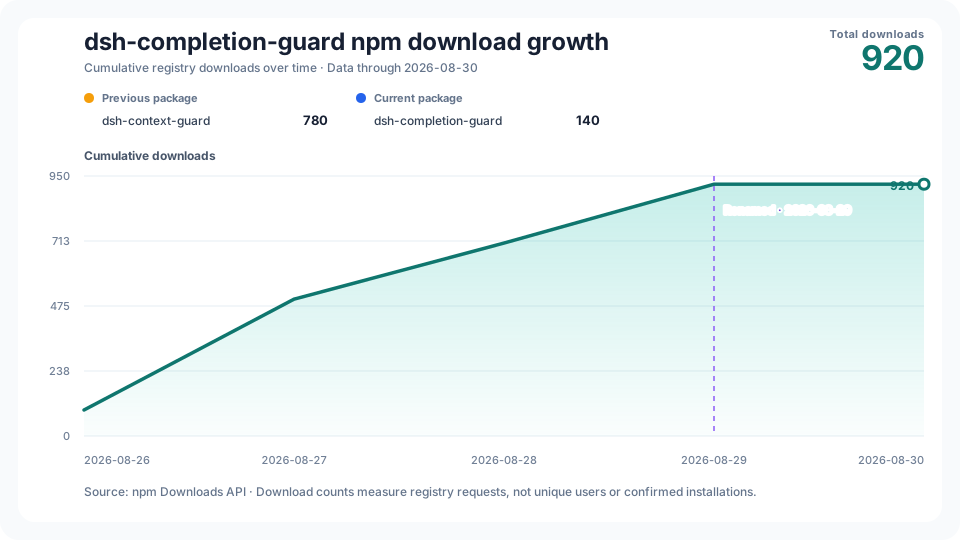
The cumulative chart keeps the old and new npm package totals visibly separate, marks the 2026-08-29 rename, and combines them only for the project growth line. npm download counts measure registry requests; they are not counts of unique users or confirmed installations.
History starts on the first public npm release day, 2026-08-26; its real first-day count is retained even when nonzero. The vertical axis starts at zero. Date labels share one fixed day interval and centered anchors; the caption always gives the exact coverage end.
The workflow is scheduled to collect twice daily. It publishes through the last day whose counts are unchanged in checks at least 12 hours apart and at least two UTC calendar days old. The chart shows the history cutoff, API availability date and latest check time separately. When npm data is delayed or revised, the previously checked curve remains visible with a pending status; a collection failure leaves the last chart intact. This observation rule is not an npm guarantee that counts will never change. See the source data and latest collection status.
Documentation
- Installation and first load — safe setup, first loading wait and session modes.
CHANGELOG.md— versioned user-visible changes.docs/ARCHITECTURE.md— ownership, durable state, and certification pipeline.docs/COMPATIBILITY.md— supported DSH versions and certifiable command subset.docs/LOCAL_ACCEPTANCE.md— deterministic, isolated, native, and public-package validation scopes.docs/distribution.md— verified public distribution destinations and the rename note.docs/PRIVACY.md— stored facts, prohibited data, and failure behavior.docs/UPSTREAM_BASE.md— historical starting point and repository authority boundary.docs/SEMANTIC_COMPATIBILITY.md— current shared behavior and known gaps.docs/PORTING_NOTES.md— behavior retained from Codex and DSH-specific replacements.
Development
pnpm install --frozen-lockfile
pnpm --dir tests/fixtures/host-composition install --frozen-lockfile
pnpm run test:stats
pnpm run typecheck
pnpm test
pnpm run lint
pnpm run build
pnpm run pack:check
These commands validate a local source tree and package. CI, native-platform acceptance, npm publication, GitHub release identity, and installation in a live DSH environment remain separate evidence scopes.
Links
More in this category
toby-bridges/api-relay-audit★ 880
Runs local security audits of AI API relays and LLM proxies from DeepSeek Harness, producing Markdown reports for prompt injection, model substitution signals, tool-call rewriting, error leakage, stream integrity, and profile-gated Web3 risks.
SeaOf0/dsh-redteam-model★ 688
Authorized-security DSH collection: nine work modes (redteam coordinator, pentest, code audit, binary analysis, attack-defense, AV evasion, incident response, cloud security, CTF solving) and fifteen runtime plugins, managed from a settings page with one-click deploy, install, update and uninstall.
howmp/dsh-pentest★ 607
Authorized pentest mode for DeepSeek Harness — exploration chain, assets and findings with a Web view.
PerryLink/dsh-auto-review★ 234
Second-model auto-review on the approval answerer chain: a read-only reviewer subagent returns structured allow/deny verdicts with reasons, fail-closed by default.
ADWMC/helm-d#helmd★ 168
Single-bundle reverse-engineering and pentest security plugin: first-turn tool narrowing, domain routing, and 33 tools covering APK, web, native binary, protocol, malware and LLM samples — with unpacking, license-bypass and anti-analysis case playbooks, an H-CoT evaluation engine (semantic routing, /hcot command), a web workbench with a ledger-driven tool shelf, an on-disk case workflow (auto-persisted evidence chain, E-numbered validated findings, post-compaction resume), GitHub-based external tool discovery, and 361 on-demand reference docs.
NanmiCoder/dsh-auto-mode★ 164
Adds an Auto permission preset between Workspace Write and Full access: routine work stays in the official workspace-write sandbox while the current session model reviews escalation and destructive calls, granting one exact wider access once, asking when the intent is ambiguous, and denying critical paths.
Community comments
Comments are public GitHub Discussions. Loading them connects to GitHub and Giscus; a GitHub account is required to post.