Add an optional rejection reason to approval prompts: the text is steered into the running turn before the rejection is answered, and the panel only follows the session you are currently viewing.
Install
# from npm (prebuilt)
dsh plugin --profile web add dsh-approval-reason-dock
# from GitHub (first run asks for allowBuilds approval — follow the hint, retry)
dsh plugin --profile web add github:FzqxDedafeiyu/dsh-approval-reason-dock
Any plugin you install runs third-party code with your own permissions — it can read your files, use your credentials, and reach the network, and tool approvals don’t sandbox it. GitHub-sourced plugins also run build scripts at install time — pnpm blocks those until you allow them, so an install can stop with ERR_PNPM_GIT_DEP_PREPARE_NOT_ALLOWED or ERR_PNPM_IGNORED_BUILDS; dsh prints the exact key to add under allowBuilds in your profile’s pnpm-workspace.yaml, and the install works on the next run. Allowing a build is a trust decision: only install sources you trust, and pin a commit (github:owner/repo#sha).
README

An additive web-client plugin for DeepSeek Harness that lets you type an optional rejection reason on approval prompts. The reason is delivered into the running turn as a steering user message before the approval is answered as rejected, so the model reads it in its next step instead of guessing why the action was denied.
Preview
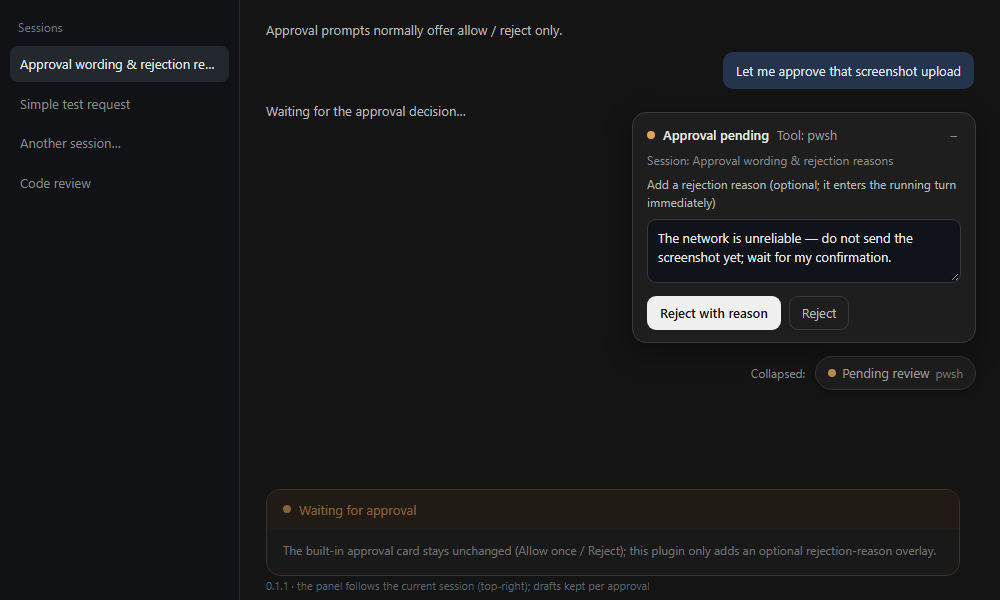
Why
Harness approval prompts offer Allow once / Reject only. The rejection result is a closed outcome value with no reason channel, so a rejection reaches the model as a bare "the user rejected tool X". When a denial carries context ("the network is unreliable", "do not touch that file yet"), it belongs in the conversation immediately — not in a follow-up turn.
This plugin adds a small frame-wide panel on top of the host UI. It does not replace the built-in approval card, does not change the approval protocol or audit events, and fails soft: if the panel cannot render, the built-in card keeps working exactly as before.
Behavior
- While the active session has an answerable approval, a panel appears in the top-right corner (
shell.overlayslot). - The panel follows the session shown in the main view: only that session's approval is offered, and approvals in other sessions stay quiet until you switch to them. The panel header shows the session title.
- The panel starts expanded and can be collapsed into a semi-transparent “Pending review” pill so it does not cover the conversation; clicking the pill expands it again. Each new approval starts expanded.
- Reason drafts are kept per approval, so switching between several sessions with pending approvals does not wipe the text typed for the other one.
- Type a reason and press Reject with reason:
(approval rejection reason) <text>is sent into the running session as a steering user message (remote.session.promptwithmode: "steer");- if the turn no longer accepts steering, it is queued (
mode: "queue") instead; - the approval is then answered as
rejected.
- Rejection closes the panel immediately. Only a failed reason delivery keeps a dismissible error notice with the error code.
- Reject answers without a reason, same as the built-in button.
Install
Requires DSH 0.2.2-rc.1 or a later 0.2.x release (see engines.dsh).
Version match:
| DSH | Plugin | Status |
|---|---|---|
0.2.1-rc.2 |
0.1.0 |
verified stable; 0.1.1 is not supported on this line |
0.2.2-rc.1 |
0.1.1+ |
verified (all 0.1.1 real-machine tests ran here) |
On DSH 0.2.1-rc.2, install the verified older line explicitly:
dsh plugin --profile web add dsh-approval-reason-dock@0.1.0
Why 0.1.1 does not claim 0.2.1: it needs the client-side uiSession service
declared in exports.inject, and that service was not verified to exist in the
0.2.1 client runner. The DSH plugin manager evaluates engines.dsh for
compatibility, so 0.1.1 may be flagged as incompatible on 0.2.1; pinning
@0.1.0 avoids depending on that check.
Install with the DSH CLI (npm package):
dsh plugin --profile web add dsh-approval-reason-dock
Preferred: install the bundle from the DSH UI (Plugin Manager → install bundle) using the npm package name or the GitHub spec:
dsh-approval-reason-dock
github:FzqxDedafeiyu/dsh-approval-reason-dock
Or from GitHub source with the CLI:
dsh plugin --profile web add github:FzqxDedafeiyu/dsh-approval-reason-dock
Manual profile patch (if you manage the profile yourself): add the bundle to dsh.profile.bundles and let its patch insert the row:
- insert:
    - id: approval-reason-dock
      name: dsh-approval-reason-dock
The bundle ships cordis.patch.yml, index.js (empty Host half), client.js (browser half), locale/*.json and icon.svg.
Compatibility and risks
- The browser half uses DSH client internals: the
shell.overlayslot,uiSessionsession-status interactions, andremote.session.prompt. These APIs are not a stable public contract; a Harness upgrade may require a plugin update. - If an internal API is missing, the panel stays hidden and approvals still work through the built-in card (fail-soft).
- The plugin sends no network requests and reads no session content beyond the pending approval metadata.
Privacy
The reason you type becomes a normal user message in the session log and model context (capped at 500 characters, plain text, never rendered as HTML). Nothing is sent anywhere else.
Uninstall
Remove the dsh-approval-reason-dock entry from dsh.profile.bundles (or use Plugin Manager → uninstall), then restart DSH.
Development
node test/harness.mjs
The harness checks the manifest/packaging shape, loads the real client.js factory, and drives the approval flow (reason delivery, steer→queue fallback, failure notices, already-settled approvals) against a fake React/Cordis/slot environment. npm run pack:check verifies the published file list.
Repository layout:
client.js           browser half (window.__ModuleLoader__ bundle)
index.js            host half (no-op apply)
cordis.patch.yml    Loader row
locale/{en,zh}.json display metadata
icon.svg            plugin icon
test/harness.mjs    sandbox tests
.github/workflows/  CI
Maintenance
Release, install/rollback, upgrade smoke tests and troubleshooting are documented in the maintenance handbook (Chinese, written for this deployment).
License
MIT. See LICENSE.
Links
More in this category
zhu1090093659/dsh-web#packages/dsh-task-board★ 10290
Task board for the dsh web GUI: a sidebar multi-column kanban whose cards run in real DSH agent sessions and can also be scheduled with cron expressions, executed host-side even with the browser closed.
zhu1090093659/dsh-web#packages/dsh-web-all★ 10290
Plugin and skin collection for the DSH Web UI: task board, Git graph, right-side panel, remote mobile UI, pet, live token stats, and a skin center.
ccch1mneyyy/dsh-TUI★ 7336
Claude Code-style full-screen terminal UI: pixel-whale header, live status line, and streaming thought expansion.
MeteorNOX/DeepSeek-Balance-Whale-Widget★ 7093
A fixed-corner whale widget for the DSH web GUI — balance, today's usage and per-turn cost with peak/off-peak pricing, editable balance-alert and daily-budget bubbles, a module-based custom bubble queue with A/B weighted choices and random lines or images, 30+ vendor templates (OpenAI, OpenRouter, Kimi, SiliconFlow, Ark, Zhipu, MiniMax and more) with per-model balance and subscription quota, plus task-end sound, imported audio, custom roles and a resource manager. Local-only, no telemetry.
omdsh-dev/DSH-better-sidebar★ 5036
Full sidebar workbench with file rendering and editing, terminal, Git, and subagents; third-party plugins can register new tabs.
Devin-AXIS/deepseek-design#deepseek-idesign★ 1792
Visual design studio for websites, app prototypes, posters, cards, reports, and magazines, with templates, direct element editing, selection-aware AI draft handoff, and export.
Community comments
Comments are public GitHub Discussions. Loading them connects to GitHub and Giscus; a GitHub account is required to post.