A DeepSeek Harness bundle that shows an opened document in the center while the current conversation stays visible on the right, with a per-session toggle, a resizable divider, layout presets and a narrow-window Document/Chat switch. Only the window layout changes; editing, saving and preview continue to use the host's native document and Office viewers.
Install
# from npm (prebuilt)
dsh plugin --profile web add dsh-document-view
# from GitHub (first run asks for allowBuilds approval — follow the hint, retry)
dsh plugin --profile web add github:Frank-Fan-1058/dsh-document-view
Any plugin you install runs third-party code with your own permissions — it can read your files, use your credentials, and reach the network, and tool approvals don’t sandbox it. GitHub-sourced plugins also run build scripts at install time — pnpm blocks those until you allow them, so an install can stop with ERR_PNPM_GIT_DEP_PREPARE_NOT_ALLOWED or ERR_PNPM_IGNORED_BUILDS; dsh prints the exact key to add under allowBuilds in your profile’s pnpm-workspace.yaml, and the install works on the next run. Allowing a build is a trust decision: only install sources you trust, and pin a commit (github:owner/repo#sha).
README
⭐ If this saves you a few round trips, star the repo — it helps other DeepSeek Harness users discover the plugin in marketplaces.
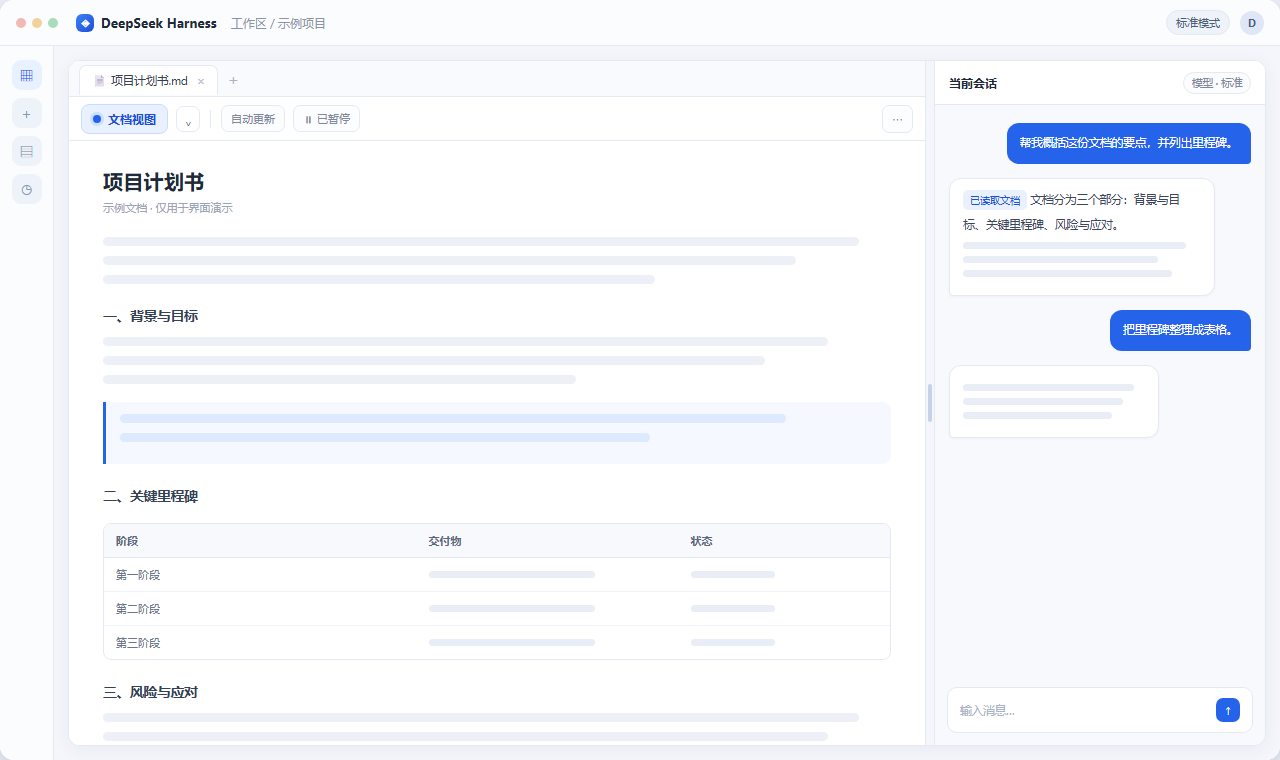
Screenshots are desensitized illustrations with generic placeholder content. They contain no real sessions, file names, accounts, or personal data.
- Install in 30 seconds
- The problem
- Who it is for
- Features
- Privacy & security
- Requirements & compatibility
- Install
- Usage
- FAQ
- Roadmap
- Contributing
- License
Install in 30 seconds
Published on npm — one command:
# Official CLI
dsh plugin --profile web add dsh-document-view

# Or 1024 Store
dsh1024 plugin --profile web add dsh-document-view
Package: npm / dsh-document-view (currently 1.1.1). Enable it in the DSH plugin list and refresh the page. Other install options are in Install.
The problem
Open a file in DSH and it takes over the right sidebar, pushing your conversation away. Asking the AI to explain, summarize or rewrite against that document means constantly switching between "reading" and "chatting" — and losing context every time. Pasting the content into the chat means repeated copy-paste and truncated context.
dsh-document-view does exactly one thing: keeps both on screen. It does not take over the editor, change save behavior, or touch your files. It only rearranges the window so DSH native document / Office preview and the chat panel work side by side.
| Default | Document view on | |
|---|---|---|
| Document | Takes the right sidebar | Center area |
| Conversation | Pushed away | Always visible on the right |
| Ask AI about the document | Switch back and forth / paste | Same screen |
| Editing / saving / preview | Native | Still native |
Who it is for
- Reading papers, reports, contracts or specs while asking the AI about them
- Checking Excel / PowerPoint data and following up on a specific row or slide
- Editing code or Markdown while getting AI review, without switching tabs
- Using a large or multi-monitor setup and wanting document and chat side by side
Features
1. Document and chat, side by side
Open any file, then click Document view in the conversation header actions or the file tab actions. Drag the divider to resize; ← / → nudge it, Home resets the ratio, and double-clicking the divider restores the default. The toggle and ratio are saved per session.
2. Settings and auto-enter
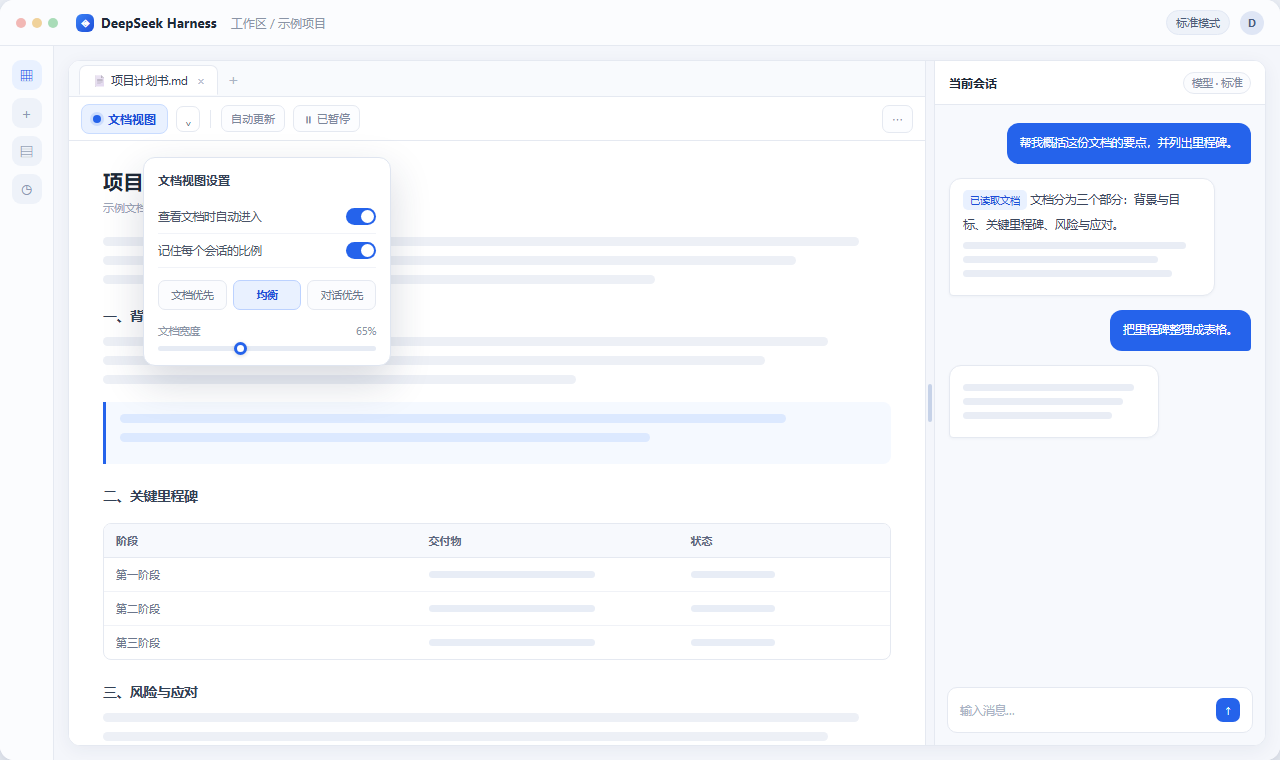
The arrow next to the toggle opens settings:
- Auto-enter on document view (off by default) — fires only when you click a file or file tab; background file operations never open it. After you exit manually, the same file will not re-open repeatedly.
- Document-first / Balanced / Chat-first presets, saved per session.
- Auto update / Paused — reuses the host native file watcher. Pause when you want to read carefully; resuming shows the latest content while preserving the native viewer page and zoom state.
3. Works in narrow windows
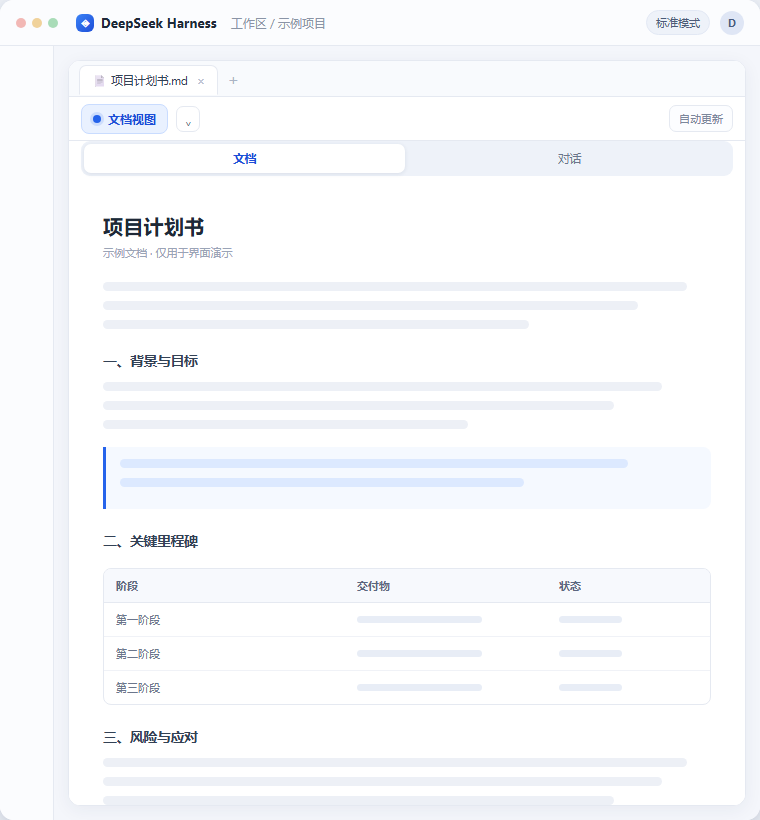
When the window is too narrow it switches to a single-column Document / Chat toggle. Unsent input is preserved, and focus moves to the visible switch if the current focus would be hidden.
4. Native all the way down
Rendering, editing, saving and preview of Markdown, PDF, Word, Excel and PowerPoint remain entirely with DSH own viewers and Office engine. The plugin never reads, writes or uploads your files and reimplements no editing feature. Disable it and the default layout returns.
Privacy & security
The plugin touches your workspace UI, so every claim below is verifiable from the source:
- No network calls — no
fetch,XMLHttpRequest,WebSocket, no external URLs in the code. - No file access — no filesystem or editor read/write APIs.
- No credentials — no API keys, tokens, passwords, cookies,
.envor config files ship in the package. - One preference only — browser
localStorageholds the auto-enter toggle and per-session ratios underdsh.document-view.v1; no document content, paths, file names or chat content. - Narrow CSS scope — all styles are scoped to the plugin own
[data-fdc-*]attributes. No host components are moved, cloned or remounted; only the window grid geometry changes.
See SECURITY.md and docs/COMPATIBILITY.md.
Requirements & compatibility
- DeepSeek Harness Desktop / Web, verified on v0.2.2-rc.3.
- Node.js >= 20 — only for rebuilding from source; not needed to install or use.
- No
engines.dshhard constraint: a wrong constraint blocks installation outright, so compatibility is documented instead.
The plugin relies on the host DOM structure and slot names. If a DSH upgrade changes them, the plugin disables itself safely and the page keeps working (no white screen). Re-verify with the upgrade checklist.
Install
Option 0 — from npm (recommended, unlocks one-line install)
dsh1024 plugin --profile web add dsh-document-view
# or
dsh plugin --profile web add dsh-document-view
Option 1 — local directory
git clone https://github.com/Frank-Fan-1058/dsh-document-view.git
Then in DSH: Plugins → Add plugin, pick the dsh-document-view directory, enable it, and refresh the page (or restart DSH).
Option 2 — tarball
npm pack
Extract dsh-document-view-*.tgz anywhere, then point step 2 of Option 1 at that directory.
Option 3 — build from source
npm install            # only needed to rebuild
node scripts/build.mjs
node scripts/verify.mjs
src/ is the source; client.js is the self-contained build artifact (all CSS inlined, no runtime dependencies). Rebuild client.js after any src/ change — do not hand-edit the artifact.
file:dependencies are physical copies: after editing source, removenode_modules/<package>and reinstall so the running copy updates.
Usage
- Open a file in the right sidebar (Markdown / PDF / Office).
- Click Document view in the conversation header or file tab actions.
- Drag the divider;
←/→to nudge,Homeor double-click to reset. - Open settings via the arrow for auto-enter and layout presets.
- Click the toggle again (or the exit entry in the session / file header) to return to the default layout.
FAQ
Will it affect my editors or Office plugins? No. It changes layout only — Univer, Office converters and native editors are untouched.
Are my files read or uploaded? No. No network requests, no file I/O, only the toggle and ratios are stored.
Does anything remain after disabling? No. All injected styles, attributes, the divider and listeners are removed on teardown.
What if a DSH upgrade breaks it? It disables itself safely and the page stays usable. Open an Issue with your DSH version.
Which file types are supported? Whatever the host supports natively — Markdown, PDF, Word, Excel, PowerPoint, etc. The plugin adds no format restrictions.
Roadmap
Shipped: v1.0.0 first third-party installable release, v1.1.0 bilingual docs and safe-deactivation fallback, v1.1.1 npm trusted publishing.
Already listed: npm package, 1024 Store / awesome catalog (PR #942 merged), and the GitHub dsh-plugin topic. Next (feedback-driven): follow up on the dsh-market catalog PR review; re-verify after new DSH releases; add more locales and layout presets. See ROADMAP.md and CHANGELOG.md.
Contributing
Issues and PRs welcome — see CONTRIBUTING.md. Rebuild client.js when changing src/; update both locale/en.json and locale/zh.json when changing UI copy. Never put real sessions, file names, accounts or personal data into illustrations or examples.
Want more people to find it inside DSH? See docs/PUBLISHING.md for the full playbook (1024 Store, dsh-market, the dsh-plugin GitHub topic, npm publishing) and the ready-to-use catalog entry.
License
MIT © 2026 dsh-document-view contributors
Links
More in this category
zhu1090093659/dsh-web#packages/dsh-task-board★ 10458
Task board for the dsh web GUI: a sidebar multi-column kanban whose cards run in real DSH agent sessions and can also be scheduled with cron expressions, executed host-side even with the browser closed.
zhu1090093659/dsh-web#packages/dsh-web-all★ 10458
Plugin and skin collection for the DSH Web UI: task board, Git graph, right-side panel, remote mobile UI, pet, live token stats, and a skin center.
ccch1mneyyy/dsh-TUI★ 7797
Claude Code-style full-screen terminal UI: pixel-whale header, live status line, and streaming thought expansion.
MeteorNOX/DeepSeek-Balance-Whale-Widget★ 7271
A fixed-corner whale widget for the DSH web GUI — balance, today's usage and per-turn cost with peak/off-peak pricing, editable balance-alert and daily-budget bubbles, a module-based custom bubble queue with A/B weighted choices and random lines or images, 30+ vendor templates (OpenAI, OpenRouter, Kimi, SiliconFlow, Ark, Zhipu, MiniMax and more) with per-model balance and subscription quota, plus task-end sound, imported audio, custom roles and a resource manager. Local-only, no telemetry.
omdsh-dev/DSH-better-sidebar★ 5191
Full sidebar workbench with file rendering and editing, terminal, Git, and subagents; third-party plugins can register new tabs.
omdsh-dev/dsh-genui★ 1007
Interactive UI components rendered inline in replies: layout, charts, forms, quizzes, mermaid, 3D scenes, and an action event loop back to the model.
Community comments
Comments are public GitHub Discussions. Loading them connects to GitHub and Giscus; a GitHub account is required to post.