An always-on-top window that shows the running task's status, the live step and todo progress, offers approve/reject and option buttons for pending approvals and questions, and turns into a done card with a result preview plus a one-click jump back to the conversation. Ships prebuilt native shells for macOS and Windows; on Linux only the in-page wake-up button remains. Its HTTP routes have no DSH access check, so a web page open in your browser could call them.
Install
# from GitHub (first run asks for allowBuilds approval — follow the hint, retry)
dsh plugin --profile web add github:FlowRiver1/dsh-float-panel
Any plugin you install runs third-party code with your own permissions — it can read your files, use your credentials, and reach the network, and tool approvals don’t sandbox it. GitHub-sourced plugins also run build scripts at install time — pnpm blocks those until you allow them, so an install can stop with ERR_PNPM_GIT_DEP_PREPARE_NOT_ALLOWED or ERR_PNPM_IGNORED_BUILDS; dsh prints the exact key to add under allowBuilds in your profile’s pnpm-workspace.yaml, and the install works on the next run. Allowing a build is a trust decision: only install sources you trust, and pin a commit (github:owner/repo#sha).
README
Once DSH starts a task, a small system-level floating window stays on top of whatever you are doing: whether the agent is still working, what it is doing right now, and which step it is on. Approvals and multiple-choice questions can be answered straight from the window. When the task finishes, the window turns into "done" — click once to jump back to that conversation in DSH.
| Running | Waiting for approval |
|---|---|
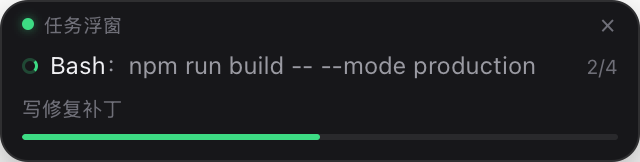 |
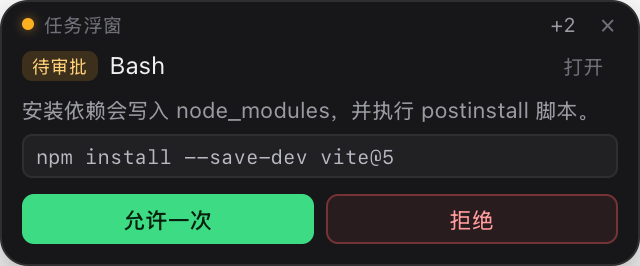 |
The first two come from macOS. Windows renders the same card with the same page; only the window shell differs:
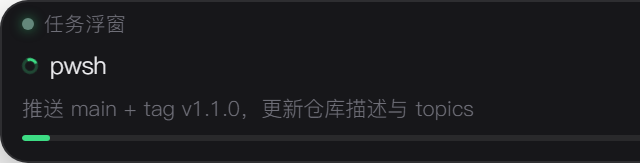
Install
Requirements: macOS 13+ (native AppKit panel) or Windows 10 1903+ / Windows 11 (native WPF + WebView2 panel; needs the WebView2 Runtime and .NET Framework 4.8, both preinstalled on Windows 11 and most Windows 10 machines), plus DSH >=0.2.0-rc.2.
One package serves both systems. The repo ships the prebuilt macOS universal binary and DSHFloatPanel.exe for Windows, so installing needs no Xcode, no Visual Studio and no build step; the host picks the shell for the current process.platform at runtime.
dsh plugin --profile web add github:FlowRiver1/dsh-float-panel
Restart DSH afterwards and the plugin shows up in Settings → Plugins.
Local development uses a link install instead:
dsh plugin --profile web add link:/path/to/float-panel
Usage
- The window appears in the bottom-right corner after you send a request; drag it anywhere, the position is remembered. It is anchored by its bottom edge, so a taller card grows upward instead of pushing toward the Dock.
- Set
config.autoOpen: falseto stop it opening automatically; the "◍ 任务浮窗" button at the bottom-right of DSH brings it back. - The × only closes the window, it never interrupts the task.
- One conversation at a time is shown (approval > question > running > done); the rest collapse into a
+Ncounter. - Finished tasks stay for 30 minutes; clicking "open" removes them.
- On Windows the only difference is cosmetic: the rounded card is produced by clipping the window region (no soft drop shadow), the drag strip is still the top 22px, the panel never steals focus from the app you are typing in, and it stays out of the taskbar and Alt+Tab. "Open" first tries to activate the DSH window directly and falls back to the
dsh://openprotocol. - Without the WebView2 Runtime the window does not appear: a dialog explains what to install, and the in-page button shows the reason. The task itself is unaffected.
How it works
index.js is the host half: it folds the committed session/event log into a tiny snapshot of "what is this task doing right now" and serves it over /float-panel/* routes on DSH's existing web port. client.js is the page half: it reports which conversation is on screen and turns clicks in the window into real answer() calls. panel.html is the window UI (one UI for both platforms; it talks to WKWebView on macOS and WebView2 on Windows). The shells are native/main.swift (AppKit NSPanel + WKWebView) and native/windows/Panel.cs (WPF + WebView2) — an Electron renderer cannot create an always-on-top window, so each platform gets a ~500-line native shell that the host spawns.
Because the host is the single source of truth, the panel stays accurate even when the DSH page is in the background or not open at all.
Building the shells
Both shells are prebuilt and committed; only rebuild after changing their source.
macOS (native/main.swift, needs the Xcode command line tools): cd native && ./build.sh.
Windows (native/windows/Panel.cs, needs only the in-box .NET Framework, no SDK):
powershell -ExecutionPolicy Bypass -File native/windows/build.ps1
The script compiles with %WINDIR%\Microsoft.NET\Framework64\v4.0.30319\csc.exe; the WebView2 managed assemblies and the x64/ / arm64/ WebView2Loader.dll are committed alongside it and fetched from NuGet only when missing. -Console builds a DSHFloatPanel-debug.exe that prints startup failures to a terminal.
Limits
- The floating window needs a native system window: macOS 13+ and Windows 10 1903+ / 11. On Linux only the in-page wake-up button exists, and it reports that the platform is unsupported.
- Windows requires the WebView2 Runtime; without it the window is skipped with a dialog and a hint in the page, and the task is unaffected.
- Free-text answers are not editable in the panel — it offers a "go answer" shortcut instead.
- Approvals must be settled by the page, so the window needs the DSH page to have been opened at least once (always true on desktop).
Privacy
The plugin reads local session state only. Nothing is sent anywhere: no telemetry, no analytics. Every route lives on DSH's own web port, and panel / state / action require a 32-character token stored at ~/Library/Application Support/dsh-float-panel/token on macOS or %LOCALAPPDATA%\dsh-float-panel\token on Windows; the remaining routes accept loopback origins only and validate Origin. On Windows the WebView2 user data folder lives in that same state directory (webview/, 10–50MB) and falls back to %TEMP%\dsh-float-panel-webview, then to the plugin directory, if the state directory is not writable; panel-error.log records the reason.
License
Links
More in this category
zhu1090093659/dsh-web#packages/dsh-task-board★ 10669
Task board for the dsh web GUI: a sidebar multi-column kanban whose cards run in real DSH agent sessions and can also be scheduled with cron expressions, executed host-side even with the browser closed.
zhu1090093659/dsh-web#packages/dsh-web-all★ 10669
Plugin and skin collection for the DSH Web UI: task board, Git graph, right-side panel, remote mobile UI, pet, live token stats, and a skin center.
ccch1mneyyy/dsh-TUI★ 8366
Claude Code-style full-screen terminal UI: pixel-whale header, live status line, and streaming thought expansion.
MeteorNOX/DeepSeek-Balance-Whale-Widget★ 7489
A fixed-corner whale widget for the DSH web GUI — balance, today's usage and per-turn cost with peak/off-peak pricing, editable balance-alert and daily-budget bubbles, a module-based custom bubble queue with A/B weighted choices and random lines or images, 30+ vendor templates (OpenAI, OpenRouter, Kimi, SiliconFlow, Ark, Zhipu, MiniMax and more) with per-model balance and subscription quota, plus task-end sound, imported audio, custom roles and a resource manager. Local-only, no telemetry.
omdsh-dev/DSH-better-sidebar★ 5362
Full sidebar workbench with file rendering and editing, terminal, Git, and subagents; third-party plugins can register new tabs.
omdsh-dev/dsh-genui★ 1070
Interactive UI components rendered inline in replies: layout, charts, forms, quizzes, mermaid, 3D scenes, and an action event loop back to the model.
Community comments
Comments are public GitHub Discussions. Loading them connects to GitHub and Giscus; a GitHub account is required to post.