Interactive K-line analysis for DeepSeek Harness with multi-market quotes, technical indicators, news, and fundamentals.
Install
# from GitHub (first run asks for allowBuilds approval — follow the hint, retry)
dsh plugin --profile web add github:FTShare-Lab/dsh_kline
Any plugin you install runs third-party code with your own permissions — it can read your files, use your credentials, and reach the network, and tool approvals don’t sandbox it. GitHub-sourced plugins also run build scripts at install time — pnpm blocks those until you allow them, so an install can stop with ERR_PNPM_GIT_DEP_PREPARE_NOT_ALLOWED or ERR_PNPM_IGNORED_BUILDS; dsh prints the exact key to add under allowBuilds in your profile’s pnpm-workspace.yaml, and the install works on the next run. Allowing a build is a trust decision: only install sources you trust, and pin a commit (github:owner/repo#sha).
README
简体中文 | English
Explore markets, read charts, and find key price levels inside DeepSeek Harness. Ask AI for an analysis, or open a hands-on workspace to search symbols, change timeframes, and study a chart yourself.
Quotes and technical analysis are for research and education only, not investment advice.
What it helps you do
- Start with a sentence: ask for a chart, a trend read, or an indicator analysis in natural language.
- Explore on your own: open the K-line workspace, search a name or ticker, and switch among daily, weekly, monthly, quarterly, yearly, and available intraday views.
- Read trend and momentum: use MA, volume, MACD, KDJ, RSI, BOLL, ATR, and VWAP.
- Find price areas: identify support and resistance, or draw and save your own levels and notes.
- Compare and review: overlay indices or symbols, then select a period to inspect return, range, drawdown, and activity.
- Add context: use Market, Sectors, News, Company, and Dragon & Tiger List views for indices, sector rankings, capital-flow events, news, company profiles, fundamentals, and ownership data.
- Build a watchlist: save symbols, create or rename groups, sort, import, and open several at once. Watchlists stay in your current browser.
Preview
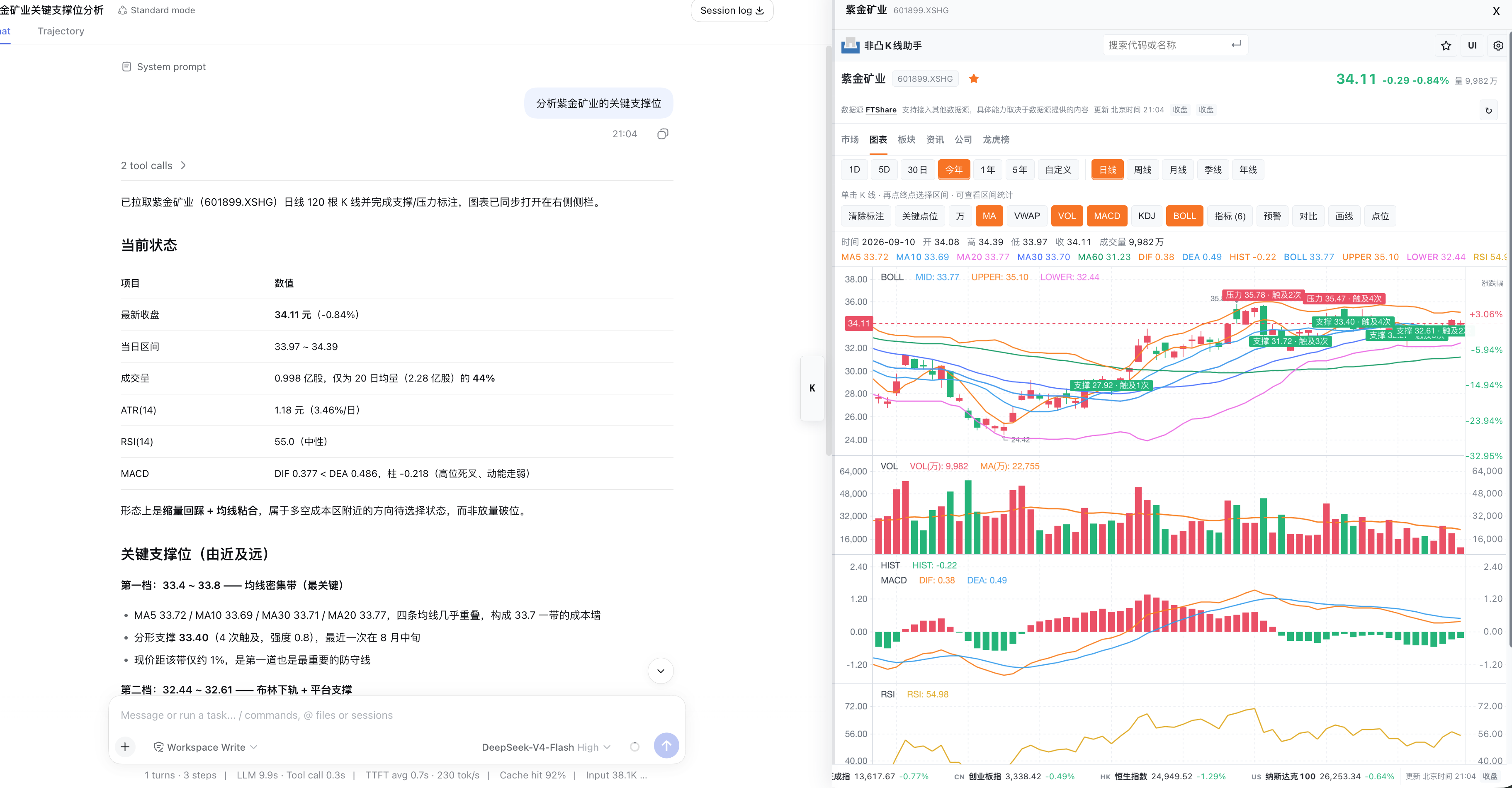
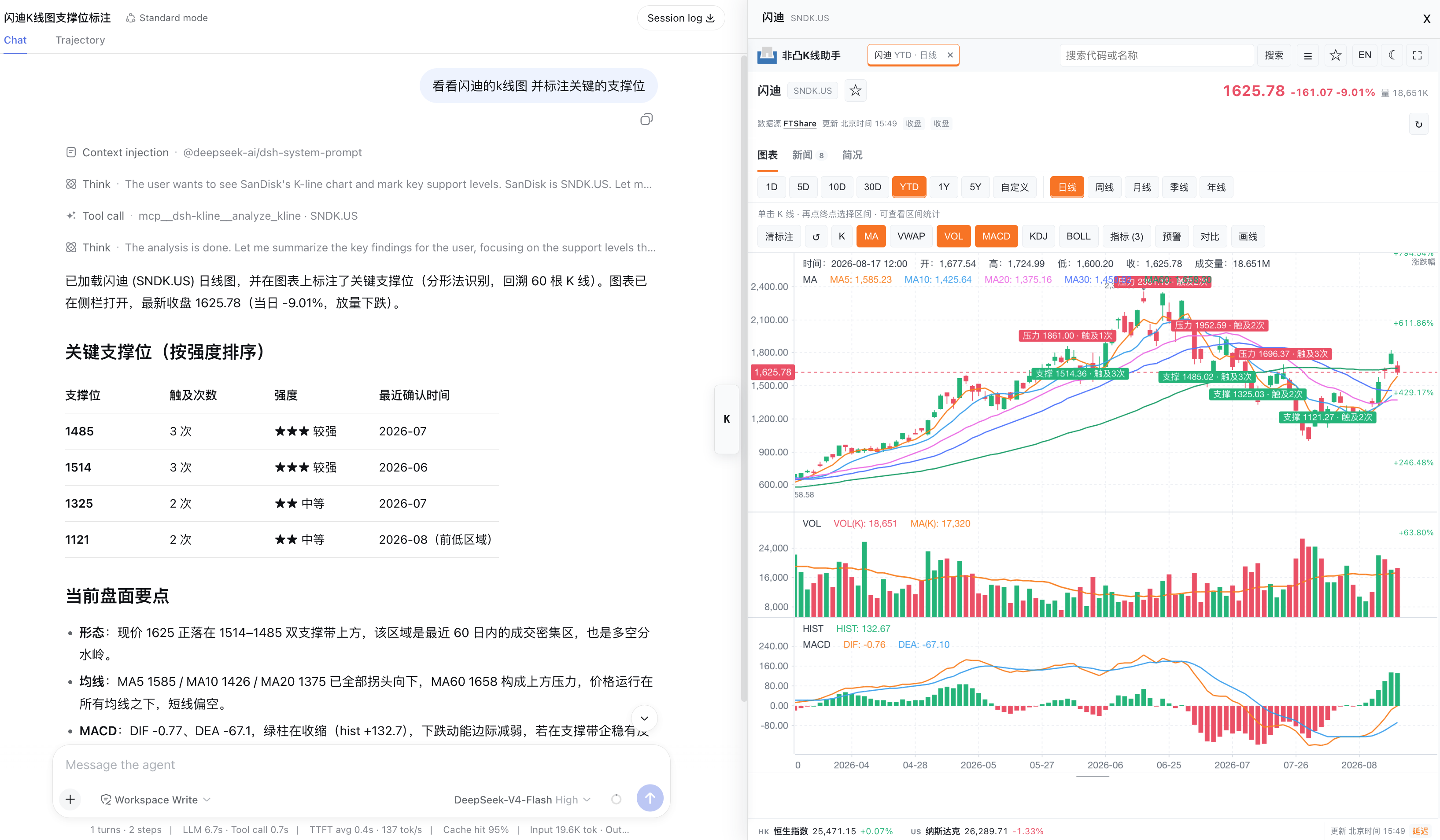
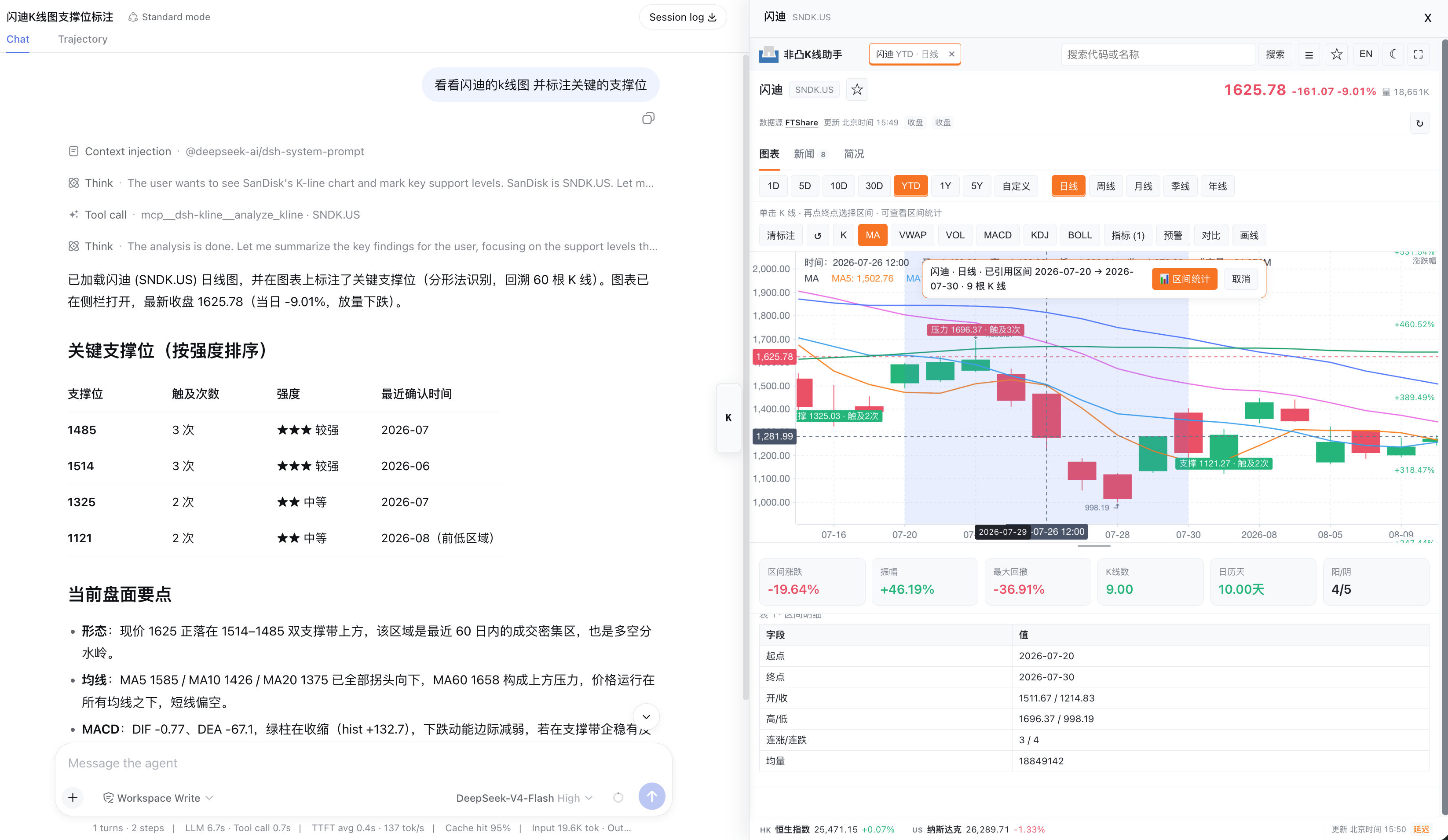
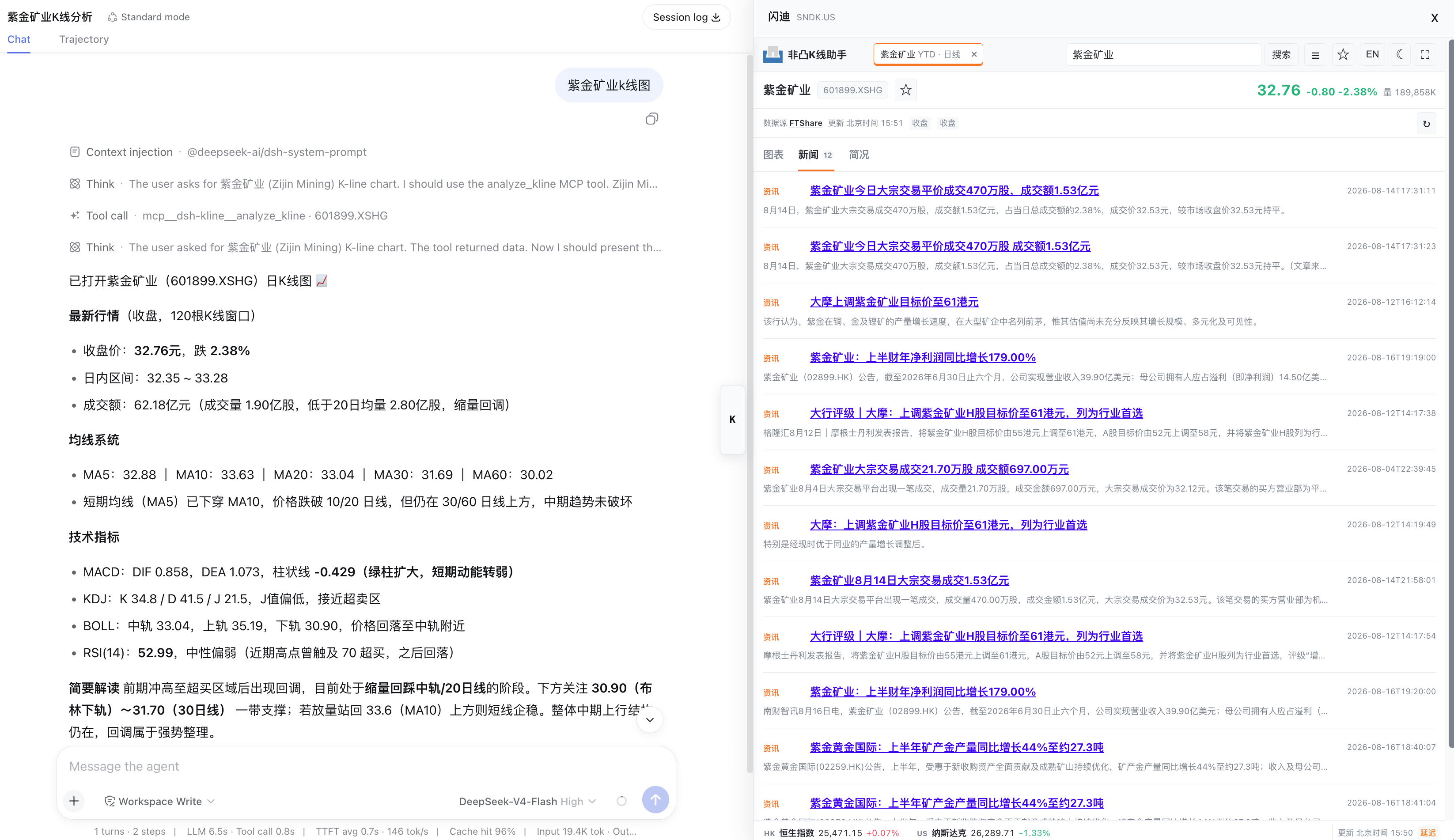
Get started
1. Install and enable
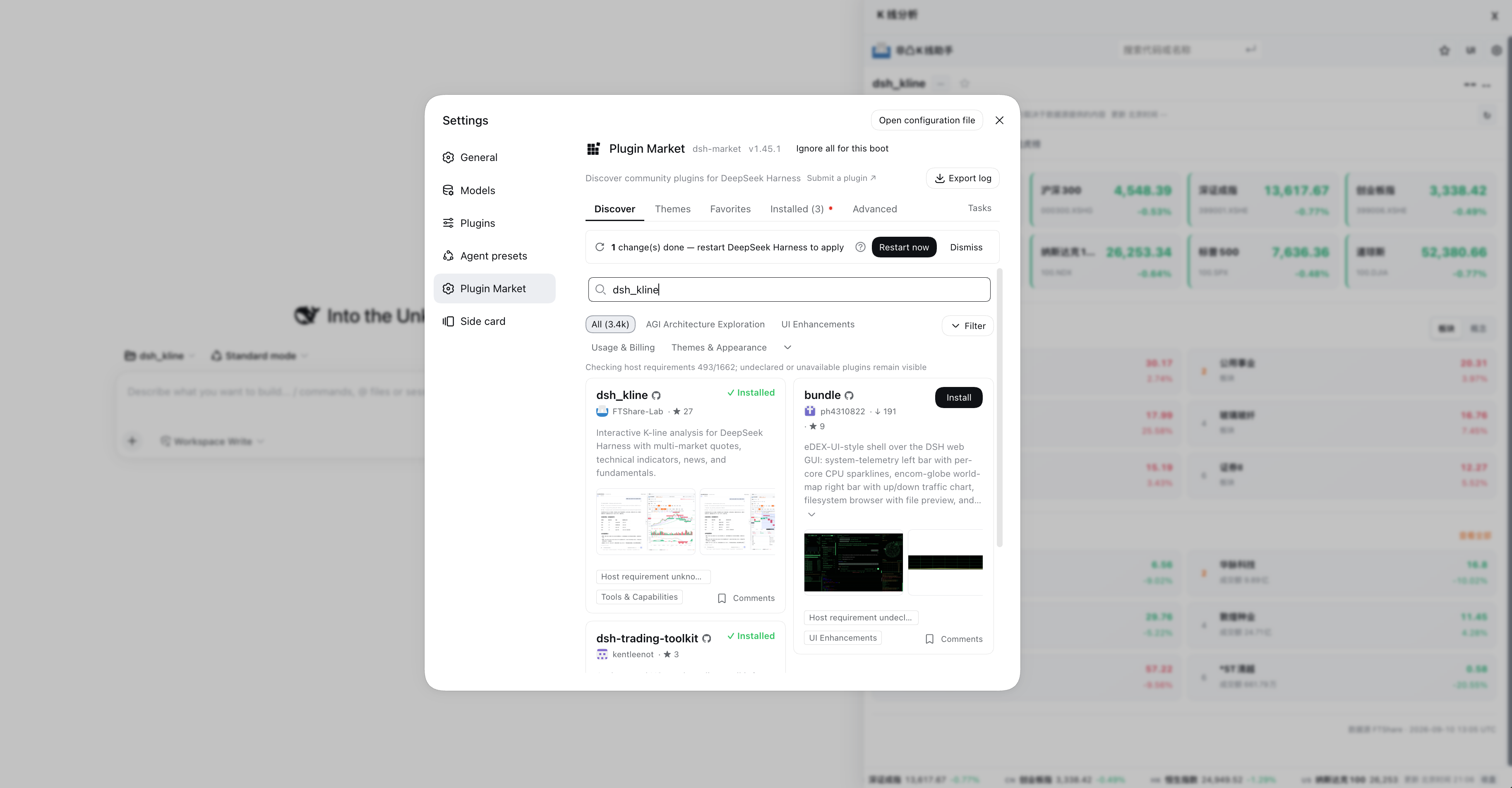
Find dsh_kline in the DeepSeek Harness plugin marketplace. If the catalog has not refreshed yet, install directly from GitHub:
dsh plugin --profile web add github:FTShare-Lab/dsh_kline
The first launch prepares its runtime automatically. Later, update from the marketplace or Settings when a new version is available.
The plugin supports macOS, Linux, and native Windows. Install a working DSH Web host and Python 3.10 or newer first. On Windows, use the python.org installer with the Python Launcher enabled. Git Bash and WSL are not required. First-launch details are stored in dsh_kline/bootstrap.log under the user cache directory; the Windows default is %LOCALAPPDATA%\dsh_kline\bootstrap.log.
2. Choose either entry point
Ask AI in a conversation, for example:
Show the K-line chart for Zijin Mining and its trend over the last monthShow Tencent's daily chart and mark support and resistanceAnalyze NVIDIA's volume, MACD, and RSI over the past monthWhat recent news and fundamentals should I know about this company?
Open the workspace directly: click the K button on the right, or choose 非凸 K 线助手 / dsh_kline from the + menu where workspace Tabs are available. Search by name or ticker; exchange suffixes are not required.
Both entry points open the same chart experience. Each conversation keeps its own chart state so analyses never overwrite one another, while watchlists, annotations, and preferences remain available.
Using the chart
- Search for a company or ticker at the top.
- Pick a time range and candle timeframe. Intraday availability depends on the market and data entitlement.
- Enable the indicators you need, then pan, zoom, or use the crosshair for detail.
- Select Key levels for automatic support and resistance, or Levels to add your own price line or note.
- Click two candles in sequence to review return, range, drawdown, and trading activity for that interval.
- Select the star beside a symbol to add it to a watchlist.
Where a UI menu is available, choose Automatic, Classic sidebar, or workspace Tab. Automatic uses the best interface your current Harness supports; when Tabs are unavailable, the regular K-line sidebar continues to work.
Quotes and data sources
FTShare is the default optional source. After you configure an API key, the plugin exposes the quote, intraday, news, and company-data capabilities available to your account. Availability differs by market and plan.
Current-session intraday charts for regular A-share stocks prefer FTShare's realtime one-minute feed. Indices, ETFs, and multi-session minute history keep their applicable history endpoints so coverage and chart timeframes remain consistent.
The plugin reuses FTShare credentials in this order: an FTSHARE_API_KEY already injected into the current DSH service, an explicitly configured FTSHARE_API_KEY_FILE, and a local credential previously saved by this plugin. If the key is already available to the process that starts DSH, it is used automatically. Installing the FTShare SDK alone, or storing a key in another app's private configuration, is not enough for the plugin to read it.
For safety, the plugin never scans .env files, shell configuration, keychains, or other apps' configuration files, and never displays a key or path. Settings → Data source identifies the active source; use Manage FTShare configuration to paste and test a replacement key, either for the current session or saved locally for future launches.
Theme and language follow the DSH host by default. Settings → Theme/Language also offers manual choices and a way back to Follow host (default).
Without a key, some public quote and chart capabilities remain available. When data is delayed, the market is closed, permission is missing, or an upstream source is unavailable, the UI explains the applicable reason and source.
Frequently asked questions
Why is an intraday chart unavailable? Intraday access depends on the symbol's market, your account plan, and the source's currently supported coverage. Test the connection in Data source first; daily, weekly, and monthly views are not subject to that same intraday entitlement.
What if the first launch fails on Windows?
Run py -3.10 --version in a terminal (a newer version is also supported) to confirm that the Python Launcher can find Python, then inspect %LOCALAPPDATA%\dsh_kline\bootstrap.log. For a custom Python location, set DSH_KLINE_PYTHON to the full python.exe path before starting DSH Web. Installing DSH Web itself and troubleshooting its Windows sandbox remain host-level concerns covered by the DSH documentation.
Why do two conversations show different charts? This is intentional: each chart belongs to its conversation, so an analysis in one conversation cannot replace another's chart. Search or start a new analysis in the other conversation when needed.
Why can data differ slightly from another platform? Quotes can be delayed and may differ with adjustment policy, exchange conventions, market-close state, and upstream services. Use appropriately licensed feeds for commercial, high-frequency, or latency-sensitive work.
For AI and developers
Most workflows only need analyze_kline. The plugin also exposes fetch_candles, search_symbols, calc_metrics, analyze_kline_rows, data_source_status, configure_ftshare, test_ftshare_connection, and health for raw data, external OHLCV, configuration, and diagnostics; market_pulse, market_board_detail, and security_intelligence provide market and security intelligence, while get_watchlist and save_watchlist manage watchlist groups.
FTShare is a default adapter, not a prerequisite for analysis. Callers can pass normalized OHLCV rows to analyze_kline_rows and keep using indicators, key levels, charts, and the workspace. See the provider adaptation guide.
Host-provided Python runtime
Ordinary installs default to DSH_KLINE_RUNTIME_MODE=auto, preserving existing Python/venv selection and dependency preparation. Desktop applications, containers, and other hosts can set these variables before starting DSH:
| Environment variable | Meaning |
|---|---|
DSH_KLINE_PACKAGE_ROOT |
Optional absolute plugin package directory; defaults to the existing profile-relative installation location. |
DSH_KLINE_PYTHON |
Path to the Python interpreter provided by the host. |
DSH_KLINE_RUNTIME_MODE |
auto (default) or external. |
external requires Python 3.10+ with the required dependencies already available. It only validates and launches the service: no venv creation, dependency installation, or interpreter fallback. The host must repair failures. This mode rejects DSH_KLINE_VENV, --prepare-project, and --bootstrap-runtime. DSH_KLINE_DEFER_BOOTSTRAP does not trigger background installation in this mode.
The host owns the interpreter, dependency search paths, and isolation settings (such as PYTHONPATH, PYTHONNOUSERSITE, or Windows embedded Python's ._pth); the plugin does not infer the host's directory layout. Set DSH_KLINE_CHART_PORT=0 for a dynamic port. The MCP patch explicitly forwards the runtime variables without changes to DSH core. When running the Node launcher directly, its own location determines the package root.
Updates and license
See Releases for version history. This project is released under the MIT License; frontend provenance is in PROVENANCE.md.
Links
More in this category
Tencent/WeKnora#dsh-weknora★ 34236
Four read-only tools over a WeKnora knowledge base: list knowledge bases, hybrid passage search, reassemble one document's chunks in order, and WeKnora's own cited RAG or ReAct-agent answer with a resumable session id.
superdesigndev/treg★ 5325
Tool catalog for agents: search ~2,600 external endpoints (SEO and SERP, backlinks, social, people and company enrichment, ad libraries, scraping) by the task you want done, read each one's parameters and per-call price, then call it with the credential injected server-side. Ships the skill plus an MCP row that stays disabled until TREG_TOKEN is set.
TencentCloudBase/CloudBase-AI-Toolkit#dsh-plugin★ 1137
Tencent CloudBase backend for DeepSeek Harness — scaffold and deploy full-stack apps from chat, render query results as table cards with paging, sorting and CSV export, preview a deployment on its domain, and call the CloudBase MCP toolset (`mcp__cloudbase__*`) with device-code login.
gitroomhq/postiz-agent#dsh-postiz★ 518
Connects DeepSeek Harness to Postiz over MCP: list connected social media channels, fetch per-platform posting rules, and schedule, draft, or publish posts to X, LinkedIn, Instagram, Facebook, Threads, TikTok, YouTube, Reddit, Bluesky, Mastodon, Discord, Slack, Telegram and more; adds a postiz workflow skill.
EthanYoQ/Invoice-Downloader#dsh-invoice-downloader★ 508
Local IMAP invoice download, OCR, archive, and Excel reimbursement summaries for DeepSeek Harness.
anysearch-team/anysearch-dsh★ 490
AnySearch-powered real-time web and vertical search provider for DeepSeek Harness.
Community comments
Comments are public GitHub Discussions. Loading them connects to GitHub and Giscus; a GitHub account is required to post.