OpenCode Go provider with live gateway model discovery, online models.dev capability metadata, session routing, and Web settings with subscription usage.
Install
# from npm (prebuilt)
dsh plugin --profile web add dsh-opencode-go
# from GitHub (first run asks for allowBuilds approval — follow the hint, retry)
dsh plugin --profile web add github:Duskriver/dsh-opencode-go
Any plugin you install runs third-party code with your own permissions — it can read your files, use your credentials, and reach the network, and tool approvals don’t sandbox it. GitHub-sourced plugins also run build scripts at install time — pnpm blocks those until you allow them, so an install can stop with ERR_PNPM_GIT_DEP_PREPARE_NOT_ALLOWED or ERR_PNPM_IGNORED_BUILDS; dsh prints the exact key to add under allowBuilds in your profile’s pnpm-workspace.yaml, and the install works on the next run. Allowing a build is a trust decision: only install sources you trust, and pin a commit (github:owner/repo#sha).
README
OpenCode Go subscription usage and multiple-account management for DeepSeek Harness, with convenient access to quotas, reset times, and account switching.
DSH already supports OpenCode Go natively. This plugin focuses on usage inside conversations, managing multiple accounts, and dedicated model and settings controls.
- Usage at a glance: see usage beside the conversation input, then open the panel for five-hour, weekly, and monthly percentages and reset times.
- Accounts in one place: inspect each account's quota and key status, drag to reorder, switch inside a conversation, or enable automatic fallback.
- Clearer model and settings controls: search and filter models, adjust visibility, limits, and thinking budgets; advanced settings are grouped by purpose, with hints and a reset action.
Supports Chinese and English, following DSH's interface language. The screenshots below show the Chinese interface.
View subscription usage
Click the usage pill beside the conversation input to open the current account's subscription usage. Bars show the percentage used, turn amber near the limit, and red when exhausted. Each quota window shows its reset time.
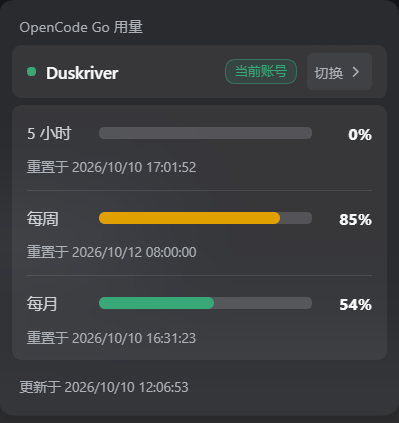
While visible, usage refreshes every minute. Periodic queries pause while the page is hidden and resume with a refresh when it becomes visible. Temporary failures show a warning; retained readings are marked as previous data. Click Retry now after a failure, or Refresh accounts in the Settings account card.
Under Settings → OpenCode Go → Advanced settings → Usage display, choose:
| Mode | Behavior |
|---|---|
| Auto (default) | Show while a DSH OpenCode Go model is selected |
| Always | Also show configured OpenCode Go account usage while using other models |
| Off | Hide the conversation pill and stop its polling |
Usage analytics
Open Usage analytics at the bottom of the conversation usage panel, or under Settings → OpenCode Go → Usage analytics. Both open the same dashboard. It covers this plugin's route, including closed sessions, totals input, output, and cache tokens per model, and estimates cost with the Go plan's models.dev prices.
- Ranges: today, 7 days, 30 days, and 90 days. Opening scans local sessions without uploading their contents; closing the dialog stops the request. Model and pricing metadata may refresh from models.dev, without sending it conversation content, account keys or per-request analytics. Normal inference sends request content to your configured model gateway, which also serves quota queries; there is no additional telemetry or analytics service.
- Cost uses the request start time. DeepSeek V4.1 Flash and V4 Pro are charged at twice the off-peak rate during the official peak window (01:00–04:00 and 06:00–10:00 UTC, Monday through Friday).
- Each model row shows only the display name and usage figures. Official quota percentages remain authoritative; the estimate is not an invoice.
- A scan stops at 500 sessions, 500,000 events, or 12 seconds by default and says so, including why. Scan more history raises the session cap to 2,000; the choice is remembered locally. Closed sessions' folds are cached locally against the durable log revision, so only changed sessions are re-read when revisions are available, including after a restart. Without a revision, in-memory reuse is limited to five seconds.
- DSH's native OpenCode Go route is excluded; pre-0.1.16 legacy route records are admitted by request time. A Host without
sessionQueryshows an unavailable state.
Themes: switch between Silent Black, Graphite (default), Sea Salt, and Warm Sand under Settings → OpenCode Go → Usage analytics; the four previews show each palette directly. Themes follow DSH's light/dark mode and are stored locally. The pill popover and the dashboard no longer carry their own switch. The pill no longer carries the Go · prefix; with multiple accounts it shows the active account's full name, truncated with an ellipsis when long, with the complete name kept in the button title and the expanded panel.
See usage analytics notes for the exact accounting rules and limits.
Manage multiple accounts
Open Settings → OpenCode Go → Accounts to manage accounts:
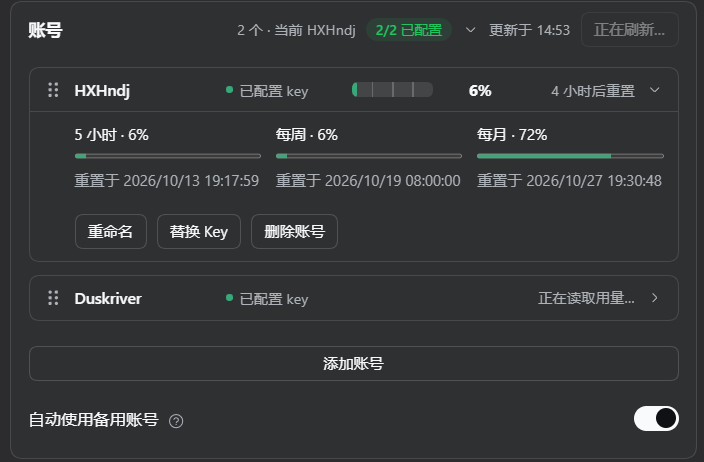
- Add, rename, replace keys, or remove accounts; up to 20 accounts are supported.
- See key status, five-hour usage, and a reset countdown in each row; expand it for full usage and account actions.
- Drag a row's handle to reorder accounts. The first row becomes current, and the order determines automatic fallback priority.
- Click Switch in the conversation usage panel to move the selected account first for subsequent requests in this profile. The other accounts keep their relative order.
With Automatic fallback enabled, an exhausted quota or unusable key causes the plugin to try other accounts in order before output begins. A fallback account that starts producing output moves first and becomes current, and the usage panel shows a switch notice. Requests that have already produced output, recorded token usage, or been canceled are not automatically resent through another account.
Keys are saved through DSH's credential service. Settings never displays an already saved key.
Install and get started
Requires DSH 0.1.5-rc.1 or later. See the compatibility matrix for verified host versions.
Install from DSH
- Open Plugins → Add plugin.
- Enter
dsh-opencode-goand click Install. - Click Enable now after installation.
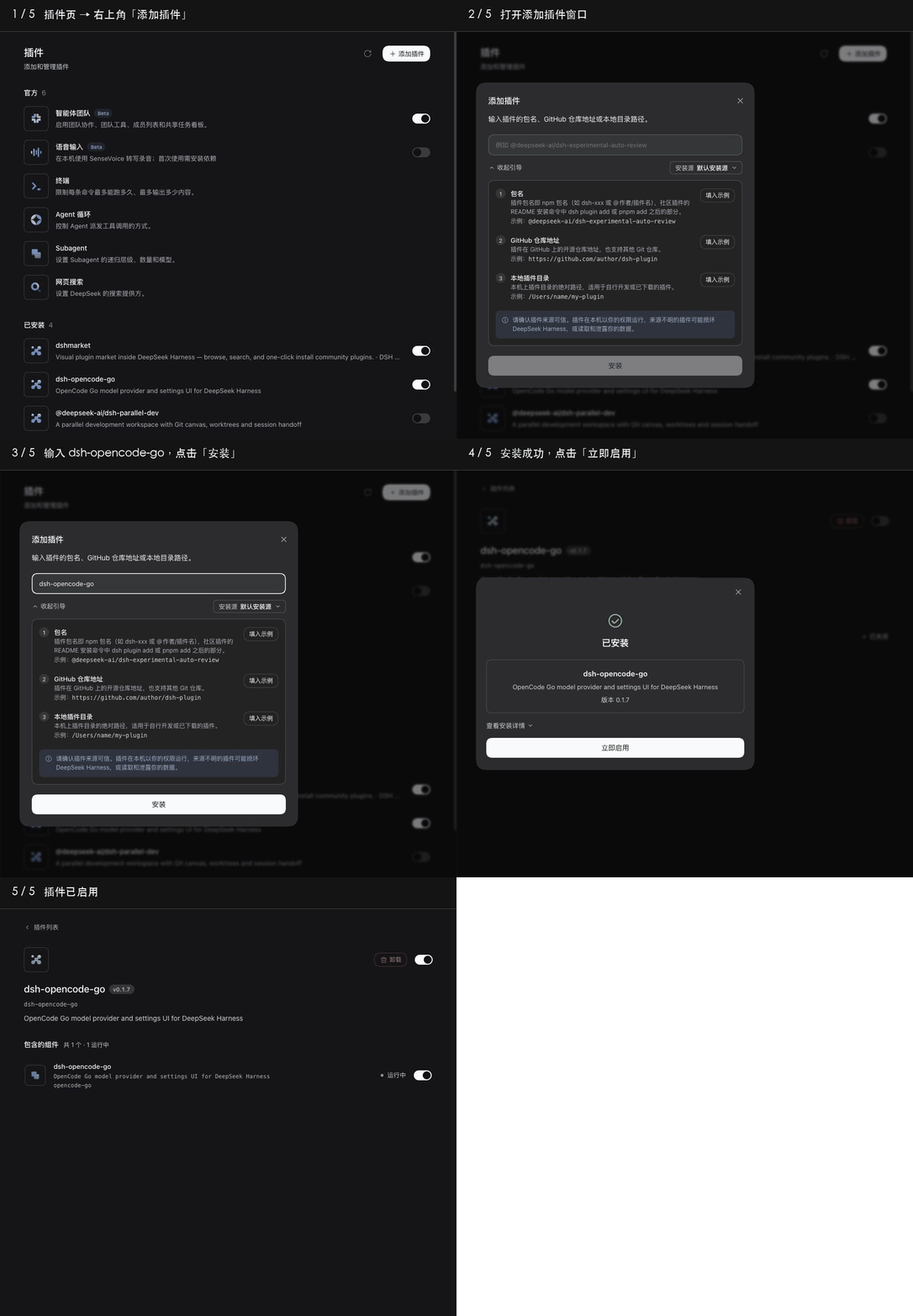
You can also enter the repository URL:
https://github.com/Duskriver/dsh-opencode-go
Command-line installation:
dsh plugin --profile web add dsh-opencode-go
Start or restart dsh web after command-line installation. Web and Headless use separate profiles; install and update each individually.
Get started
- Open Settings → OpenCode Go, enter your OpenCode Go subscription API key and save, or add an account in Accounts.
- Select a model under DSH OpenCode Go in the conversation model picker.
- Start chatting and check usage beside the input. With multiple accounts, open the panel to switch.
The plugin registers its own DSH OpenCode Go model provider. Selecting a native DSH provider does not automatically use this plugin's account switching. Always mode can still show usage for accounts configured in this plugin.
Models and settings
Select models and adjust parameters
Search Available models by name or ID, or filter by New in 7 days, Customized, or Deprecated. Click Refresh to check the latest catalog.
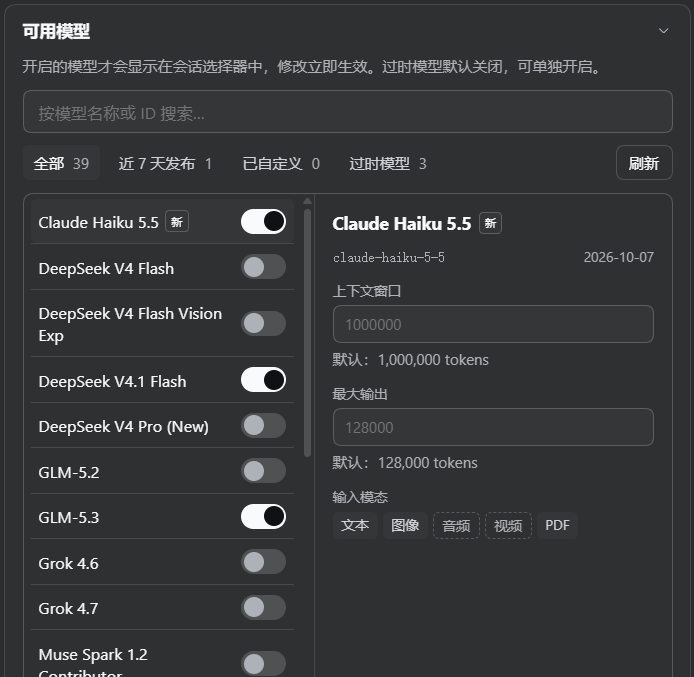
- Each model's switch controls its visibility in the conversation picker and takes effect immediately.
- Select a model to inspect its catalog context window, maximum output, and input modalities. Save limit overrides to apply them; empty values use defaults.
- Reasoning models offer the applicable switch, effort, or token budget options. Budget-based models also accept custom budgets that become available after saving.
Requests to deepseek-v4.1-flash default to a 64k (65,536-token) output allowance, bounded by the model's output capacity. The same default is reported to DSH for compaction budgeting. This rule applies only to that model; other models retain their SDK output defaults. Set a model's Max output override when a longer answer is needed.
Streaming, reasoning, tool calls, and image input depend on model capabilities. Input modalities shown in Settings come from online model metadata; this plugin currently converts and forwards only image attachments.
Grouped advanced settings
Advanced settings are grouped into Usage and protocol, Connection, Cache and timeouts, and Image handling. Hover over a question mark for help. Reset all to defaults clears the card's custom overrides; save to apply the reset. The current account selection is preserved.
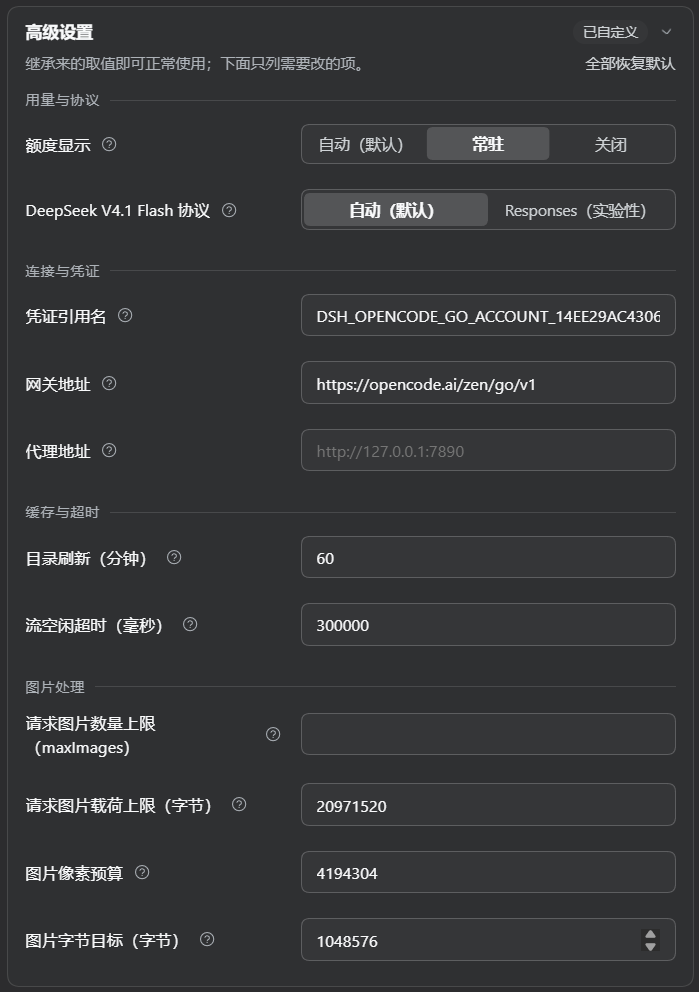
HTTP, HTTPS, and SOCKS5 proxies are supported. After saving, subsequent conversations, catalog updates, and usage queries use the proxy. Connections originate from the machine running DSH; on a remote deployment, 127.0.0.1 refers to that server.
The DeepSeek V4.1 Flash Responses option is experimental, applies only to new requests, and does not promise lower latency. See the advanced guide for full configuration and usage instructions.
Screenshots illustrate the interface. Actual models, quotas, and timestamps depend on your account and the current online catalog.
Updates and common questions
Update to the latest npm release:
dsh plugin --profile web update dsh-opencode-go --latest
Restart dsh web and reload the page afterward. For desktop DSH, quit and reopen the application. Headless users should replace web with headless. The repository's default branch may contain changes not yet released to npm.
Why is usage hidden? Auto mode shows it only for DSH OpenCode Go models. Check that the plugin is enabled, a key is configured, and the display mode is appropriate. Choose Always to show usage with other providers.
What if usage queries or account additions fail? Retry in the usage panel or refresh usage in the account card. An added account whose key was not saved can be repaired with a key or removed. See account operations and saving for recovery behavior.
What if a long conversation keeps returning 400? Check the output allowance and context window in the error, then run /compact or lower that model's Max output before retrying. Explicit context overflow is passed to DSH's recovery mechanism; an unexplained 400 keeps its classification and includes troubleshooting guidance. Failed attempts without measured tokens omit zero usage so they do not report an empty context.
Why does an old conversation need its model selected again? When upgrading from 0.1.16 or earlier, select DSH OpenCode Go again in existing conversations or Agent presets. Manual configurations use provider: dsh-opencode-go.
Which hosts are verified? Installed compatibility covers ten host versions from 0.1.5-rc.1 through 0.2.1-alpha.1. Later versions need verification. Developer messages, dynamic tool additions/removals, and deferred tool loading are explicitly rejected; see development and compatibility.
Uninstall:
dsh plugin --profile web remove dsh-opencode-go
More documentation
Links
More in this category
Ebony-Vinyl/dsh-our-free-model★ 55971
Adds free model lanes to DeepSeek Harness — DeepSeek V4.1 Flash, Kimi K3 and others — with no login, sign-up or API key, plus a local OpenAI-compatible gateway, fallback routing and a usage dashboard.
dingminhua/dsh-connect-workbuddy★ 993
Connects locally signed-in WorkBuddy models, CN and international alike, to DSH, reading each model's credit multiplier from the upstream catalog on every refresh, with per-model image input toggles, account switching backed by an auto-failing-over pool, manual daily check-in, and read-only credit overviews shown as compact pills on the card and in the composer.
Alice-Marx/dsh-model-router★ 603
Routes DeepSeek Harness work across configured model APIs and supported vendor CLIs with dependency-aware packages and cost previews.
V1ki/dsh-plugin-subscriptions★ 546
Use ChatGPT (Codex), Claude, and Grok subscriptions as DeepSeek Harness LLM providers, with Settings login, model catalogs, usage, plus image_generate, video_generate, and x_search tools.
Mars-Sea/dsh-commandcode-provider★ 446
Unofficial Command Code LLM provider: registers a `commandcode` route with a live model catalog and reasoning-effort support.
FishBottle7/opencode2dsh★ 384
Exposes OpenCode Zen free models to DeepSeek Harness, with no API key.
Community comments
Comments are public GitHub Discussions. Loading them connects to GitHub and Giscus; a GitHub account is required to post.