Adds a Restart page to the DSH Web settings panel. The page shows the PID, port, start time and uptime of the running host and restarts it through a detached helper that waits until the port stops answering before replaying the same launch invocation; the page reloads itself once the replacement host answers with a new boot id.
Install
# from GitHub (first run asks for allowBuilds approval — follow the hint, retry)
dsh plugin --profile web add github:DWJZ/dsh-restart
Any plugin you install runs third-party code with your own permissions — it can read your files, use your credentials, and reach the network, and tool approvals don’t sandbox it. GitHub-sourced plugins also run build scripts at install time — pnpm blocks those until you allow them, so an install can stop with ERR_PNPM_GIT_DEP_PREPARE_NOT_ALLOWED or ERR_PNPM_IGNORED_BUILDS; dsh prints the exact key to add under allowBuilds in your profile’s pnpm-workspace.yaml, and the install works on the next run. Allowing a build is a trust decision: only install sources you trust, and pin a commit (github:owner/repo#sha).
README
description: "dsh-restart: a Settings page that restarts the dsh Web host process with one click."
dsh-restart
English | 中文
A Restart page in the DeepSeek Harness (dsh) Web settings panel: one button replaces the running host process with a fresh one.
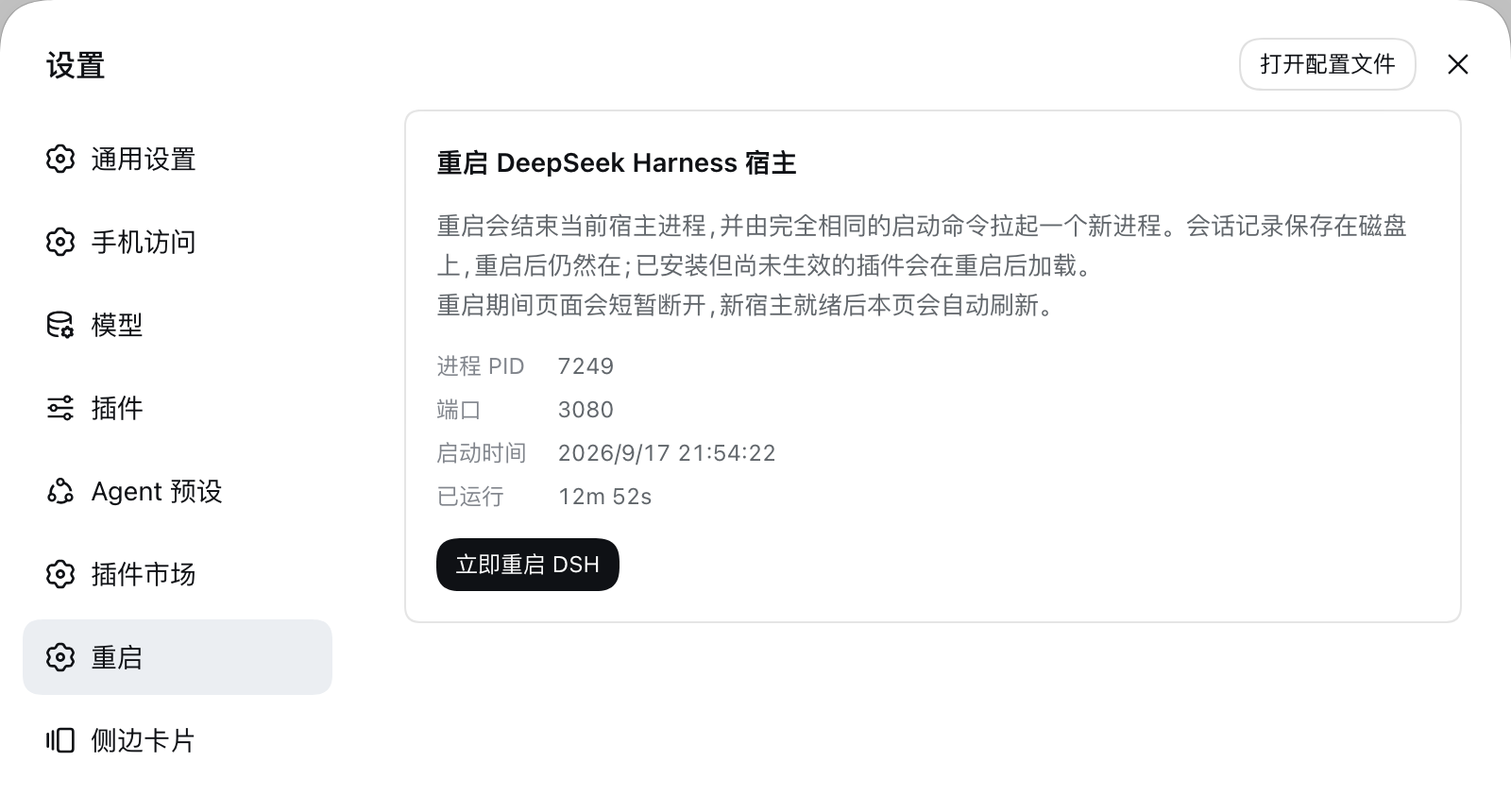
What it does
- Host half registers three routes on the Web server, all limited to direct same-origin loopback requests:
GET /dsh-restart/status— boot id, PID, start time, and serving port of the current processPOST /dsh-restart/restart— replaces the current process (the host exits after answering202)POST /dsh-restart/stop— ends the current process and starts nothing (same ordering)
- Browser half registers a
settings.sectionpage showing that identity, a restart button, and a stop button. - Shortcut — Cmd+Shift+K (macOS) or Ctrl+Shift+K (Windows) restarts the host without opening settings. Rebind it on the settings Keyboard page like any other command. It fires from the page and from editable surfaces such as the composer, while terminal input keeps it out, and it appears with its label on the settings Keyboard page. Web on Linux is left unbound: the client's shortcut allowlist rejects every
primary+altchord there, so registering one would fail the plugin's activation. After a restart it polls/dsh-restart/statusand reloads the page as soon as a different boot id answers; after a stop there is nothing to wait for, so the page reports success once the status route stops answering — and says plainly that starting again means running the launch command in a terminal.
The restart itself is done by a detached helper: the host exits after 400 ms, and the helper waits until the port stops accepting connections before spawning the replacement with exactly the same launch invocation (Node binary, execArgv, absolute entry path, remaining argv, working directory). That ordering is what keeps the replacement from dying of EADDRINUSE while the old socket is still held. Logs land in the system temp directory as dsh-restart-<timestamp>.out.log / .err.log.
A stop is the same 400 ms SIGTERM with no helper behind it, which is what lets the CLI flush sessions and dispose plugins before its own escalation timer forces the exit. Because a stopped host has no replacement, the process you restart from the page is also the one no longer attached to your terminal — after any restart, stopping it means this button, kill <pid>, or curl -X POST http://127.0.0.1:<port>/dsh-restart/stop.
Sessions live on disk and survive the restart, and plugins that are installed but not active yet load on the next boot.
Install
# from GitHub
dsh plugin --profile web add github:DWJZ/dsh-restart

# local development (the profile links the checkout, so edits apply directly)
dsh plugin --profile web add link:/path/to/dsh-restart
The first install needs one restart before the page exists — restart the host from a terminal, or use dshmarket's restart button once. After that, this page is the way to restart.
Endpoint contract
POST /dsh-restart/restart accepts only requests whose peer is loopback and whose Origin matches Host; any forwarding header (Forwarded, X-Forwarded-For, X-Real-IP) or non-loopback peer is refused with 403. It answers 202, then the host exits and the helper starts the replacement.
POST /dsh-restart/stop takes the same guard and answers 202 before exiting, so the browser learns the outcome from the response instead of from a dropped connection. It never sends SIGKILL: the graceful signal is what flushes sessions.
Test
node test/smoke.mjs
Covers: the detached helper really starts a replacement process, all four refusal paths of the same-origin guard, and the client bundle's registration and render. Set DSH_CHECKOUT=<dsh checkout> to add an SSR render assertion using that checkout's React; without it that one assertion is skipped.
License
Links
More in this category
zhu1090093659/dsh-web#packages/dsh-task-board★ 9967
Task board for the dsh web GUI: a sidebar multi-column kanban whose cards run in real DSH agent sessions and can also be scheduled with cron expressions, executed host-side even with the browser closed.
zhu1090093659/dsh-web#packages/dsh-web-all★ 9967
Plugin and skin collection for the DSH Web UI: task board, Git graph, right-side panel, remote mobile UI, pet, live token stats, and a skin center.
MeteorNOX/DeepSeek-Balance-Whale-Widget★ 6767
A fixed-corner whale widget for the DSH web GUI — balance, today's usage and per-turn cost with peak/off-peak pricing, editable balance-alert and daily-budget bubbles, a module-based custom bubble queue with A/B weighted choices and random lines or images, 30+ vendor templates (OpenAI, OpenRouter, Kimi, SiliconFlow, Ark, Zhipu, MiniMax and more) with per-model balance and subscription quota, plus task-end sound, imported audio, custom roles and a resource manager. Local-only, no telemetry.
ccch1mneyyy/dsh-TUI★ 6630
Claude Code-style full-screen terminal UI: pixel-whale header, live status line, and streaming thought expansion.
omdsh-dev/DSH-better-sidebar★ 4833
Full sidebar workbench with file rendering and editing, terminal, Git, and subagents; third-party plugins can register new tabs.
Devin-AXIS/deepseek-design#deepseek-idesign★ 1681
Visual design studio for websites, app prototypes, posters, cards, reports, and magazines, with templates, direct element editing, selection-aware AI draft handoff, and export.
Community comments
Comments are public GitHub Discussions. Loading them connects to GitHub and Giscus; a GitHub account is required to post.