Visual node-based workflow canvas for DSH with sub-agent calls, code execution, branching, loops, scheduling, and workflow import/export.
Install
# from GitHub (first run asks for allowBuilds approval — follow the hint, retry)
dsh plugin --profile web add github:CodermanYHZ/dsh-node-flow
Any plugin you install runs third-party code with your own permissions — it can read your files, use your credentials, and reach the network, and tool approvals don’t sandbox it. GitHub-sourced plugins also run build scripts at install time — pnpm blocks those until you allow them, so an install can stop with ERR_PNPM_GIT_DEP_PREPARE_NOT_ALLOWED or ERR_PNPM_IGNORED_BUILDS; dsh prints the exact key to add under allowBuilds in your profile’s pnpm-workspace.yaml, and the install works on the next run. Allowing a build is a trust decision: only install sources you trust, and pin a commit (github:owner/repo#sha).
README
A visual, executable node-based workflow canvas for DeepSeek Harness
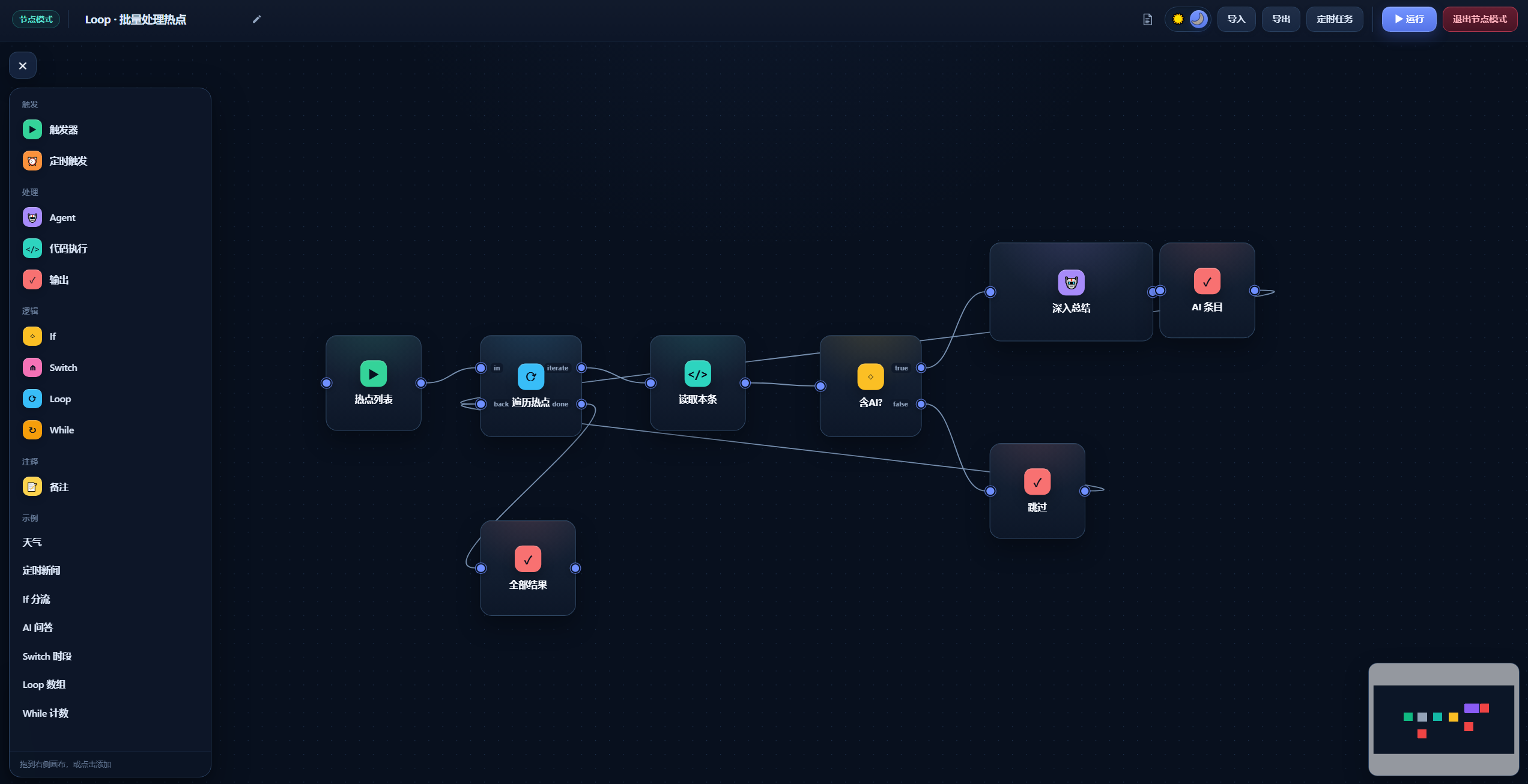
Compose triggers, sub-agents, code, conditional branches, loops, and scheduled tasks with drag-and-drop nodes, then run the complete workflow directly in DSH.
Overview
DSH Node Flow is a visual workflow plugin for DeepSeek Harness (DSH). It combines agent calls, TypeScript / Python code, conditions, and loops into executable flow diagrams, making it easy to build automation tasks and multi-step agent workflows.
Features
- Visual orchestration — drag nodes, connect handles, and inspect data and execution paths directly on the canvas.
- Sub-agent calls — agent nodes can inherit the current model or select a model route configured in DSH.
- Code nodes — run TypeScript or Python with a full-screen code editor.
- Flow control — built-in If, Switch, Loop, and While nodes cover branching and iteration.
- Execution feedback — nodes display their run state, and the actual path taken is highlighted.
- Failure policies — Code and Agent nodes support timeouts and either stopping the branch or continuing with an empty value.
- Scheduled tasks — save workflows with five-field cron expressions, inspect them in the task board, run them immediately, or cancel them.
- Import and export — save workflows as files for backup, sharing, and reuse.
- Built-in documentation — the help panel explains node fields, connection rules, result semantics, and workflow examples.
Screenshots
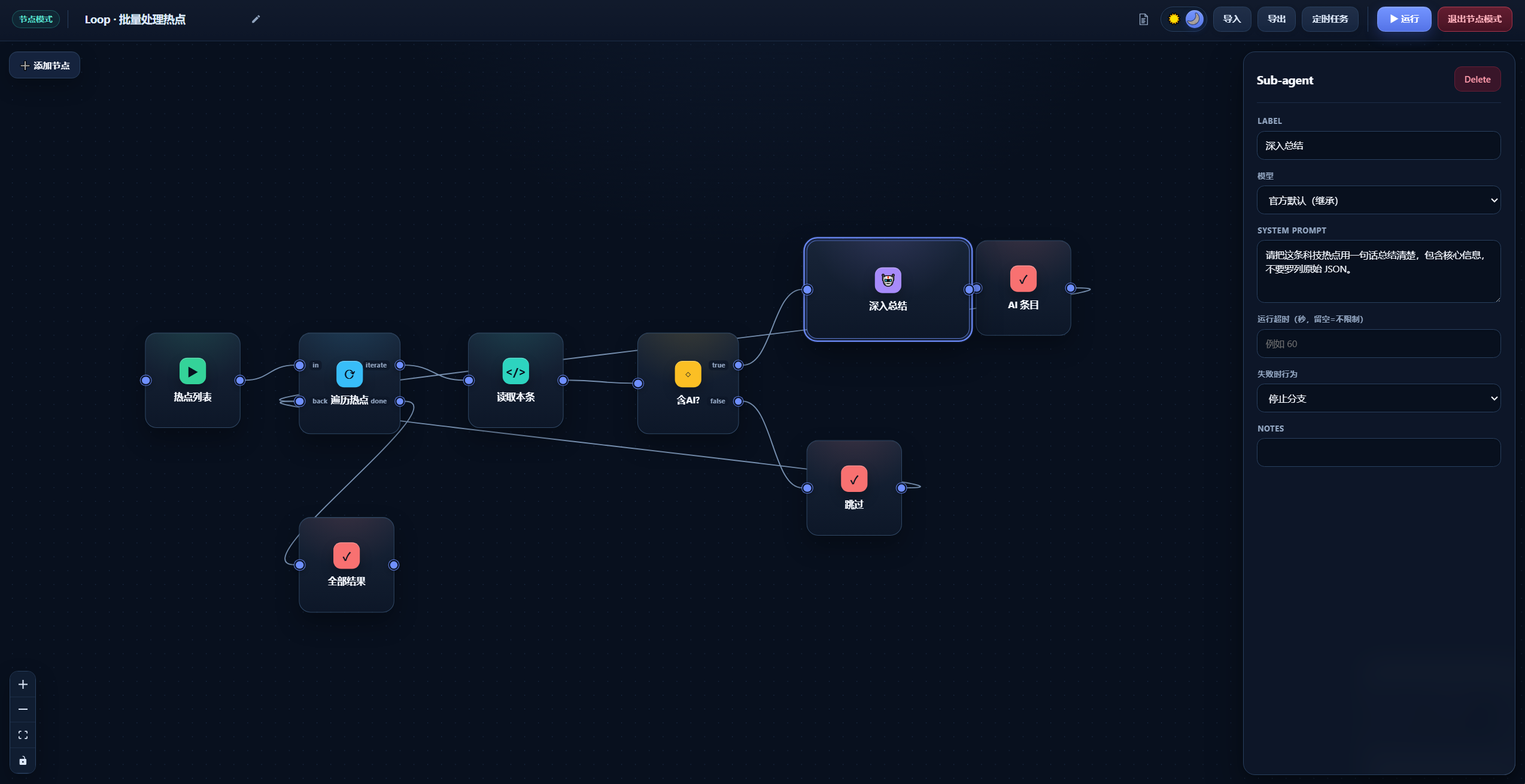
Node properties
Select a node to configure its label, model, prompt, timeout, and failure policy in the right-hand inspector.
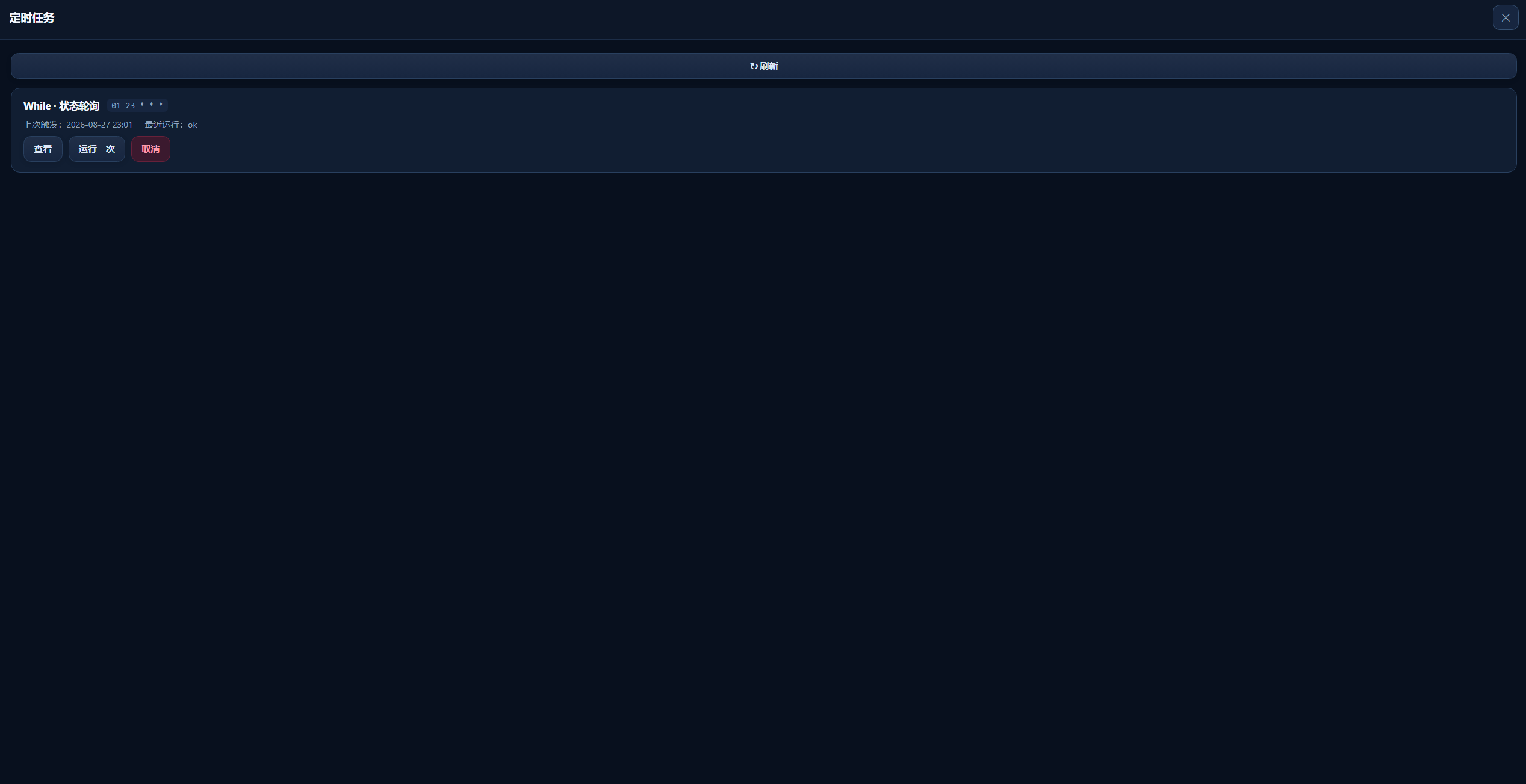
Scheduled tasks
The scheduled-task board displays cron plans, previous trigger times, and latest run results, with actions to inspect, run once, or cancel a task.
Quick start
Installation
The package has not been published to npm. Install it directly from the public GitHub repository:
dsh plugin --profile web add git+https://github.com/CodermanYHZ/dsh-node-flow.git
When running DSH from a DeepSeek Harness source checkout, use:
pnpm dsh plugin --profile web add git+https://github.com/CodermanYHZ/dsh-node-flow.git
Restart the Web UI after installation:
dsh web
For a source checkout, the corresponding command is pnpm dsh web.
Open Node Mode from the DSH sidebar to start building workflows.
Basic usage
- Click Add Node, then choose a node or a built-in example from the left panel.
- Connect node handles and configure parameters in the right-hand inspector.
- Click ▶ Run and watch the node states and highlighted execution path.
- Use Export to save the workflow as a file, or create a cron schedule from Scheduled Tasks.
Companion AI Skill
Install the companion dsh-node-flow-skill to help AI agents in DSH generate JSON workflows that can be imported directly into this plugin.
The Skill documents the current workflow schema, node fields, connection handles, loop rules, and complete examples, reducing missing fields and invalid handle names. After installation, prompt the AI with:
Use dsh-node-flow-skill to generate an importable dsh-node-flow JSON workflow that …
Skill repository: https://github.com/CodermanYHZ/dsh-node-flow-skill
Node types
| Node | Purpose |
|---|---|
| Trigger | Starts the workflow and passes its content downstream. |
| Schedule | Runs the complete workflow using a five-field cron expression. |
| Agent | Calls a DSH sub-agent using the inherited model or a selected model route. |
| Code | Runs TypeScript or Python on the host, reads upstream input, and returns a result. |
| If | Routes the workflow to true or false based on a truthy condition. |
| Switch | Matches a value against cases and falls back to default. |
| Loop | Iterates over an array or repeats N times, optionally collecting each result. |
| While | Repeats while a condition remains true, guarded by maxIters. |
| Output | Renders the upstream value using a {{result}} template. |
| Note | Adds a canvas annotation and is not executed. |
Code node API
TypeScript programs can use the global dsh object:
const response = await dsh.fetch({
  url: "https://example.com/api",
  method: "POST",
  headers: { "Content-Type": "application/json" },
  body: { message: "hello" },
})

const previous = await dsh.input(null) // Read the upstream node output
const now = await dsh.now(null)        // { iso, ts, local }

return response.json
Python nodes read upstream input from an environment variable and use standard output as the node result:
import os

previous = os.environ.get("DSH_INPUT", "")
print(previous)
DSH Code Runtime bindings require a lossless JSON argument. Use
dsh.input(null)anddsh.now(null)rather than omitting the argument.
Runtime requirements
The plugin expects the DSH host to provide these services:
ctx.webServerctx.codeRuntimefor Code nodesctx.agentsandctx.subagentsfor Agent nodesctx.llmfor the model-route list
React, ReactDOM, and @deepseek-ai/cordis are provided by DSH as peer dependencies.
Local development
npm install
npm run dev       # Start the standalone Vite preview
npm run build     # TypeScript checks + client bundle + demo build
npm test          # Run tests
License
Released under the MIT License.
Links
More in this category
loopx-project/loopx#dsh-loopx-plugin★ 6265
LoopX, a provider-neutral, local-first state kernel and control plane for long-horizon agents: keeps Goal, Todo, gate, evidence, quota, recovery, and handoff state above DeepSeek Harness, while the plugin bootstraps the CLI and skills, admits bounded same-session continuation, and adds a loopback GoalBar for the exact bound loop.
Q00/ouroboros#integrations/dsh-plugin★ 6211
Config-only bundle that mounts Ouroboros through the DSH MCP client, exposing 36 interview, Seed, execution, evaluation, and evolution workflow tools in DSH.
chuspeeism/dashi-taskboard#deepseek-harness★ 3339
Embeds the active installed Codex Taskboard runtime in the DeepSeek Harness sidebar, using its launcher runtime descriptor instead of a fixed port.
NanmiCoder/dsh-agent-teams★ 2064
AgentTeams multi-agent teams.
EthanYoQ/AI-Novel-Writer#dsh-ai-novel-writer★ 1426
Installs a dedicated AI novel-writing preset and workbench: revisioned local project assets, a compact side drawer, and native approval-gated single-file changes.
tong-io/tongflow#dsh-tongflow★ 1045
TongFlow film-crew studio for image, voice, music and video production: the agent writes per-asset TongFlow workflow files (.tongflow.json) that run through TongFlow plugins, with an embedded workflow canvas, a shot/character/take project layout and a manga-drama template; sessions starting with @tongflow open the Studio view.
Community comments
Comments are public GitHub Discussions. Loading them connects to GitHub and Giscus; a GitHub account is required to post.