Context-aware next-message suggestions in the DSH composer, with repeated Trigger cycling and explicit user review before sending.
Install
# from npm (prebuilt)
dsh plugin --profile web add dsh-prompt-for-me
# from GitHub (first run asks for allowBuilds approval — follow the hint, retry)
dsh plugin --profile web add github:ChuanTianML/prompt-for-me
Any plugin you install runs third-party code with your own permissions — it can read your files, use your credentials, and reach the network, and tool approvals don’t sandbox it. GitHub-sourced plugins also run build scripts at install time — pnpm blocks those until you allow them, so an install can stop with ERR_PNPM_GIT_DEP_PREPARE_NOT_ALLOWED or ERR_PNPM_IGNORED_BUILDS; dsh prints the exact key to add under allowBuilds in your profile’s pnpm-workspace.yaml, and the install works on the next run. Allowing a build is a trust decision: only install sources you trust, and pin a commit (github:owner/repo#sha).
README
Prompt for Me prepares your next message in the DeepSeek Harness composer. After the agent replies, you can accept a suggestion, edit it, or generate another. The plugin helps you draft; you decide when to send.
See it in action
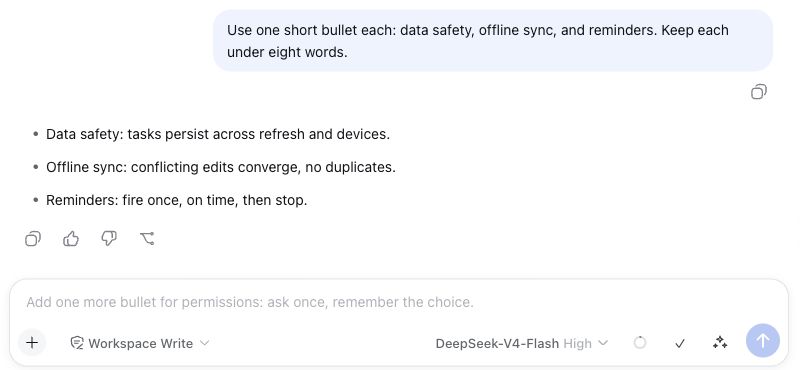
1. Your next message, ready after the reply
When the composer is idle, a suggestion appears in light gray. It is not part of your draft yet, and nothing is sent automatically.
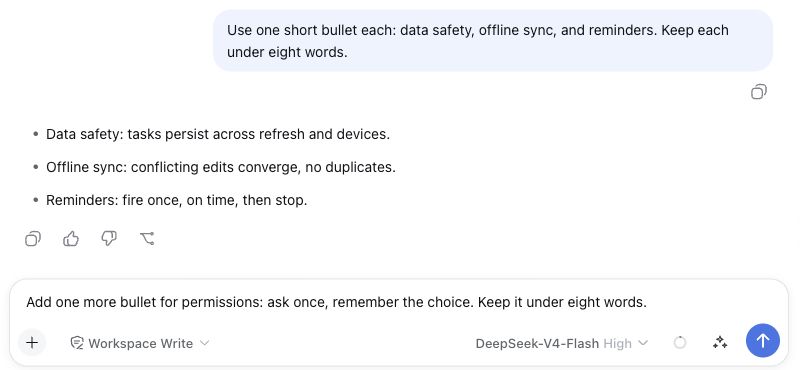
2. Accept it, then make it yours
Press Tab or click ✓ to turn the suggestion into editable text. Here, we add “Keep it under eight words.” You still decide when to send.
3. Want another direction? Click the sparkles
Click ✦, immediately left of Send, or use the default shortcut ⌘⇧Space / Ctrl+Shift+Space. A fresh next message goes straight into the draft for you to review or edit.
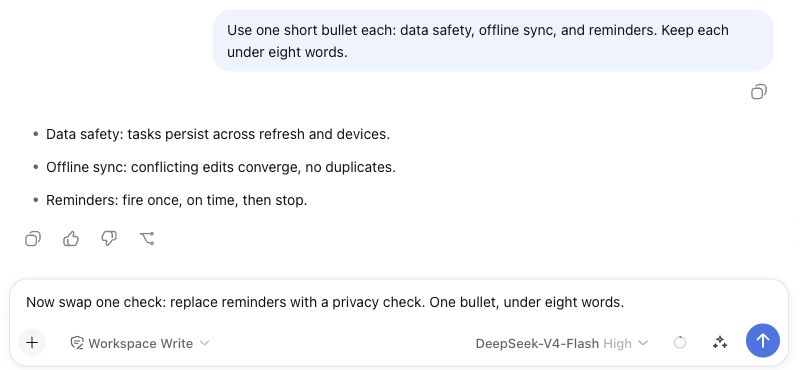
Real product screenshots using a fictional project and demo conversations. Private session lists, workspace information, and runtime statistics are outside the captured area.
What it does
- Generates only after a newly completed turn when the session is idle, plan mode is inactive, and the composer has exactly empty text, no images, and no queued intent.
- Retains that completed turn while Host policy loads or the composer is temporarily ineligible, then generates once the requirements are met.
- Cancels an in-flight automatic request if the composer becomes ineligible; late results cannot restore the suggestion. An explicit rejection by the native composer does not open a fallback preview.
- Retires suggestions from the preceding context when a newer turn completes, including after submissions that settle too quickly for an intermediate composer state to render.
- Shows native inline ghost text on compatible Harness clients. Older clients use a small preview card without mutating the draft.
- Accepts a ghost with Tab, Right Arrow, or the adjacent check control. Enter never accepts ghost text.
- Hides the ghost when you type, offers it again if you clear the draft, and dismisses it with Escape.
- Keeps the Sparkles Trigger and
Mod+Shift+Spaceshortcut. An explicit Trigger always requests a fresh suggestion and writes it directly into the draft, even while automatic generation is in flight. - Sends skipped suggestions with the next explicit request so the model avoids repeating or paraphrasing them. The bounded cycle stores at most ten.
- Never bypasses Harness approvals, never invokes tools, and never sends a message automatically.
Interaction reference
| Situation | Result |
|---|---|
| A turn completes and the composer is eligible | One automatic suggestion appears outside the draft. |
| Tab, Right Arrow, or the check control | The visible suggestion becomes one undoable draft edit. |
| Enter while only a ghost is visible | Nothing is accepted or sent. |
| Start typing | The ghost hides; your text wins. |
| Clear the typed text | The hidden suggestion can reappear without another model call. |
| Escape | The visible suggestion is dismissed. |
Sparkles button or Mod+Shift+Space |
A fresh suggestion is generated and directly fills or replaces the draft. |
| Edit and Enter | Only the final text is submitted; adoption becomes positive feedback only now. |
Install
The release tarball is the simplest option because it contains prebuilt Host and Client artifacts:
dsh plugin --profile web add https://github.com/ChuanTianML/prompt-for-me/releases/download/v0.6.1/dsh-prompt-for-me-0.6.1.tgz
Restart dsh web after installation.
You may also install a pinned Git tag:
dsh plugin --profile web add github:ChuanTianML/prompt-for-me#v0.6.1
pnpm 10 may ask you to allow the package's prepare script for a Git install. Add dsh-prompt-for-me: true under allowBuilds in the Web profile's pnpm-workspace.yaml, then run the command again. The script only copies the checked-out Host files and wraps the checked-out Client factory; it performs no downloads.
Update or remove it with:
dsh plugin --profile web update dsh-prompt-for-me
dsh plugin --profile web remove dsh-prompt-for-me
Current DeepSeek Harness builds provide the native inline suggestion API. If that API is absent but completed-turn projection is available, the plugin falls back to an explicit preview card with Use and dismiss controls. The manual Sparkles workflow remains direct-fill in either presentation.
Web UI settings
Open Settings → Plugins → Configurable, then expand Prompt for Me. The card follows Harness settings structure, tokens, spacing, and staged Save/Discard behavior. Saved values live in the shared Host user-settings document and take effect immediately without a restart.
You can continue editing during a save. These newer edits remain unsaved until you click Save again.
- Suggest after the Agent replies is on by default. Turning it off withdraws any unaccepted automatic ghost and stops future automatic generation; the manual Sparkles Trigger remains available.
- Manual generation shortcut defaults to
Mod+Shift+Space. Select the current shortcut and press a new Command/Ctrl or Alt combination, or disable the shortcut. Harness still owns ghost acceptance, which defaults to Tab. - Advanced settings → Suggestion model follows the current Session by default. It can instead pin one provider/model from the current Harness model directory.
The UI deliberately omits context-range controls, quick/personalized modes, a personalization reset, token limits, and timeouts. The plugin owns those product decisions instead of asking users to tune suggestion quality.
Model and API key
The plugin calls ctx.llm on the Harness Host. By default it reuses the current session's provider and model, falling back to the Harness default selection. The provider therefore uses the API key already configured in DeepSeek Harness. The browser never receives or reads that key, and this plugin has no separate key.
Most users can pin an auxiliary model from the Web UI advanced settings. Deployment maintainers may also set both provider and model as a composition base in cordis.patch.yml or an overriding profile patch; a saved Web UI choice takes precedence:
- id: prompt-for-me
  name: dsh-prompt-for-me
  config:
    provider: deepseek-official
    model: deepseek-chat
Data and privacy
On each automatic or explicit generation request, the Host may send these bounded text fields to the selected model provider:
- the current draft;
- the last three direct-human/assistant turns from the current session;
- current-session submitted suggestion edits, exact accepts, and rejected suggestions;
- bounded raw examples from manual prompts and suggestion interactions in up to 20 earlier sessions;
- up to ten suggestions skipped during the current cycle, so the model can avoid repeating or paraphrasing them.
The current draft and recent turns determine the task, intent, and message content. Current-session feedback adjusts the immediate wording. Cross-session memory may influence only durable style, detail, and workflow preferences. Manual prompts and submitted suggestion edits carry more weight than exact accepts; rejected suggestions are weak negative evidence. Editing a suggestion and triggering again rejects the original suggestion but does not treat the unsubmitted edit as a positive preference.
Harness records injected workspace instructions, runtime context, and skill catalogs in user-role events. The plugin excludes these non-human sources from conversation turns and preference memory. If both the draft and direct-human conversation are empty, generation stops before the model call.
Common API-key, token, password, and Bearer-token patterns are replaced with [REDACTED_SECRET] before the model call. Attachments, tool arguments, files, credentials, and binary blocks are not collected. The plugin has no analytics endpoint and sends data only to the model route already selected in Harness.
Interaction records are stored only in this browser's localStorage under dsh.prompt-for-me.outcomes.v2. Each record contains its session ID, final action, origin, and the relevant original/final text. Merely seeing or adopting ghost text is not positive feedback; it becomes evidence only after submission. Version 1 records migrate automatically and remain untouched. The plugin does not expose a reset control that asks users to manage this history.
DeepSeek Harness 0.1.0-rc.6 does not expose downstream registration for custom durable session-event types. For that reason, the standalone plugin does not append its auxiliary model request or outcomes to the Harness session log; doing so would make persisted sessions unreadable to the stock runtime. This is the main difference from the experimental in-tree implementation and will be revisited when a public event-registration API exists.
The generation RPC uses NDJSON. Each complete candidate is validated before it reaches either the transient suggestion surface or the draft; partial model tokens and incomplete JSON never enter the composer. Background failures stay quiet. Explicit failures remain visible on the Sparkles control.
The auxiliary request always uses reasoning effort off. The model receives one system instruction plus one JSON user message with current, currentSessionFeedback, userPreferenceMemory, and currentCycleSkipped. It receives no tool schemas or attachments.
The Host retains the latest 50 privacy-safe performance records in memory and logs each record as prompt-for-me metrics. Records contain model route, text byte/item counts, history/input preparation time, first model chunk/reasoning/text times, suggestion arrival time, total model/request time, and provider token usage. They contain no prompt, candidate, or outcome text. Query the current process with:
curl -sS -X POST -H 'content-type: application/json' \
  -d '{"method":"metrics"}' \
  http://127.0.0.1:3080/dsh-prompt-for-me/rpc
Configuration
The Web UI exposes only the three everyday choices above. The table below documents cordis.patch.yml composition controls for deployment maintainers; ordinary users are not expected to tune the stable generation limits:
| Field | Default | Meaning |
|---|---|---|
automatic |
true |
Offer a non-draft suggestion after eligible completed turns. |
maxCandidateBytes |
4096 |
UTF-8 limit per suggestion. |
maxDraftBytes |
32768 |
UTF-8 limit for a draft or edited outcome. |
maxCurrentCycleSkipped |
10 |
Skipped suggestions retained as hard negative context for the next Trigger. |
maxCurrentCycleSkippedBytes |
16384 |
Shared JSON budget for suggestions skipped during the current cycle. |
maxCurrentTurns |
3 |
Most recent current-session turns retained. |
maxCurrentContextBytes |
16384 |
JSON budget for the retained turns. |
maxCurrentFeedbackBytes |
4096 |
JSON budget for current-session suggestion feedback. |
maxPreferenceMemoryBytes |
8192 |
JSON budget for cross-session preference memory. |
maxHistorySessions |
20 |
Earlier sessions inspected. |
maxManualPrompts |
8 |
Earlier manual prompts retained. |
maxEditedSuggestions |
6 |
Edited suggestion pairs retained per feedback tier. |
maxAcceptedExact |
6 |
Exact accepts retained per feedback tier. |
maxRejectedSuggestions |
4 |
Weak rejection signals retained per feedback tier. |
maxLocalOutcomes |
50 |
Browser-local interaction records retained. |
maxLocalOutcomesBytes |
131072 |
Shared JSON budget for browser-local records and their RPC copy. |
maxOutputTokens |
2048 |
Auxiliary model output budget. |
timeoutMs |
30000 |
Suggestion request timeout, including historical session reads and the auxiliary model call. |
shortcut |
Mod+Shift+Space |
Portable Trigger, or disabled. |
Development
Requires Node.js 22.19 or newer.
npm run check
The command rebuilds the static Host/Client artifacts, runs the Node and React UI test suites, and verifies the npm package contents.
The React settings tests cover both source and built clients; see UI test setup.
License
MIT
Links
More in this category
zhu1090093659/dsh-web#packages/dsh-task-board★ 8178
Task board for the dsh web GUI: a sidebar multi-column kanban whose cards run in real DSH agent sessions and can also be scheduled with cron expressions, executed host-side even with the browser closed.
zhu1090093659/dsh-web#packages/dsh-web-all★ 8178
Plugin and skin collection for the DSH Web UI: task board, Git graph, right-side panel, remote mobile UI, pet, live token stats, and a skin center.
omdsh-dev/DSH-better-sidebar★ 3903
Full sidebar workbench with file rendering and editing, terminal, Git, and subagents; third-party plugins can register new tabs.
ccch1mneyyy/dsh-TUI★ 3815
Claude Code-style full-screen terminal UI: pixel-whale header, live status line, and streaming thought expansion.
MeteorNOX/DeepSeek-Balance-Whale-Widget★ 3514
A fixed-corner whale widget for the DSH web GUI — balance, today's usage and per-turn cost with peak/off-peak pricing, editable balance-alert and daily-budget bubbles, a module-based custom bubble queue with A/B weighted choices and random lines or images, 30+ vendor templates (OpenAI, OpenRouter, Kimi, SiliconFlow, Ark, Zhipu, MiniMax and more) with per-model balance and subscription quota, plus task-end sound, imported audio, custom roles and a resource manager. Local-only, no telemetry.
Devin-AXIS/deepseek-design#deepseek-idesign★ 1711
Visual design studio for websites, app prototypes, posters, cards, reports, and magazines, with templates, direct element editing, selection-aware AI draft handoff, and export.
Community comments
Comments are public GitHub Discussions. Loading them connects to GitHub and Giscus; a GitHub account is required to post.