One stylesheet that retypesets the DSH conversation to measured Codex metrics: 14/22 px body, tighter headings, lists and blocks, a rounded quote bar, and Tidy Tables with a themed header, row/column rules, full-width short tables and contained scrolling for wide tables; no settings or DOM rewriting, with real before/after captures.
Install
# from npm (prebuilt)
dsh plugin --profile web add dsh-chat-tidy
# from GitHub (first run asks for allowBuilds approval — follow the hint, retry)
dsh plugin --profile web add github:ChuanTianML/dsh-chat-tidy
Any plugin you install runs third-party code with your own permissions — it can read your files, use your credentials, and reach the network, and tool approvals don’t sandbox it. GitHub-sourced plugins also run build scripts at install time — pnpm blocks those until you allow them, so an install can stop with ERR_PNPM_GIT_DEP_PREPARE_NOT_ALLOWED or ERR_PNPM_IGNORED_BUILDS; dsh prints the exact key to add under allowBuilds in your profile’s pnpm-workspace.yaml, and the install works on the next run. Allowing a build is a trust decision: only install sources you trust, and pin a commit (github:owner/repo#sha).
README
Keep the answer in view. Open the work when you need it.
Tidy Chat adds Codex-inspired work disclosure, live turn timing, compact typography, and polished Markdown tables to DeepSeek Harness Web. Your original reasoning and tool cards remain available, with their native interactions intact.
Tidy Work · new in 0.4.0
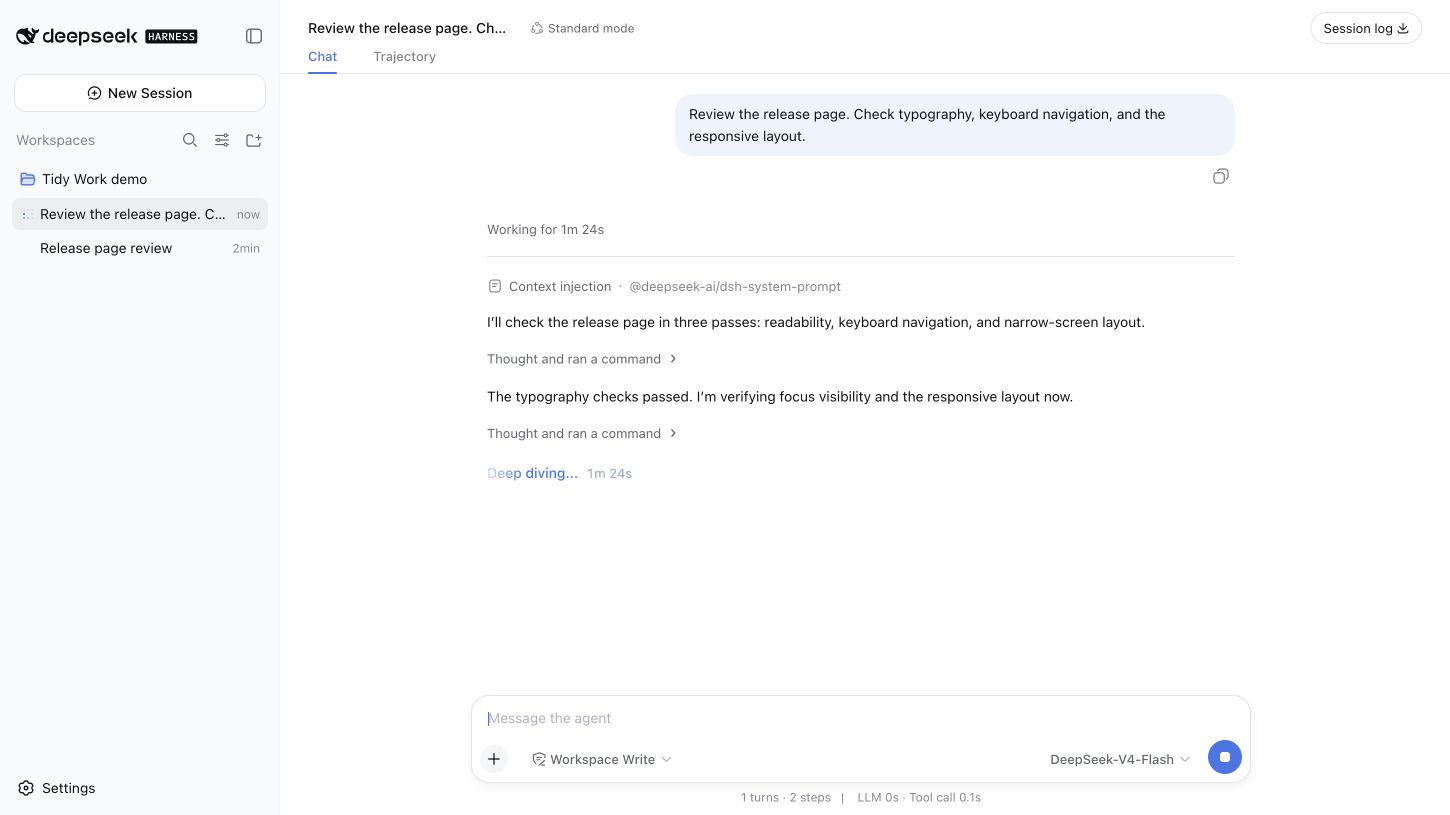
- While working: a turn header shows “Working for …”. Progress commentary stays visible; consecutive reasoning and supported tool calls share an expandable activity summary.
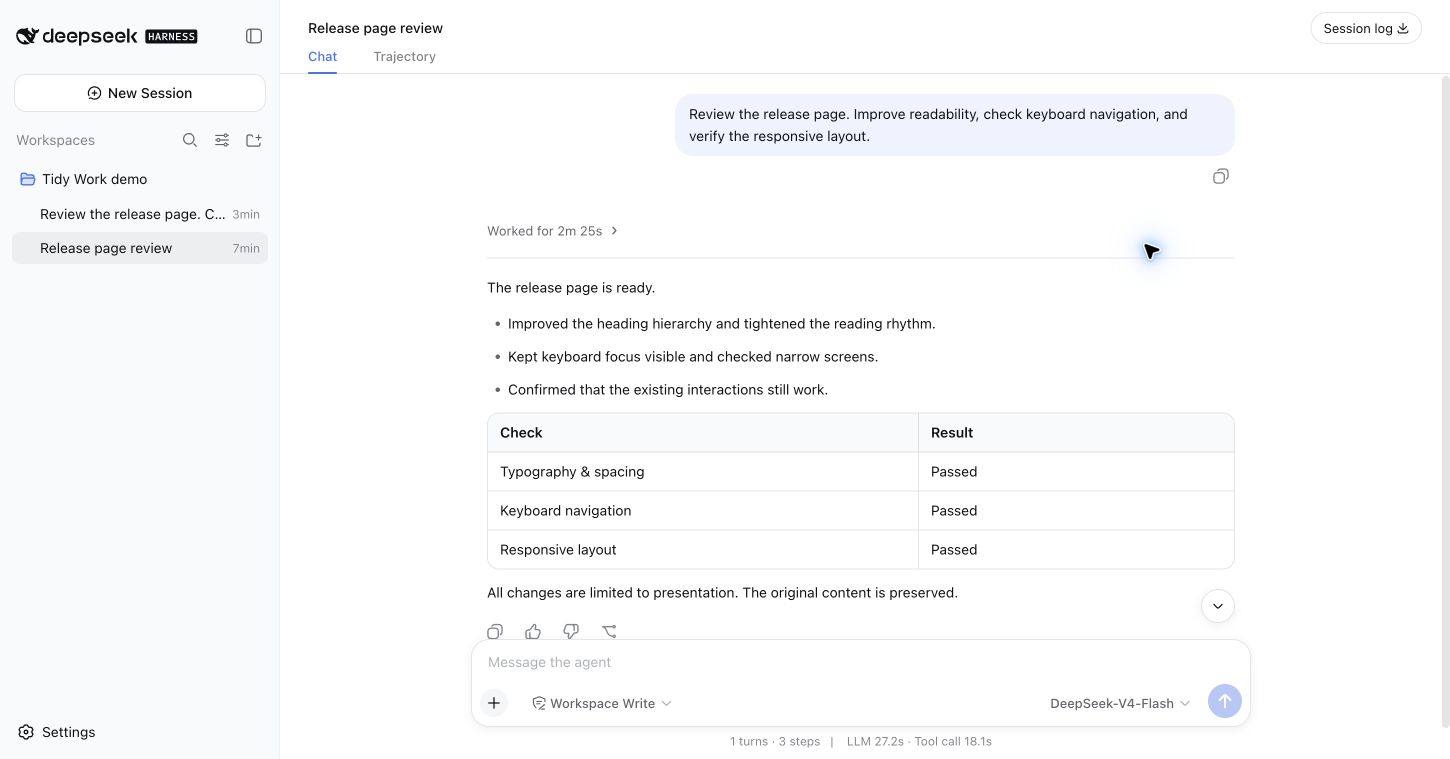
- When complete: “Worked for …” folds the intermediate work and leaves the final answer visible. Expand the turn, then an activity group, then a native Think or tool card to inspect the original details.
- When attention is needed: failed tool calls, interrupted output, approval/question interfaces, unknown tools, and third-party content stay accessible. Only a normally completed turn with an identified final answer and a known start defaults to collapsed.
The timer uses recorded turn timestamps, including after a reload. It does not add parallel tool durations. Explicit expansion survives updates and session switches during the plugin's lifetime. Selected text or a focused native control prevents completion from folding the work you are reading.
English and Simplified Chinese labels follow the Harness language. Controls support keyboard activation, visible focus, and reduced motion.
In action
Working: the elapsed time and progress stay visible.
Complete: the answer stays in view; intermediate work folds into one header.
Inspect: expand a summary to reach the original Think and tool cards.
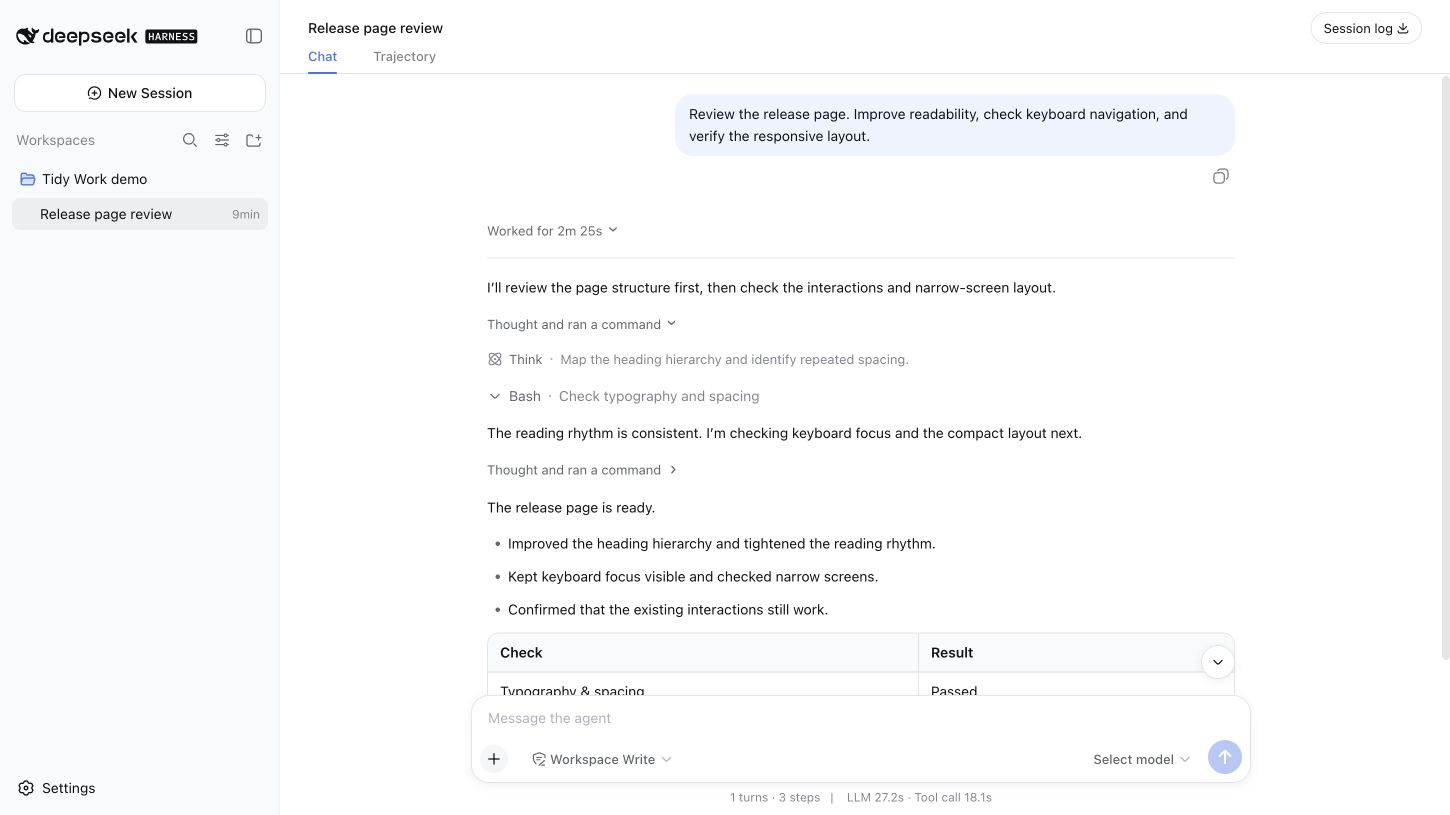
These are unedited Chrome captures of the real Harness Web app in an isolated local profile. The conversation, commands, and results are synthetic demonstration data; they contain no private conversations, credentials, or personal paths. The running example uses a keyless local adapter, not a live model benchmark. See the capture fixture.
Tidy reading
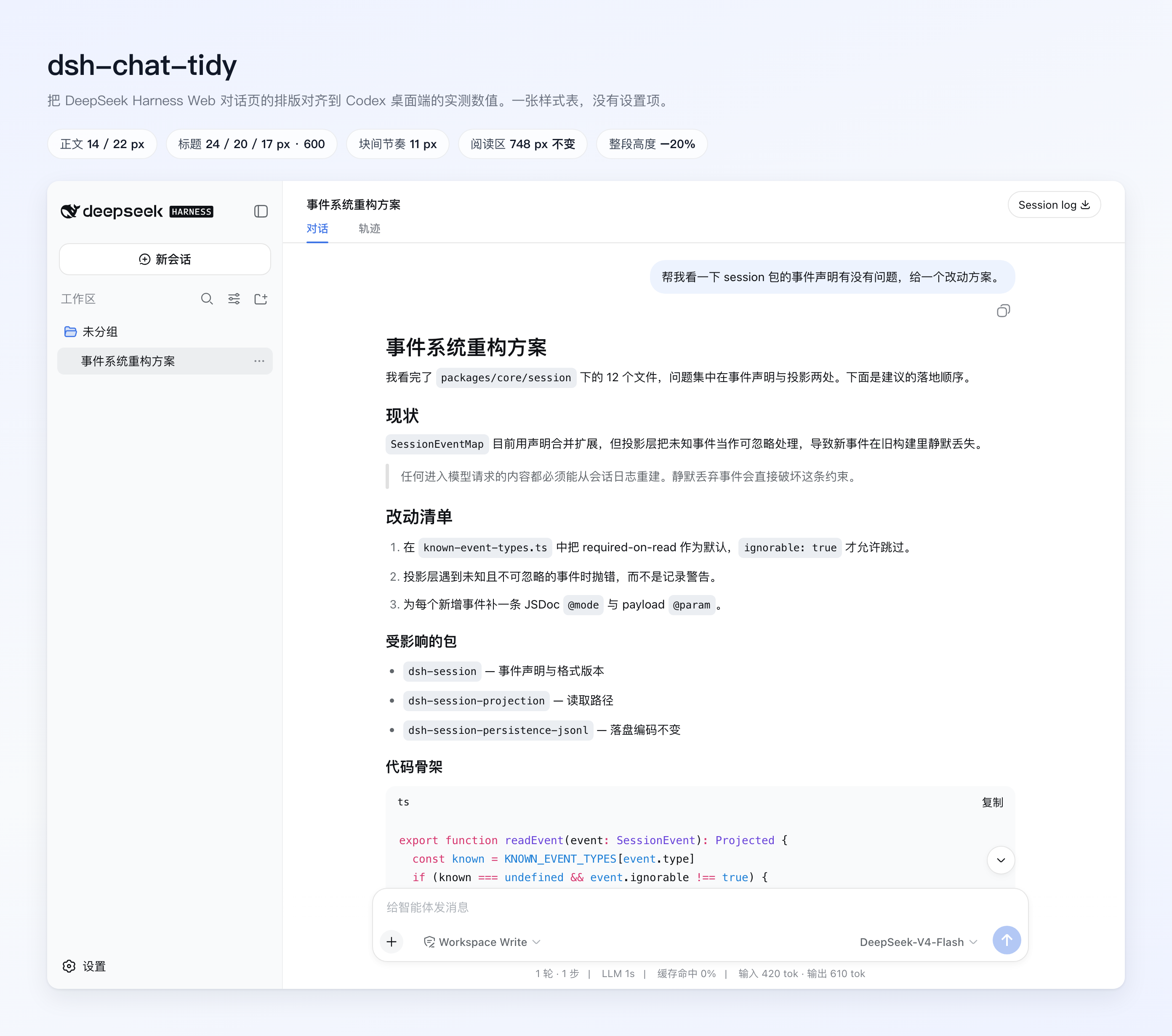
Typography and spacing are measured from the Codex desktop app, then applied to DSH's own semantic chat anchors.
| Item | Tidy Chat |
|---|---|
| Body | 14 / 22 px |
| Headings h1–h6 | 24 / 20 / 17 / 17 / 15 / 15 px, weight 600 |
| Heading margins | 20 px above, 10 px below |
| Paragraph rhythm | 11 px |
| Activity labels | 13 / 22 px |
| Reading column | DSH's existing 748 px |
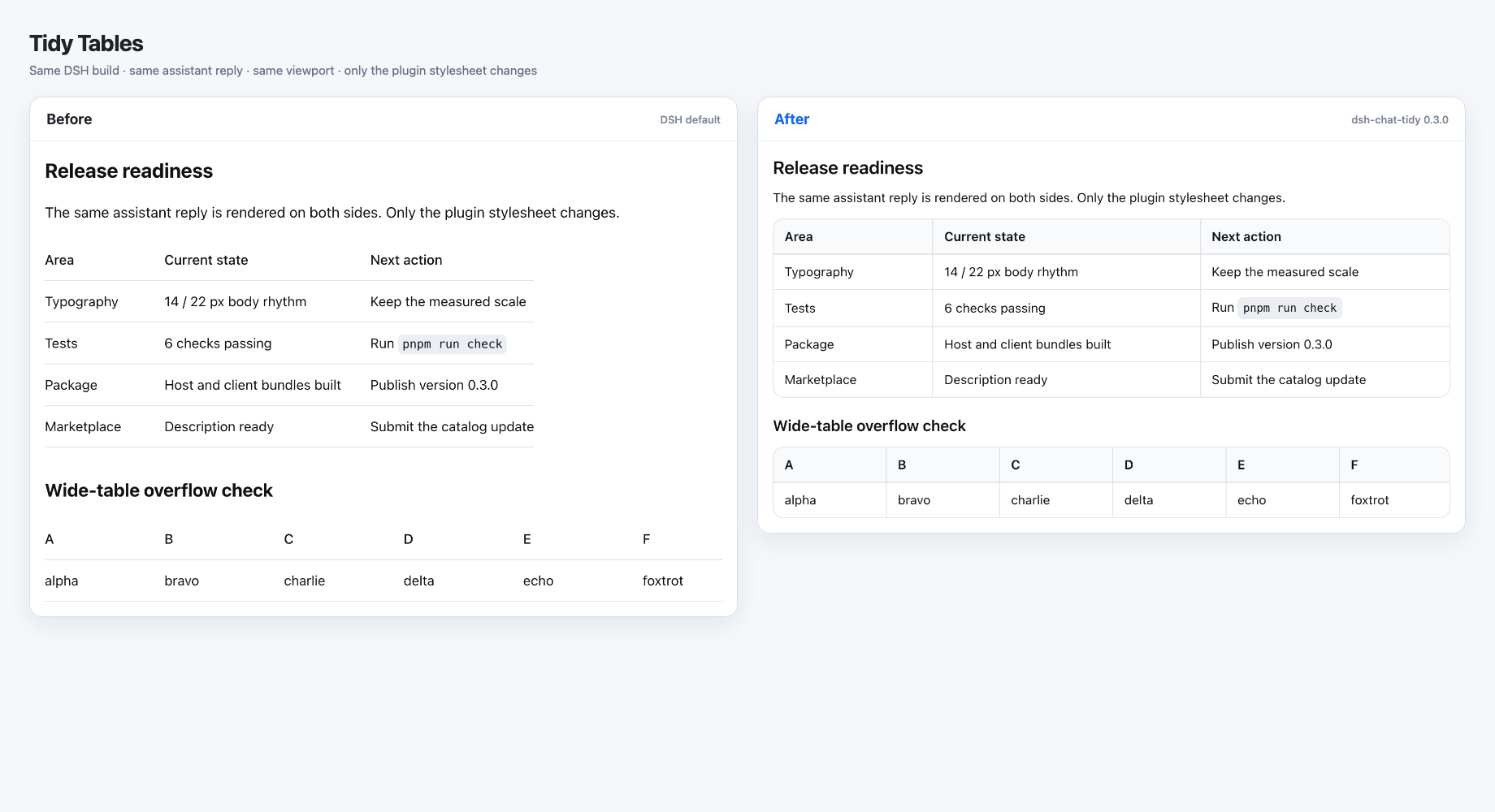
Tidy Tables
Tables use a rounded frame, themed header, row and column rules, and compact 8 × 12 px cell padding. Short tables fill the column; wide tables retain horizontal scrolling. Content and alignment are unchanged.
Install
dsh plugin --profile web add dsh-chat-tidy
Or install from GitHub:
dsh plugin --profile web add github:ChuanTianML/dsh-chat-tidy
Restart dsh web and reload the page. Verified host and client bundles are committed, so GitHub installation does not require a dependency build script.
To use a local checkout:
dsh plugin --profile web add -w /absolute/path/to/dsh-chat-tidy
How it fits
The plugin subscribes through the public session header slot and adds presentation controls at native semantic anchors. It does not replace the Chat view, move or clone native React nodes, rewrite model output, or modify session logs. It reads the session projection locally to identify turns and their final answers. It makes no network requests and writes no browser storage.
Disabling or uninstalling the plugin restores all rows and removes its controls, listeners, timer, and stylesheet. There is no Settings row. Reader choices are held only in memory and reset on a page reload.
Supported activity grouping currently covers reasoning and the native bash, pwsh, read, write, edit, glob, grep, web_search, and web_fetch tools. Other tools keep their native presentation. A missing semantic anchor leaves the corresponding content visible.
- Harness: targets
>=0.1.0-rc.6with the public Chat projection and session header utilities slot. - Light/dark and token-based themes: host
--dsw-*tokens retain palette ownership. - Other layout plugins: overlapping typography or flow overrides may compete; choose one layout plugin.
- Alternative conversation views: work disclosure attaches only to the native Chat flow.
Development
Requires Node ^22.19 or >=24 and pnpm 11.
pnpm install
pnpm run check
pnpm run pack:check
For integration against a built Harness checkout:
DSH_HARNESS_ROOT=/absolute/path/to/deepseek_harness pnpm run test:harness
This boots the actual Harness browser bundles and the plugin through ModuleLoader in jsdom with the keyless fixture transport. It uses temporary test files and removes them after the run. Browser appearance requires a separate visual check.
See DESIGN.md for presentation rules, VALIDATION.md for evidence, and SECURITY.md for reporting. MIT licensed.
Links
More in this category
zhu1090093659/dsh-web#packages/dsh-task-board★ 8121
Task board for the dsh web GUI: a sidebar multi-column kanban whose cards run in real DSH agent sessions and can also be scheduled with cron expressions, executed host-side even with the browser closed.
zhu1090093659/dsh-web#packages/dsh-web-all★ 8121
Plugin and skin collection for the DSH Web UI: task board, Git graph, right-side panel, remote mobile UI, pet, live token stats, and a skin center.
omdsh-dev/DSH-better-sidebar★ 3868
Full sidebar workbench with file rendering and editing, terminal, Git, and subagents; third-party plugins can register new tabs.
ccch1mneyyy/dsh-TUI★ 3734
Claude Code-style full-screen terminal UI: pixel-whale header, live status line, and streaming thought expansion.
MeteorNOX/DeepSeek-Balance-Whale-Widget★ 3369
A fixed-corner whale widget for the DSH web GUI — balance, today's usage and per-turn cost with peak/off-peak pricing, editable balance-alert and daily-budget bubbles, a module-based custom bubble queue with A/B weighted choices and random lines or images, 30+ vendor templates (OpenAI, OpenRouter, Kimi, SiliconFlow, Ark, Zhipu, MiniMax and more) with per-model balance and subscription quota, plus task-end sound, imported audio, custom roles and a resource manager. Local-only, no telemetry.
Devin-AXIS/deepseek-design#deepseek-idesign★ 1665
Visual design studio for websites, app prototypes, posters, cards, reports, and magazines, with templates, direct element editing, selection-aware AI draft handoff, and export.
Community comments
Comments are public GitHub Discussions. Loading them connects to GitHub and Giscus; a GitHub account is required to post.