Manage MCP servers from the Web settings panel: view, add, edit, remove, enable or disable them, with hot reload on save.
Install
# from npm (prebuilt)
dsh plugin --profile web add @opendsh/dsh-plugin-setting-mcp
# from GitHub (first run asks for allowBuilds approval — follow the hint, retry)
dsh plugin --profile web add github:Ceelog/dsh-plugins#path:/src/plugins/dsh-plugin-setting-mcp
Any plugin you install runs third-party code with your own permissions — it can read your files, use your credentials, and reach the network, and tool approvals don’t sandbox it. GitHub-sourced plugins also run build scripts at install time — pnpm blocks those until you allow them, so an install can stop with ERR_PNPM_GIT_DEP_PREPARE_NOT_ALLOWED or ERR_PNPM_IGNORED_BUILDS; dsh prints the exact key to add under allowBuilds in your profile’s pnpm-workspace.yaml, and the install works on the next run. Allowing a build is a trust decision: only install sources you trust, and pin a commit (github:owner/repo#sha).
README
English | 中文
DSH web plugin: manage MCP servers from the settings panel. View, edit, remove,
enable, and disable MCP servers, then Save — the change hot-reloads immediately
(no process restart), because each server is a live @deepseek-ai/dsh-mcp-client
loader entry.
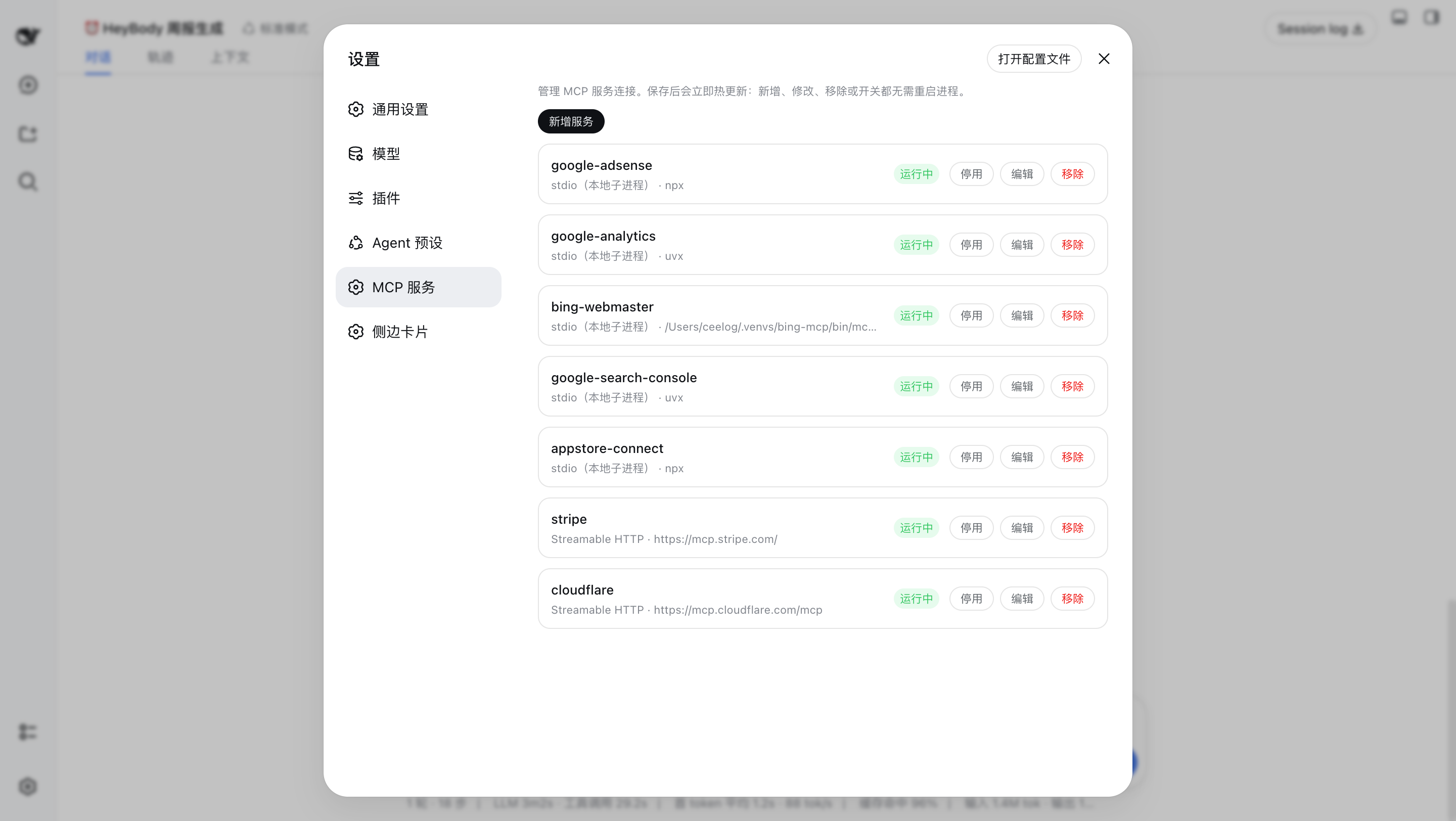
What it does
- View — lists every configured MCP server with its
serverName, transport (stdio / Streamable HTTP), command or URL, and live state (enabled / disabled, plus the connection phase:active,failed,loading, …). - Add / Edit — full editor for a server:
serverName, transport,commandargs+cwd+env(stdio), orurl+headers(HTTP), plus the per-call timeout and thefailOnStartupErrorflag.
- Remove — deletes the server's loader entry (with a confirm prompt).
- Enable / Disable — toggles the entry's
disabledflag without touching its config, so a disabled server keeps its full configuration. - Save → hot reload — edits are staged locally; Save reconciles the
loader tree (
create/update/remove), then writes the server set back to the profile'scordis.patch.yml(the durable patch layer). Each operation restarts only the affecteddsh-mcp-clientinstance, which is the same hot-swap the harness HMR performs.
Architecture
A dual-face npm package installed into the web profile:
| Half | Entry | Role |
|---|---|---|
| Server | lib/index.js |
Cordis plugin (inject: ["loader"]): mounts the ctx.mcp typert service that projects and reconciles the loader's @deepseek-ai/dsh-mcp-client entries. |
| Protocol | lib/typert.js |
Host TYPERT face (mcp/list, mcp/save), auto-registered by dsh-typert-loader. |
| Browser | lib/client.js |
React page mounted into the settings.section slot; calls the host through the installed remote.mcp namespace. |
The client↔server channel is the DSH typert protocol: strict zod codecs validate every argument and result on both sides.
Install
dsh plugin --profile web add @opendsh/dsh-plugin-setting-mcp
How it maps to cordis.patch.yml
The plugin manages the dsh-mcp-client rows in the profile's cordis.patch.yml
(the user patch layer — not cordis.yml, which the launcher resets to an
empty list on every boot). A stdio server is the same as:
# cordis.patch.yml
- insert:
    - id: mcp-github
      name: "@deepseek-ai/dsh-mcp-client"
      config:
        serverName: github
        transport: stdio
        command: npx
        args: ["-y", "@modelcontextprotocol/server-github"]
        env:
          GITHUB_TOKEN: ...
and a Streamable HTTP server is the same as:
# cordis.patch.yml
- insert:
    - id: mcp-web
      name: "@deepseek-ai/dsh-mcp-client"
      config:
        serverName: web
        transport: streamable-http
        url: http://localhost:3000/mcp
        headers:
          Authorization: ...
The tool names the model sees stay server-qualified (mcp__<serverName>__<tool>),
exactly as with hand-written entries.
Development
pnpm install
pnpm --filter @opendsh/dsh-plugin-setting-mcp build
pnpm --filter @opendsh/dsh-plugin-setting-mcp test
Known limitations
reconnectis not surfaced by the editor. A disabled/enabled toggle and edits to other servers keep the storedreconnectblock; the editor itself cannot view or change it.- Advanced
reconnectfields and future MCP capabilities (resources, prompts) are out of scope for this panel; they remain configurable directly incordis.patch.yml. - Save is a reconcile, not a transaction. Operations apply sequentially; if a later entry fails (e.g. the server process can't start), earlier operations are already applied and the failure is reported in the panel.
Links
More in this category
zhu1090093659/dsh-web#packages/dsh-task-board★ 8121
Task board for the dsh web GUI: a sidebar multi-column kanban whose cards run in real DSH agent sessions and can also be scheduled with cron expressions, executed host-side even with the browser closed.
zhu1090093659/dsh-web#packages/dsh-web-all★ 8121
Plugin and skin collection for the DSH Web UI: task board, Git graph, right-side panel, remote mobile UI, pet, live token stats, and a skin center.
omdsh-dev/DSH-better-sidebar★ 3868
Full sidebar workbench with file rendering and editing, terminal, Git, and subagents; third-party plugins can register new tabs.
ccch1mneyyy/dsh-TUI★ 3734
Claude Code-style full-screen terminal UI: pixel-whale header, live status line, and streaming thought expansion.
MeteorNOX/DeepSeek-Balance-Whale-Widget★ 3369
A fixed-corner whale widget for the DSH web GUI — balance, today's usage and per-turn cost with peak/off-peak pricing, editable balance-alert and daily-budget bubbles, a module-based custom bubble queue with A/B weighted choices and random lines or images, 30+ vendor templates (OpenAI, OpenRouter, Kimi, SiliconFlow, Ark, Zhipu, MiniMax and more) with per-model balance and subscription quota, plus task-end sound, imported audio, custom roles and a resource manager. Local-only, no telemetry.
Devin-AXIS/deepseek-design#deepseek-idesign★ 1665
Visual design studio for websites, app prototypes, posters, cards, reports, and magazines, with templates, direct element editing, selection-aware AI draft handoff, and export.
Community comments
Comments are public GitHub Discussions. Loading them connects to GitHub and Giscus; a GitHub account is required to post.