Reads and writes a self-hosted Bitwarden/Vaultwarden vault from any session: eleven bitwarden_* tools, real-time WebSocket sync with a polling fallback, a settings panel with readonly, ask and auto write modes, and optional local masking — with masking on, passwords surface as stable placeholders unless revealed one field at a time, and on-disk session logs are swept for bitwarden secrets. Masking and log sweeping are separate switches.
Install
# from npm (prebuilt)
dsh plugin --profile web add dsh-vaultwarden
# from a prebuilt release tarball
dsh plugin --profile web add "https://github.com/BuvkB/dsh-vaultwarden/releases/latest/download/dsh-vaultwarden.tgz"
# from GitHub (first run asks for allowBuilds approval — follow the hint, retry)
dsh plugin --profile web add github:BuvkB/dsh-vaultwarden
Any plugin you install runs third-party code with your own permissions — it can read your files, use your credentials, and reach the network, and tool approvals don’t sandbox it. GitHub-sourced plugins also run build scripts at install time — pnpm blocks those until you allow them, so an install can stop with ERR_PNPM_GIT_DEP_PREPARE_NOT_ALLOWED or ERR_PNPM_IGNORED_BUILDS; dsh prints the exact key to add under allowBuilds in your profile’s pnpm-workspace.yaml, and the install works on the next run. Allowing a build is a trust decision: only install sources you trust, and pin a commit (github:owner/repo#sha).
README
English | 中文
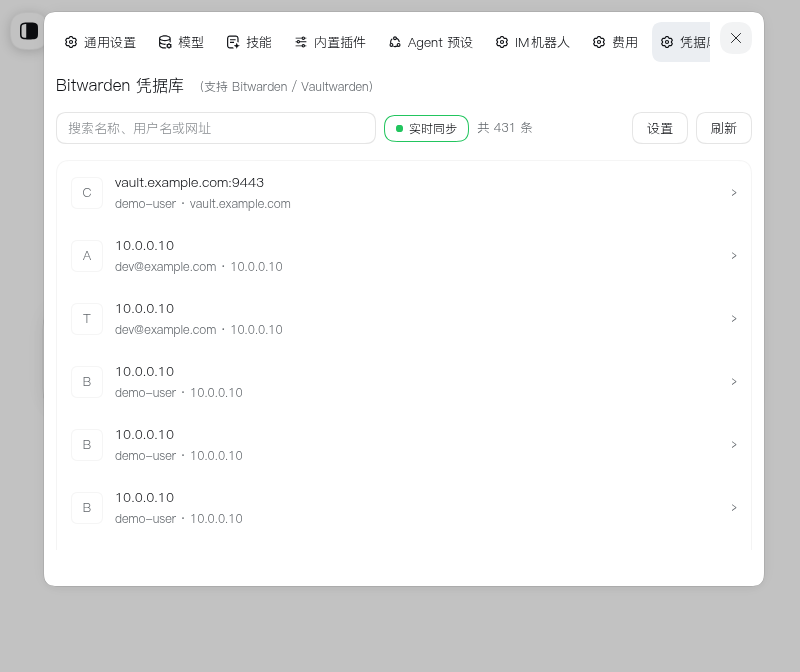
A Vaultwarden / Bitwarden integration for DeepSeek Harness. Browse and edit the vault from Settings → Password vault, and let models search, read and write entries on demand. Passwords, TOTP codes and card data are masked with stable placeholders by default, and plaintext in local session logs can be scrubbed. Works with self-hosted Vaultwarden and Bitwarden Cloud.
Preview
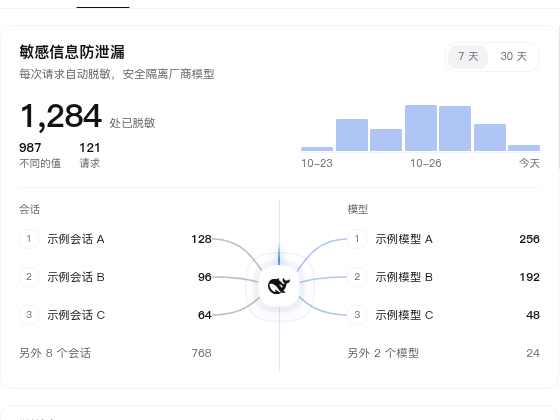
| Password vault | Masking trail |
|---|---|
 |
 |
Highlights
- Real-time sync & cache: SignalR WebSocket updates, with automatic polling fallback and upgrade retries; an encrypted local cache plus revision probing speeds up cold starts.
- Vault panel: sections, search, paging, entry details, TOTP countdown, copy, create/edit, archive/trash/restore and folder moves; write actions follow the plugin's access tier.
- Masking & log scrubbing: passwords, TOTP codes and card data are returned as stable placeholders with a
Maskedkey suffix (e.g.passwordMasked) — the pristine key is never present, so a caller that forgets to reveal fails loudly instead of submitting a placeholder; values are fetchable per entry and field, and plaintext in session logs is periodically replaced with[REDACTED:BW], with incremental and immediate sweeps. - Masking dashboard: daily totals, top conversations/models and a drill-down masking ledger.
- Passkeys: read passkey metadata from entries; export a 0600 WebAuthn credential file under the plugin's access tier (v2 with
cdpandplaywrightblocks for CDP clients and Playwright), with import, remove and temporary-file cleanup; login recipe in docs/passkey-login.md. Login prefers a passkey whenever the entry has one (hasFido2: true); the password is only the fallback. - Permissions & security: read-only / ask / full-access tiers; when the DSH session is
workspace-writeorread-only, writes and passkey exports still go through host approval. The panel uses the host's authenticated/apiRPC; the plugin serves no HTTP route of its own. Master password and API keys are write-only fields. - Settings page: connection, sign-in, two-factor and plugin permissions in one place, for both self-hosted servers and Bitwarden Cloud.
Install
# Latest stable tarball used by the marketplace
dsh plugin --profile web add https://github.com/BuvkB/dsh-vaultwarden/releases/latest/download/dsh-vaultwarden.tgz

# Or from npm
dsh plugin --profile web add dsh-vaultwarden@latest
Requires Node.js >= 22.
Configuration
Open Settings → Plugins → dsh-vaultwarden:
| Field | Description |
|---|---|
serverUrl / email |
Vaultwarden URL and login email |
masterPassword |
Master password; write-only |
apiKeyClientId / apiKeyClientSecret |
Optional API-key login (bypasses two-factor prompts) |
accessMode |
readonly / ask / auto for model-driven writes |
maskEnabled |
Plugin masking master switch (on by default). Off returns plaintext, hides the masking trail page and stops log scrubbing; turn it off only when another local masking service already covers this path |
sweepMode |
Log-scrubbing switch (subject to maskEnabled) |
When the DSH session is workspace-write / read-only (approval: ask), writes and passkey exports still require host approval even if the plugin is set to auto. Password/TOTP reads, log scrubbing and passkey temporary-file cleanup do not require approval; the latter two are forced security cleanups.
DSH_BITWARDEN_* environment variables and profile composition are also supported. See docs/ui-design.md for every field.
Tools
bitwarden_find · bitwarden_get · bitwarden_reveal · bitwarden_status · bitwarden_sync · bitwarden_folders · bitwarden_create · bitwarden_update · bitwarden_delete · bitwarden_restore
Passkeys: bitwarden_passkey_list · bitwarden_passkey_export · bitwarden_passkey_cleanup · bitwarden_passkey_import · bitwarden_passkey_remove; login recipe in docs/passkey-login.md.
bitwarden_sweep immediately scrubs Bitwarden plaintext from local session logs.
Masking notes
- Plugin masking is on by default. If another local masking service already covers this path, turn it off under Settings → Plugins → dsh-vaultwarden. With it off the Masking trail page disappears and passwords etc. can reach the model context and session logs as plaintext — this is insecure.
- Placeholders look like
{{BW_PASSWORD_xxxxxxxx}}; they are HMAC-derived, irreversible and can be referenced, compared or fetched per field. - The dashboard and ledger details live in docs/ui-design.md.
[REDACTED:BW]means plaintext was written to disk and later scrubbed; it has no salt for reverse lookup.
Development
bash scripts/build.sh        # full gate
node test/client-card.test.mjs
node test/trail.test.mjs
Links
License
MIT. Third-party notices: THIRD-PARTY-NOTICES.md.
Links
More in this category
kenryu42/cc-safety-net★ 1900
Pre-execution guard that blocks destructive Git and filesystem commands and access to secrets such as SSH keys and .env files before a tool call runs.
ADWMC/helm-d#helmd★ 984
Security-analysis plugin for DeepSeek Harness: 33 tools spanning six security domains, evidence/reporting and toolbox, plus the case lifecycle, routing and tool ledger; a session-bound case workflow with an evidence chain, E-id validation and reproducible findings; 362 on-demand references; three hot-swappable persona profiles; and a four-tab workbench (armor / case / intercept / about) with case-state recovery after context compaction.
toby-bridges/api-relay-audit★ 904
Runs local security audits of AI API relays and LLM proxies from DeepSeek Harness, producing Markdown reports for prompt injection, model substitution signals, tool-call rewriting, error leakage, stream integrity, and profile-gated Web3 risks.
SeaOf0/dsh-redteam-model★ 807
Authorized-security DSH collection: nine work modes (redteam coordinator, pentest, code audit, binary analysis, attack-defense, AV evasion, incident response, cloud security, CTF solving) and fifteen runtime plugins, managed from a settings page with one-click deploy, install, update and uninstall.
howmp/dsh-pentest★ 616
Authorized pentest mode for DeepSeek Harness — exploration chain, assets and findings with a Web view.
PerryLink/dsh-auto-review★ 244
Second-model auto-review on the approval answerer chain: a read-only reviewer subagent returns structured allow/deny verdicts with reasons, fail-closed by default.
Community comments
Comments are public GitHub Discussions. Loading them connects to GitHub and Giscus; a GitHub account is required to post.