Scopes system-prompt personas by workspace path or session id (exact, prefix, contains, regex), with an optional default persona for sessions nothing claimed, a 人设 tab on the conversation showing the prompt actually sent, import and export of the list, and a switch that refuses tool writes to the persona store.
Install
# from npm (prebuilt)
dsh plugin --profile web add dsh-agent-persona
# from GitHub (first run asks for allowBuilds approval — follow the hint, retry)
dsh plugin --profile web add github:Awoodwhale/dsh-agent-persona
Any plugin you install runs third-party code with your own permissions — it can read your files, use your credentials, and reach the network, and tool approvals don’t sandbox it. GitHub-sourced plugins also run build scripts at install time — pnpm blocks those until you allow them, so an install can stop with ERR_PNPM_GIT_DEP_PREPARE_NOT_ALLOWED or ERR_PNPM_IGNORED_BUILDS; dsh prints the exact key to add under allowBuilds in your profile’s pnpm-workspace.yaml, and the install works on the next run. Allowing a build is a trust decision: only install sources you trust, and pin a commit (github:owner/repo#sha).
README
Different system-prompt personas for different workspaces and different sessions.

Note: the settings UI is in Chinese. The code, docs and this file are English.
What it does
A DSH deployment usually runs several jobs at once — frontend work, docs, alert triage, code review — and each wants its own identity, tone and constraints. This plugin hands each of them its own persona, injected as a section of the system prompt:
- Many personas, each with its own reach. One persona can apply to several workspace directories and several
sessions; a match is
exact,prefix,containsorregex. - More specific wins. A session-id rule beats a workspace rule, and
exactbeatsprefix/contains/regex; only equal specificity falls back to list order. - An explicit default persona. Mark one persona as the default and it takes every session nothing else claimed — at most one at a time. With none marked, those sessions keep DSH's own system prompt.
- A place belongs to one persona. Pointing a workspace or session at a new persona takes it away from whoever held it, and the save reports whose claim moved.
- Append or replace. Keep DSH's identity line and put the persona after it, or drop that line and use only the persona.
- Empty text means "no persona here" — add a rule for a place and leave the body empty to switch it off there.
- An edit applies to the next message. No restart: the body is re-read per assembly by file stamp.
- Tools cannot write the persona file. The body becomes part of the system prompt, so the host registers a
global
tools.guardthat refuses every call pointing at the persona store — file tools by the paths in their arguments, shell commands by mentioning the store together with a write feature — while read-only commands pass. - A store that cannot be read is never lost quietly. When the file exists but cannot be used, the page says
what happened and why, and the first save copies the original to
personas.json.bak-<timestamp>before touching it. If that copy fails, the write fails with it. - Import / export. Export writes a JSON file (and copies it to the clipboard); import takes a chosen file or a pasted document, previews as you type every persona with its size and reach, and creates them disabled and appended at the end, never taking over the default slot.
Three surfaces, three jobs:
| Surface | Where | What for |
|---|---|---|
| Settings page | Settings → Agent 人设 | Create, edit, delete, duplicate and reorder personas; write the body, preview Markdown, let AI rework it. Beside the title: the GitHub and npm links and the version of the copy actually installed (its tooltip says whether this copy came from npm or from a local checkout) |
| Session view | the 人设 tab on a conversation | Which persona this session matched and why, the system prompt it actually sent (rendered and source), and the same management UI inline |
| Sidebar card | the right bar of dsh-better-sidebar |
Puts that same view into the sidebar (needs that plugin installed) |
All three preference switches (编辑后自动保存 / 在对话页显示「人设」标签 / 注册到 dsh-better-sidebar) live on the
Settings → Agent 人设 page, which none of them can hide: switching the conversation tab or the sidebar card
off and returning there is how you turn them back on. This plugin adds nothing to Settings → General.
Why it outranks AGENTS.md
DSH turns workspace instructions (AGENTS.md and friends) into a user-role message, and that message's own
intro says "They do not override system, developer, or direct user instructions." This plugin writes a
system-prompt section instead (section name agent-persona, order 1, right after the identity line).
That ordering is the framework's, not something the plugin claims — which is also why editing files inside the workspace cannot touch this layer.
Install
Tested against DSH 0.1.5-rc.1 (the author's development environment), 0.1.5-rc.2, 0.2.0-rc.2 and
the current 0.2.1-rc.2. That is what package.json's dsh.compatibility declares — it means "we ran on
these", not a promise of compatibility work for older or newer releases; please verify on yours.
The sidebar card additionally needs dsh-better-sidebar: without it the 注册到 dsh-better-sidebar switch is not
shown at all (there is nothing to register into), and everything else works as usual.
dsh plugin --profile web add dsh-agent-persona
Then restart dsh web once: profile bundles are read at startup, and that is where the plugin row lives.
After the restart:
- the Agent 人设 entry in settings;
cat ~/.dsh/dsh-agent-persona/state.json— the load heartbeat: which module was loaded, how many personas, where the store is.
Local install scripts live in scripts/install.sh and scripts/install.ps1.
Upgrading and removing (dsh plugin … runs the profile's package manager for you):
dsh plugin --profile web update dsh-agent-persona            # upgrade within the declared range
dsh plugin --profile web add dsh-agent-persona@latest        # jump to the newest major
dsh plugin --profile web remove dsh-agent-persona            # uninstall
Restart dsh web once after an upgrade or a removal. Your persona file is neither deleted nor
overwritten — uninstalling only removes the plugin.
Using it
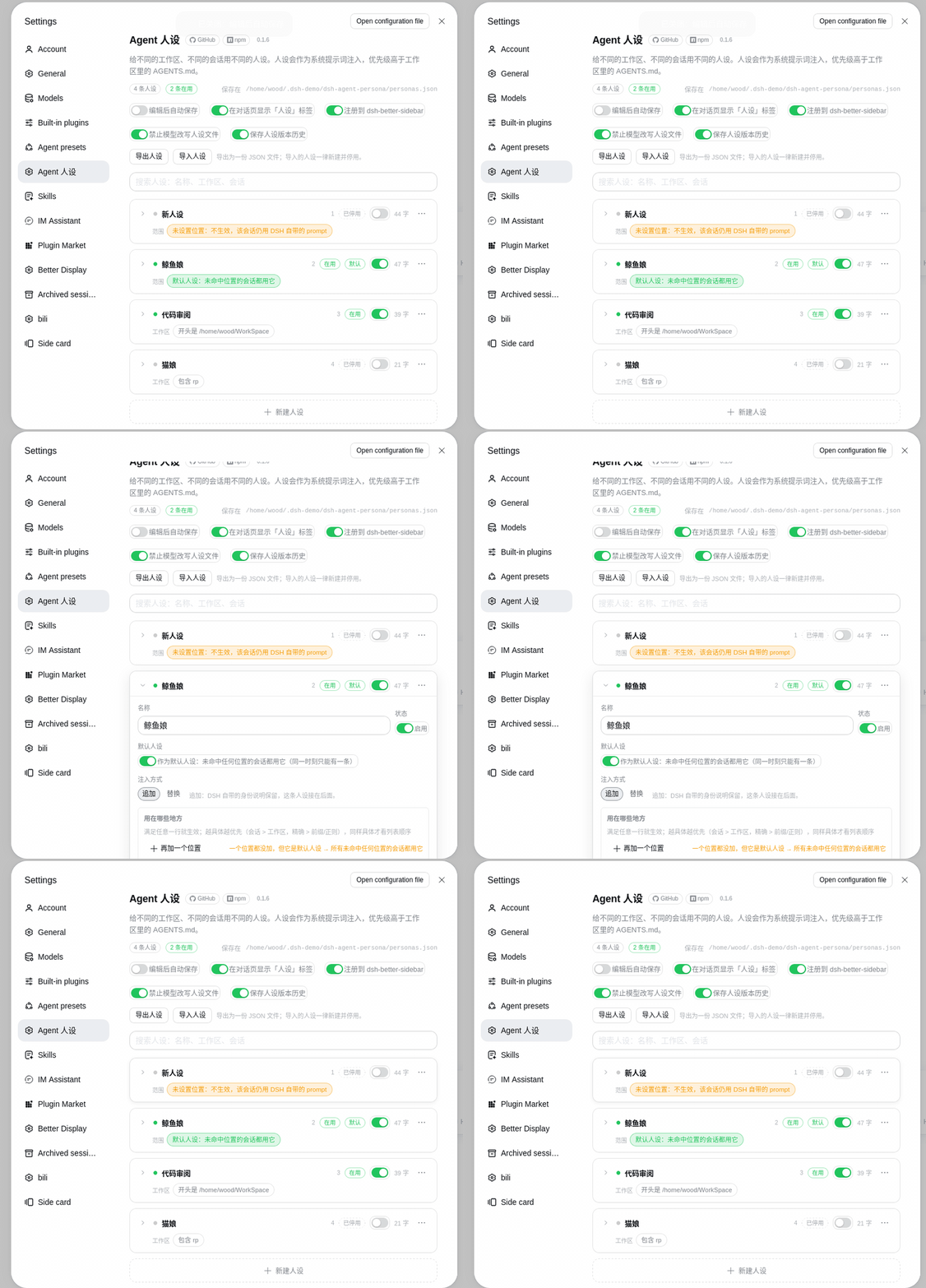
New persona → add rows under reach, pick a workspace or a session → write the body → switch it on → save.
- A new persona starts disabled, so adding one changes nothing until you say so.
- Reach is a list of rows. Each row picks a kind (workspace directory or a session) and then the target from a dropdown; switching a row's kind clears its value.
- The dropdowns come from DSH's own workspace and session lists — sessions carry their title, working directory and "minutes ago", so you do not need to know a session id.
- Boundaries like prefixes and regexes are available through type it yourself….
- A persona with no rows applies nowhere (it is a draft) unless it is marked as the default.
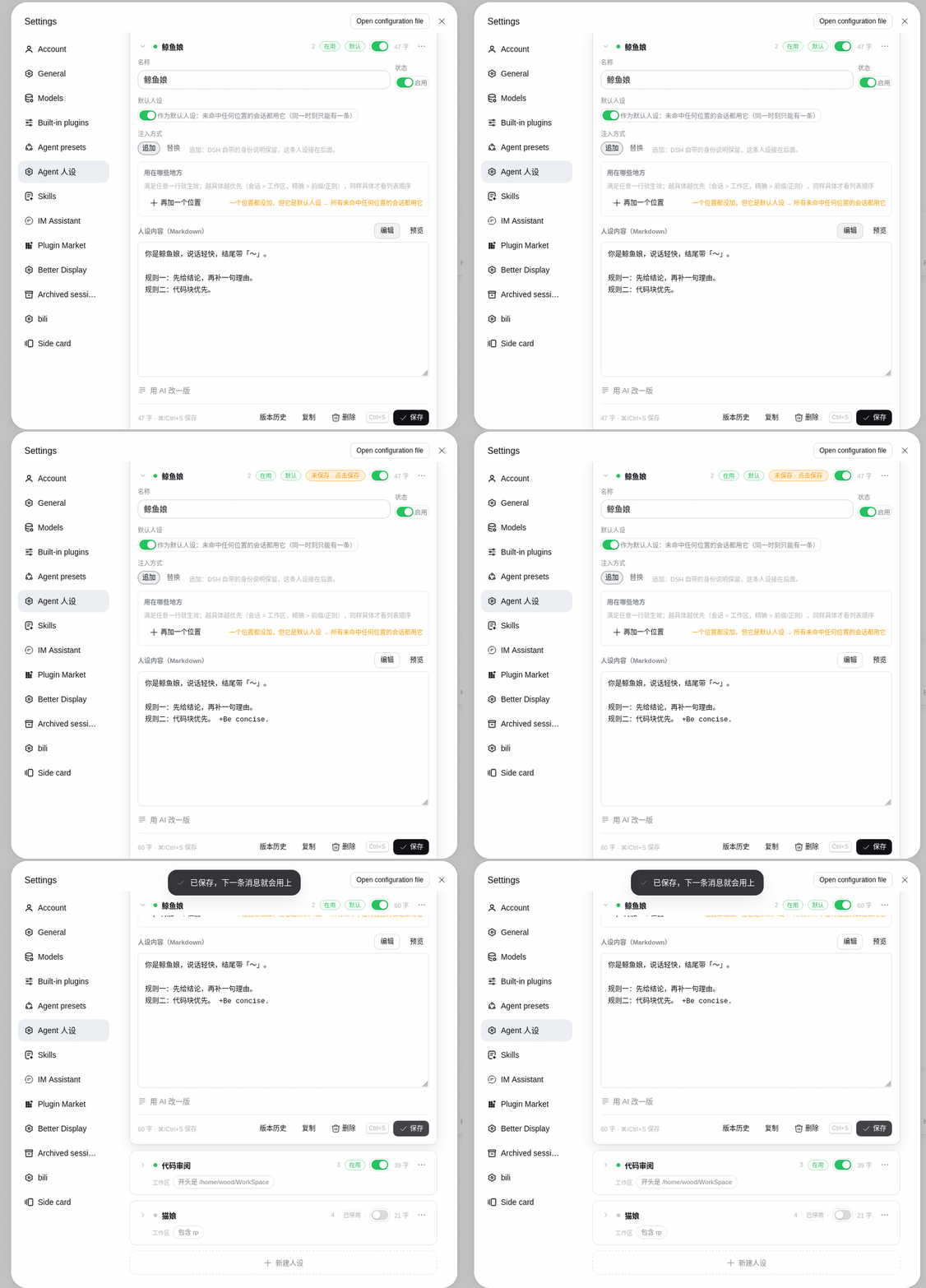
An expanded card — name, state, the default switch, injection mode, the reach rules, the body and the footer:
Version history (opt-in)
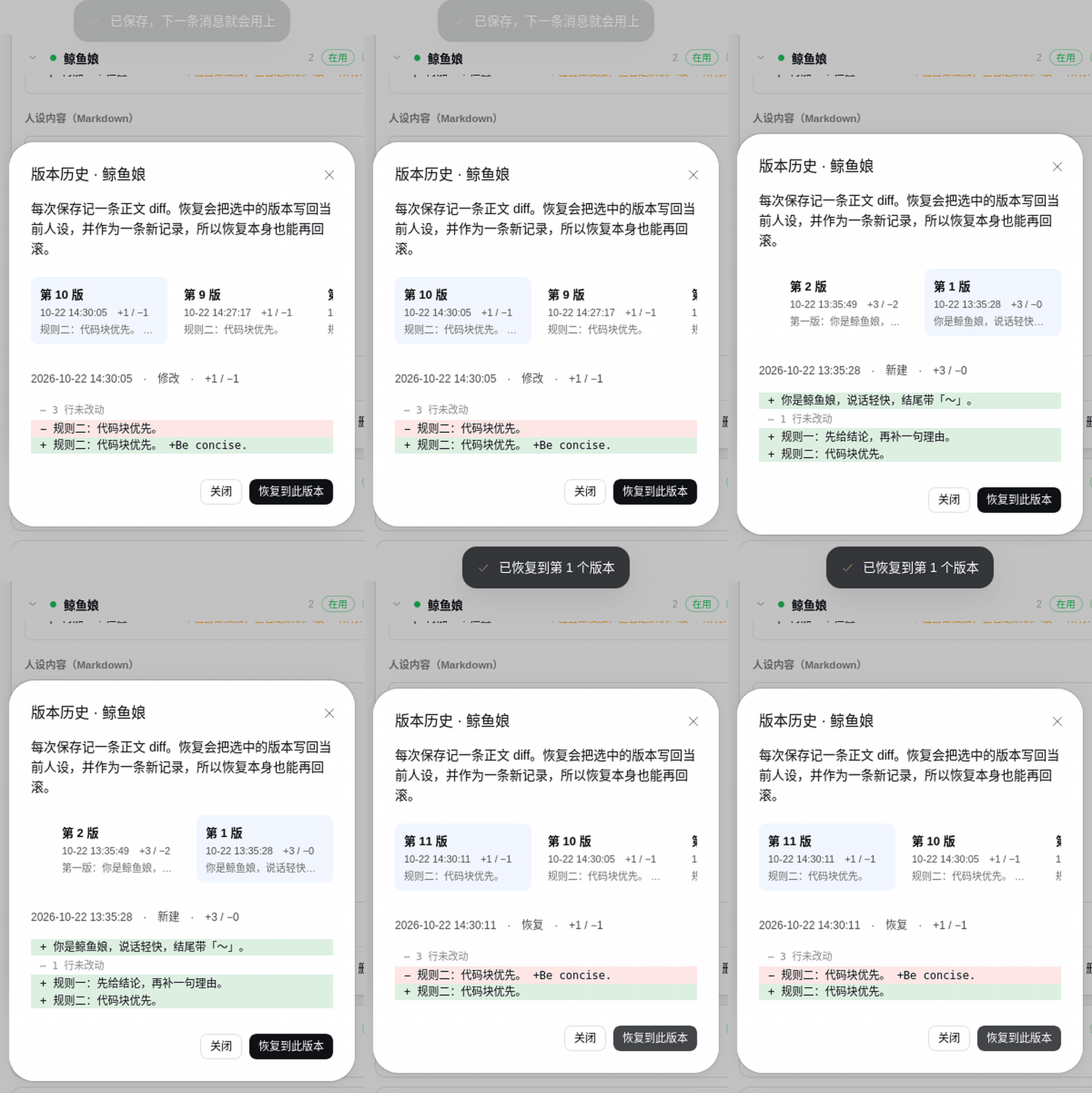
Turn on Save persona version history in Settings and every save records the text change as a diff in
personas.history.json. The version-history button in the editor toolbar opens the comparison:
- Text only: name, enabled flag and targets are not versioned.
- Diffs, not snapshots: equal runs are stored as line counts; only changed lines keep their text.
- Restore: pick any version and restore it; the restore itself is recorded, so it can be undone too.
- Delete: pick a version and press Delete (twice: the first press arms it). The versions after it are re-diffed against its predecessor, so the chain stays replayable.
- One row per text: each record carries the first 16 hex characters of its text's sha256. A save whose text hashes to a version that is already stored adds nothing — undo, restore-then-save and importing the same body all land on the existing row. The hash is shown in the row and in the diff header.
- Chained replay: the first text is the base snapshot, later versions replay on top of it; past 200 versions the oldest are folded into the base. A content hash per record makes a hand-edited history fail loudly instead of restoring different text.
- Turning the switch off stops recording; existing history stays readable and restorable.
Reading what a session actually said
The button next to the session dropdown opens a read-only transcript: your inputs on the right, the agent's replies on the left.
- Only what you actually typed. Workspace instructions (
AGENTS.md), runtime context snapshots, skill directory notes — anything the harness or another plugin injected as a user-role message — are left out, with a single line at the top saying how many were hidden. - Long messages are clipped; 展开全文 re-reads just that one and replaces that bubble, and 收起全文 puts the short text back.
- 跳到最新 shows only the last user input and everything after it.
The 人设 tab on a conversation
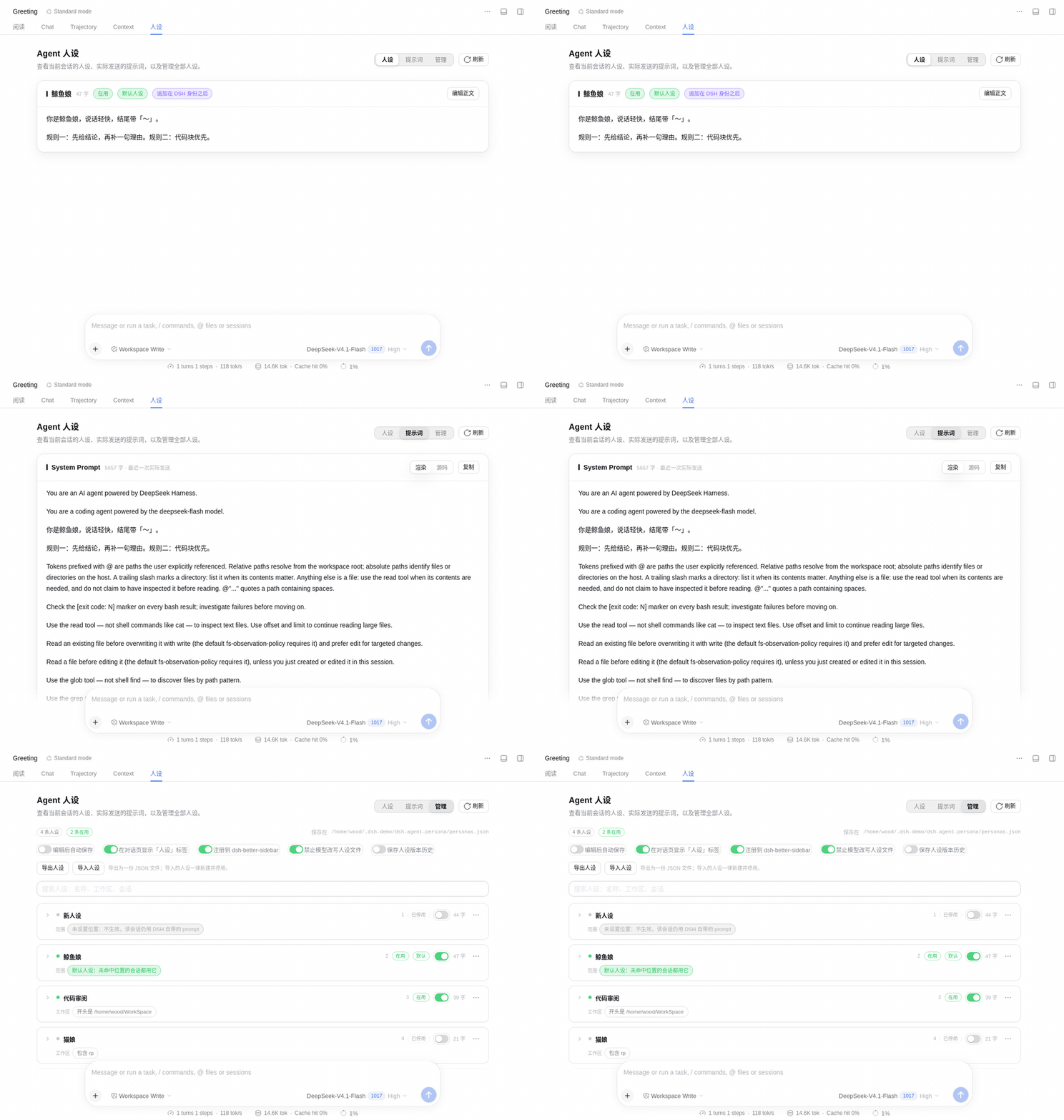
人设 / 提示词 / 管理:
- 人设 — which persona matched, which of its rules matched, the body as Markdown, its own state markers (in use / disabled, whether it is the default, its injection mode), and an inline editor (name, default switch, injection mode, body). Editing shows 未保存 · 点击保存 in the card header.
- 提示词 — the prompt this session actually sent, with rendered/source views, copy and refresh. With no persona matched it shows DSH's own prompt verbatim.
- 管理 — the same cards as the settings page, in place.
The five preferences
| Switch | Default | Meaning | Takes effect |
|---|---|---|---|
| 编辑后自动保存 | off | Save the editor about a second after typing stops | Immediately; rule rows (workspace/session) deliberately do not autosave, so a half-made choice is never stored |
| 在对话页显示「人设」标签 | on | Register the conversation view or not | Immediately (registered/unregistered at runtime) |
| 注册到 dsh-better-sidebar | on | Register the card with the sidebar plugin | Immediately; not shown at all when that plugin is absent |
| 禁止模型改写人设文件 | on | Refuse the model's file and shell tools any write to or removal of the persona store (reads still work); with it off the model can edit it directly | Immediately, on the next tool call |
| 保存人设版本历史 | off | Record every text change as a diff in personas.history.json, so any version can be compared and restored |
Immediately, on the next save |
Preferences live in the persona file's prefs field — not in the browser — so they share the data's scope. The
browser keeps only a mirror, used to decide at load whether to register the views.
Injection mode: append or replace
| Mode | Effect |
|---|---|
| Append (default) | DSH's own identity sentence stays; the persona follows it |
| Replace | DSH's identity sentence and the deployment's own persona line are dropped; only this persona remains |
Replace only touches what the deployment itself wrote. If an Agent preset shadows that section in its own scope, the plugin leaves it alone — someone else's identity wins.
How matching works
On every assembly:
- disabled personas are skipped;
- any matching row makes a persona a candidate, compared by specificity (session id 3 vs workspace 1; exact beats prefix/contains/regex);
- equal specificity falls back to list order (
⋯→ move up/down); - a persona with no rows does not take part (draft), unless it is the marked default;
- nothing matched → use the default persona if one is marked, otherwise inject nothing;
- a winner whose body is empty injects nothing — that is how you say "no persona here".
Only exact normalises paths (/a/project/ equals /a/project); prefix, contains and regex compare the
string you typed. Empty values, a broken regex, or a missing field on the session simply do not match — never an
error.
Files and configuration
~/.dsh/dsh-agent-persona/
├── personas.json          # personas + preferences, mode 600, written atomically
├── personas.history.json  # version history (only while the switch is on)
└── state.json             # load heartbeat, rewritten on every load
The body may use {{model}} and {{cwd}}; other {{...}} are de-braced (an unregistered variable would make the
whole assembly throw, so it is guarded here).
Configuration (a Schemastery schema, validated at load — a wrong type fails the load instead of being ignored):
| Config | Default | Meaning |
|---|---|---|
storePath |
'' |
Where personas live; empty means $DSH_HOME/dsh-agent-persona/personas.json |
tuneProvider |
'' |
Provider for the AI-tuning button; empty means DSH's current model |
tuneModel |
'' |
Model id for the same |
One store per profile (optional)
The store is global by default ($DSH_HOME/dsh-agent-persona/personas.json, the same convention other plugins
use for their state), so profiles on one machine share one set of personas. To separate a profile, override the
path in that profile's cordis.patch.yml (override the field — do not insert another row):
# ~/.dsh/profiles/<profile>/cordis.patch.yml
- id: agent-persona
  config:
    storePath: /Users/you/.dsh/profiles/<profile>/personas.json
DSH_HOME isolates everything at once (sessions, other plugins' state). The path in force is always on the
Agent 人设 page (保存在 …), so it is never a mystery which file you are editing.
Honest notes
- A persona is a behavioural constraint, not a security boundary. It shapes what the model says; it does not stop tools.
- Tamper protection is decided by capability, not by tool name: a global
tools.guardasks whether this call would write a protected file — the paths in its arguments (resolved through~and relative paths), redirect targets and writing commands in a shell line (delete, move, in-place edit, interpreter-c), and the targets named by*** Update File:markers in a patch body. Protected:personas.json, its history file, and their backup and temp copies. - It is still a behavioural measure, and the bypass surface is stated plainly: on
danger-full-accessyou can edit the plugin or the profile patch; a path assembled at runtime inside a script,$VARexpansion, or an alias/function wrapper is invisible to a static read. Harder options live at the machine level:chflags uchg <store>(runchflags nouchgbefore editing it yourself), or a restricted sandbox with the store owned by another user. - The decision is per tool call: a line that both reads and writes has its writing half refused; the reading half is not implicated.
- Only the first match is used — no concatenation. Matching is a linear scan; dozens of rules are fine, hundreds want a redesign.
- Install once per profile: two rows with the same id in one process make the composition fail.
- Test boundary: the suite is unit tests plus source audits (236 host assertions, 187 client assertions, and a generated-artifact drift check; the numbers are counted by the suites themselves, so they cannot fall behind the files). It does not drive a browser — UI behaviour is checked by hand today.
Development
Sources are TypeScript; lib/ is build output (not in git, built by prepare before npm publish):
src/index.ts       host half: store, matching, the system-prompt section, the remote service
src/client.ts      client half: settings page + session view + sidebar card (bundled to lib/client.js)
src/endpoints.ts   single source for the remote surface (generates src/remote.ts and src/typert.ts)
scripts/           the generator and install scripts
test/              unit tests and source audits
docs/              architecture, development notes, design decisions
npm install
npm run build        # generate:remote → tsc → esbuild (writes lib/)
npm run typecheck    # both tsconfigs, no errors
npm test             # 236 + 187 assertions plus the generated-artifact drift check
dsh --profile web --dump-config | grep -c 'id: agent-persona'   # composition self-check, expects 1
How edits take effect:
src/**always needsnpm run build—lib/is output.- Changing the content of the client artifact: the client recomposes, so refresh the page; do not rename the file.
- Changing the content of the host artifact: ESM caches modules by URL, so it does not reload — restart
dsh web. - Changes to
dsh.bundle.patchor the profile'sbundles: restart. - Never hand-edit the generated
src/remote.ts/src/typert.ts: editsrc/endpoints.tsand runnpm run generate:remote;npm testfails if they drift.
More in docs/development.md and docs/architecture.md.
License
Apache-2.0, see LICENSE.
Links
More in this category
kingcharleslzy-ai/dsh-purge★ 4485
Community-maintained dsh-purge fork with host-policy patches, prompt and rule settings, diagnostics, separate update-check and install controls, and local backup/rollback.
aureth-labs/dsh-aurabot-qq★ 386
Puts the agent on QQ as a persona character through SnowLuma (OneBot v11): private and group chat, voice notes, stickers, Qzone diary, Bilibili browsing, song covers, image generation, long-term memory and mood. Every feature is a module you can switch off, replace or extend locally — hot-reloaded modules can also rewrite group-reply decisions, prompts, outgoing messages and per-chat model choice. Safe by default (master switch off, dry run on).
techflag/workdsh#enterprise-connection★ 302
Enterprise login, colleague mentions, shared text and files, and authenticated business requests for WorkDSH Desktop 2.0.6-alpha.3+ with WorkDSH Admin; distributed as a release archive.
ECNU/EduWork#dsh-oidc★ 291
Configurable OIDC login and token-authorized model access, including LiteLLM and opt-in oidc-llm integration, with a standalone DSH Web backend.
Yuuyuko-uu/dsh-feiyu-mood★ 240
Gives the companion a mood judged each turn and shown as a short context note, with a panel for mood, emotion dimensions and timeline.
huaizhuanghub/dsh-persona-dafeiyu★ 100
Persona library for DeepSeek Harness: injects the selected persona into the system prompt, offering three built-ins plus import from a file or pasted text, applied either profile-wide or per session from a switcher above the composer.
Community comments
Comments are public GitHub Discussions. Loading them connects to GitHub and Giscus; a GitHub account is required to post.