Turns an English paper PDF into a Chinese group-meeting .pptx whose figures and tables are the paper's own cropped pixels.
Install
# from GitHub (first run asks for allowBuilds approval — follow the hint, retry)
dsh plugin --profile web add github:AshenSeeker/dsh-group-meeting-slides
Any plugin you install runs third-party code with your own permissions — it can read your files, use your credentials, and reach the network, and tool approvals don’t sandbox it. GitHub-sourced plugins also run build scripts at install time — pnpm blocks those until you allow them, so an install can stop with ERR_PNPM_GIT_DEP_PREPARE_NOT_ALLOWED or ERR_PNPM_IGNORED_BUILDS; dsh prints the exact key to add under allowBuilds in your profile’s pnpm-workspace.yaml, and the install works on the next run. Allowing a build is a trust decision: only install sources you trust, and pin a commit (github:owner/repo#sha).
README
This plugin publishes its README in Chinese only.
把一篇英文论文 PDF 变成中文组会汇报 PPT的 DeepSeek Harness 技能。 论文里的每张图、每个表都用原文自己的像素,不重画、不臆造数字。
An agent skill for DeepSeek Harness that turns an English paper PDF into a Chinese group-meeting (组会 / 文献汇报) slide deck. Every figure and table keeps the paper's own pixels — nothing is redrawn, no number is invented.
效果
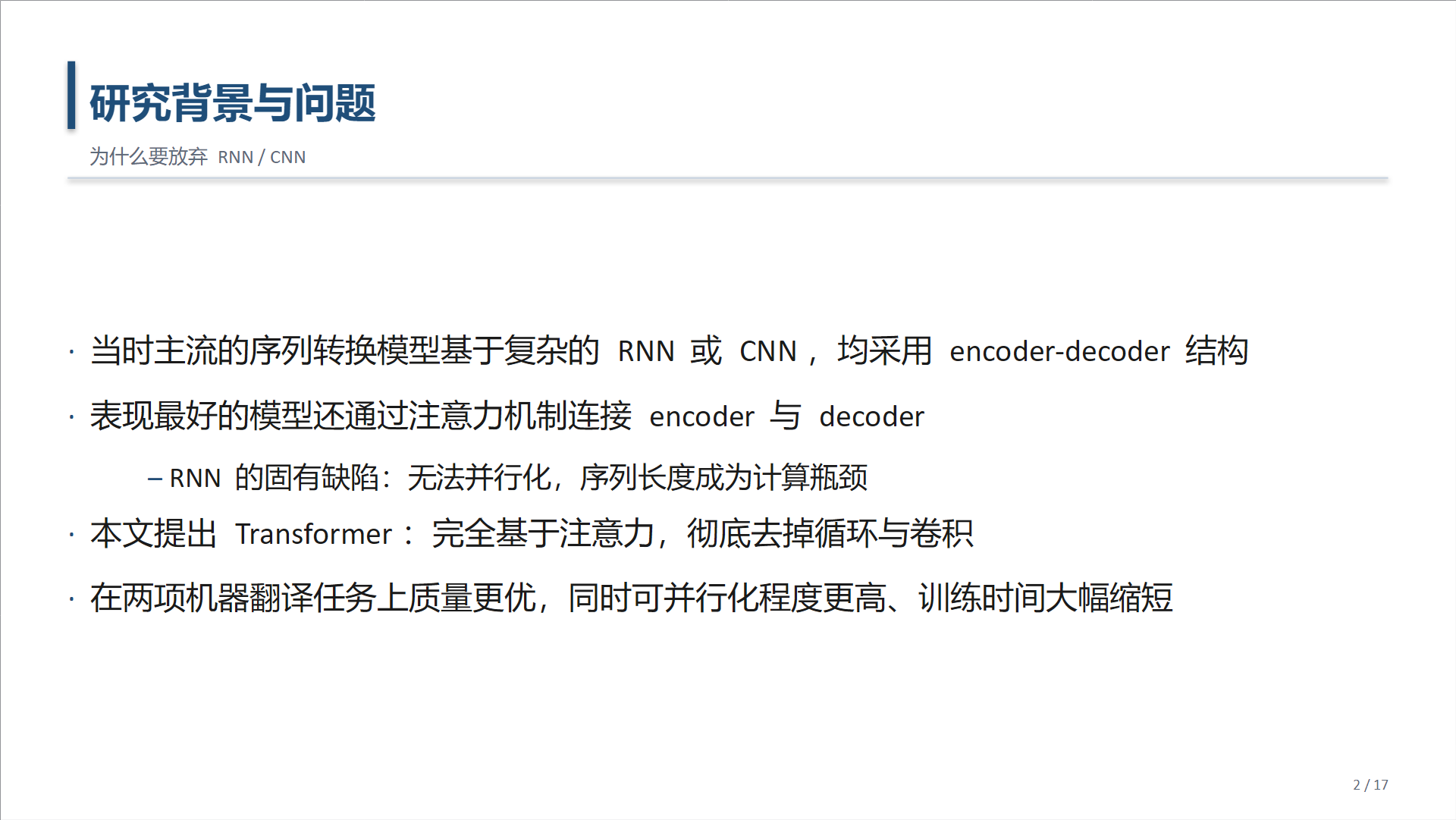
| 封面 | 正文 |
|---|---|
 |
 |
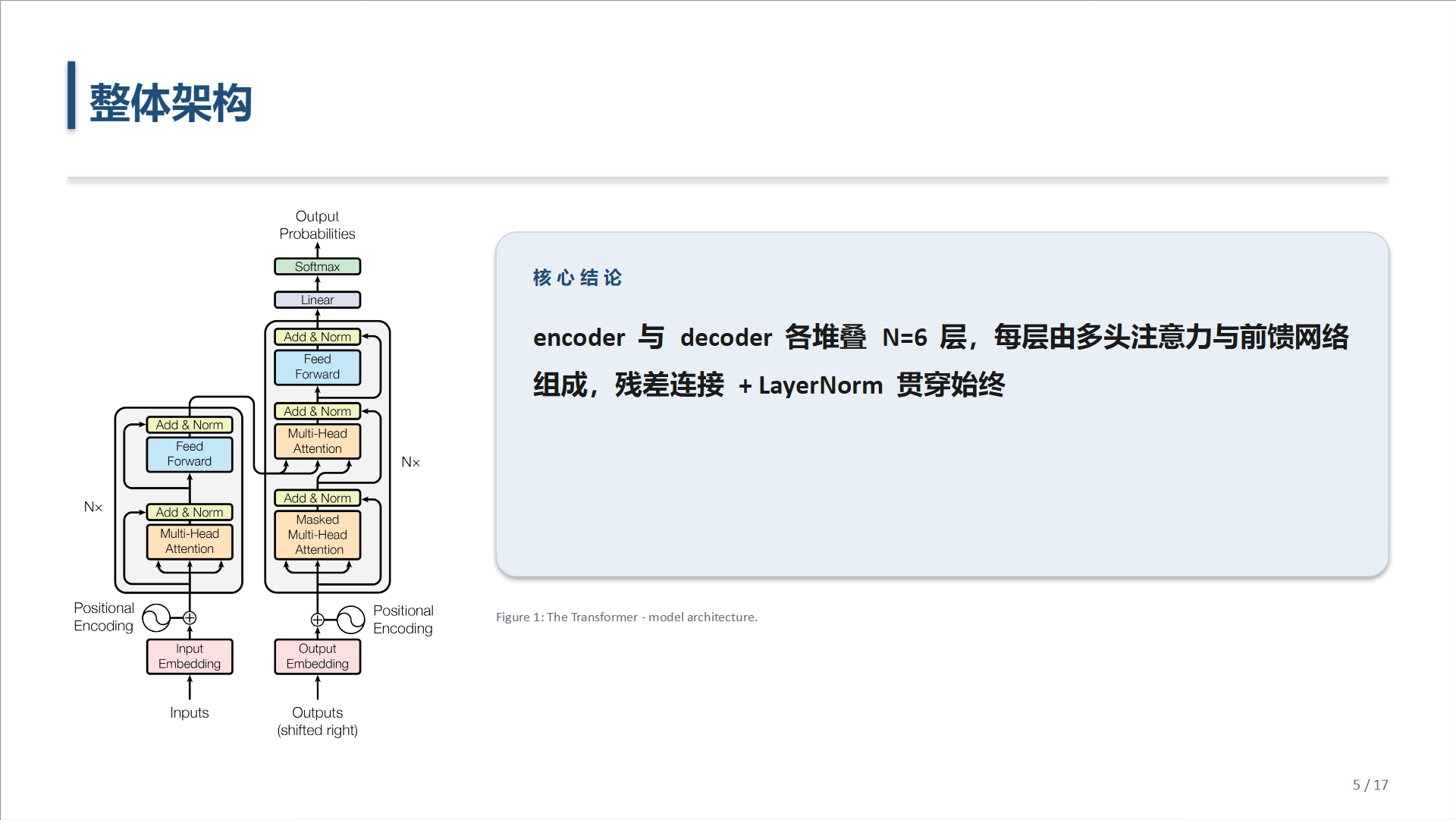
| 图(原图 + 英文 caption) | 表(带结论条) |
|---|---|
 |
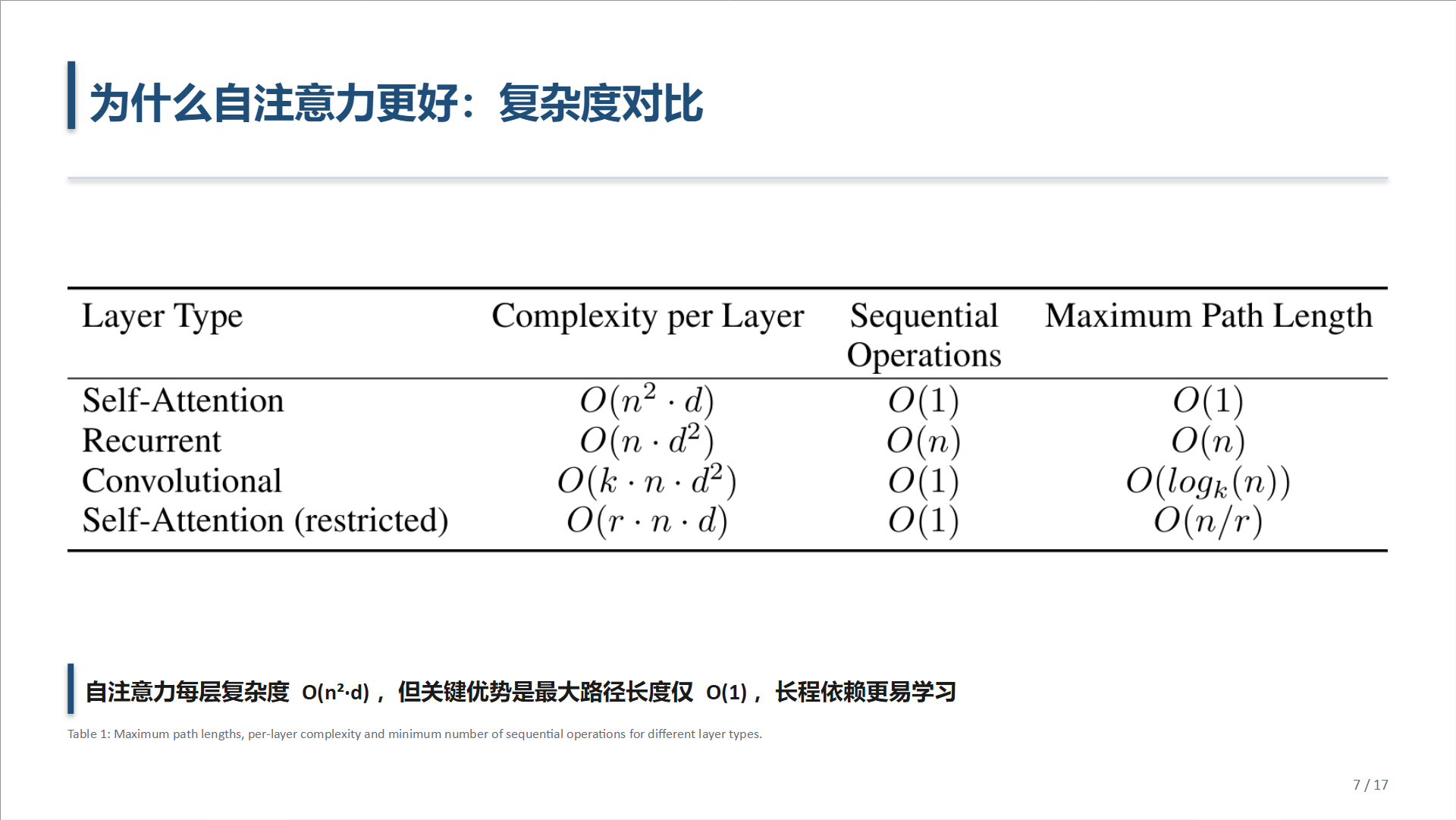 |
以上四页由本技能从 Attention Is All You Need(Vaswani et al., NeurIPS 2017) 直接生成,未做手工修图。
安装
本仓库是一个 DSH 插件包,package.json 里声明了 dsh.bundle,所以两种装法都行。
插件方式(会出现在技能目录里,之后可随插件一起升级):
dsh plugin add AshenSeeker/dsh-group-meeting-slides
手动方式(不想装插件就拷文件夹):
# Windows
git clone https://github.com/AshenSeeker/dsh-group-meeting-slides.git
Copy-Item -Recurse dsh-group-meeting-slides\group-meeting-slides "$env:USERPROFILE\.dsh\skills\"
# macOS / Linux
git clone https://github.com/AshenSeeker/dsh-group-meeting-slides.git
cp -r dsh-group-meeting-slides/group-meeting-slides ~/.dsh/skills/
装好后重启 DSH(或新开一个会话),对 agent 说「把这篇论文做成组会 PPT」 并给出 PDF 路径即可。
依赖
脚本需要 Python 与三个库,由 agent 通过 load_workspace_dependencies
取到解释器后调用,你不必手动装到系统 Python 里:
| 库 | 用途 |
|---|---|
PyMuPDF |
解析 PDF 版面、按真实 bbox 裁剪图片 |
python-pptx |
生成 .pptx |
Pillow |
图片尺寸与宽高比处理 |
若 agent 报告缺少这些库,把上面的列表发它,让它装到工作区依赖里。
它怎么工作
技能刻意把机械活和判断活分开:
| 谁 | 干什么 |
|---|---|
scripts/extract.py |
PDF 几何、图注定位、按 bbox 抠图、整页渲染兜底 |
scripts/build_pptx.py |
版式、字体、图片等比放置(13.333×7.5 宽屏,academic / dark 双主题) |
| Agent | 读论文、定叙事、写中文文案、逐张核对图片 |
extract.py  →  paper.md + figures.json + figures/ + tables/ + pages/
                       ↓
              agent 逐张看图、读论文、写 deck.json
                       ↓
build_pptx.py  →  <课题>_组会汇报.pptx  +  讲稿.md
关键设计:先看图,再写字
SKILL.md 里有一条硬性流程:写任何一页之前,必须先把 figures/ 和
tables/ 里每张图打开看一遍,并且做语义核对——图注说的是 Table 2,
图里真的是 Table 2 吗?两个 crop 是否字节相同(说明两个图注指到了同一个
对象,至少一个是错的)?
裁剪是几何启发式,它一定会出错。这一步是唯一能抓住「框得很漂亮但框错了表」 的地方。
目录结构
dsh-group-meeting-slides/
├── package.json                    # dsh.bundle 清单
├── cordis.patch.yml                # 挂载技能提供器
├── lib/index.js                    # 技能提供器(把 SKILL.md 交给技能目录)
├── README.md
├── LICENSE
├── assets/preview/                 # README 预览图
└── group-meeting-slides/           # 技能本体,也可整个拷进 ~/.dsh/skills/
    ├── SKILL.md                    # 触发词、工作流、硬规则
    ├── references/
    │   ├── deck-schema.md          # deck.json 的完整契约
    │   └── storyline.md            # 12–18 页的组会叙事与中文写作规范
    └── scripts/
        ├── extract.py
        └── build_pptx.py
硬规则
这些不是建议,是技能运行时强制执行的:
- 绝不臆造数字。幻灯片里出现的每个数都要能追到论文正文或某张已裁的表。
- 绝不用 python-pptx 重画图表。宁可少一页,也不给一张错的图。
- 保持宽高比。
build_pptx.py强制,不允许绕过它直接add_picture。 - 每张图下方保留英文原图注,方便听众回原文核对。
- 文案用中文,术语首次出现保留英文,例如 「缩放点积注意力(scaled dot-product attention)」。
兼容性
| 宿主 | 状态 |
|---|---|
| DeepSeek Harness 桌面版 | 已验证 |
| DeepSeek Harness Web 版 | 应当可用——技能层由宿主统一加载,不依赖桌面独有 API |
技能本体是纯 Markdown + Python;仓库根上的 package.json → cordis.patch.yml
→ lib/index.js 只是把 group-meeting-slides/SKILL.md 挂进技能目录的一层壳,
运行时不联网、不装依赖,也不改宿主行为。
许可
Apache-2.0 © 2026 海龟饲料 (@AshenSeeker)
English
An agent skill for DeepSeek Harness. Give it an English paper PDF; it produces a
Chinese group-meeting .pptx plus speaker notes, where every figure and table is
the paper's own pixels cropped at the real bounding box — never redrawn, never
estimated.
Install: dsh plugin add AshenSeeker/dsh-group-meeting-slides, or copy
group-meeting-slides/ into ~/.dsh/skills/ if you would rather install it as a
plain skill folder.
Requires: Python with PyMuPDF, python-pptx, Pillow (resolved by the host's
load_workspace_dependencies, not your system Python).
Why it is split this way: the scripts own everything mechanical and reproducible — PDF geometry, figure cropping, typography, aspect-ratio-safe placement. The agent owns what needs judgement — reading the paper, deciding the argument, writing the copy. Before writing a single slide the agent must open and semantically verify every extracted image, because geometric cropping fails in ways geometry cannot detect.
Licensed under Apache-2.0.
Links
More in this category
zhu1090093659/dsh-web#packages/dsh-skill-explorer★ 9959
Skill center for the dsh web GUI: browse all loaded skills grouped by source, enable or disable model invocation, create new skills, and delete into a recoverable trash.
iflytek/skillhub#dsh★ 5358
Browse and search a SkillHub registry and manage local skill installation, updates, and removal inside DeepSeek Harness. Targets DSH 0.2.0-rc.2 and 0.2.1-rc.2; not yet compatible with 0.2.1-rc.3.
QingYunA/answer-me-with-html★ 5085
Answers a question with a one-page visual HTML explainer: the model writes a short Markdown draft and the bundled `am` CLI builds the page, with flow, sequence, tree, timeline and ER diagrams, tables and callouts.
hyhmrright/brooks-lint★ 1556
Provides six code quality skills for code review, architecture audits, technical debt, test quality, health dashboards, and remediation.
GanyuanRan/Aegis★ 1411
Software-engineering method pack for coding agents, with skills for baseline-first planning, systematic debugging, prompt hygiene, verification before completion, and repair/retirement tracking.
superdesigndev/superdesign-skill★ 935
Design skill for UI and marketing graphics on the Superdesign canvas: reads the repo for context, extracts its design system, then generates and iterates branchable design drafts, flow pages, and reusable components through the Superdesign CLI.
Community comments
Comments are public GitHub Discussions. Loading them connects to GitHub and Giscus; a GitHub account is required to post.