Annotatable file editor for the DSH right sidebar with a lazy file tree, inline annotations, cross-file annotation navigation, Markdown preview, and composer-draft handoff.
Install
# from a prebuilt release tarball
dsh plugin --profile web add "https://github.com/Arvin-work/dsh-plugin-file-annotate/releases/download/v0.1.1/local-dsh-plugin-file-annotate-0.1.1.tgz"
# from GitHub (first run asks for allowBuilds approval — follow the hint, retry)
dsh plugin --profile web add github:Arvin-work/dsh-plugin-file-annotate
Any plugin you install runs third-party code with your own permissions — it can read your files, use your credentials, and reach the network, and tool approvals don’t sandbox it. GitHub-sourced plugins also run build scripts at install time — pnpm blocks those until you allow them, so an install can stop with ERR_PNPM_GIT_DEP_PREPARE_NOT_ALLOWED or ERR_PNPM_IGNORED_BUILDS; dsh prints the exact key to add under allowBuilds in your profile’s pnpm-workspace.yaml, and the install works on the next run. Allowing a build is a trust decision: only install sources you trust, and pin a commit (github:owner/repo#sha).
README
This plugin publishes its README in Chinese only.
An annotatable file editor for the DeepSeek Harness (DSH) right sidebar.
在 DSH 右侧栏中打开工作区文件,选中文本写批注,跨文件跳转批注,并把结构化修改要求加入对话草稿。
- 选中文本即可写批注,不用离开文件
- 批注在所有文件之间统一计数、统一导航
- 提交只加入对话输入框,不会自动发送
- Markdown 实时预览
- 原生 DSH 外观;无构建步骤、无运行时 npm 依赖
功能
文件编辑
- 以
extension优先级接管常见文本/代码文件,在右侧栏直接打开。 - 支持编辑与保存;
⌘/Ctrl+S保存,带文件版本校验,避免覆盖外部修改。 - 大文件超过 20 万字符时退化为纯文本模式,并禁用申请重定位等重操作。
行内批注
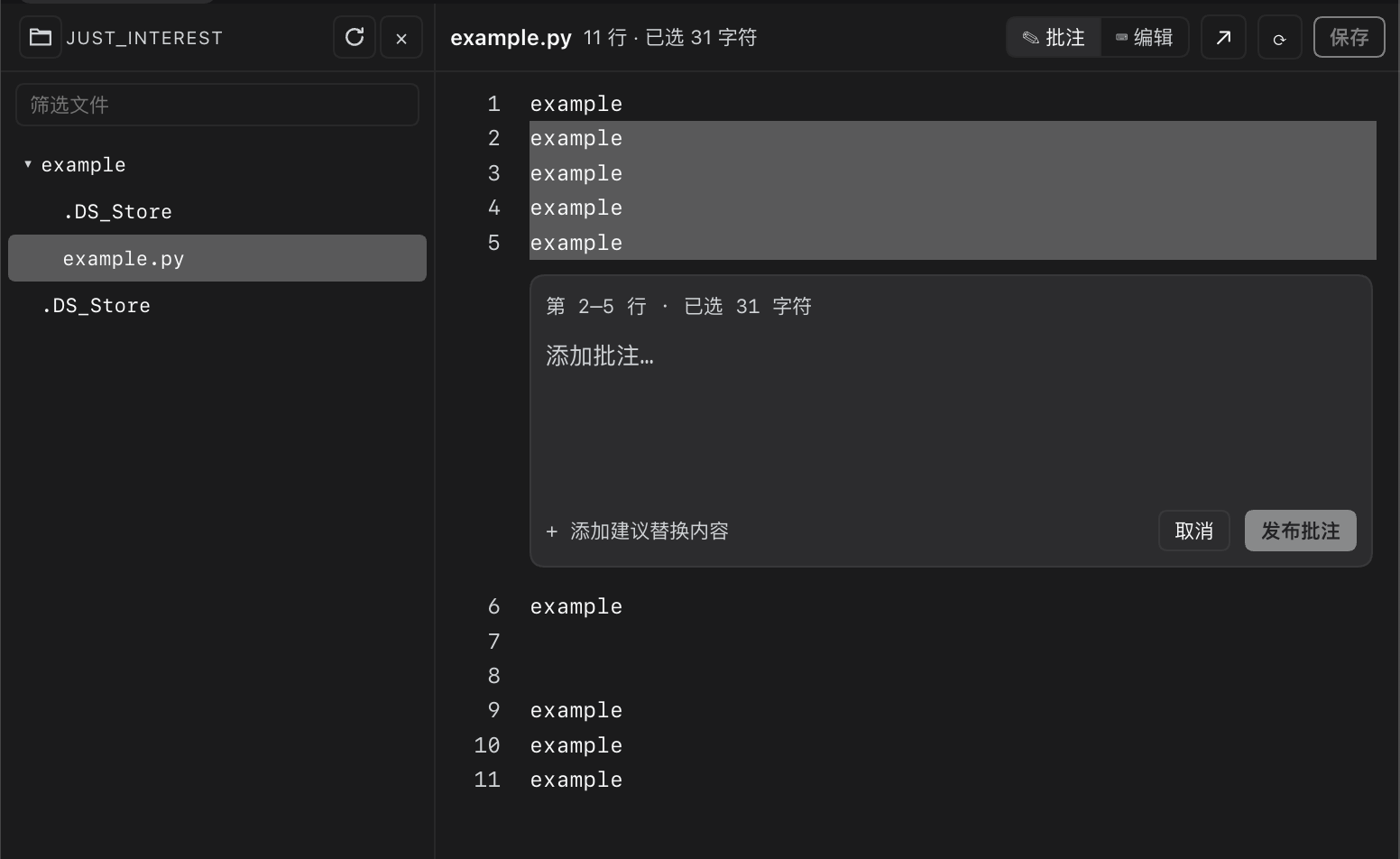
- 默认“批注”模式:选中文本后,在选中行下方出现批注块。
- 批注块内 Enter 发布,Shift+Enter 换行;中文输入法组合输入期间不会误发布。
- “编辑”模式恢复正常选中/复制/编辑。
- 批注引用创建时的原文和行号;原文被改写导致 quote 不再匹配时标记为 stale,并提示位置可能已失效。
跨文件批注导航
- 当前会话只要有批注,右下角就显示统一计数
1/N。 ↑/↓跨文件切换,自动打开目标文件并定位到批注范围。- 在工作区模式下切换右侧当前文件,文件树保持不动;在独立编辑器 tab 中则替换当前 tab,不堆积新 tab。
提交把当前会话所有文件的批注一次性加入对话草稿,成功后自动清除全部批注;清除清当前文件;全部清除清当前会话全部批注,并带二次确认。
Markdown 预览
- 打开
.md/.markdown/.mdx时,工具栏出现「预览」按钮。 - 用当前编辑中的 draft 渲染标题、段落、列表、引用、表格、代码块、链接等。
- 按钮文字始终是「预览」,通过亮/不亮表示当前是否处于预览状态。
- 预览为只读;再次点击关闭预览回到源码。
文件树
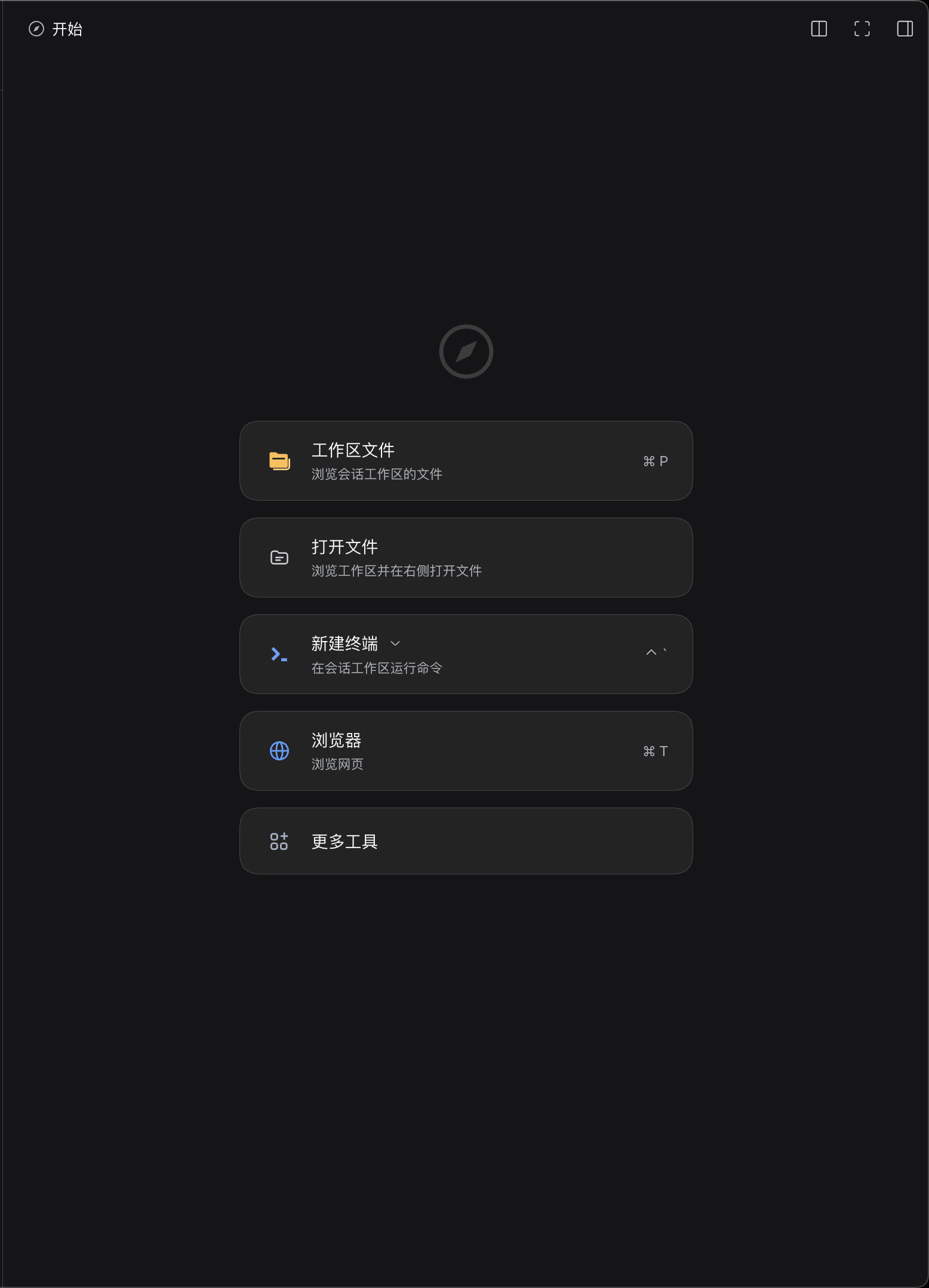
- 「打开文件」工作区:左侧文件树 + 右侧编辑器。
- 懒加载目录、目录变更自动刷新、筛选、刷新、拖宽、当前文件高亮。
- 支持键盘导航、双击打开、展开/滚动位置持久化。
- 可隐藏文件树,保留左侧 30px 轨道重新展开。
非文本文件
图片、PDF、Office 等非文本文件不在批注编辑器内渲染;从文件树点击时交给宿主原生预览打开。PDF 使用 DSH 宿主的 PDF 查看器,不是插件内嵌的 PDF 渲染器。
其它
- 原有只读文本预览可通过头部
✎ 批注此文件转换为批注编辑器。 - 工具栏
↗可用宿主原生预览打开同一文件。 - 右侧栏终端使用 DSH 原生
terminaltab;插件不提供伪终端。
安装
从 GitHub 安装
dsh plugin --profile <profile> add github:Arvin-work/dsh-plugin-file-annotate
如果使用 DSH Desktop,建议在 Settings → Plugins → Add plugin 中粘贴 GitHub 仓库地址,由桌面端管理当前 Profile。
安装后按提示刷新页面;如果宿主支持热加载,通常刷新即可看到「打开文件」入口。
从 Release tarball 安装
如果仓库的 GitHub Release 提供了 tarball:
dsh plugin --profile <profile> add <Release tarball 的 https 地址>
插件市场
被 DSH Market 收录后,可以在市场搜索 File Annotator 或 文件批注器 后一键安装。
使用流程
说明:截图中的示例项目
just_interester(界面标题显示为JUST_INTEREST)、example.py文件以及example批注均为演示数据,仅用于说明操作流程,不代表真实项目、真实文件或真实用户数据。
打开右侧栏的「打开文件」。
从左侧文件树选择一个文本/代码文件。
在“批注”模式下选中一段文本。
在出现的批注块里写下修改要求,按 Enter 发布。
用右下角浮动条的
↑/↓跨文件浏览批注。需要让智能体处理时,点
提交:当前会话所有文件的批注会一次性加入当前对话输入框,确认后再发送;提交成功后全部批注自动清除,浮动条消失。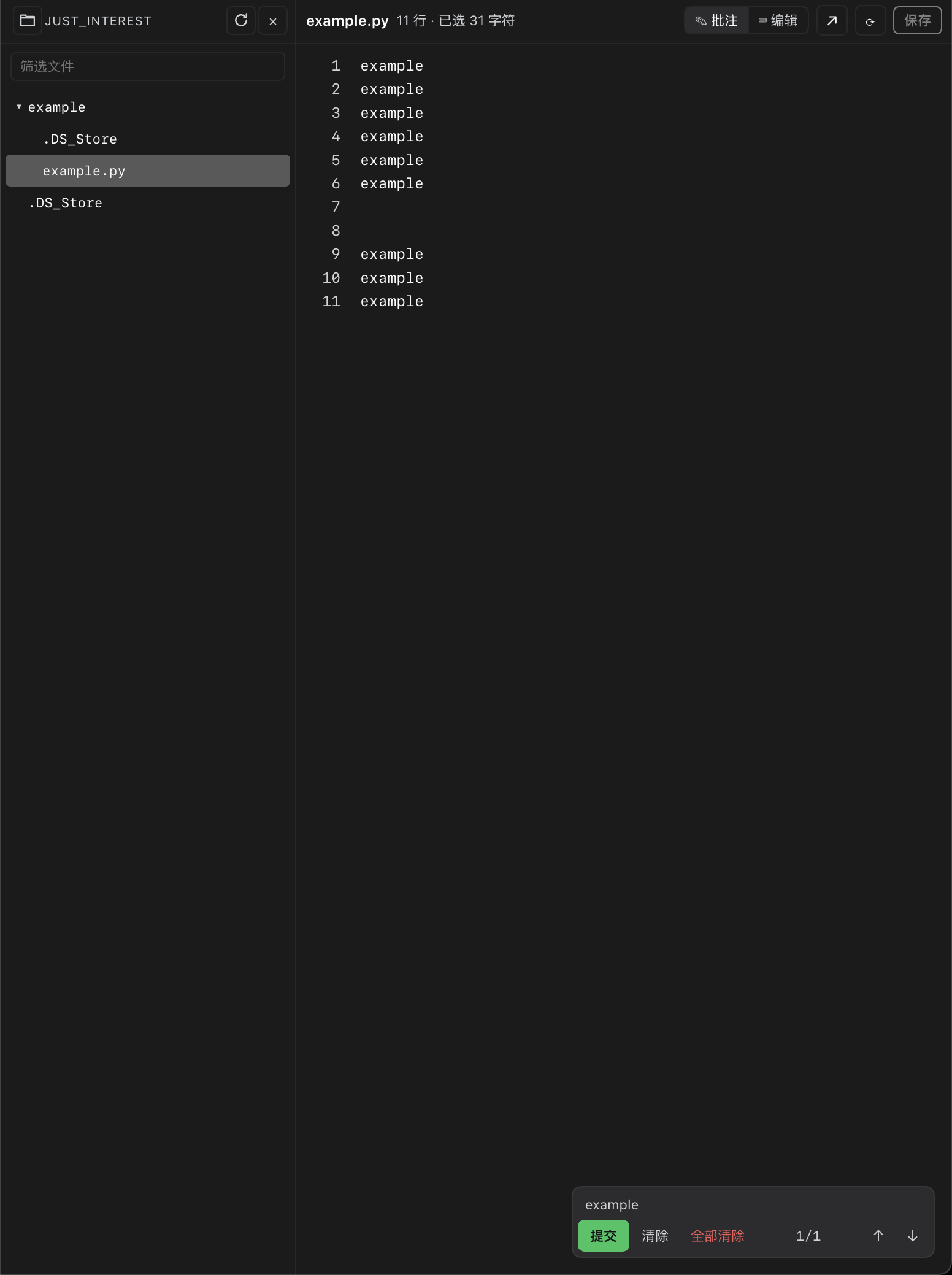
需要直接修改文件时,切到“编辑”模式,改完保存。
隐私与数据
- 批注保存在当前浏览器的
localStorage,按会话和文件区分。 - 插件没有遥测,不会把批注、文件内容或个人信息发送到第三方服务。
- 文件读取/写回通过 DSH 宿主的 workspace/file API 完成,遵守宿主的文件策略和沙箱。
提交只调用宿主的 composer actions(必要时回退到 bridge)把文本追加到对话输入框,不会直接提交给模型。
已知限制
- PDF、图片、Office 等非文本文件不能在批注编辑器中编辑或批注;它们交给宿主原生预览。
- 插件不内嵌终端;终端使用 DSH 原生右侧栏 terminal tab。
- 大文件(>200k 字符)使用纯文本高亮,且不执行批注重定位;直接保存也受 20 万字符限制。
- 批注 quote 被改写后会显示 stale,无法自动定位到正确位置。
- 关闭编辑器 tab 不会弹未保存确认;需要先保存。
- 依赖当前 DSH 的 Client 插件/侧栏 API;DSH 升级后如有 API 变化可能需要适配。
开发
插件没有构建步骤,也没有运行时 npm 依赖:
index.js— Host 半,注册保存命令。client.js— Client 半,注册侧栏 tab、编辑器、文件树、批注导航、Markdown 预览。cordis.patch.yml— bundle patch,插入file-annotate行。locale/{zh,en}.json— 插件管理器显示名称与描述。icon.svg— 插件图标。
开发时可以用本地目录 link 安装:
dsh plugin --profile <profile> add /absolute/path/to/dsh-plugin-file-annotate
License
MIT. See the LICENSE file in the repository.
Links
More in this category
zhu1090093659/dsh-web#packages/dsh-task-board★ 10406
Task board for the dsh web GUI: a sidebar multi-column kanban whose cards run in real DSH agent sessions and can also be scheduled with cron expressions, executed host-side even with the browser closed.
zhu1090093659/dsh-web#packages/dsh-web-all★ 10406
Plugin and skin collection for the DSH Web UI: task board, Git graph, right-side panel, remote mobile UI, pet, live token stats, and a skin center.
ccch1mneyyy/dsh-TUI★ 7675
Claude Code-style full-screen terminal UI: pixel-whale header, live status line, and streaming thought expansion.
MeteorNOX/DeepSeek-Balance-Whale-Widget★ 7201
A fixed-corner whale widget for the DSH web GUI — balance, today's usage and per-turn cost with peak/off-peak pricing, editable balance-alert and daily-budget bubbles, a module-based custom bubble queue with A/B weighted choices and random lines or images, 30+ vendor templates (OpenAI, OpenRouter, Kimi, SiliconFlow, Ark, Zhipu, MiniMax and more) with per-model balance and subscription quota, plus task-end sound, imported audio, custom roles and a resource manager. Local-only, no telemetry.
omdsh-dev/DSH-better-sidebar★ 5142
Full sidebar workbench with file rendering and editing, terminal, Git, and subagents; third-party plugins can register new tabs.
Devin-AXIS/deepseek-design#deepseek-idesign★ 1816
Visual design studio for websites, app prototypes, posters, cards, reports, and magazines, with templates, direct element editing, selection-aware AI draft handoff, and export.
Community comments
Comments are public GitHub Discussions. Loading them connects to GitHub and Giscus; a GitHub account is required to post.