Unify third-party plugin settings in DeepSeek Harness. Auto-discover, group, and reorder plugin settings under one collapsible nav entry with drag-and-drop support.
Install
# from npm (prebuilt)
dsh plugin --profile web add dsh-settings-hub
# from GitHub (first run asks for allowBuilds approval — follow the hint, retry)
dsh plugin --profile web add github:Amengclass/dsh-settings-hub
Any plugin you install runs third-party code with your own permissions — it can read your files, use your credentials, and reach the network, and tool approvals don’t sandbox it. GitHub-sourced plugins also run build scripts at install time — pnpm blocks those until you allow them, so an install can stop with ERR_PNPM_GIT_DEP_PREPARE_NOT_ALLOWED or ERR_PNPM_IGNORED_BUILDS; dsh prints the exact key to add under allowBuilds in your profile’s pnpm-workspace.yaml, and the install works on the next run. Allowing a build is a trust decision: only install sources you trust, and pin a commit (github:owner/repo#sha).
README
dsh-settings-hub
Unify third-party plugin settings in DeepSeek Harness
Highlights
- Unified entry — All third-party plugin settings automatically grouped under "扩展设置项", no more scattered across the sidebar
- Auto-discovery — Newly installed plugins appear automatically, no manual config needed
- Group by parent — Sub-settings grouped by their parent plugin via dependency analysis
- Drag reorder — Drag to reorder groups and items, order persisted to localStorage
- Ghost drag — Original item stays in place while a semi-transparent ghost follows the cursor
- Zero intrusion — No DSH source modifications; uses the official shadow mechanism on
sidebar.settings - Works on both fronts — Compatible with
dsh weband the DSH desktop app (DSH 0.1.x / 0.2.x)
How it works
┌─────────────────────────────────────────────┐
│              DeepSeek Harness               │
│  ┌──────────────┐  ┌──────────────────────┐ │
│  │  Native       │  │  扩展设置项 ▾        │ │
│  │  通用设置     │  │  ┌─ Plugin Group A ─┐│ │
│  │  模型        │  │  │  Sub-item 1      ││ │
│  │  插件        │  │  │  Sub-item 2      ││ │
│  │  Agent 预设  │  │  ├─ Plugin Group B ─┤│ │
│  │              │  │  │  Sub-item 1      ││ │
│  └──────────────┘  │  └──────────────────┘│ │
│                    └──────────────────────┘ │
└─────────────────────────────────────────────┘
Native settings (General/Models/Plugins/Agent Presets) stay untouched. Third-party plugin settings auto-collapse under "扩展设置项".
Screenshots
| Collapsed | Expanded |
|---|---|
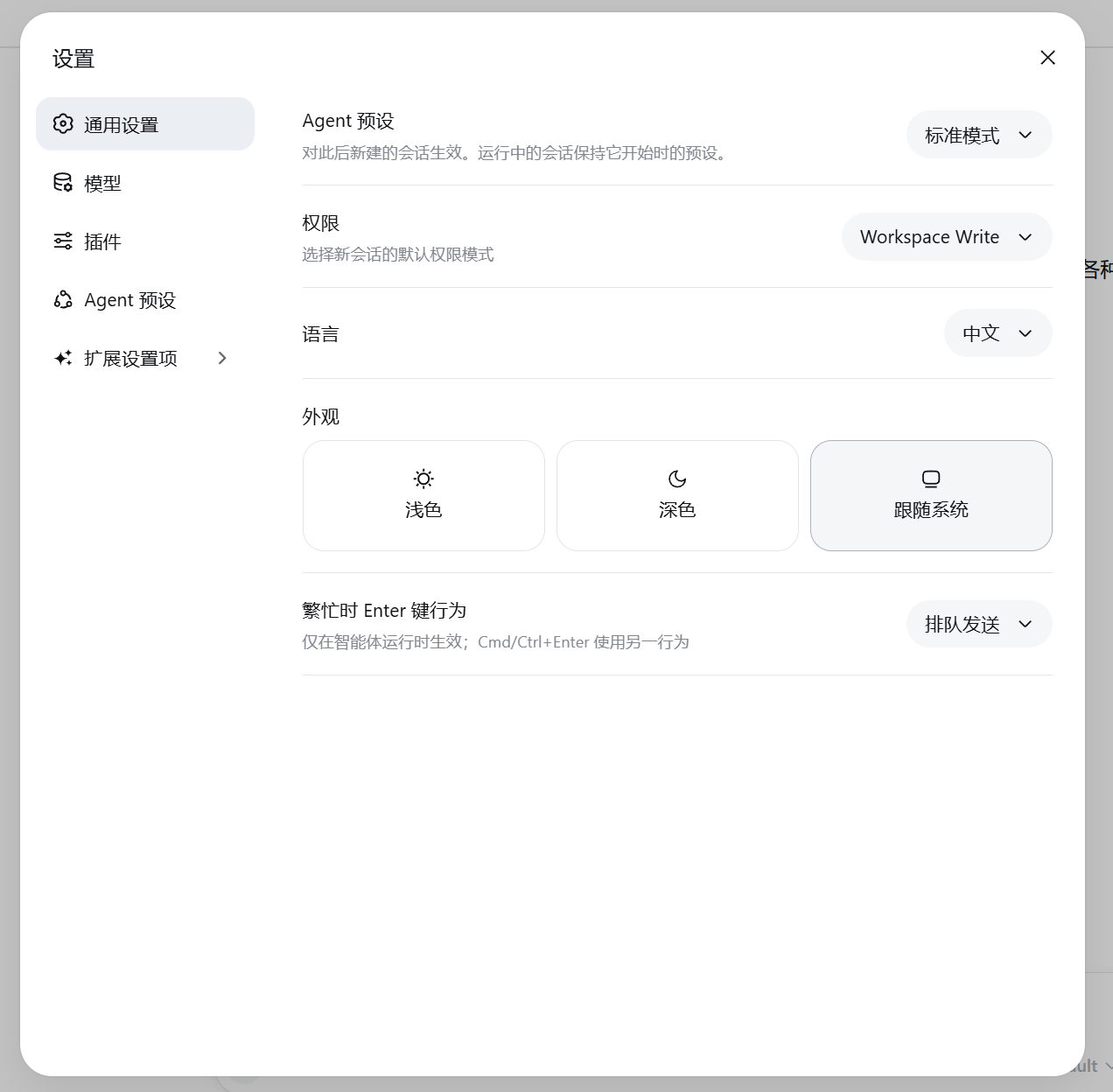 |
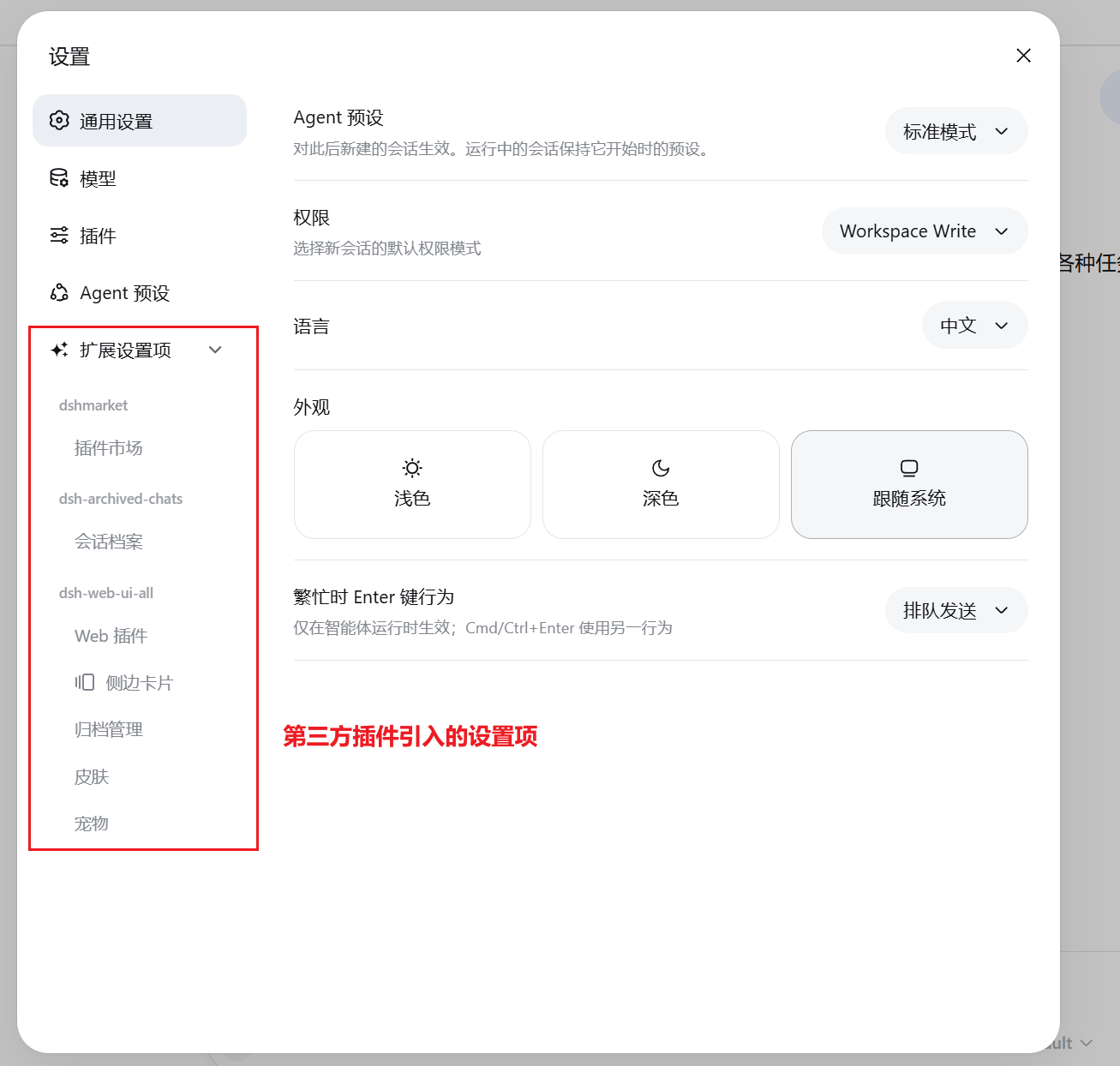 |
Quick Start
Prerequisites
- DeepSeek Harness installed
- Node.js 18+
Install
Option1: npm (recommended)
dsh plugin --profile web add dsh-settings-hub
pnpm 11 users: pnpm blocks packages published within 24 hours by default. If you get an older version, add to
~/.dsh/profiles/web/pnpm-workspace.yaml:minimumReleaseAgeExclude: - dsh-settings-hubThen reinstall.
Update:
dsh plugin --profile web update dsh-settings-hub@latest
Option 2: GitHub
dsh plugin --profile web add github:Amengclass/dsh-settings-hub
Option 3: From source
git clone https://github.com/Amengclass/dsh-settings-hub.git
cd ~/.dsh/profiles/web
npm link /path/to/dsh-settings-hub
Run
dsh web
Uninstall
dsh plugin --profile web remove dsh-settings-hub
Open http://127.0.0.1:3080 and click "设置" in the bottom-left corner.
Desktop app users: The DSH desktop app uses its own profile (
~/.dsh/profiles/desktop), so install this plugin from the desktop app's own plugin manager rather than runningdsh plugin --profile web add. The desktop app anddsh webare independent — each manages its own plugins.
Configuration
No configuration needed. Works out of the box:
| Behavior | Description |
|---|---|
| Auto-discovery | Scans installed plugins, dynamically registers settings groups |
| Drag reorder | Drag to adjust order, saved to localStorage |
| Group attribution | Auto-groups by node_modules dependency tree |
FAQ
- Verify:
ls node_modules/dsh-settings-hub - Restart DSH:
dsh web - Clear browser cache and refresh
Plugins must register settings.section to be discovered. Some plugins (e.g. dsh-vision-router) use alternative registration mechanisms and are not yet supported.
pnpm 11 blocks packages published within 24 hours by default. If you get an older version, add a whitelist entry in ~/.dsh/profiles/web/pnpm-workspace.yaml:
minimumReleaseAgeExclude:
  - dsh-settings-hub
Then reinstall.
Development
git clone https://github.com/Amengclass/dsh-settings-hub.git
cd dsh-settings-hub

cd ~/.dsh/profiles/web
npm link /path/to/dsh-settings-hub

dsh web
Project structure
dsh-settings-hub/
├── index.js              # Node: HTTP API + dependency scanning
├── lib/
│   └── client.js         # Browser: settings UI + drag & drop
├── cordis.patch.yml      # DSH bundle layer declaration
├── package.json
└── README.md
Contributing
Issues and PRs welcome!
- Fork the repo
- Create a feature branch:
git checkout -b feature/my-feature - Commit:
git commit -m 'feat: add my feature' - Push:
git push origin feature/my-feature - Open a Pull Request
License
Links
More in this category
zhu1090093659/dsh-web#packages/dsh-task-board★ 8670
Task board for the dsh web GUI: a sidebar multi-column kanban whose cards run in real DSH agent sessions and can also be scheduled with cron expressions, executed host-side even with the browser closed.
zhu1090093659/dsh-web#packages/dsh-web-all★ 8670
Plugin and skin collection for the DSH Web UI: task board, Git graph, right-side panel, remote mobile UI, pet, live token stats, and a skin center.
MeteorNOX/DeepSeek-Balance-Whale-Widget★ 4631
A fixed-corner whale widget for the DSH web GUI — balance, today's usage and per-turn cost with peak/off-peak pricing, editable balance-alert and daily-budget bubbles, a module-based custom bubble queue with A/B weighted choices and random lines or images, 30+ vendor templates (OpenAI, OpenRouter, Kimi, SiliconFlow, Ark, Zhipu, MiniMax and more) with per-model balance and subscription quota, plus task-end sound, imported audio, custom roles and a resource manager. Local-only, no telemetry.
ccch1mneyyy/dsh-TUI★ 4484
Claude Code-style full-screen terminal UI: pixel-whale header, live status line, and streaming thought expansion.
omdsh-dev/DSH-better-sidebar★ 4133
Full sidebar workbench with file rendering and editing, terminal, Git, and subagents; third-party plugins can register new tabs.
Devin-AXIS/deepseek-design#deepseek-idesign★ 1453
Visual design studio for websites, app prototypes, posters, cards, reports, and magazines, with templates, direct element editing, selection-aware AI draft handoff, and export.
Community comments
Comments are public GitHub Discussions. Loading them connects to GitHub and Giscus; a GitHub account is required to post.