Project-isolated long-term memory for DeepSeek Harness that keeps one bank per project and adds a cross-project view; it can also seed a project's memory from its git history without opening a session there.
Install
# from GitHub (first run asks for allowBuilds approval — follow the hint, retry)
dsh plugin --profile web add github:AllenWES365/dsh-local-memory
Any plugin you install runs third-party code with your own permissions — it can read your files, use your credentials, and reach the network, and tool approvals don’t sandbox it. GitHub-sourced plugins also run build scripts at install time — pnpm blocks those until you allow them, so an install can stop with ERR_PNPM_GIT_DEP_PREPARE_NOT_ALLOWED or ERR_PNPM_IGNORED_BUILDS; dsh prints the exact key to add under allowBuilds in your profile’s pnpm-workspace.yaml, and the install works on the next run. Allowing a build is a trust decision: only install sources you trust, and pin a commit (github:owner/repo#sha).
README
This plugin publishes its README in Chinese only.
给 DeepSeek Harness 的跨项目长期记忆:每个项目各存各的库,互不干扰;一个总视角一次看遍全部。
https://github.com/AllenWES365/dsh-local-memory
dsh plugin --profile web add github:AllenWES365/dsh-local-memory
memory_projects      列出全部项目,标出哪些有记忆、哪些还没有
memory_banks         列出所有项目记忆库(含规模与活跃度)
memory_recall_all    跨库查询,结果按项目分组
memory_seed          给还没有记忆的项目直接建库(从 git 历史播种),不必先进去开会话
设置 → 本地记忆       图形界面:项目总览 + 一键建立/更新记忆 + 勾选要查哪些库 + 直接搜
界面
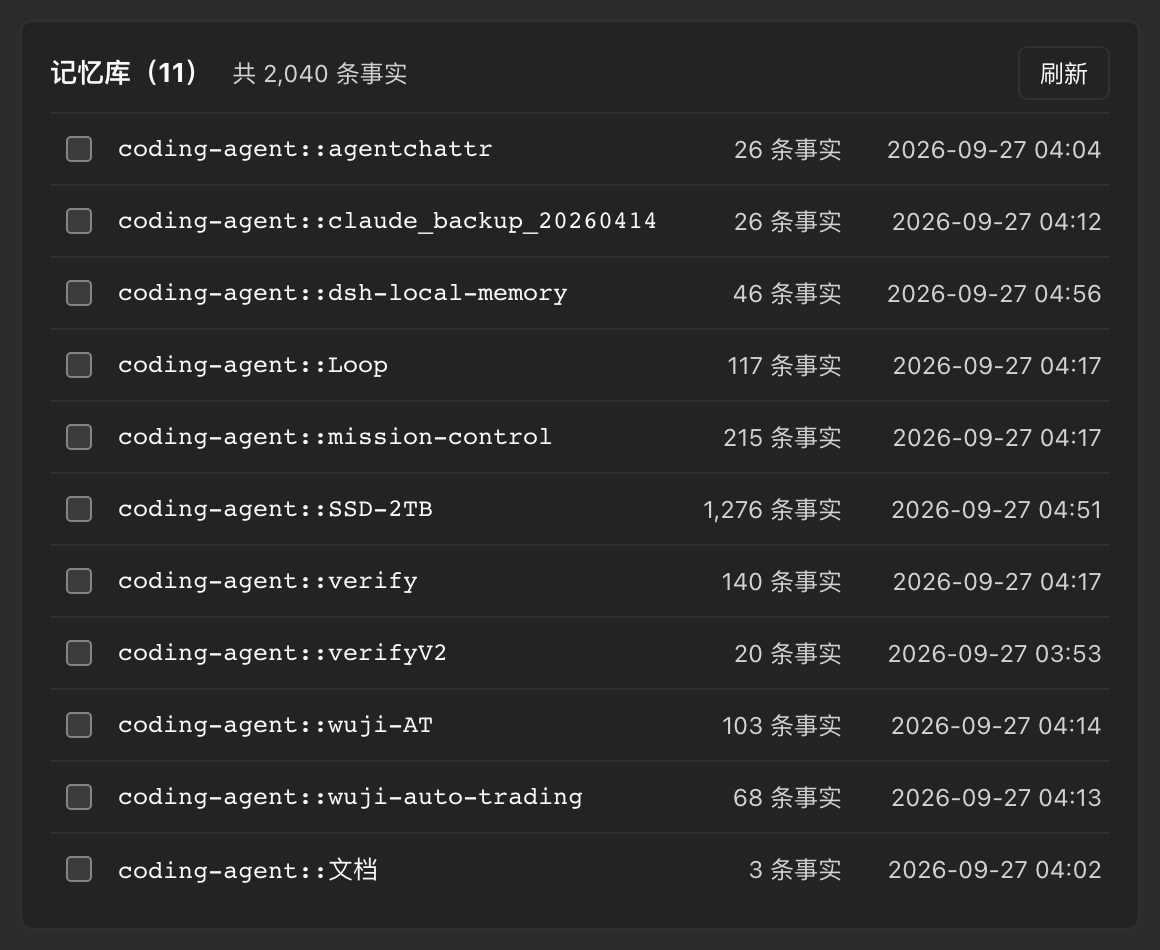
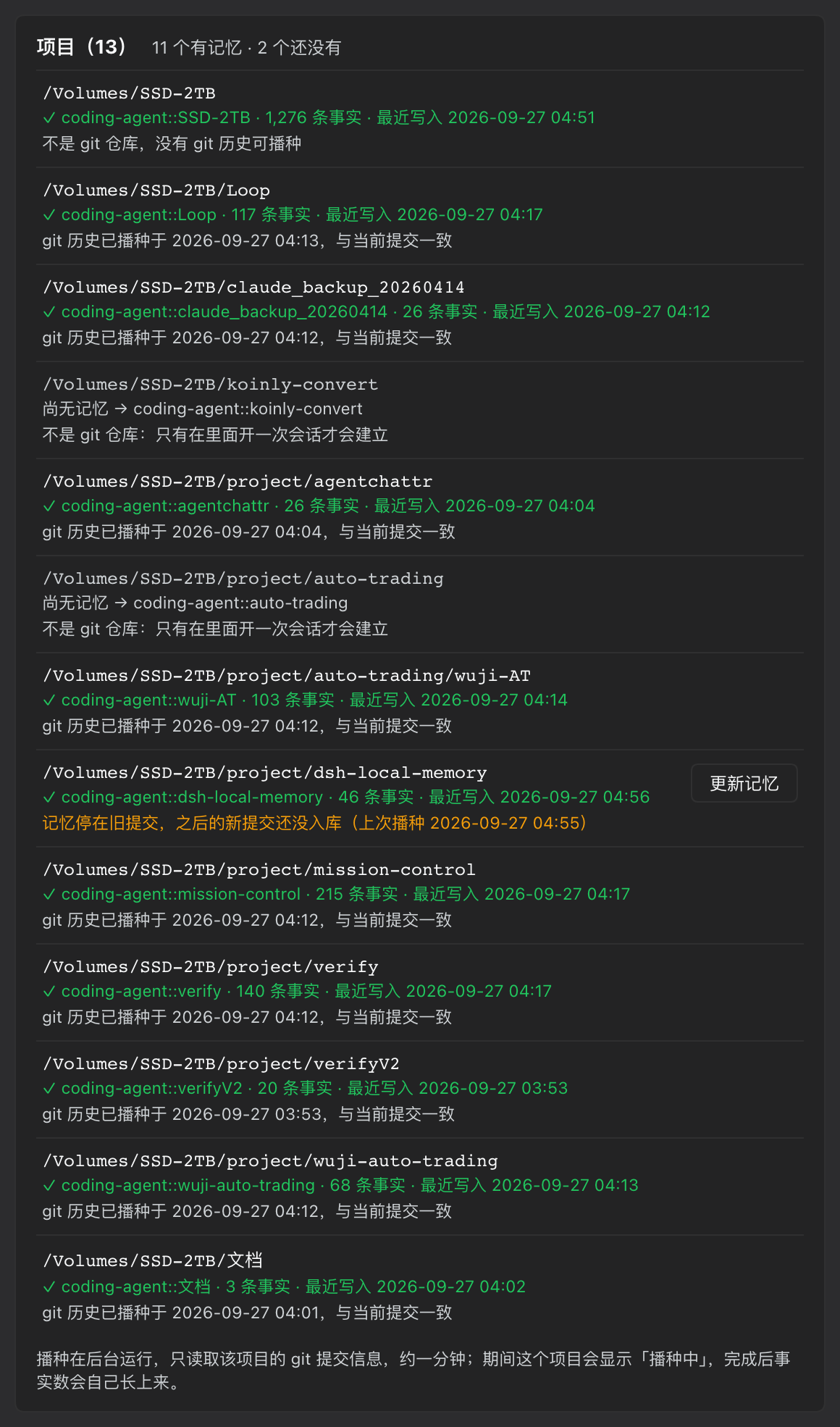
设置 → 本地记忆
每个项目一个库,规模与活跃度一目了然;下面是磁盘上找到的全部项目,标出哪些有记忆、哪些还没有,能动的直接给按钮。
它解决什么问题
Hindsight 的记忆库是平级的——没有层级,没有"总库管理分库"这回事。所以原生只有两个选择:
| 方案 | 结果 |
|---|---|
| 一个共享库 | CEO 视角能看到全部 ✅ 但项目之间不再隔离(检索是库级的)❌ |
| 每个项目一个库 | 隔离干净 ✅ 但总视角那个库永远是空的 ❌ |
这个插件保留"每项目一库"(Hindsight 原生就做得好),再在读取时补上缺失的跨库视角。
聚合结果是一份视图,不是第二份副本——所以没有东西需要同步,也不会有数据重复。
还有一个更隐蔽的缺口
「库列表」只能回答**"我记得什么"。它回答不了"我该记得什么"**——一个从没被工作过的项目根本不在列表里,沉默和不存在的表现一模一样。
你有 10 个项目、1 个库的时候,你需要看到的是缺的那 9 个,而且要按名字列出来。
所以还有 memory_projects:它扫描工作区、找出其中的 git 仓库、推导每个项目将会得到的库名,再和实际存在的库对照。于是:
10 git repository/repositories under 1 working root(s):
- 9 with no memory yet
- 0 whose memory is behind the current commit
- 1 already up to date or not comparable

No memory yet:
- /Volumes/SSD-2TB/project/mission-control  →  coding-agent::mission-control
- /Volumes/SSD-2TB/project/verify  →  coding-agent::verify
...
目录里出现过的库但对应不到任何项目时,也会单独列出来——那种"来历不明的库"正是这个视图该暴露的东西。
光诊断不做,等于把活推回给你
第一版的「项目」一栏只报告、不解决:它列出 12 个还没记忆的项目,然后告诉你「去里面开一次会话就好了」。这是把活儿丢回给读它的人,而且它分不清两种截然不同的状态:
| 磁盘上的东西 | 能不能建库 |
|---|---|
| git 仓库 | 可以,git log 就在那里,随时能播种 |
| 普通文件夹 | 永远不行——Hindsight 的 synced 要求存在 gitlog: 文档,没有 git 历史就永远到不了 |
两种都写成「尚无记忆」,读者没法知道哪一行是可以动的。所以现在每一行都知道自己是哪一种,能动的直接给按钮:
/Volumes/SSD-2TB/project/verify
尚无记忆  →  coding-agent::verify                       [建立记忆]
git 仓库,可以直接播种历史,不必先开会话
点下去跑的是 Hindsight 自己的播种引擎(deepen.js)——和它在会话启动时 spawn 的是同一个入口,不是重新实现的一遍。所以播出来的库不可能和开会话得到的有什么不同。播种在后台进行,约一分钟;期间该行显示「播种中… 42s」,完成后事实数自己长上来。
已建库的项目还会分辨「git 历史已播种」和「这个库其实只来自对话」,以及记忆是否停在旧提交上——后两种情况给出「播种 git 历史 / 更新记忆」。
依赖
需要先装并配好 Hindsight:
dsh plugin --profile web add @vectorize-io/hindsight-coding-agents
然后确认是本地 daemon 模式(详见下方「前置配置」)。没有它,本插件没有可读的数据源。
安装
dsh plugin --profile web add github:AllenWES365/dsh-local-memory
装完重启 DSH,然后在 设置 → 本地记忆 看到界面。
这条命令是验证过的:在一个干净的 profile 里(--from-default-profile web 初始化、全新的 DSH_HOME)执行它,命令会自动把这个包加进 dsh.profile.bundles 并挂载,界面和路由都正常。
本插件尚未发布到 npm,所以
add dsh-local-memory这种写法在别人机器上会失败——请用上面的 GitHub 地址。从本地源码开发时才用
dsh plugin --profile web add link:$PWD。
前置配置(一次性)
配置文件在 ~/.hindsight/coding-agent.json,正确内容就是这一行:
{ "serverMode": "daemon" }
为什么不能多写
| 字段 | 后果 |
|---|---|
bankId |
强制所有项目共用一个库——项目隔离和跨库视角同时失效。危害最大的一个设置。 |
retainTags / retainMetadata |
每个库本来就是项目,多余 |
observationScopes |
默认 shared 才对;combined 只是"单库内假装分区"的补丁 |
LLM key 不在配置文件里
事实提取需要一个 LLM。它只能通过环境变量传给 daemon:
export HINDSIGHT_API_LLM_PROVIDER=deepseek
export HINDSIGHT_API_LLM_MODEL=deepseek-v4-flash
export HINDSIGHT_API_LLM_API_KEY=...
写进 ~/.zshrc 之后必须开新终端——.zshrc 每个交互式 shell 只读一次,在旧终端里重启 dsh web 什么也不会生效。
用 ollama 做 provider 可以做到完全离线。
库名规则
| 会话所在目录 | 库名 |
|---|---|
/Volumes/SSD-2TB(不是 git 仓库 → 用目录名兜底) |
coding-agent::SSD-2TB |
…/project/verify |
coding-agent::verify |
…/Loop |
coding-agent::Loop |
规则是 coding-agent:: + 项目目录名,全自动。库在某个项目里第一次记录内容时创建——你还没进去工作过的项目没有库,这是正常的。
性能:老实说
成本由库的规模决定,不是库的数量。 实测:
| 库 | 一次检索 |
|---|---|
| 小库(几条事实) | ~30 ms |
| 大库(数百条事实、数万条关系边) | ~1.0–1.4 s |
客户端没有任何参数能改善单库成本——实测:关重排 1035ms vs 基线 1030ms;budget: low 反而更慢(1255ms);max_tokens 把 59 条压到 3 条,耗时仍是 1025ms;limit 被忽略。并发 1/6/13 相差不到 20%,因为 daemon 基本串行处理。
所以:查你确信藏着答案的那一两个库。全量扫描只在你确实不知道去哪找时才做——工具会如实报告耗时并说明原因。
界面上的库列表带事实数和最后写入时间,就是为了让"选哪几个库"变成有依据的判断而不是猜。
四个工具
memory_banks
2 memory bank(s):
- coding-agent::SSD-2TB  (596 facts, last write 2026-09-27 01:28)
- workspace              (873 facts, last write 2026-09-27 02:33)
memory_recall_all
Searched 2 bank(s) in 1102ms for: 这个项目用什么数据库?

## coding-agent::SSD-2TB
- alpha-svc 项目是订单服务,使用 PostgreSQL 16 存储订单,并使用 Kafka 做异步事件。
- … 另有 36 条未显示

## coding-agent::beta-web
- beta-web 项目是前端站点,技术栈为 SvelteKit + Tailwind。
banks参数可只查指定的库(强烈建议)- 每个库有默认上限(5 条),超出会明确标注而不是静默丢弃
- 单个库失败不会影响其它库,失败原因单独列出
- 耗时超过 1 秒会说明为什么慢、以及怎么缩小范围
memory_projects
1 working root(s), 11 project(s) found, 2 with memory.

## With memory
- /Volumes/SSD-2TB
    coding-agent::SSD-2TB  (1017 facts, last write 2026-09-27T03:52, not a git repository, so there is no history to seed)
- /Volumes/SSD-2TB/project/dsh-local-memory
    coding-agent::dsh-local-memory  (29 facts, git history seeded 2026-09-27T03:49)

## Git repositories with no memory yet — these are seedable now
- /Volumes/SSD-2TB/project/mission-control
    will become coding-agent::mission-control
memory_seed
| 调用 | 作用 |
|---|---|
memory_seed() |
列出现在能播种什么,无副作用 |
memory_seed({ all: true }) |
把所有还没记忆的 git 仓库都建起来 |
memory_seed({ path }) / { paths: [...] } |
只建指定的几个 |
相对路径、不在工作区里的路径、不是 git 仓库的目录,都会被说明理由后拒绝。播种一律在后台跑,用 memory_projects 看进度。
设置界面
设置 → 本地记忆
- 库列表:名称、事实数、最后写入时间,可勾选(不勾 = 查全部)
- 项目总览:每条项目按状态给出对应操作
- 没记忆的 git 仓库 →
[建立记忆],顶部还有[全部建立(N)] - 记忆停在旧提交 →
[更新记忆] - 库只来自对话、git 历史没播过 →
[播种 git 历史] - 已经是 git 仓库且播过、和当前提交一致 → 只显示状态,不给按钮
- 不是 git 仓库 → 说明「只有在里面开一次会话才会建立」,不给按钮(给了也点不动)
- 没记忆的 git 仓库 →
- 播种中的行显示「播种中… 42s」,并且每 5 秒回 host 核对一次。判定完全基于证据,不靠计时器猜:
- host 报告该库的
gitlog文档落地时间不早于点击时刻 →git 历史已入库,事实仍在后台抽取(播种进程还会继续跑约一分钟,事实数仍在涨,所以不写"全部完成") - host 不再报告这个项目在播种、且没有任何
gitlog落地 →播种进程已结束,但没有写入 git 历史+ 日志路径 - 超过 20 分钟 → 时间说明 + 日志路径
- host 报告该库的
- 跨库查询:输入问题直接搜,下方显示耗时、命中库数、按库分组的结果
- 失败库单独列出原因
出问题时
| 现象 | 原因 |
|---|---|
| 界面显示"连接失败" | 记忆服务没在运行。打开任意会话会按需把它拉起来 |
| 每次都 401 | 配置指向云端且没有 token。改成 {"serverMode":"daemon"} 并重启 |
重启报 EADDRINUSE,或插件说 already owned by process N |
有旧的 DSH 进程还活着占着端口和独占锁。先 kill <pid>(用 lsof -nP -iTCP:3080 -sTCP:LISTEN 找) |
| 起不来时的后路 | dsh --profile rescue,用不含社区插件的干净 profile 启动同一个界面 |
| 环境变量不生效 | 用新终端,或在原终端先 source ~/.zshrc |
诊断端点:
curl -s localhost:9077/health                       # 健康状态
curl -s localhost:9077/v1/default/banks | jq        # 库列表 + 规模
贡献
MIT。装上插件后会自动注册一个 dsh-local-memory 技能,记录了这套后端的运维知识(含上面这些坑的成因与修法)——改这个插件前建议先读它。
许可
MIT
Links
More in this category
vectorize-io/hindsight#coding-agents★ 60916
Hindsight, agent memory that learns: long-term project memory with auto recall and retain, knowledge pages, deep reflection, and per-repo memory banks.
volcengine/OpenViking#examples/dsh-memory-plugin★ 42209
OpenViking memory and context bundle for DeepSeek Harness: pre-step auto-recall and profile injection, session capture, `viking://` URI guarding, and recall/write memory tools backed by an OpenViking server.
MemTensor/MemOS#memos-local-plugin★ 12392
Local-first memory plugin for DeepSeek Harness: layered L1/L2/L3 memory with automatic capture, manual memos_* retrieval tools, and a built-in memory viewer.
agentscope-ai/ReMe#dsh★ 3799
Connects DeepSeek Harness to ReMe's local-first, self-evolving personal knowledge base: automatically captures completed main-agent conversations as user-owned Markdown memory, searches conversations and source material through reme_search with BM25, optional embeddings, and wikilink expansion, and schedules daily memory consolidation.
zilliztech/memsearch#MemSearch★ 2873
Shared Markdown memory for DSH and other coding agents, with automatic capture, pre-step context injection, searchable recall, and memory-to-skill self-evolution through a review panel.
vshulcz/deja-vu#extensions/dsh★ 1544
Cross-session memory and context recovery across forty-five other coding agents (45+) on this machine, reading session files they already wrote before install (Claude Code, Codex, Cursor, Windsurf, Trae, Antigravity, VS Code Copilot Chat, opencode, OpenClaw, Hermes, Kimi, Qoder, Cline, Zed, Magpie and more): six tools (deja_recall, deja_session, deja_blame, deja_fix, deja_how, deja_remember), a /deja command, and optional automatic recall injected into runtime context. Local BM25 CLI/MCP index, no LLM, no embeddings, no network (dsh plugin --profile web add dsh-deja).
Community comments
Comments are public GitHub Discussions. Loading them connects to GitHub and Giscus; a GitHub account is required to post.