Personalization for the agent: a Web UI panel (about-you, reply style & tone, traits for headings/lists and emoji, output language, custom instructions) and `/soul` commands, with nickname/occupation/bio/style/traits/language compiled into a system prompt and re-injected into active sessions. Exposes `soulConfig` for other plugins and a `set_persona` tool the agent can call.
Install
# from npm (prebuilt)
dsh plugin --profile web add dsh-soul
# from GitHub (first run asks for allowBuilds approval — follow the hint, retry)
dsh plugin --profile web add github:Aliuyanfeng/dsh-soul
Any plugin you install runs third-party code with your own permissions — it can read your files, use your credentials, and reach the network, and tool approvals don’t sandbox it. GitHub-sourced plugins also run build scripts at install time — pnpm blocks those until you allow them, so an install can stop with ERR_PNPM_GIT_DEP_PREPARE_NOT_ALLOWED or ERR_PNPM_IGNORED_BUILDS; dsh prints the exact key to add under allowBuilds in your profile’s pnpm-workspace.yaml, and the install works on the next run. Allowing a build is a trust decision: only install sources you trust, and pin a commit (github:owner/repo#sha).
README
dsh-soul
A personalization plugin for DeepSeek Harness (DSH). Configure your agent's nickname, reply style, tone, and custom instructions.
Features
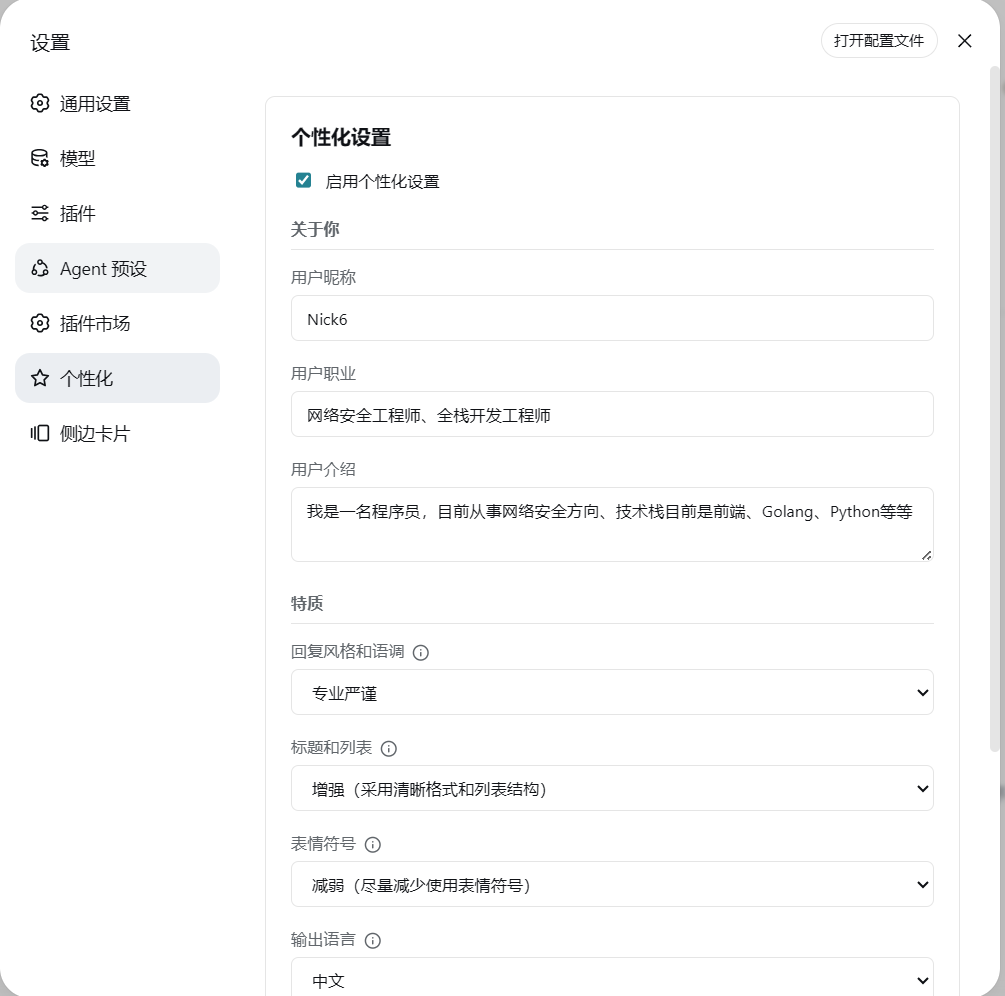
- Personalization settings page in the Web UI
- Localized settings UI (English/Chinese, follows the interface language), dirty tracking (save disabled when unchanged), save-result toasts, and a read-only prompt preview panel
- Enable or disable personalization
- "About you": set your nickname, occupation and bio so replies fit your background
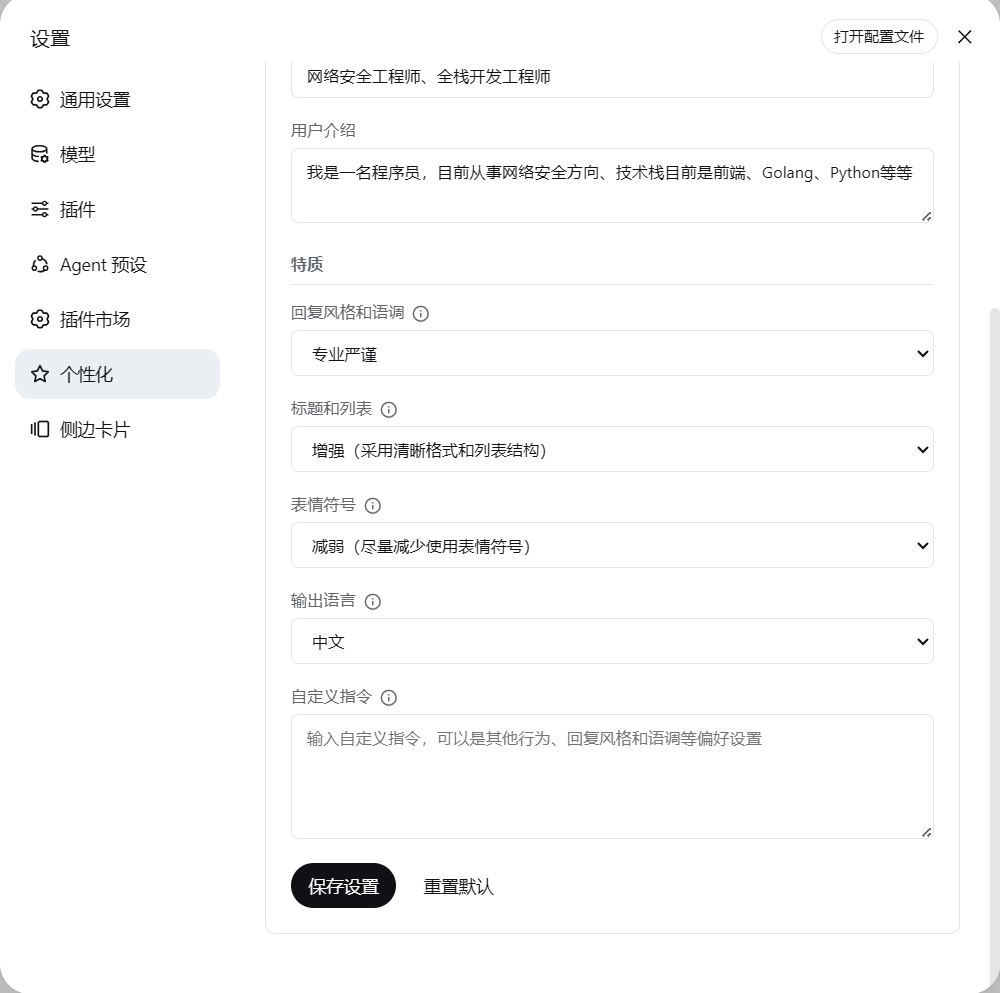
- Combined style & tone option:
professional,casual,humorous,roast,efficient - Trait fine-tuning (layered on top of style & tone):
- Headings & lists:
default,more(clear formatting with headings and lists),less(more paragraph text) - Emoji:
default,more(frequent emoji usage),less(minimal emoji usage) - Tables:
default,more(prefer tables for comparisons and multi-field data),less(avoid tables; use lists or paragraphs)
- Headings & lists:
- Reply length preference:
concise(key points only),normal(no extra constraint, default),detailed(expand background, steps and reasoning) - Output language (agent reply language +
/soulcommand output language): Chinese or English - The compiled system prompt follows the output language (English descriptions when
language=en) - Custom instructions
- Agent-callable tool
set_personato let the model adjust persona during a conversation - Named personas: 7 built-in personas (Socratic Questioner / Minimalist / Senior Architect / Teaching Explainer / Strict Code Reviewer / Brainstorm Partner / Self-Driven Collaborator — shipped with the plugin, cannot be deleted) plus your own named personas, switched with one click (save / use / list / delete, in both the Web UI and slash commands); each row summarises the style and every dimension that differs from its default
- Personas cover the agent's personality only: switching a persona never touches "About you" (nickname / occupation / bio describe you, not how the agent talks). Built-in and self-saved personas behave identically — saving a persona snapshots style / traits / reply length / reply language / custom instructions, never the identity fields; full-config snapshots written by earlier versions are stripped on read
set_personaconfirmation mode (requireToolConfirmation): agent persona changes first raise the host's native approval panel above the composer, taking effect only after you click "Allow once" or "Reject" (Enterallows,Escrejects); when the approval channel is unavailable (e.g. the session approval policy isnever) it degrades to a pending proposal handled with/soul confirm- Composer light trail: while the agent is replying, a light trail loops around the composer border (default color
#679EFE)- Color: preset swatches, a color picker, or a hex input (e.g.
#679EFE) - Flow speed: slow / normal / fast (default slow, 4.8s / 3.6s / 2.4s); trail thickness: thin / normal / thick (default thin, 1.5 / 2.5 / 4 px)
- The trail advances at constant speed along the border and fades into a tail; it sits exactly on the composer border, never producing a double line
- The settings page shows a live preview that follows color / speed / thickness; automatically disabled under "reduce motion"
- Color: preset swatches, a color picker, or a hex input (e.g.
/soul setkey=value field updates- Configuration persisted to disk
- Input validation: field whitelist, types, length limits (nickname/occupation 50, bio 500, custom instructions 2000 chars), enum and hex-color checks; invalid or oversized fields reject the whole write
- Durable config: writes are atomic (temp file +
rename, so an interrupted write can never leave half a config); reads tell "file missing" apart from "file corrupted" — a corrupt file is left untouched, backed up as.corrupt, refused as a write target, and the reason is shown right in the settings page so your custom instructions and persona library are never silently wiped - Reset is the escape hatch for a corrupt config: since every other write path refuses to touch a corrupt file,
/soul reset(and the settings-page reset button) moves it aside as.corruptand writes a fresh default config, reporting the backup path — so a bad file never locks you out of the plugin without a restart - Delivery is observable:
/soul showends with a delivery line,GET /api/soul/statusreportsversion/enabled/configPath/configError/promptChars/ both channels /deliveryWarning, and the settings page shows the same reason as a banner.configError(cannot read the config) anddeliveryWarning(cannot deliver it to active sessions) are reported separately — same symptom, different fix - Prompt interpolation is disabled:
{{…}}in custom instructions stays literal and can no longer break system-prompt assembly - Configuration synced to all active agents after every update
- Change detection: the prompt is refreshed and sessions injected only when a behavior-affecting field actually changed — appearance-only config (composer light trail) is persisted without injecting anything
- Change history and rollback (the "Change history" group on the settings page): every config change appends a record (time, source, field-level
old → new), and you can undo one change together with everything after it; deleted personas can be restored individually. The log lives in$DSH_HOME/soul-config.history.jsonl(append-only, one record per line, readable by eye). When it cannot be written, only the log suffers — config writes still go through, and you are told the history may be incomplete - Plugin icon: a dedicated icon in the plugin manager list and the sidebar entry (
assets/icon.svg, 36×36, shipped with the npm package) - Settings nav icon: the "Personalization" entry in the settings panel draws the same geometry as the plugin icon — same trail and spark, but coloured and weighted like its neighbours (monochrome
currentColor). DSH hardcodes nav glyphs by section id and offers no way for a plugin to declare one, so the client swaps the glyph in the DOM - Prompt preview (read-only, collapsible section at the bottom of the settings page): shows the currently active prompt while the form is untouched; as soon as any edit is pending it compiles the draft instead — what will actually be injected once you save — refreshing live (400 ms after you stop typing) and again after save / reset / applying a persona. Fields that fail validation are listed separately and excluded from the preview
Roadmap
| Version | Direction | Status |
|---|---|---|
0.7.2 |
Settings-page styling aligned with the host, stacked card carousel, persona changes routed through the host's native approval panel | Released |
0.8.0 |
Change audit and rollback — every config change recorded (timestamp, source, field-level from→to), with a timeline and undo in the settings page | Design doc, done |
0.8.1 |
Persona workspace binding — one directory subtree binds one persona, applied automatically on entering the directory | Design doc, in progress |
0.8.2 |
Self-evolution proposals with diff approval — the Agent proposes persona refinements and the diff goes through the approval panel | Planned |
0.9.0 |
Memory layer — long-term memory across sessions, isolated per persona, recalled on demand | Planned |
Design rationale lives in the corresponding design document; shipped changes are in RELEASE_NOTES.md and the release process in PUBLISHING.md. The roadmap states direction, not a commitment — the order may change.
Installation
dsh plugin --profile <profile> add dsh-soul
dsh plugin --profile <profile> update dsh-soul
Replace <profile> with your own profile name (e.g. desktop when using the DSH desktop build).
The plugin is registered via cordis.patch.yml:
- insert:
    - id: soul
      name: dsh-soul
Compatibility
The plugin ships no DSH runtime packages; the host provides them all. DSH validates peerDependencies before loading, comparing against the DSH runtime version (the version of @deepseek-ai/dsh-app-boot), not the individual packages' versions:
| Package | Range |
|---|---|
@deepseek-ai/dsh-llm |
>=0.1.1-rc.2 <0.3.0-0 |
@deepseek-ai/dsh-tools |
>=0.1.0-rc.6 <0.3.0-0 |
@deepseek-ai/cordis |
^4.0.1 || ^4.0.5-alpha.1 |
So DSH 0.1.x and 0.2.x are supported, prereleases included. Run npm run verify:compat to check the declaration against your environment.
If DSH reports "dsh-soul@x.y.z is incompatible with DSH a.b.c", the plugin predates that DSH version — updating it is enough:
dsh plugin --profile <profile> update dsh-soul
Screenshots
Settings page (About you + Traits)
Settings page (Traits + Output language + Custom instructions)
/soul command prompt

/soul command output (set nickname, show, enable, disable, reset)

Usage
After starting DSH, open the Personalization section on the settings page, edit the configuration and click Save Settings.
Slash commands are also available:
/soul show        Show current configuration (confirmation mode, persona count & delivery status)
/soul set k=v     Change config fields (e.g. /soul set style=humorous language=en; trail: trailColor=#679EFE trailSpeed=fast trailWidth=thick)
/soul save <name> Save the current persona as a preset (personality fields only, never "About you"; built-in names are reserved)
/soul use <name>  Apply a persona (built-in personas work the same way)
/soul list        List personas (✔ marks the active match; built-ins carry a [built-in] tag)
/soul del <name>  Delete a persona (delete / rm aliases; built-in personas cannot be deleted)
/soul confirm     Apply the pending persona proposal (confirmation mode)
/soul reject      Discard the pending persona proposal
/soul reset       Reset configuration (keeps the persona library; with a corrupt config this is the escape hatch — the bad file is moved aside as .corrupt first)
/soul enable      Enable personalization
/soul disable     Disable personalization
/soul Bob         Set nickname
Once saved, the configuration is synced to all active agents and takes effect on the next request in the current session; no-op saves inject nothing.
The agent can also use the set_persona tool to adjust your persona (nickname, style & tone, traits, reply language, custom instructions). The model only invokes this tool when you explicitly ask to change how it addresses or responds to you. With Require confirmation for persona changes (requireToolConfirmation) enabled, tool changes first raise the host's native approval panel above the composer (the same interaction the host uses for sandbox escalation and model switching), where you click "Allow once" or "Reject" — Enter allows, Esc rejects, and the decision is written to the session audit log. When the approval channel is unavailable (for example the session approval policy is never, or no web UI answerer is present) it degrades to a pending proposal handled with /soul confirm or /soul reject. Under a full-permission session (approval policy never) the panel never appears and every change requires a manual command, so turning this switch off is recommended.
Configuration File
The configuration is stored in the DSH user data directory:
soul-config.json
Example:
{
  "enabled": true,
  "nickname": "Bob",
  "occupation": "Software Engineer",
  "bio": "Interested in programming and technology",
  "style": "professional",
  "language": "en",
  "customInstructions": "Be concise and lead with the conclusion.",
  "requireToolConfirmation": false,
  "trailEnabled": true,
  "trailColor": "#679EFE",
  "trailSpeed": "slow",
  "trailWidth": "thin"
}
Your own personas are stored in the same file under the personas field: name → persona field snapshot (style / traits / reply length / reply language / custom instructions) + updatedAt. A persona never contains "About you" (nickname / occupation / bio) — those describe you, and switching a persona only changes how the agent talks. This is enforced structurally by PROFILE_FIELDS and PERSONA_FIELDS in lib/config.mjs: snapshotting, applying, ★ matching and on-disk normalisation all go through the PERSONA_FIELDS allow-list, so built-in and self-saved personas behave the same way. Persona library changes never touch the active config; a persona is applied to the config (and synced to sessions) only when used. Built-in personas are not persisted — they live in lib/personas.mjs — and listing / applying / match detection all go through the merged view of built-ins plus your own; on a name collision the built-in wins, and a built-in name can neither be saved over nor deleted.
Composer light trail fields: trailEnabled (on/off, default true), trailColor (6-digit hex, stored uppercase, default #679EFE), trailSpeed (slow / normal / fast, default slow), trailWidth (thin / normal / thick, default thin). These are appearance-only: they are persisted but never enter the system prompt and never trigger a session injection.
Length limits: nickname / occupation 50 chars, bio 500 chars, custom instructions 2000 chars; the color must be #rrggbb. Unknown fields are dropped; invalid or oversized fields reject the whole write (HTTP returns 400 with per-field error details).
How It Works
"Takes effect on the next request after saving" is guaranteed by two channels — both are required (see DEBUGGING.md 3.5).
Channel 1: the system-prompt section. The plugin compiles the config into a system prompt and registers it with DSH:
spCtx.systemPrompt.section({
  name: 'soul:persona',
  order: 0,
  // Host prompt interpolation is disabled: with it on, any complete {{…}} pair in your
  // custom instructions makes assembly throw — and that throw happens at the top of
  // agent.step() with no try/catch, so every single turn fails.
  interpolate: false,
  text: () => compilePrompt(configCache || DEFAULT_CONFIG)
})
The host re-assembles the prompt before every step, does not cache function-form text providers, and commits a new system snapshot whenever the text changes — so this channel updates on the next request.
Channel 2: injection into active sessions. After a config change the plugin walks every active agent and calls agent.inject() with a standard UserMessage:
agent.inject(createUserMessage({
  content: [{ type: 'text', text: `[dsh-soul personalization updated]\n…\n${prompt}` }],
  // Session format v4 requires producers to carry their own kind (the shared
  // kind:'plugin' + plugin field is rejected, failing every turn before step);
  // construction lives in lib/injection.mjs
  source: { kind: 'plugin:dsh-soul', form: 'snapshot', sections: [{ name: 'soul:persona', text: prompt }] }
}))
agent.inject() places the latest config into the agent's pending context so it takes effect on the next request; it does not trigger a new request and does not rewrite message history. It is also the visible carrier of "already updated": a [dsh-soul personalization updated] message shows up in the conversation.
Why both are needed: with channel 1 alone, changing the persona mid-conversation was measured not to take effect on the next turn (channel 2 was removed on that assumption during 0.7.1 development, then rolled back verbatim).
npm run verify:hostandnpm run verify:e2epin each channel down in place; re-run them after every DSH upgrade.
Diagnostics. Both channels fail silently with the same symptom — "I changed the config and nothing happened" — so the plugin records delivery honestly: the delivery line at the end of /soul show, GET /api/soul/status, and the banner on the settings page (configError = the config cannot be read; deliveryWarning = it cannot be delivered to active sessions).
License
MIT License — see LICENSE for the full text.
Links
More in this category
zhu1090093659/dsh-web#packages/dsh-task-board★ 8801
Task board for the dsh web GUI: a sidebar multi-column kanban whose cards run in real DSH agent sessions and can also be scheduled with cron expressions, executed host-side even with the browser closed.
zhu1090093659/dsh-web#packages/dsh-web-all★ 8801
Plugin and skin collection for the DSH Web UI: task board, Git graph, right-side panel, remote mobile UI, pet, live token stats, and a skin center.
MeteorNOX/DeepSeek-Balance-Whale-Widget★ 4908
A fixed-corner whale widget for the DSH web GUI — balance, today's usage and per-turn cost with peak/off-peak pricing, editable balance-alert and daily-budget bubbles, a module-based custom bubble queue with A/B weighted choices and random lines or images, 30+ vendor templates (OpenAI, OpenRouter, Kimi, SiliconFlow, Ark, Zhipu, MiniMax and more) with per-model balance and subscription quota, plus task-end sound, imported audio, custom roles and a resource manager. Local-only, no telemetry.
ccch1mneyyy/dsh-TUI★ 4640
Claude Code-style full-screen terminal UI: pixel-whale header, live status line, and streaming thought expansion.
omdsh-dev/DSH-better-sidebar★ 4198
Full sidebar workbench with file rendering and editing, terminal, Git, and subagents; third-party plugins can register new tabs.
Devin-AXIS/deepseek-design#deepseek-idesign★ 1463
Visual design studio for websites, app prototypes, posters, cards, reports, and magazines, with templates, direct element editing, selection-aware AI draft handoff, and export.
Community comments
Comments are public GitHub Discussions. Loading them connects to GitHub and Giscus; a GitHub account is required to post.