Coding workbench for DSH: docked workspace panels, a grouped project sidebar, split editor tab groups with hibernate/resume, file preview and diff views — built on parallel git worktree development with cross-session collaboration primitives.
Install
# from GitHub (first run asks for allowBuilds approval — follow the hint, retry)
dsh plugin --profile web add github:Aealen/dsh-coding-workspace
Any plugin you install runs third-party code with your own permissions — it can read your files, use your credentials, and reach the network, and tool approvals don’t sandbox it. GitHub-sourced plugins also run build scripts at install time — pnpm blocks those until you allow them, so an install can stop with ERR_PNPM_GIT_DEP_PREPARE_NOT_ALLOWED or ERR_PNPM_IGNORED_BUILDS; dsh prints the exact key to add under allowBuilds in your profile’s pnpm-workspace.yaml, and the install works on the next run. Allowing a build is a trust decision: only install sources you trust, and pin a commit (github:owner/repo#sha).
README
🌏 中文文档:README.md
A DeepSeek Harness (dsh) plugin: a coding workbench. Built on git worktree parallel development, it layers cross-session collaboration primitives, a project-grouped sidebar and a docked workspace panel (file explorer / Git Changes · Logs) on top — turning dsh's single-session UI into a cockpit for multi-workspace parallel development.
Renamed from
dsh-worktree: the original focus (worktree management) has grown into a full workbench, so the name follows. The lineage store filename (worktree-lineage.json) is unchanged — the lineages it records were always worktrees.
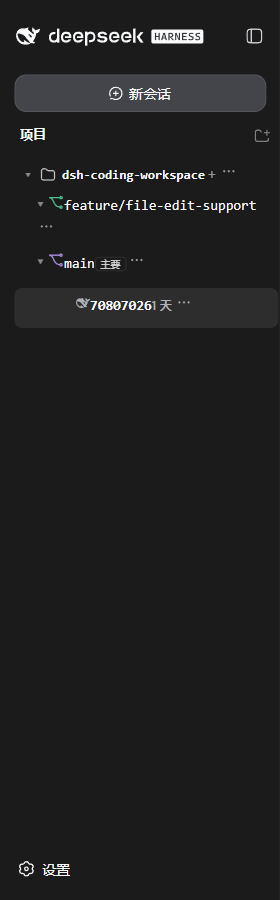
- 🌲 Project-grouped sidebar: project → workspace (primary tag, branch name, custom icon/color) → session (nested subagents), a three-level tree for all parallel tasks at a glance; Import project picks a repo and registers the main repo + all its worktrees in one go
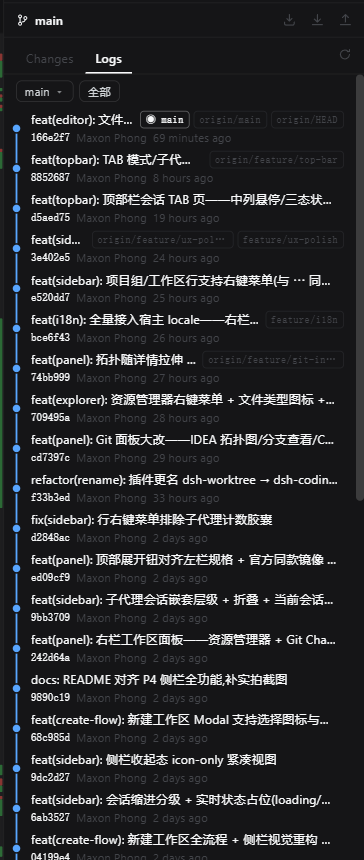
- 🗂️ Workspace panel: docked with real push (VSCode-style) — explorer (git status coloring / context menu / file-type icons / inline rename) + Git Changes (diffstat / Changelist groups / partial commit / discard) + Logs (IDEA-style lane topology, branch browsing with highlight, click a commit's file to see that commit's diff); Fetch/Pull/Push/Commit one click away
- 🧠 AI commit message: streams a complete commit message (subject + body) from the selected files' diff plus the repo's existing commit style, wired to the host default model — zero config
- 🗨️ Top-bar session tabs: a tab strip floating over the center column — whale logo + title + tri-state status dot + hover archive, mode pill & subagent badge, file tabs colored by git status, wheel horizontal scroll / active-tab follow
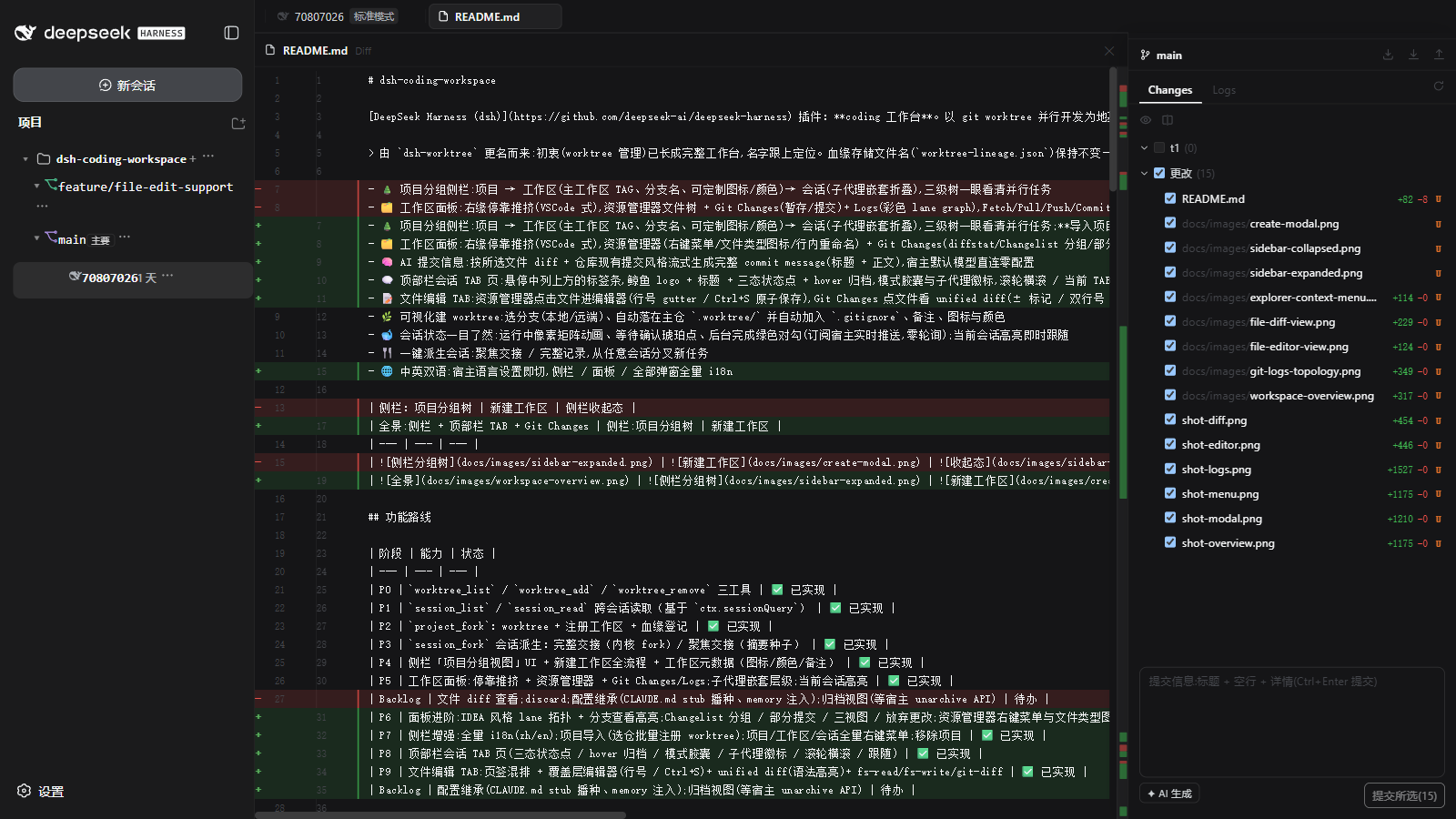
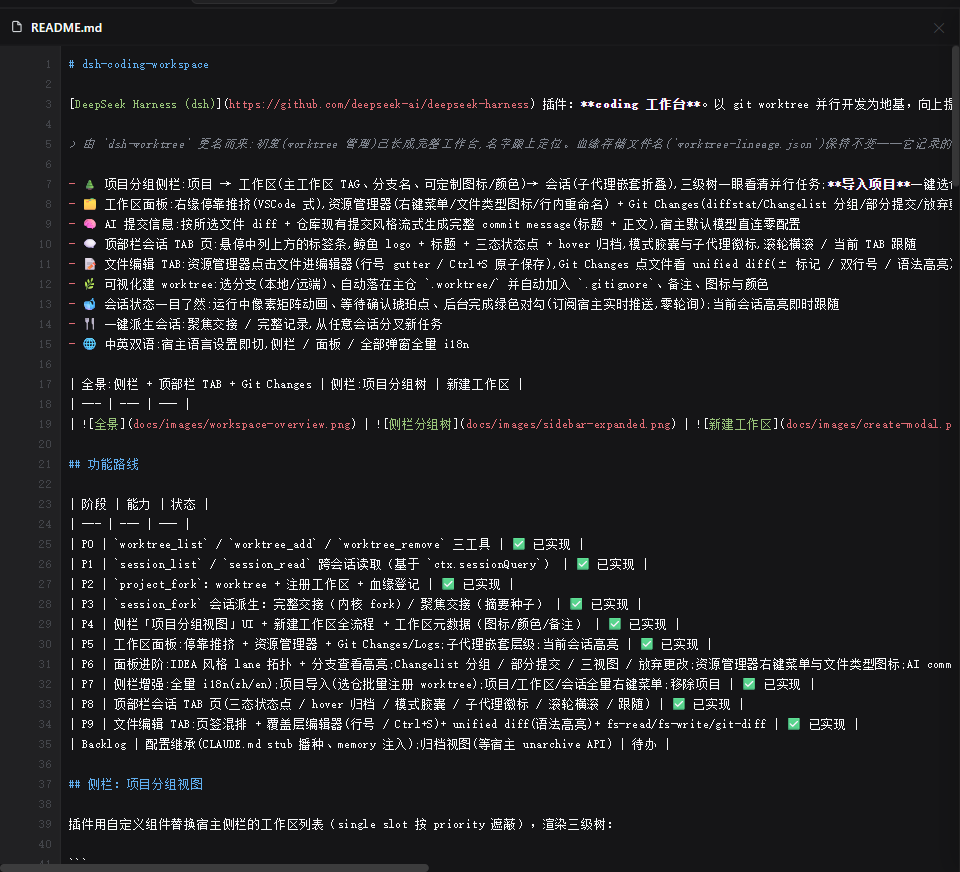
- 📝 File editor tabs: double-click a file in the explorer to edit (line-number gutter / Ctrl+S / undo-redo), with an inline diff in the editor (HEAD deletion bands + green additions, live as you type); line comments (Note for AI), image preview with zoom & pan, split groups (drag-merge tabs, sleep/resume); file tabs mix with session tabs (middle-click close / archive)
- 🌿 Visual worktree creation: pick a branch (local/remote), auto-placed under the main repo's
.worktree/and auto-added to.gitignore, with note, icon and color - 🐋 Session status at a glance: running pixel-matrix animation, waiting-for-confirmation amber dot, completed green check (subscribes to host push, zero polling); the active session highlights instantly
- 🍴 One-click session fork: focused handoff / full transcript, branch a new task off any session
- 🌐 Bilingual UI: follows the host language setting — sidebar / panel / all dialogs fully i18n'd
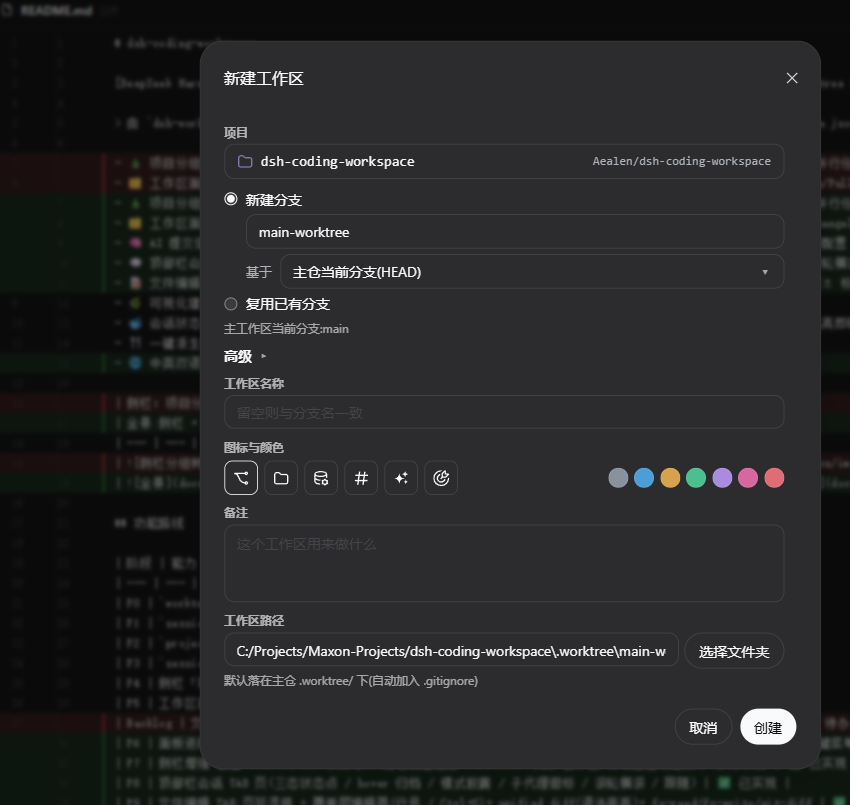
| Overview: sidebar + top-bar tabs + Git Changes | Sidebar: project tree | New workspace |
|---|---|---|
 |
 |
 |
Roadmap
| Phase | Capability | Status |
|---|---|---|
| P0 | worktree_list / worktree_add / worktree_remove tools |
✅ Done |
| P1 | session_list / session_read cross-session reads (via ctx.sessionQuery) |
✅ Done |
| P2 | project_fork: worktree + workspace registration + lineage |
✅ Done |
| P3 | session_fork: full handoff (kernel fork) / focused handoff (summary seed) |
✅ Done |
| P4 | Sidebar project-group view + full new-workspace flow + workspace metadata (icon/color/note) | ✅ Done |
| P5 | Workspace panel: dock push + explorer + Git Changes/Logs; subagent nesting; active-session highlight | ✅ Done |
| P6 | Panel pro: IDEA-style lane topology + branch browse highlight; Changelist groups / partial commit / three views / discard; explorer context menu & file-type icons; streaming AI commit message | ✅ Done |
| P7 | Sidebar: full i18n (zh/en); project import (batch-register worktrees); context menus everywhere; remove project | ✅ Done |
| P8 | Top-bar session tabs (tri-state dots / hover archive / mode pill / subagent badge / wheel scroll / follow) | ✅ Done |
| P9 | File editor tabs: mixed tab strip + overlay editor (line numbers / Ctrl+S) + unified diff (syntax highlight) + fs-read/fs-write/git-diff | ✅ Done |
| P10 | Editor & engineering pro: git coloring trio (explorer tree / inline editor diff / top-bar file tabs); split groups (sleep/resume); Git Logs historical commit file diff; cross-platform (Windows/macOS/Linux) & Release CI | ✅ Done |
| Backlog | Config inheritance (CLAUDE.md stub seeding, memory injection); archive view (waiting for host unarchive API) | Planned |
Sidebar: project-group view
The plugin replaces the host sidebar's workspace list with a custom component (single slot shadowing by priority), rendering a three-level tree:
📁 demo-app            ← project group header (git main repo, collapsible)
   🌿 main [Primary]   ← main workspace (branch + tag, custom icon/color)
   🌿 feature/login    ← worktree (note/icon/color persisted via lineage)
      🐋 Fix login redirect…  ← session (DeepSeek icon + message digest + relative time)
   🌿 feature/payment
📁 Other workspaces    ← ungrouped workspaces
- Live status dots: first column shows running (host
StateDotpixel-matrix animation), waiting-for-confirmation (amber dot — approval/plan/question), completed-unread (green check, cleared on open). Data comes from thectx.sessions.listsnapshot (useSyncExternalStoreover host mux push) — no polling. - Message digests: lazy-loaded when a workspace expands (plugin HTTP route extracts each session's tail in batch) — more informative than titles.
- Collapsed icon rail: when the sidebar collapses, a compact view keeps one icon per project/workspace/session (green when running), centered in one column; hover keeps the full tooltip, clicks behave the same.
- Two-level folding: project groups and workspaces both collapse; state persisted (localStorage).
New workspace
The + on a project group opens a fully visual Modal:
- Two branch sources:
new branch(name + "based on" any local/remote branch, defaults to the main repo HEAD) /reuse existing branch(direct pick; branches already checked out in another worktree are disabled and labeled). - Advanced: workspace name (defaults to the branch name), icon & color (6 icons × 7 colors, same set as the rename Modal), note, workspace path (defaults to
<main repo>/.worktree/<branch>, one-click system directory picker). - Paths under the main repo's
.worktree/are appended to its.gitignoreautomatically. - Create =
git worktree add+ dsh workspace registration + lineage, all atomic (git failure aborts; registration failure does not roll back the created worktree — the result body reports per step).
Workspace management
Row menu: new session, rename (with icon/color), set note, remove workspace record (disk untouched); right-click opens the same menu. Notes and icon/color persist on the lineage edge and show in the hover tooltip.
Session fork
The session row menu "fork" opens a Modal with two choices: focused handoff (mechanical summary seed, the new session travels light) / full transcript (kernel fork, complete context).
Subagent nesting & highlight
Sessions with host origin==='subagent' nest under their parent automatically (connector indent, smaller font); the parent row folds them behind a ▸N/▾N pill. The open session (including subagents) highlights instantly — authoritative source is the host useSessions snapshot s.current.
Archive filter
Archived sessions are hidden from the tree automatically (data fully retained); the host has no unarchive API yet, so the archive browse view waits for it.
Import & remove projects
- Import project: the "Projects · import" button on the sidebar action row (right under the host's New Session) → pick a git repo in the system directory picker → the plugin enumerates all of its worktrees (
git worktree list --porcelain, auto-locating the repo root upward) and registers each as a dsh workspace (hostcreateis idempotent; bare repos skipped). Lineage is inferred server-side from.gitpointer files — after registration the sidebar groups them under "project → worktree" automatically. - Remove project: right-click a project group header → "Remove project" (red) — removes only the workspace records from the dsh list; session records are kept and disk directories are untouched, as the confirm dialog states.
Workspace panel
Docked at the right edge (true VSCode-style push, falls back to overlay on narrow screens), two tabs:
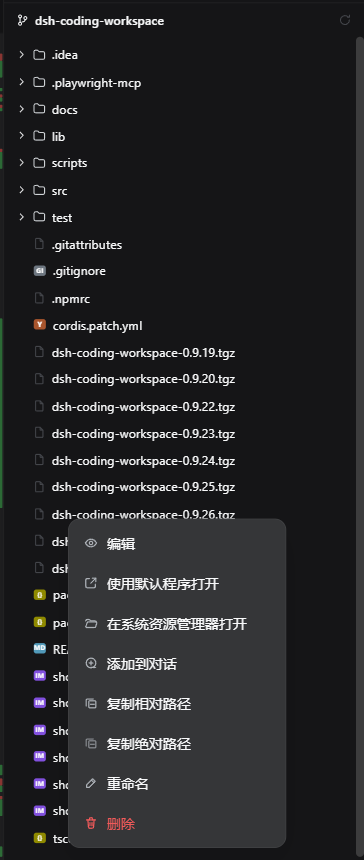
| Explorer: file-type icons + context menu | Logs: lane topology + branch badges |
|---|---|
 |
 |
Explorer
- Lazy-expanded file tree with noise dirs (
.git/node_modules/…) filtered; file-type icons — colored badges for 70+ extensions (TS/JS/PY/PDF…), generic outline for unknown. - Git status coloring (IDEA-style): modified blue / added green / untracked green / ignored orange-yellow; directories aggregate the highest-priority status of their subtree — see at a glance which area changed.
- Context menu: open with default app / reveal in file explorer (Windows
explorer /select) / add to conversation (through the host reference system — lands a blue reference chip in the composer, same pipeline as a manual@) / copy relative·absolute path / rename (inline) / delete (red + confirm). All writes go through workspace whitelist validation; rename validates the new name against Windows reserved names / illegal characters.
Git · Changes
- Per-file diffstat on the right:
+N -Madded/deleted lines (green/red) + status letter; hovering swaps the column for action buttons (modified = discard changes, new file = delete). - Changelist groups: custom groups (persisted); drag / right-click to move files; commit by group selection; flat / by-module / by-folder views (secondary grouping inside a group never crosses Changelists).
- Partial commit: commit any subset of checked files (untracked included) while the rest of the index stays untouched.
- Commit box: AI commit message (SSE streaming into the box, host default model; complete subject + body mimicking the repo's existing style; the box locks while generating).
Git · Logs
- IDEA-style lane topology: a frontend lane algorithm over parents, whole-column SVG bezier edges, constant lane width, continuous across rows; expanding a commit detail stretches the topology with the row height (measured rows + ResizeObserver).
- Branch browsing: dropdown to view any local/remote branch; commits already on the current branch are highlighted (a rough diff via a single
git log --not HEAD). - Inline commit details (full message / author / changed files); click a changed file to see that commit's diff —
hash^vshashaligned rendering (all edges handled: added left-empty / deleted right-empty / rename based on the old name / root commits), historical versions read-only, tabs carry an@shorthashmark, the same file from different commits coexists as separate tabs. - Fetch / Pull / Push icon buttons (pull is fast-forward only; auto
-uwhen no upstream).
Top bar: session tabs
A tab strip floating above the center conversation column (edges track the host column in real time; never covers the sidebar or logo):
- Tab = whale logo (brand color when active) + title + tri-state status dot (running pixel animation / waiting amber / completed green — host mux push, zero polling) + hover-revealed red archive button;
+starts a new session (registers the workspace idempotently first when needed). - Tab tail: mode pill (agent preset such as standard) and subagent count badge (hidden at zero).
- Wheel horizontal scroll, active-tab auto-follow; push shifts only the conversation column (
_centerColmargin-top variable bridge), sidebar stays put.
File editing & diff
Top-bar tabs mix sessions and files (file tabs carry a type icon and a dirty dot; middle-click closes a file tab [dirty confirm] and archives a session tab):
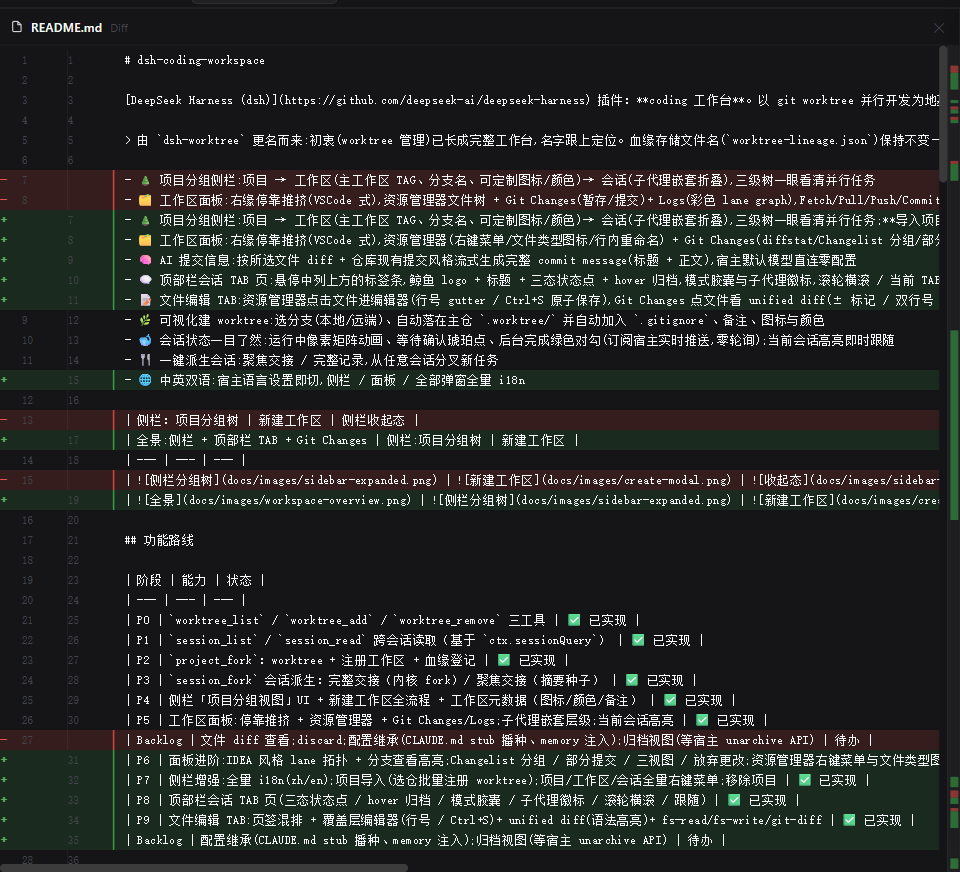
| Editor: gutter + syntax highlight + line comments | Unified diff: ± marks + dual line numbers + bands |
|---|---|
 |
 |
- Editor: double-click a file in the explorer — line-number gutter, Ctrl+S / floating save button (temp file + rename atomic write); self-managed undo / redo stack (Ctrl+Z / Ctrl+Y, 500ms keystroke coalescing); binary / non-UTF-8 files are refused with a hint to open externally.
- Inline diff in the editor: opening a file shows its diff shape — deletion bands (vs HEAD) inline where the rows used to be, additions/modifications on green, a right-edge status strip (green add / red delete, click to jump) updating with a debounce as you edit; all editability is preserved (save / dirty mark / undo-redo / line comments / context menus).
- Git coloring & ignored files: top-bar file tab names are colored by git status (same palette as the explorer); ignored files skip all diff computation entirely (never committed, no diff semantics — a pure editor).
- Split groups: drag a file tab to the edge to merge it into a tab group, multiple groups coexist; groups left behind go to sleep (the merged tab stays in the strip, dual icon + short name), clicking it restores the whole group, each group has its own split button; left/right ratios are remembered per group.
- Line comments (Note for AI): the gutter shows a
+on hover (VSCode-style); comment a line or a selected range; comment cards render inline between rows (title + body + send to session / edit / delete); "send to session" pastes a File/Line/User comment block into the chosen session's composer; comments persist next to the code (sidecar JSON). - Context & selection menus: right-click in editor / diff (add comment / copy / cut / paste / select all — official Menu primitives); releasing a left-button selection pops a quick menu automatically.
- Unified diff: click a file in Git Changes —
±marks, sticky dual line-number gutter, full-width color bands, a right-edge mini status column (click to jump); diffed against HEAD, untracked files show as all-added. - Image preview: image files (from any entry) open a viewer — wheel zoom centered on the cursor, drag to pan, double-click to fit, 100% actual size, checkerboard under transparent PNGs, a size/percentage status bar; served by the
fs-rawraw byte route. - Syntax highlighting: a ported highlight.js, per-line rendering hybridized with a block state machine (block comments / template literals decided per line), twelve languages (common dev languages plus powershell / yaml / dockerfile / dos), one-dark / light themes following the host.
- The diff core is a pure function (
panel-diff.ts: LCS alignment + CRLF normalization + budget truncation) with its own unit tests.
Internationalization
Sidebar / panel / top bar / all dialogs and menus go through the host locale (ctx.locale) — zh & en, 170+ balanced keys; switching language in settings applies instantly (slot outlets re-render themselves), falling back to Chinese when the host locale service is absent.
Install
dsh plugin --profile <profile-name> add dsh-coding-workspace
Or manually: add this package to $DSH_HOME/profiles/<name>/package.json dependencies and append dsh-coding-workspace to the insert list in cordis.patch.yml (a ready-made patch file ships in this repo).
Development
npm install
npm run typecheck   # tsc --noEmit
npm run build       # outputs to lib/
npm test            # unit tests (node --test)
Releases run through the Release CI: pushing a v* tag triggers a Windows + Ubuntu matrix test run → auto-creates a GitHub Release (tgz asset uploaded) → publishes to npm automatically (with NPM_TOKEN configured, all three plugin marketplaces pick the new version up on their own).
Cross-platform
The git executable is located per platform: Windows (where → registry → common locations) vs macOS·Linux (which → /usr/bin → /usr/local/bin → Homebrew); workspace path placeholders use the host OS's separator. The CI matrix keeps Windows-specific semantics (8.3 short names / reserved names / path casing) from regressing.
Tools
worktree_list
Lists all worktrees of a repo. Params:
repoPath(optional): repo path; defaults to the current working directory.
worktree_add
Creates a new worktree. Params:
path(required): new worktree directory.branch(required): branch name; the new branch's name whencreateBranch=true.createBranch(optional, default true): create and check out a new branch.baseRef(optional): start point for a new branch (commit/branch/tag).repoPath(optional): source repo path.
worktree_remove
Removes a worktree. Requires explicit force=true when dirty. Params:
path(required): worktree directory.force(optional): discard uncommitted changes and force removal.repoPath(optional): source repo path.
session_fork
Forks a new session from a source session and records the parent-child edge in ~/.dsh/session-lineage.json. Params:
sourceSessionId(required): source session.mode:full(default — kernelSessionStore.fork, same path as the Web UI message-branch button) /focus(focused handoff).summary: required forfocus— read the source withsession_read, distill a summary, passed as the new session's seed message.boundary: optional forfull, an event seq anchor (falls back to the last completed turn).newSessionId: optional custom child session id.
session_list
Lists recent harness sessions (history persisted). Params: limit (default 20), cwdContains (filter by working directory).
session_read
Reads one session. Params: sessionId (required), mode (tail default trailing window / full), maxChars (default 12000). Read-only; never wakes the source session. Requires the profile to provide sessionQuery; fails with a readable error otherwise.
project_fork
Project fork trio: git worktree (new branch) → register as dsh workspace → lineage (the group view's data source). Params: name (required, doubles as branch name), sourceRepoPath, worktreePath, baseRef, title. Registration/lineage failures never tear down a created worktree; the result body reports per step.
HTTP routes (sidebar/panel UI backend)
| Route | Purpose |
|---|---|
POST /dsh-coding-workspace/repo-info |
Branch list (local/per-remote) + current branch + occupied branches + origin short name |
POST /dsh-coding-workspace/worktree-create |
Full git worktree add pipeline + registration + lineage (note/icon/color) |
POST /dsh-coding-workspace/workspace-note |
Workspace metadata write-back (note/icon/color; empty string clears) |
POST /dsh-coding-workspace/lineage |
Batch lineage read (grouping/branch/metadata display) |
POST /dsh-coding-workspace/session-summaries |
Batch lazy message digests (trailing-window extraction) |
POST /dsh-coding-workspace/session-fork |
Session fork (focused / full) for sidebar actions |
POST /dsh-coding-workspace/fs-list |
Panel explorer listing (lazy, traversal-guarded, noise dirs filtered) |
POST /dsh-coding-workspace/fs-action |
Explorer writes: open / reveal / delete / rename (shell-less spawn, explicit confirm) |
POST /dsh-coding-workspace/fs-read |
Editor file read (binary / non-UTF-8 detection, no size cap) |
POST /dsh-coding-workspace/fs-write |
Editor save (temp file + rename atomic write) |
GET /dsh-coding-workspace/fs-raw |
Raw image bytes for preview (double extension check + 50MB guard) |
POST /dsh-coding-workspace/line-notes |
Line comment persistence (list / add / update / delete, line & range) |
POST /dsh-coding-workspace/git-overview |
Panel branch / upstream / ahead / behind (isRepo=false for non-repos) |
POST /dsh-coding-workspace/git-status |
Panel Changes three groups (staged / unstaged / untracked) + per-file diffstat (numstat / counted untracked) |
POST /dsh-coding-workspace/git-log |
Panel Logs (%H…%P line protocol, frontend lane topology; branch mode includes exclusive commits) |
POST /dsh-coding-workspace/git-show |
Panel commit detail (meta + changed files, hash whitelist) |
POST /dsh-coding-workspace/git-diff |
File diff (base=HEAD; untracked shows all-added; check-ignore detection for ignored files; LCS aligned client-side) |
POST /dsh-coding-workspace/git-commit-diff |
Historical commit file diff (hash^ vs hash aligned; raw blob reads — binary detection without mojibake guessing) |
POST /dsh-coding-workspace/git-tree-status |
Explorer git coloring (file/dir status aggregation incl. untracked & ignored; dirs take the subtree's top priority) |
POST /dsh-coding-workspace/git-action |
Panel write funnel (stage/unstage/commit(partial)/fetch/pull/push/rollback whitelist) |
POST /dsh-coding-workspace/git-changelist |
Changelist persistence (list / create / delete / move, batch drag included) |
POST /dsh-coding-workspace/git-worktrees |
Project import: enumerate a repo's worktrees (read-only, root located upward, cap 50) |
POST /dsh-coding-workspace/ai-commit-msg |
AI commit message generation (host LlmRuntime streaming, SSE) |
Design notes
- The plugin never modifies dsh itself — purely additive mounting via Cordis micro-kernel extension points.
- The workspace panel mounts on
shell.overlay(the officially blessed additive overlay list slot); docking push uses a "CSS variable bridge" — when open, the panel writes--dsh-coding-workspace-panel-widthand injected CSS makes#root { margin-right: var(...) }yield, never touching host inline styles; conflicting plugins (e.g. better-sidebar) make it fall back to a pure overlay. - Lineage (worktree ←→ source repo) persists in the harness home's
worktree-lineage.json(atomic writes; the narrowed interface can be swapped for actx.storageKV form). Design trade-offs in docs/plan-P1-P2.md. - Sessions belong to workspaces via
cwd(workspaceIdsis only a fallback), independent of attach ordering; the archived set comes fromworkspace.listregistry-global data. - Git runs through direct
child_processhonoring tool cancel signals (exec.signal), never a shell service — predictable behavior; the git executable is located per platform — Windows (where→ registry → common locations) dodgesENOENTfrom "relative command + cwd", POSIX useswhich+ common install locations. - Data always comes from official host snapshots (dsh 0.1.2 reorganized the client RPC into Typert Remote — the reverse-engineered
POST /api/<method>endpoints are gone): workspace lists readctx.workspaces.list(WorkspaceSource), session lists readctx.sessions.list(SessionListStateids+byId, sessionId backfilled from the ids key). Snapshots become ready progressively (workspace first, sessions seconds later) — both sources get their own subscription to trigger rebuilds, with a signature over the row + archive sets deduping push storms. - The top bar mounts the same
shell.overlay(a second entry) but pushes only the conversation column —[class*="_centerCol"] { margin-top: var(--dsh-coding-workspace-topbar-h) }, never#root(that would squeeze the sidebar too); bounds are measured from the host conversation column with a ResizeObserver, following sidebar resizes and panel toggles live. - i18n rides the host
ctx.locale(dsh-client-locale): register/bind and you're in; slot outlets carry a locale-revision subscription so a language switch re-renders the whole tree. A cordis third-party service must be declared in the entry's inject — undeclared services throw "without inject" even forctx.get, and a missed declaration makestsilently fall back to the default language. - Plugin copy lives in
locales.ts(zh/en dictionaries, key-set balance script-checked); components callt(key, params); when the host locale service is absent it falls back to Chinese and the panel never dies over i18n.
Links
More in this category
zhu1090093659/dsh-web#packages/dsh-task-board★ 9673
Task board for the dsh web GUI: a sidebar multi-column kanban whose cards run in real DSH agent sessions and can also be scheduled with cron expressions, executed host-side even with the browser closed.
zhu1090093659/dsh-web#packages/dsh-web-all★ 9673
Plugin and skin collection for the DSH Web UI: task board, Git graph, right-side panel, remote mobile UI, pet, live token stats, and a skin center.
MeteorNOX/DeepSeek-Balance-Whale-Widget★ 6324
A fixed-corner whale widget for the DSH web GUI — balance, today's usage and per-turn cost with peak/off-peak pricing, editable balance-alert and daily-budget bubbles, a module-based custom bubble queue with A/B weighted choices and random lines or images, 30+ vendor templates (OpenAI, OpenRouter, Kimi, SiliconFlow, Ark, Zhipu, MiniMax and more) with per-model balance and subscription quota, plus task-end sound, imported audio, custom roles and a resource manager. Local-only, no telemetry.
ccch1mneyyy/dsh-TUI★ 6018
Claude Code-style full-screen terminal UI: pixel-whale header, live status line, and streaming thought expansion.
omdsh-dev/DSH-better-sidebar★ 4645
Full sidebar workbench with file rendering and editing, terminal, Git, and subagents; third-party plugins can register new tabs.
Devin-AXIS/deepseek-design#deepseek-idesign★ 1607
Visual design studio for websites, app prototypes, posters, cards, reports, and magazines, with templates, direct element editing, selection-aware AI draft handoff, and export.
Community comments
Comments are public GitHub Discussions. Loading them connects to GitHub and Giscus; a GitHub account is required to post.