Read-only XLSX, XLS, ODS, CSV and TSV viewer for dock-files with worksheet tabs, sorting, filters, search and cell links.
Install
# from npm (prebuilt)
dsh plugin --profile web add dock-spreadsheet
# from GitHub (first run asks for allowBuilds approval — follow the hint, retry)
dsh plugin --profile web add github:AKS1st/dock-spreadsheet
Any plugin you install runs third-party code with your own permissions — it can read your files, use your credentials, and reach the network, and tool approvals don’t sandbox it. GitHub-sourced plugins also run build scripts at install time — pnpm blocks those until you allow them, so an install can stop with ERR_PNPM_GIT_DEP_PREPARE_NOT_ALLOWED or ERR_PNPM_IGNORED_BUILDS; dsh prints the exact key to add under allowBuilds in your profile’s pnpm-workspace.yaml, and the install works on the next run. Allowing a build is a trust decision: only install sources you trust, and pin a commit (github:owner/repo#sha).
README
A read-only spreadsheet viewer for dock-files. Open XLSX, XLS, ODS, CSV and TSV files inside the dock workbench without uploading them to an external service. Parsing, virtual scrolling and grid interactions use SheetJS CE, Papa Parse and Tabulator. No runtime CDN requests are required.
Scope: read-only preview. The plugin does not edit or save files, evaluate formulas, or run macros. Since 0.2 it shows formula text, solid fills, column widths, merged ranges and hidden rows/columns/sheets, but it does not reproduce fonts, borders, alignment, conditional formatting, charts, images or print layouts; merged cells use an approximation (anchor cell + blank covered cells + an inspector badge).
For maximum Excel-like fidelity use DeepSeek Harness' built-in right-side document preview. This plugin is a lightweight, searchable, copyable data browser; see Relationship to the native Harness preview.
Screenshots
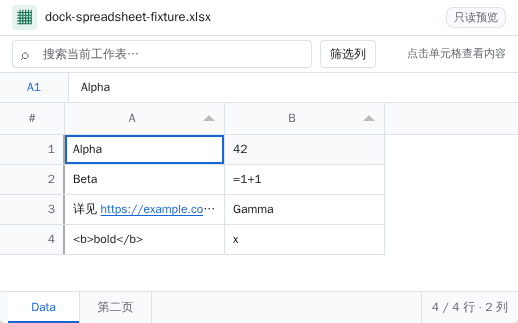
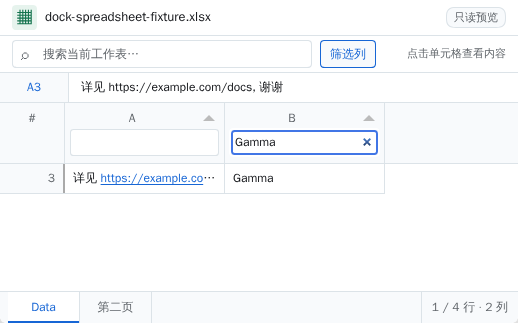
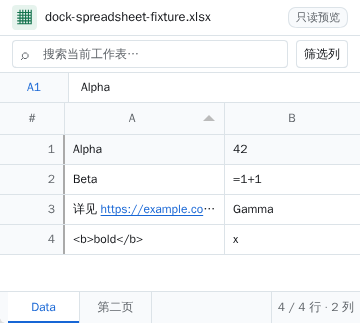
These screenshots come from a 0.1.x isolated dsh web + Chromium run using a synthetic workbook. The 0.2 formula bar, copy/export and refresh controls are not shown.
Features
- Common file types: dock-files dispatches
.xlsx,.xls,.ods,.csvand.tsvto the viewer. Switch worksheets using bottom tabs, including arrow keys and Home/End. - Read-only formula bar: select a cell to see the actual formula (preferred) or the displayed text. Program-generated formulas without a cached result show
=formulaplus a “no cache” badge instead of an empty cell. - Copy and export: drag-select a range and press Ctrl/⌘+C (TSV + HTML table, ready to paste into Excel); the toolbar offers “Copy selection / Copy view / Export CSV”.
- Structure metadata: column widths, solid fills, number formats, merged ranges (anchor + blank covered cells + inspector badge) and hidden rows/columns. Hidden worksheets stay hidden by default and can be revealed with the “hidden sheets” toggle.
- Refresh: the
↻button re-reads the file. While open, the Host checks the file mtime every 4 seconds and shows “file changed, reload” instead of replacing what you are reading. - Find and filter: search across the current worksheet's data columns, click a column header to sort (numeric/date columns sort by type), and reveal per-column header filters on demand.
- Link navigation: recognise
http(s)://,www.and Excel hyperlink objects in cells. Ctrl+click (or ⌘+click on macOS) opens a new tab. - Large-sheet preview: Tabulator's virtual rendering limits DOM nodes to visible rows. The footer shows visible rows/columns, the source totals and a truncated-preview marker.
- Coordinate fidelity: keep the original column letters and row numbers for sheets starting at an offset such as
C3; empty cells remain empty.
New in 0.2.0
- Formula bar and no-cache formula notice; type-aware numeric/date sorting.
- Range selection, copy selection/view and CSV export.
- Hidden sheet/hidden row/column toggles; column widths, fills and merged-range display.
- Refresh button and change notice; UTF-16 BOM/GBK fallback and delimiter sniffing for CSV/TSV.
- Fixed four invalid CSS tokens that left a white background in dark mode.
Relationship to the native Harness preview
| Need | Recommended |
|---|---|
| Fonts, borders, conditional formatting, charts, maximum Excel fidelity | Harness right-side document preview |
| Fast data lookup, search/filter, copy/export, formula inspection, ODS, lightweight floating window | This plugin |
| Very large or complex workbooks | The native preview is capped at 16 MiB / 250k cells; this plugin accepts 20 MiB but still parses on the main thread, so very large files may pause the UI |
Both can be installed side by side.
The dock plugin family
dock is a set of composable plugins; this one covers a single capability. Every plugin is optional:
| Plugin | What it does |
|---|---|
| dock-base | workbench shell: activity bar, side bar, editor area, status bar and the ctx.workbench registry |
| dock-files | file explorer: workspace tree, new/rename/delete, drag-and-drop and clipboard import |
| dock-editor | text viewer/editor: undo/redo, Ctrl+S save, binary detection |
| dock-images | image viewer: PNG/JPEG/GIF/WebP/BMP/SVG/ICO/AVIF |
| dock-markdown | Markdown viewer: GFM rendering, outline, relative-asset resolution |
| dock-media | audio/video player: HTTP Range streaming, music player and fullscreen video |
| dock-git | Git history: swimlane graph, branches/tags, stage and commit |
| dock-spreadsheet | read-only spreadsheets: XLSX/XLS/ODS/CSV/TSV |
This plugin is dock-spreadsheet; see the "Recommended companion plugins" section of dock-base for full combinations.
Installation
Requires DSH Web, Node.js ≥20, and the enabled dock-base and dock-files plugins. Install all three as top-level plugins in this order: downloading a base package as a dependency alone does not mount its bundle.
npm (recommended)
dsh plugin --profile web add dock-base
dsh plugin --profile web add dock-files
dsh plugin --profile web add dock-spreadsheet
GitHub (alternative)
dsh plugin --profile web add github:AKS1st/dock
dsh plugin --profile web add github:AKS1st/dock-files
dsh plugin --profile web add github:AKS1st/dock-spreadsheet
For local development, use dsh plugin --profile web add link:/absolute/path/to/dock-spreadsheet. After installing or updating, restart dsh web yourself to ensure the new bundle takes effect; the plugin never restarts your process. The Web profile's node_modules/dock-spreadsheet must resolve—merely listing its name as a bundle is not an installation. If the profile is on a read-only mount, make that directory writable before installing.
Usage
- Open a supported file in the dock-files explorer. The viewer appears in a dock floating window; it does not add a separate activity-bar item.
- Click a data cell: the formula bar shows its formula (or
=formulaplus a “no cache” badge); the inspector also shows the address, comment and merged-range markers. - Drag-select cells or hold Shift to extend the range, then Ctrl/⌘+C; or use the “Copy selection / Copy view / Export” buttons.
- Search to filter the current worksheet; click a column header to sort; press the column-filter button to show/hide header inputs.
- Click a worksheet tab to switch sheets; reveal hidden worksheets/hidden rows and columns with the corresponding toggles.
- When the file changes externally, click “reload” in the notice, or press
↻at any time.
Formats, limits and security
| Topic | Actual behavior |
|---|---|
| Excel / OpenDocument | SheetJS CE 0.20.3 reads .xlsx, .xls and .ods; displays cached/formatted text without recalculating formulas. Formula text, solid fills, column widths, hidden rows/columns/sheets and merged ranges are exposed. |
| Delimited text | Papa Parse reads .csv and .tsv; accepts UTF-8 (with or without BOM), BOM-marked UTF-16, and falls back to GBK when UTF-8 fails; the delimiter (,/\t/;/` |
| Preview window | At most 5,000 rows and 256 columns from each worksheet's used range; the footer shows source totals and a truncated-preview marker. |
| File access | The Host exposes POST /dock-spreadsheet/read for raw bytes and POST /dock-spreadsheet/stat for mtime/size. Both check same-origin/trusted-host requests, an absolute path, an allowed extension and a regular file; reads are capped at 20 MiB and there is no write API. |
| Workspace boundary | Like other dock viewers, the Host may read an absolute path outside the workspace referenced by the session. Do not deploy this plugin on an untrusted or publicly reachable Host. |
| Cell rendering | Treat workbook content as untrusted: render via DOM text nodes / textContent, never innerHTML; <b> in a cell stays text. Links use only HTTP(S) and open with noopener,noreferrer. |
| Performance | Virtual scrolling reduces DOM work, but parsing still runs on the browser main thread; a complex workbook near the limits may briefly pause the UI. |
This is not a full spreadsheet engine: no editing, saving, collaboration, formula evaluation, macros, chart/image rendering, font/border/alignment/conditional-formatting/frozen-pane fidelity, or automatic encoding detection beyond UTF-8/UTF-16/GBK.
Development and verification
pnpm install
pnpm run check   # embed Tabulator styles and check TypeScript
pnpm test        # build Host / Client and run 21 tests
pnpm run build   # produce lib/ for GitHub/npm distribution
Unit/integration tests cover all five formats, formulas including no-cache cells, hidden sheets, column widths/merges, UTF-16/GBK/delimiter handling, coordinates and preview limits, Host read/stat guards, browser bundle registration, and a real React + Tabulator mount exercising the formula bar, search, numeric sorting, copy-view, refresh, hidden sheets and link interactions. The isolated-container Chromium checks were not re-run after the 0.2 changes; re-run them before a release.
The client artifact bundles SheetJS, Papa Parse, Tabulator and their styles; only platform React remains external in the browser. GitHub consumers use committed lib/ files, without a consumer build step or prepare/postinstall script.
Troubleshooting
| Symptom | Check |
|---|---|
| A workbook still opens in the default text viewer | Confirm dock-base, dock-files and dock-spreadsheet are enabled as Web-profile bundles and their packages resolve. Restart dsh web yourself, then reopen the file. |
Install fails with EROFS |
The Web profile's node_modules is on a read-only filesystem. Make the directory writable and reinstall rather than editing only the manifest. |
A formula shows =... with “no cache” |
The file was generated by openpyxl/XlsxWriter and has no saved result; the plugin can only show the formula. Re-save it once in Excel to obtain cached values. |
| CSV/TSV encoding error | Try saving as UTF-8; the viewer also attempts GBK but may still fail. |
| Copy fails | The browser may refuse clipboard writes; focus the page and allow clipboard access, or use “Export CSV”. |
| File rejected or data seems incomplete | Files over 20 MiB are rejected; each sheet previews at most 5,000 rows/256 columns; the footer shows source totals. |
| Ctrl+click does not open a link | The cell text or hyperlink object must contain http(s):// or www.; check whether the browser blocked a new tab. |
License and acknowledgements
MIT. Thanks to SheetJS CE, Papa Parse and Tabulator.
Links
More in this category
zhu1090093659/dsh-web#packages/dsh-task-board★ 10669
Task board for the dsh web GUI: a sidebar multi-column kanban whose cards run in real DSH agent sessions and can also be scheduled with cron expressions, executed host-side even with the browser closed.
zhu1090093659/dsh-web#packages/dsh-web-all★ 10669
Plugin and skin collection for the DSH Web UI: task board, Git graph, right-side panel, remote mobile UI, pet, live token stats, and a skin center.
ccch1mneyyy/dsh-TUI★ 8366
Claude Code-style full-screen terminal UI: pixel-whale header, live status line, and streaming thought expansion.
MeteorNOX/DeepSeek-Balance-Whale-Widget★ 7489
A fixed-corner whale widget for the DSH web GUI — balance, today's usage and per-turn cost with peak/off-peak pricing, editable balance-alert and daily-budget bubbles, a module-based custom bubble queue with A/B weighted choices and random lines or images, 30+ vendor templates (OpenAI, OpenRouter, Kimi, SiliconFlow, Ark, Zhipu, MiniMax and more) with per-model balance and subscription quota, plus task-end sound, imported audio, custom roles and a resource manager. Local-only, no telemetry.
omdsh-dev/DSH-better-sidebar★ 5362
Full sidebar workbench with file rendering and editing, terminal, Git, and subagents; third-party plugins can register new tabs.
omdsh-dev/dsh-genui★ 1070
Interactive UI components rendered inline in replies: layout, charts, forms, quizzes, mermaid, 3D scenes, and an action event loop back to the model.
Community comments
Comments are public GitHub Discussions. Loading them connects to GitHub and Giscus; a GitHub account is required to post.