Git history visualization for the dock workbench: swimlane commit graph, branch and tag management, stage/commit/push and remote operations.
Install
# from npm (prebuilt)
dsh plugin --profile web add dock-git
# from GitHub (first run asks for allowBuilds approval — follow the hint, retry)
dsh plugin --profile web add github:AKS1st/dock-git
Any plugin you install runs third-party code with your own permissions — it can read your files, use your credentials, and reach the network, and tool approvals don’t sandbox it. GitHub-sourced plugins also run build scripts at install time — pnpm blocks those until you allow them, so an install can stop with ERR_PNPM_GIT_DEP_PREPARE_NOT_ALLOWED or ERR_PNPM_IGNORED_BUILDS; dsh prints the exact key to add under allowBuilds in your profile’s pnpm-workspace.yaml, and the install works on the next run. Allowing a build is a trust decision: only install sources you trust, and pin a commit (github:owner/repo#sha).
README
The best Git history visualization plugin in the DSH ecosystem — no contest. A swimlane commit graph, branch/tag badges, a three-column diff, stage/commit/push and remote management — the VSCode Git panel transplanted straight into the DSH workbench. Inspecting repos, managing branches or pushing code from DSH? dock-git is the ultimate weapon.
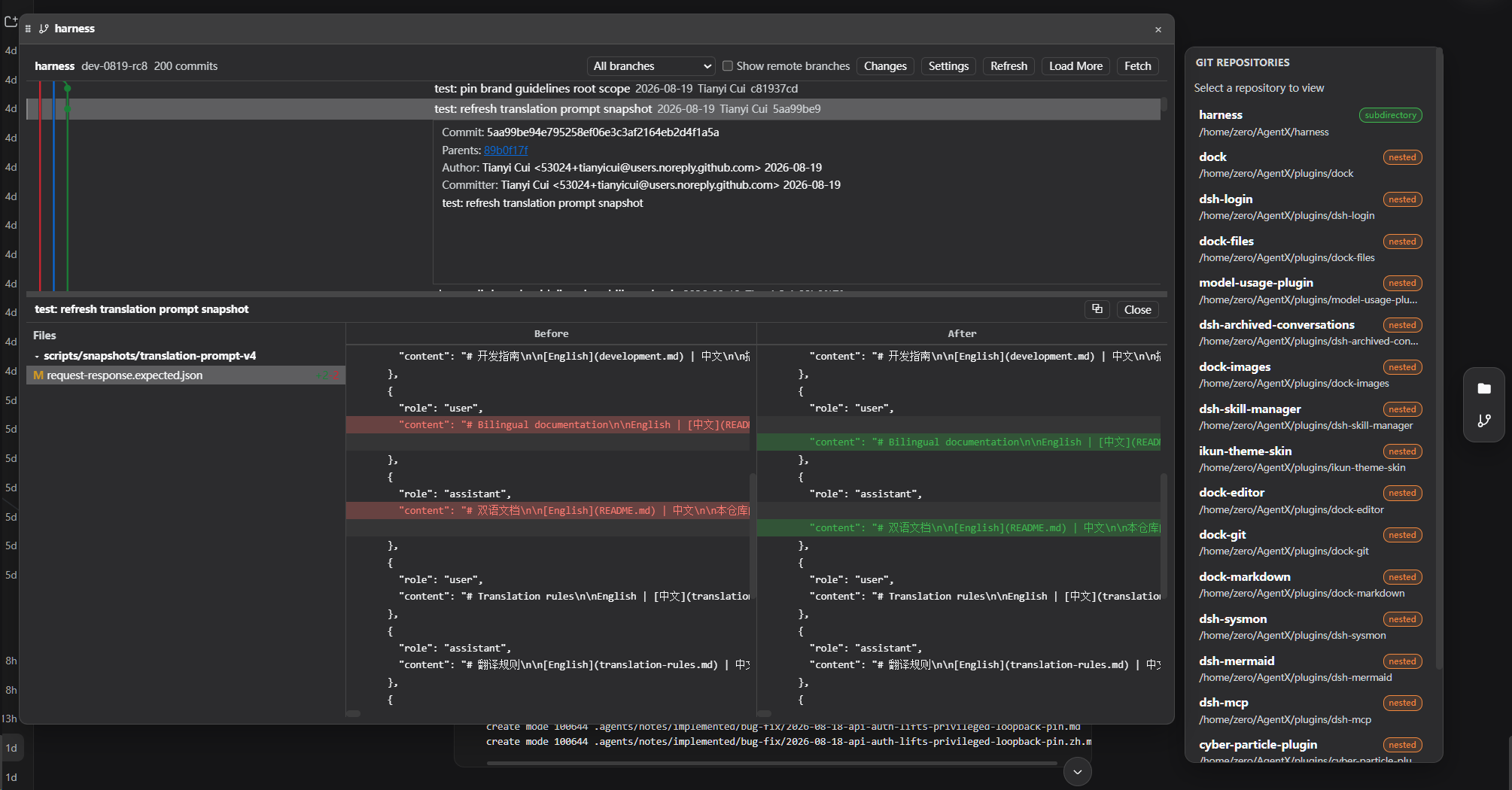
Git history visualization plugin of the dock family: mounts a side-bar launcher (activity item git) that renders the current workspace's git commit history graph (commits / branches / tags / remotes) and supports branch, tag, config, remote, stage, commit and push operations.
Preview
Features
- Commit history graph: swimlane graph with branch/tag/remote badge glyphs and an "uncommitted changes" node; N+1 probe for "more commits".
- Commit details: expand a commit to see the message, author, changed-file tree (added/modified/deleted/renamed), old/new file content three-column view, and diff (512 KiB truncation, UTF-16 safe).
- Multi-repo discovery: scans the session workspace (cwd plus two levels of subdirectories) for independent git repositories and lets you switch the target.
- Branch/tag management: create, rename, delete branches; create/delete tags; checkout via
git switch(no path-semantics ambiguity); merge one local branch into another (git merge --no-edit, pulled into the current branch). - Staging and commit: VSCode-style status/stage/unstage/commit (
--no-verify, repository hooks never run). - Commit reset & revert: right-click a commit to reset it (
git reset) with a selectable mode (mixed / soft / hard), or revert it (git revert --no-edit, creating an inverse commit). - Remote operations: list / add / remove / set-url, fetch, pull, fetch-into, push (branch/tag,
--force-with-leasesupported). - Config read/write: read any repository config; writes are limited to
user.name/user.email. - i18n: built-in Chinese/English UI following the DSH global locale.
Dependencies
| Dependency | Type | Notes |
|---|---|---|
| dock >= 0.1.0 | peer (required) | workbench shell: the side-bar panel, editor-area view and ctx.workbench come from it |
git CLI |
system runtime | required: every Git operation spawns the system git, which must be on PATH |
| DSH Web environment | runtime | required; client platform is Web |
cordis ^4.0.0-rc.7 |
peer | plugin framework (ships with DSH) |
react ^18.2.0 |
peer (optional) | needed for client rendering; without it the panel UI does not activate |
Optional companions: dock-git is fully independent of file browsing and does not need dock-files; if you also install dock-files plus viewer plugins, files in commit details can seamlessly open through the workbench.
Install
Requires the dock base plugin:
Recommended install from the npm registry:
dsh plugin --profile web add dock-base
dsh plugin --profile web add dock-git
Or install from GitHub (alternative):
dsh plugin --profile web add github:AKS1st/dock
dsh plugin --profile web add github:AKS1st/dock-git
Security
- The
/wb-gitroute only accepts POSTs from trusted origins (loopback / trustedHosts plus same-origin check). - git is always spawned directly with an argument vector (never a shell string); the environment is sanitized (GIT_DIR / GIT_WORK_TREE removed, fixed C locale).
- Every user-controlled argv position is validated: ref names, remote names, config keys, stage paths, commit messages, ... — leading
-(option injection),../@{(range/refspec smuggling), pathspec magic (:), control characters and NUL are all rejected. repoRootis confined to the session workspace (realpath prefix comparison) — git cannot run in arbitrary directories.- High-output commands (log / diff / show / status) carry a streaming byte cap; exceeding it kills the child so the host never OOMs.
- Checkout uses
git switch, which never falls back to path semantics (working-tree files cannot be accidentally restored).
License
MIT
Links
More in this category
zhu1090093659/dsh-web#packages/dsh-task-board★ 8405
Task board for the dsh web GUI: a sidebar multi-column kanban whose cards run in real DSH agent sessions and can also be scheduled with cron expressions, executed host-side even with the browser closed.
zhu1090093659/dsh-web#packages/dsh-web-all★ 8405
Plugin and skin collection for the DSH Web UI: task board, Git graph, right-side panel, remote mobile UI, pet, live token stats, and a skin center.
ccch1mneyyy/dsh-TUI★ 4088
Claude Code-style full-screen terminal UI: pixel-whale header, live status line, and streaming thought expansion.
MeteorNOX/DeepSeek-Balance-Whale-Widget★ 4076
A fixed-corner whale widget for the DSH web GUI — balance, today's usage and per-turn cost with peak/off-peak pricing, editable balance-alert and daily-budget bubbles, a module-based custom bubble queue with A/B weighted choices and random lines or images, 30+ vendor templates (OpenAI, OpenRouter, Kimi, SiliconFlow, Ark, Zhipu, MiniMax and more) with per-model balance and subscription quota, plus task-end sound, imported audio, custom roles and a resource manager. Local-only, no telemetry.
omdsh-dev/DSH-better-sidebar★ 4009
Full sidebar workbench with file rendering and editing, terminal, Git, and subagents; third-party plugins can register new tabs.
Devin-AXIS/deepseek-design#deepseek-idesign★ 1423
Visual design studio for websites, app prototypes, posters, cards, reports, and magazines, with templates, direct element editing, selection-aware AI draft handoff, and export.
Community comments
Comments are public GitHub Discussions. Loading them connects to GitHub and Giscus; a GitHub account is required to post.