File explorer for the dock workbench: tree browsing of the session workspace with create/rename/copy-paste/delete, drag-and-drop import and paste of local files and clipboard images.
Install
# from npm (prebuilt)
dsh plugin --profile web add dock-files
# from GitHub (first run asks for allowBuilds approval — follow the hint, retry)
dsh plugin --profile web add github:AKS1st/dock-files
Any plugin you install runs third-party code with your own permissions — it can read your files, use your credentials, and reach the network, and tool approvals don’t sandbox it. GitHub-sourced plugins also run build scripts at install time — pnpm blocks those until you allow them, so an install can stop with ERR_PNPM_GIT_DEP_PREPARE_NOT_ALLOWED or ERR_PNPM_IGNORED_BUILDS; dsh prints the exact key to add under allowBuilds in your profile’s pnpm-workspace.yaml, and the install works on the next run. Allowing a build is a trust decision: only install sources you trust, and pin a commit (github:owner/repo#sha).
README
A file explorer for DSH workspaces. dock-files provides a VSCode-style file tree, drag-and-drop import, clipboard paste, transfer task management and context menus.
File-explorer plugin of the dock family: mounts a side-bar files panel that browses the active conversation's working directory (through its own /wb-files host route) and hands clicked files to the registered file viewer (e.g. dock-editor).
Preview
| Main UI | Context menu |
|---|---|
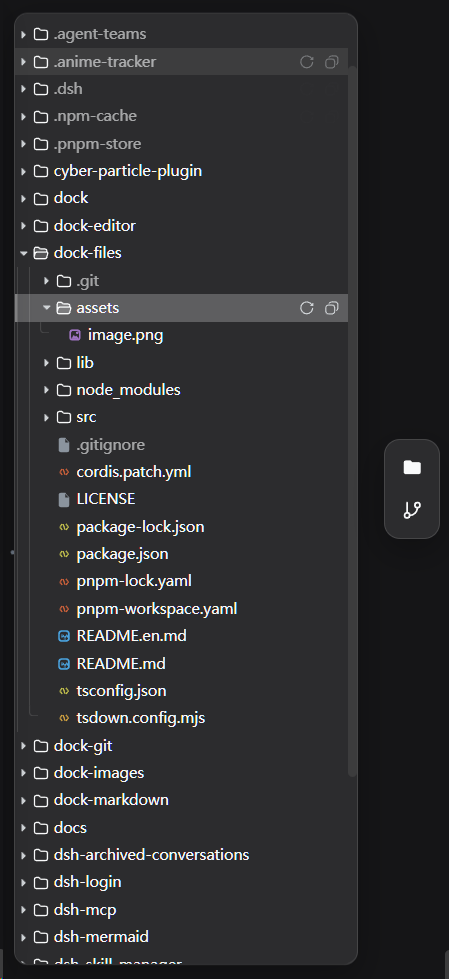 |
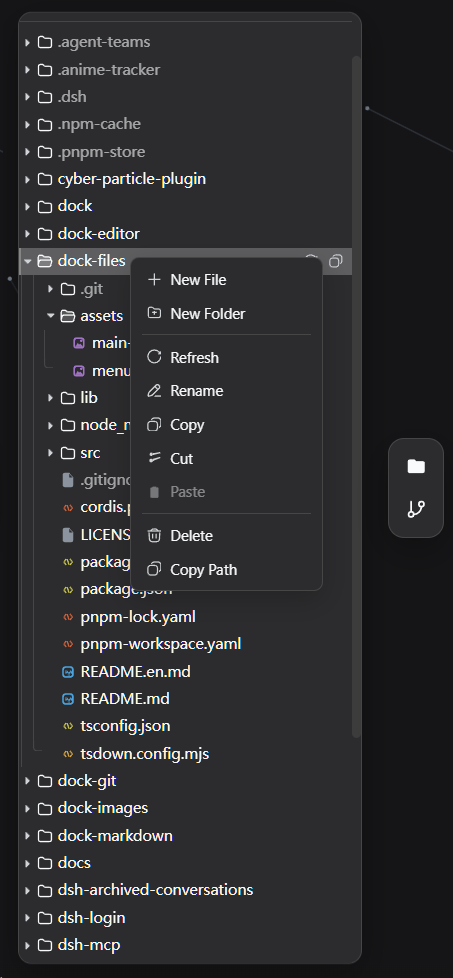 |
Features
Directory tree browsing: lazy recursive expansion, directory-first case-insensitive ordering (VSCode explorer order); VSCode-style tree UI (tinted type icons, guide lines, toolbar refresh / collapse-all, hover action buttons).
Session scoping: every operation is bounded by the session working directory; paths are canonicalized with realpath and must stay inside the workspace, otherwise 403.
File opening: clicking a file dispatches through
ctx.files.opento the matching file viewer (floating window).Conversation path opening:
dock-files.open-sourcedefaults todock(dock/harness). Harness mode does not wrapsidebarRight.openResource()and preserves the canonical carrier directly. Dock mode wraps it, recognizes onlydsh-resource://file/session/...anddsh-resource://file/absolute/..., decodes each segment per the b67 contract, and routes existing non-directory files with a registered viewer to Workbench; otherwise it calls the original method with the originaloptions. Delayed probes are ignored after a setting switch or plugin disposal.File-manager operations: the context menu carries the usual actions — new file / new folder (auto-deduped names, dropping straight into inline rename), rename (inline editing, Enter commits / Esc cancels), copy / cut / paste (copy pastes repeatedly; cut items are dimmed and the clipboard clears on paste), paste image (saves an image from the system clipboard as a file, e.g.
image.png, auto-named and deduped by mime type; the menu item probes the clipboard and only shows when it actually holds an image), delete (confirmed, recursive, never overwrites), copy path, refresh; ordinary files can be downloaded through the context menu using the browser's download handling, while symlinks are skipped; right-clicking empty space offers root-level new / paste / paste image / refresh.ZIP download: right-click a folder (or the root) and pick "Download as ZIP" to have the host recursively package that directory into a ZIP; the archive keeps the directory tree under a top-level folder name (empty and nested directories included) and skips symlinks. One archive is capped at 512 MB / 100k entries (413 beyond that). Downloads go through the transfer centre (save-as, pause, cancel); a non-directory target answers 400 and an out-of-workspace path still answers 403.
Drag & drop: drop OS files into the explorer to import copies into the target directory (original names, auto-deduped, never overwrites); drag entries inside the tree onto another directory (or the empty area = root) to move them — dropping onto a file row moves into that file's parent directory (so imprecise drops still land), while moving a directory onto itself or a descendant is rejected.
Paste local files: after copying files in the OS, click the panel to focus it and press Ctrl+V to import them (the browser only exposes local file content through the paste event); the paste target is the last clicked/right-clicked directory, else the root.
Transfer task center: ordinary files use chunked uploads to support large-file transfers. All transfer tasks are tracked in a global in-memory center, visible in a floating window and the status bar, with aggregate progress shown at the bottom. Tasks can be paused, resumed and cancelled. Tasks are not persisted across restarts and disappear after a restart; clearing history removes task records only and does not delete files.
Context menu: per-kind items for files, directories and the empty area; the menu pulls back inside the viewport when it would overflow; confirmations and notices use a theme-matching in-app dialog. Direct paste from Windows File Explorer, copying file contents and copying download links are not supported.
Localization: all UI copy (context menu, dialogs, notices, states) follows the DSH language setting (zh/en, switching live on the
locale/changeevent); default names for new files/folders follow too (New File.txt/新建文件.txt).File-domain service: provides
ctx.files(open/registerFileViewer/registerFileIcon); other plugins can register their own viewers (extsextension match ordefaultfallback) and per-extension icons (registerFileIcon, one plugin may register several groups) with anicon(tint color + optional custom SVG glyph) that the explorer renders per extension, falling back to the built-in palette for unregistered types.
Dependencies
| Dependency | Type | Notes |
|---|---|---|
| dock-base >= 0.2.0 | peer (required) | workbench shell: the side-bar panel, floating windows and ctx.workbench come from it |
| DSH Web environment >= 0.1.3-alpha.2 | runtime | required; minimum Harness version is >=0.1.3-alpha.2 (b67); client platform is Web |
cordis ^4.0.0-rc.7 |
peer | plugin framework (ships with DSH); the injected client workbench is a hard dependency |
react ^18.2.0 |
peer (optional) | needed for client rendering; without it the panel UI does not activate |
Optional viewers (browsing works without them; install one to open its file kinds): dock-editor (text), dock-images (images), dock-markdown (Markdown).
Install
Requires the dock base plugin:
Recommended install from the npm registry:
dsh plugin --profile web add dock-base
dsh plugin --profile web add dock-files
Or install from GitHub (alternative):
dsh plugin --profile web add github:AKS1st/dock
dsh plugin --profile web add github:AKS1st/dock-files
Pair it with viewer plugins (composable, on demand): dock-editor (text), dock-images (images), dock-markdown (Markdown).
Security
The host route only accepts POSTs from trusted origins (loopback / configured trustedHosts plus same-origin check), and every directory access is canonicalized with realpath and prefix-compared against the session workspace — .. escapes, symlinks pointing outside the workspace and unrelated absolute paths are all rejected (403).
License
MIT
Links
More in this category
zhu1090093659/dsh-web#packages/dsh-task-board★ 8405
Task board for the dsh web GUI: a sidebar multi-column kanban whose cards run in real DSH agent sessions and can also be scheduled with cron expressions, executed host-side even with the browser closed.
zhu1090093659/dsh-web#packages/dsh-web-all★ 8405
Plugin and skin collection for the DSH Web UI: task board, Git graph, right-side panel, remote mobile UI, pet, live token stats, and a skin center.
ccch1mneyyy/dsh-TUI★ 4088
Claude Code-style full-screen terminal UI: pixel-whale header, live status line, and streaming thought expansion.
MeteorNOX/DeepSeek-Balance-Whale-Widget★ 4076
A fixed-corner whale widget for the DSH web GUI — balance, today's usage and per-turn cost with peak/off-peak pricing, editable balance-alert and daily-budget bubbles, a module-based custom bubble queue with A/B weighted choices and random lines or images, 30+ vendor templates (OpenAI, OpenRouter, Kimi, SiliconFlow, Ark, Zhipu, MiniMax and more) with per-model balance and subscription quota, plus task-end sound, imported audio, custom roles and a resource manager. Local-only, no telemetry.
omdsh-dev/DSH-better-sidebar★ 4009
Full sidebar workbench with file rendering and editing, terminal, Git, and subagents; third-party plugins can register new tabs.
Devin-AXIS/deepseek-design#deepseek-idesign★ 1423
Visual design studio for websites, app prototypes, posters, cards, reports, and magazines, with templates, direct element editing, selection-aware AI draft handoff, and export.
Community comments
Comments are public GitHub Discussions. Loading them connects to GitHub and Giscus; a GitHub account is required to post.