Applies per-workspace default Agent and permission presets to new root sessions automatically (Settings - Workspace defaults), using only official extension points.
Install
# from GitHub (first run asks for allowBuilds approval — follow the hint, retry)
dsh plugin --profile web add github:AHIOSUZ/dsh-workspace-tools
Any plugin you install runs third-party code with your own permissions — it can read your files, use your credentials, and reach the network, and tool approvals don’t sandbox it. GitHub-sourced plugins also run build scripts at install time — pnpm blocks those until you allow them, so an install can stop with ERR_PNPM_GIT_DEP_PREPARE_NOT_ALLOWED or ERR_PNPM_IGNORED_BUILDS; dsh prints the exact key to add under allowBuilds in your profile’s pnpm-workspace.yaml, and the install works on the next run. Allowing a build is a trust decision: only install sources you trust, and pin a commit (github:owner/repo#sha).
README
English | 中文
DeepSeek Harness workspace tools: configure per-workspace Agent and permission presets that new root sessions apply automatically, so you stop re-selecting them on every new session.
Official extension points only — works out of the box on official DSH 0.1.5-rc.1 and later, with no DSH patches.
Features
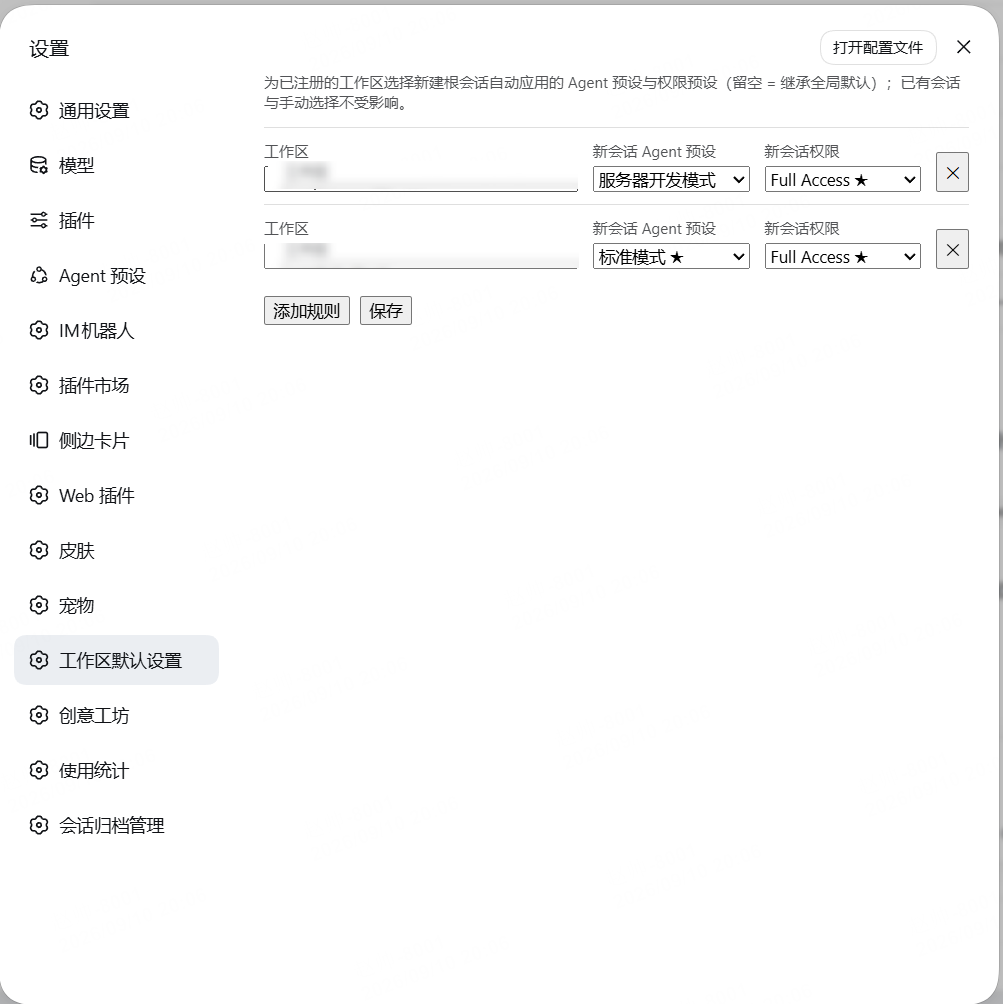
- Adds a Settings → Workspace defaults page: each rule = pick a registered workspace + pick the new-session Agent preset and permission preset (both optional = inherit the global defaults).
- The workspace dropdown lists the workspaces registered in the sidebar in real time and shows workspace names only; rules pointing at a removed workspace are marked instead of failing silently.
- Rules are stored keyed by workspace id (with the path and title kept for display), so workspace renames and path-casing changes never break matching.
How it works
- Whenever a new root session is published (the official
agent/createdevent, before the first turn), the plugin resolves the session's working directory (session.header.cwd) to a registered workspace; on a rule hit:- the Agent preset is switched through the official
agentPresets.selectand recorded durably on the session; - the permission preset is committed through the official
permissionPresets.set(sandbox mode and approval policy follow).
- the Agent preset is switched through the official
- Match scope: the session cwd equals the workspace directory or sits inside its subdirectories.
Scope and precedence
- Only root sessions created afterwards are affected: existing, resumed, forked, and subagent sessions stay untouched (children are identified by the session header's parent-session marker and delegation depth).
- Once a session starts (first turn begins), it is never switched; started or resumed sessions matching a rule are left alone.
- A choice you make after the session arrives (the New Session chip's staged preset, an in-session switch) happens after the automatic application and always wins.
- A fresh session briefly shows the global default before the first turn, then switches to the workspace default — the session list and the durable log both record the switch.
Install and usage
dsh plugin --profile web add @ahiosuz/dsh-workspace-tools
- Restart (or reload) DSH Web.
- Open Settings → Workspace defaults → Add rule.
- Pick a workspace from the dropdown (names only; hover for the full path), choose both presets, Save.
- Create a new conversation in that workspace to verify: the rule presets apply automatically before the first turn.
Compatibility
- DSH
0.1.5-rc.1(official build, no patches). Official capabilities used: theagent/createdevent,agentPresets.select, thepermissionPresetsservice, asettings.installSectionnamespace, and theremote.workspace.followstate stream. - Versions ≤0.3.0 relied on patch-provided extension points (the
workspaceActionsrow menu and thesidebar.workspaces.overlayslot). The official repository does not accept external patches, so 0.4.0 moved to pure official extension points; configuration moved from the workspace row menu to the settings panel.
FAQ
Why does a new session briefly show the global default?
The automatic application happens after the session is published (agent/created) and before the first turn — so the global default shows for a moment before the switch. That is the timing of the official create-then-switch flow; the final state is the workspace default.
Why did existing / resumed sessions not change? Rules only apply to newly created root sessions. Resumed, forked, subagent, and already-started sessions are explicitly skipped, and a session you chose manually stays on your choice.
My directory is missing from the workspace dropdown. The dropdown lists workspaces registered in the DSH sidebar. Register the directory as a workspace first, then add the rule on this page.
The switch failed — how do I debug it?
The most common failure is the target preset itself failing to mount — for example a custom preset file whose persona entry lacks the required prefix field (the schema is prefix required plus optional suffix; writing text instead fails the mount). Mount failures are logged in the DSH server log; fix the preset file and newly created sessions pick it up.
Development
npm install
npm run check
npm run check builds both halves and runs smoke tests (rule matching, listener behavior, client bundle contract, dotted-inject regression guard). The npm package prebuilds and ships lib/index.js and lib/client.js; no lifecycle scripts run on install.
Security
The plugin only reads the session's working directory (session.header.cwd) and calls the official preset services. Rules live in your settings document (the workspace-tools namespace of settings.yaml) and can be edited or cleared at any time. The plugin contains no telemetry, no credential access, no command execution, and no network access. Enabling danger-full-access follows DSH's official permission-preset semantics; use it only for directories you trust.
MIT License.
Links
More in this category
kenryu42/cc-safety-net★ 1749
Pre-execution guard that blocks destructive Git and filesystem commands and access to secrets such as SSH keys and .env files before a tool call runs.
toby-bridges/api-relay-audit★ 887
Runs local security audits of AI API relays and LLM proxies from DeepSeek Harness, producing Markdown reports for prompt injection, model substitution signals, tool-call rewriting, error leakage, stream integrity, and profile-gated Web3 risks.
SeaOf0/dsh-redteam-model★ 741
Authorized-security DSH collection: nine work modes (redteam coordinator, pentest, code audit, binary analysis, attack-defense, AV evasion, incident response, cloud security, CTF solving) and fifteen runtime plugins, managed from a settings page with one-click deploy, install, update and uninstall.
howmp/dsh-pentest★ 608
Authorized pentest mode for DeepSeek Harness — exploration chain, assets and findings with a Web view.
ADWMC/helm-d#helmd★ 443
Security-analysis plugin for DeepSeek Harness: 33 tools spanning six security domains, evidence/reporting and toolbox, plus the case lifecycle, routing and tool ledger; a session-bound case workflow with an evidence chain, E-id validation and reproducible findings; 362 on-demand references; three hot-swappable persona profiles; and a four-tab workbench (armor / case / intercept / about) with case-state recovery after context compaction.
PerryLink/dsh-auto-review★ 234
Second-model auto-review on the approval answerer chain: a read-only reviewer subagent returns structured allow/deny verdicts with reasons, fail-closed by default.
Community comments
Comments are public GitHub Discussions. Loading them connects to GitHub and Giscus; a GitHub account is required to post.