Claude Code-style permission rules engine: hard/deny/ask/allow tiers with a hard tier above full access, workspace-scoped rules, wildcard path protection, and a visual staged editor; rules persist in settings.yaml.
Install
# from GitHub (first run asks for allowBuilds approval — follow the hint, retry)
dsh plugin --profile web add github:940842546/dsh-permissions
Any plugin you install runs third-party code with your own permissions — it can read your files, use your credentials, and reach the network, and tool approvals don’t sandbox it. GitHub-sourced plugins also run build scripts at install time — pnpm blocks those until you allow them, so an install can stop with ERR_PNPM_GIT_DEP_PREPARE_NOT_ALLOWED or ERR_PNPM_IGNORED_BUILDS; dsh prints the exact key to add under allowBuilds in your profile’s pnpm-workspace.yaml, and the install works on the next run. Allowing a build is a trust decision: only install sources you trust, and pin a commit (github:owner/repo#sha).
README
English | 中文
Claude Code-style permission rules engine for DeepSeek Harness (dsh). A dual-face Cordis plugin: a host engine on the tools/pre-execute waterfall plus a visual editor in Settings → 权限 (Permissions).
Highlights
- Four rule tiers with strict precedence:
hard>deny>ask>allow. hardoutranks full access: hard rules keep blocking even when the session is on the full-access preset (approval policynever);askrules follow the session policy and auto-pass under full access.- Scopes:
globalrules apply everywhere; per-workspacerules merge on top (deny always wins on conflict). - Wildcard matching for file tools (
read/write/edit/glob/grep/read_image):write(*.pem)— path ends with.pemwrite(*secret*)— path containssecretwrite(.ssh)— path segment.sshanywhere (case-insensitive,\//normalized)write(C:\users\*)— absolute-path prefix- bare
write— every invocation
- Persistence: rules live in the
dsh-permissionssettings namespace and survive restarts (<harness home>/settings.yaml). - Model transparency: active rules are injected into the system prompt (
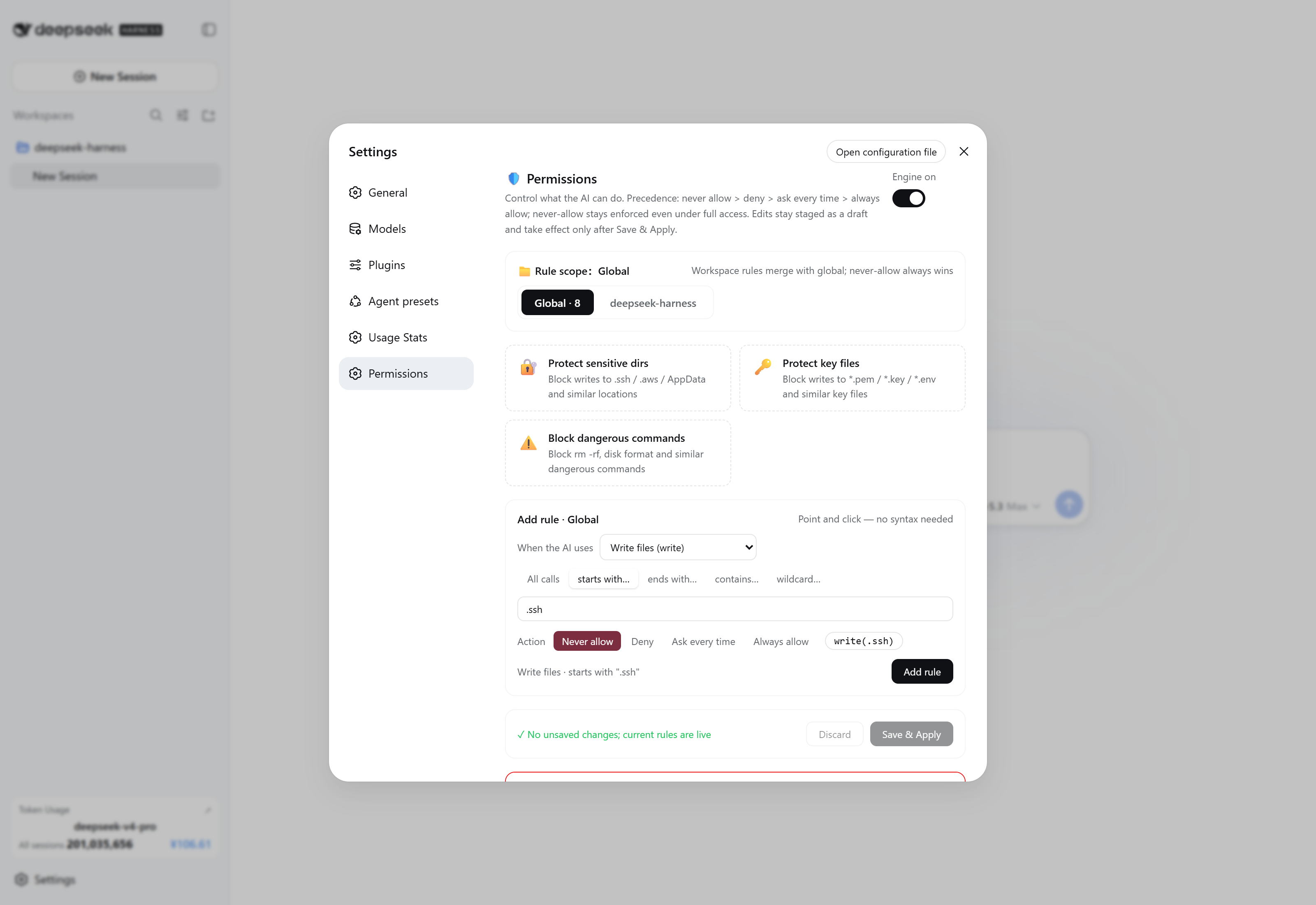
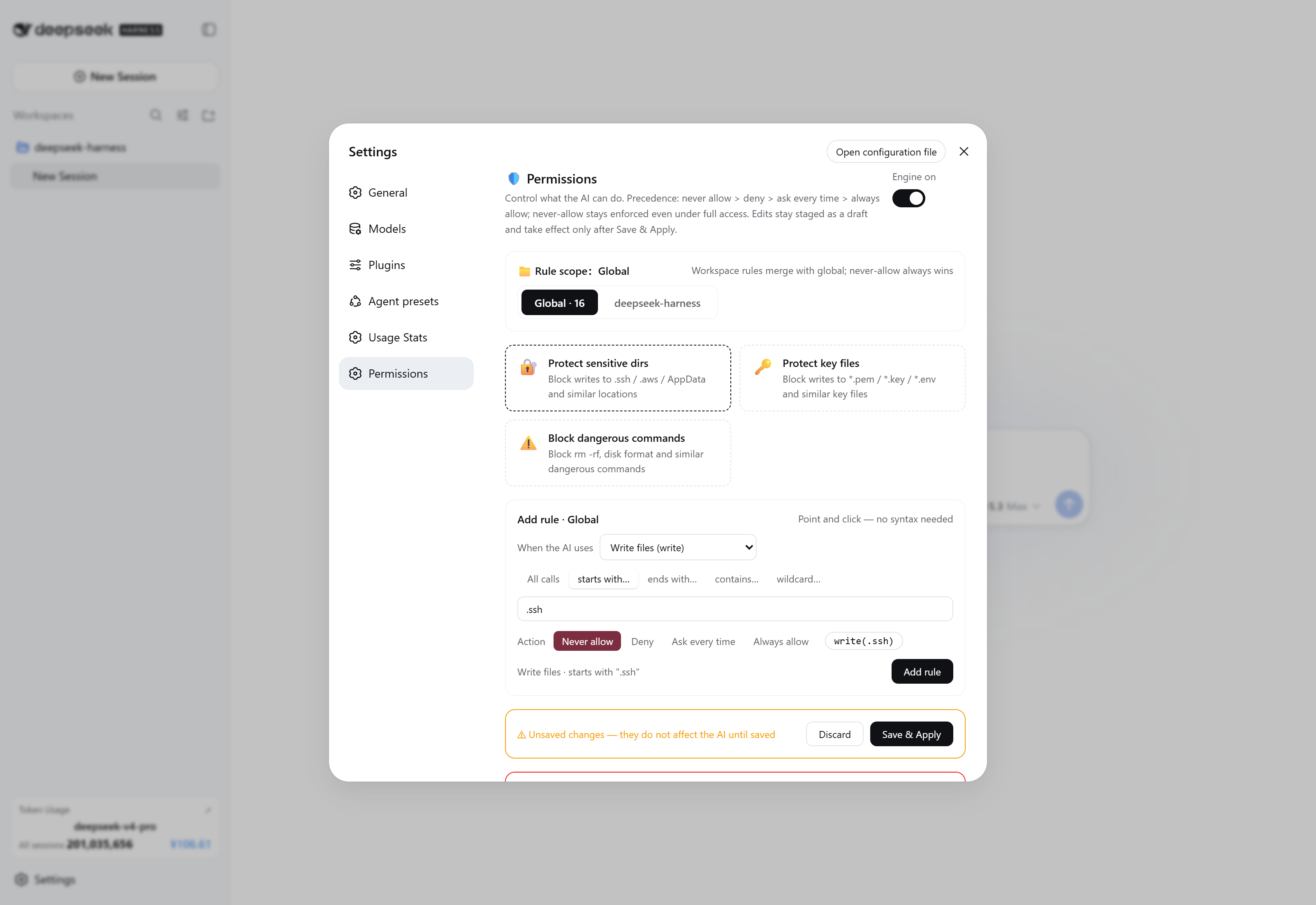
[active-permission-rules]). - Visual editor: staged (draft) editing — changes apply only after Save & Apply, with one-click presets (protect sensitive dirs / key files / dangerous commands).
Screenshots
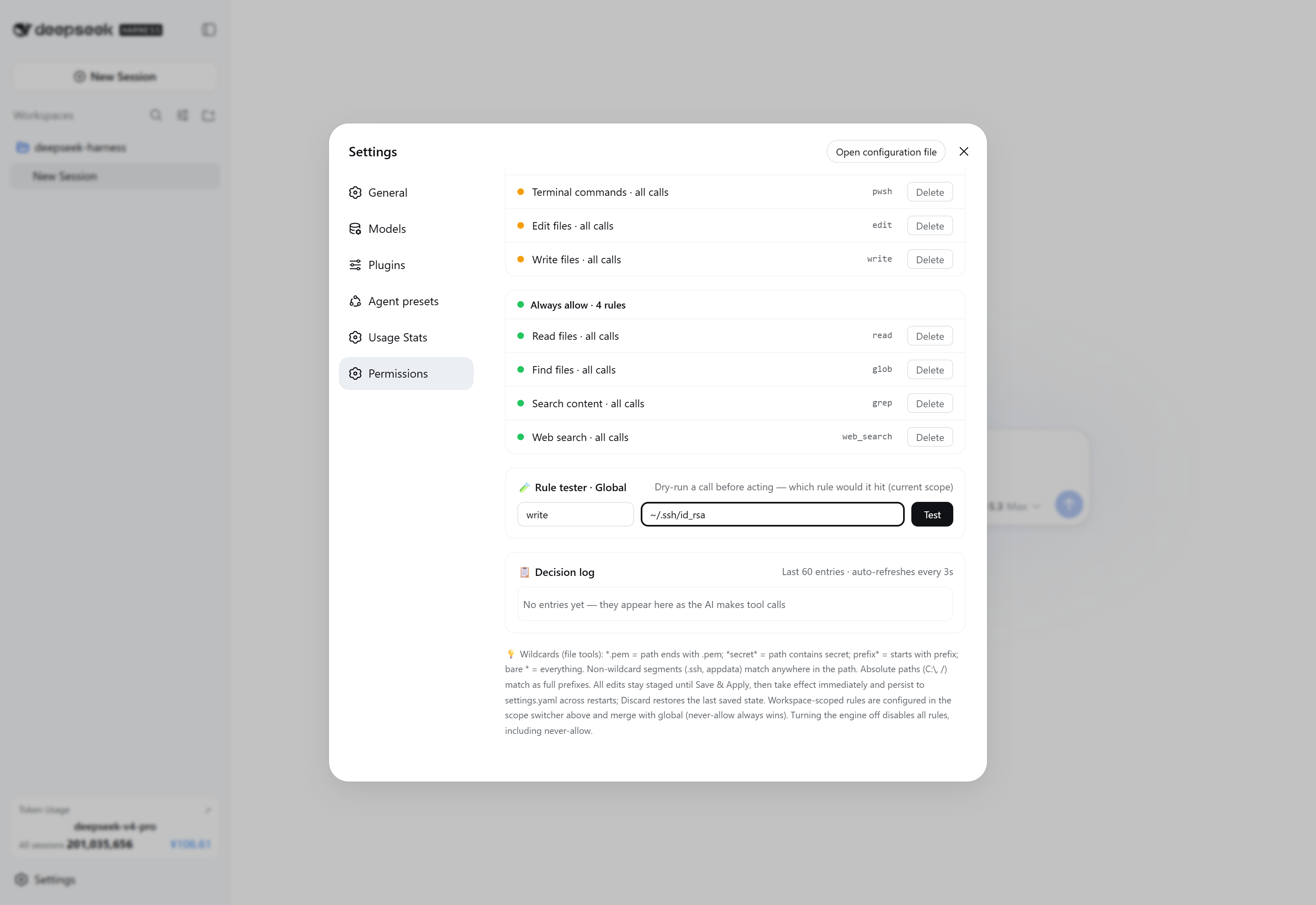
| Top: scope & rule builder | Panels / tester / decision log | Staged saving |
|---|---|---|
 |
 |
 |
Rule syntax
| Rule | Meaning |
|---|---|
pwsh |
every call of that tool |
pwsh(npm run) |
first argument starts with npm run |
write(*.pem) |
file path ends with .pem |
write(*secret*) |
file path contains secret |
write(.ssh) |
path segment .ssh anywhere |
pwsh(*) |
every call (explicit) |
Non-file tools match the raw first argument by prefix. grep additionally matches its path argument.
Install
Option A — official installer (recommended):
dsh plugin add dsh-permissions
Option B — manual patch row: append the insert list from this repo's cordis.patch.yml to your profile patch (~/.dsh/cordis.patch.yml or ~/.dsh/profiles/<profile>/cordis.patch.yml), after installing the package where the profile resolves it (~/.dsh/node_modules/dsh-permissions):
- insert:
    - id: permissions
      name: dsh-permissions
Then restart the app. The Settings → 权限 page appears automatically; the engine starts with safe defaults (16 hard rules protecting .ssh / .aws / .gnupg / AppData / *.pem / *.key / *.env / *.htpasswd, plus deny: pwsh(rm -rf *)).
Permissions page
- Engine toggle, three one-click preset cards, a point-and-click rule builder (action × tool × match mode × value → live preview), and four colored rule panels.
- All edits are staged: nothing affects the agent until you click Save & Apply; Discard restores the last saved state.
Security notes
- The engine only narrows the session's existing sandbox/approval posture:
allowskips this plugin's own ask but never bypasses the DSH sandbox ortools.guardguards. - Denials surface to the model as
Error: 权限规则拒绝…(hard:硬规则拒绝(高于 full access,不可豁免)…), so the agent can route around blocked calls. - The settings route (
GET/POST /api/dperm/rules) is the namespace owner's own endpoint — the DSH api-proxy's settings allowlist intentionally does not expose third-party namespaces.
Development / publishing
See PUBLISH.md for the release checklist and the pitfalls we hit (client package exports must include ./package.json; bundle id must equal the package name; no unbounded method refs into React's useSyncExternalStore).
License
MIT
Links
More in this category
toby-bridges/api-relay-audit★ 862
Runs local security audits of AI API relays and LLM proxies from DeepSeek Harness, producing Markdown reports for prompt injection, model substitution signals, tool-call rewriting, error leakage, stream integrity, and profile-gated Web3 risks.
SeaOf0/dsh-redteam-model★ 652
Authorized-security DSH collection: nine work modes (redteam coordinator, pentest, code audit, binary analysis, attack-defense, AV evasion, incident response, cloud security, CTF solving) and fifteen runtime plugins, managed from a settings page with one-click deploy, install, update and uninstall.
howmp/dsh-pentest★ 566
Authorized pentest mode for DeepSeek Harness — exploration chain, assets and findings with a Web view.
PerryLink/dsh-auto-review★ 218
Second-model auto-review on the approval answerer chain: a read-only reviewer subagent returns structured allow/deny verdicts with reasons, fail-closed by default.
NanmiCoder/dsh-auto-mode★ 164
Adds an Auto permission preset between Workspace Write and Full access: routine work stays in the official workspace-write sandbox while the current session model reviews escalation and destructive calls, granting one exact wider access once, asking when the intent is ambiguous, and denying critical paths.
PerryLink/dsh-permission-rules★ 117
Claude Code-style declarative permission rules: ordered allow/deny/ask YAML rules matching tool names, arguments, workspace paths, and agent identity on the tools/pre-execute waterfall, with full session-log audit, dry-run mode, and hot reload.
Community comments
Comments are public GitHub Discussions. Loading them connects to GitHub and Giscus; a GitHub account is required to post.