Adds ChatGPT-style stop, edit-and-resend, native quote annotations, and an independent sidebar follow-up chat with model and image input for DeepSeek Harness Desktop.
Install
# from GitHub (first run asks for allowBuilds approval — follow the hint, retry)
dsh plugin --profile web add github:1985899182/dsh-harness-chat-control
Any plugin you install runs third-party code with your own permissions — it can read your files, use your credentials, and reach the network, and tool approvals don’t sandbox it. GitHub-sourced plugins also run build scripts at install time — pnpm blocks those until you allow them, so an install can stop with ERR_PNPM_GIT_DEP_PREPARE_NOT_ALLOWED or ERR_PNPM_IGNORED_BUILDS; dsh prints the exact key to add under allowBuilds in your profile’s pnpm-workspace.yaml, and the install works on the next run. Allowing a build is a trust decision: only install sources you trust, and pin a commit (github:owner/repo#sha).
README
Bring ChatGPT-like conversation interactions to DSH Desktop.
Project goal: reproduce ChatGPT's two quote-based conversation workflows.
- Quote in the main chat: quote an answer and continue asking in the same conversation.
- Quote in the sidebar chat: carry the quote into Better Sidebar and ask in an independent sidebar session without changing the main chat.
UI examples
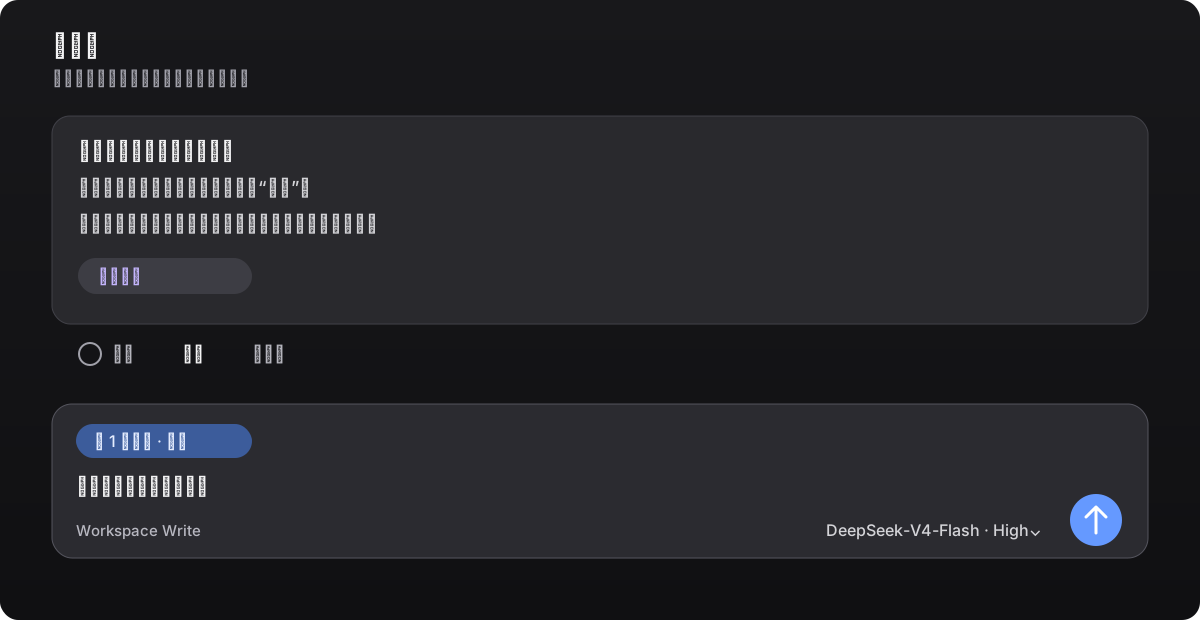
Quote in the main chat
Select text in an answer or click Quote in its action bar. The quote stays in the composer as an annotation chip; edit your question before sending.
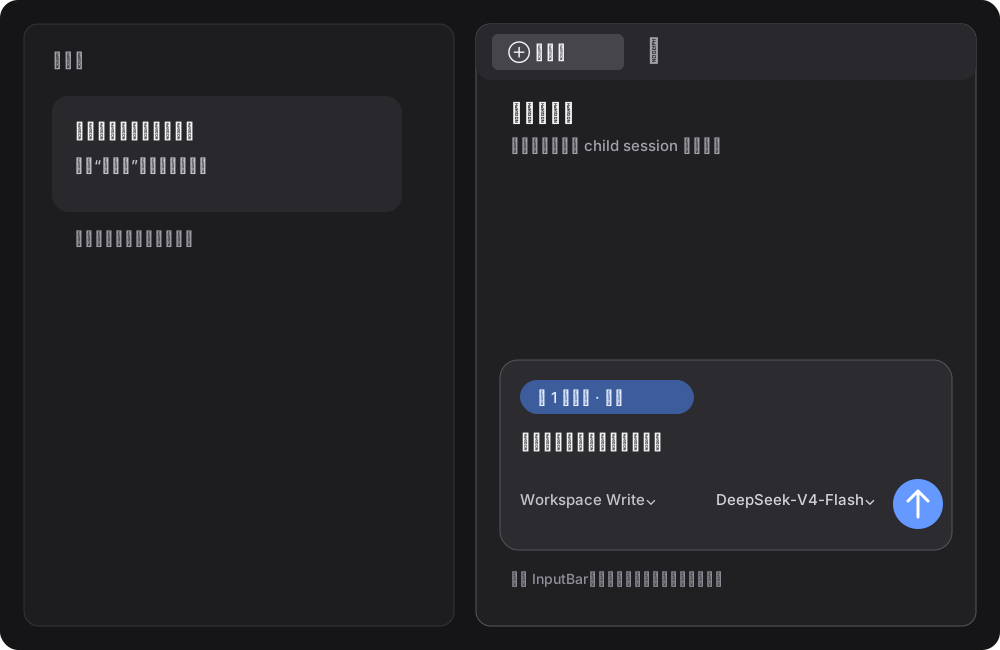
Quote in the sidebar chat
Click Ask in sidebar or choose Ask in sidebar chat from the text-selection toolbar. The sidebar keeps Better Sidebar's native composer and model selector. Text outside the quote chip is entirely user input, and nothing is sent until you click Send.
Features
- Main-chat quotes: quote a full answer or a selected fragment without leaking Markdown markers such as
>or---into the prompt. - Native annotation chip: the composer shows the quote as a
1 annotationchip. You can edit the question or remove the chip before sending. - Embedded sidebar: embeds and pins the
dsh-better-sidebar@0.28.0SideChatView, transcript mapping, and styles. It works without Better Sidebar installed, and this project's sidechat remains authoritative when another version is present. - Sidebar quote: keeps Better Sidebar's native conversation layout and DSH's session/model capabilities. Main and sidebar sessions stay independent.
- Model selection: the native model selector applies only to the current sidebar session.
- Edit and resend: click the pencil next to a user message to load the original text into the native composer. Sending replaces the visible branch in the same conversation instead of creating duplicate chats.
- Stop generation: reuses DSH's native stop/send state and does not intercept or submit native events twice.
The plugin adds the quote chip, entry points, and session routing; the sidebar layout, transcript, and child-session lifecycle come from the pinned Better Sidebar 0.28.0 source so another plugin version cannot take over.
Compatibility
| Component | Version |
|---|---|
| DSH Desktop (Windows) | 0.12.1 |
DeepSeek Harness / @deepseek-ai/dsh |
0.2.1-rc.2 |
dsh-better-sidebar |
0.28.0 |
| Node.js | >=20 |
| pnpm | 10.x or 11.x |
dsh-better-sidebar@0.28.0 targets Harness 0.2.1-rc.2. Pin Sidebar to 0.28.0 on DSH Desktop 0.12.1 (which ships Harness 0.2.1-rc.2). Harness 0.2.1-rc.2 removed the webRuntime service; this plugin now admits requests through connection.requestRejection().
Install
Use the DSH plugin command for every installation. Fully quit DSH Desktop, then run this in Windows PowerShell:
$env:DSH_HOME = "$env:APPDATA\dsh-desktop\harness"
dsh plugin --profile web add --save-exact --allow-build=node-pty "git+https://github.com/1985899182/dsh-harness-chat-control.git#v0.3.5"
If dsh is not on PATH, use the CLI bundled with DSH Desktop; it still executes the same dsh plugin install command:
$desktopNode = 'D:\DSH\DSH Desktop\resources\app\node_modules\node\bin\node.exe'
$desktopDsh = 'D:\DSH\DSH Desktop\resources\app\node_modules\@deepseek-ai\dsh\lib\bin.js'
$env:DSH_HOME = "$env:APPDATA\dsh-desktop\harness"
& $desktopNode $desktopDsh plugin --profile web add --save-exact --allow-build=node-pty "git+https://github.com/1985899182/dsh-harness-chat-control.git#v0.3.5"
The explicit HTTPS Git URL prevents pnpm from interpreting GitHub shorthand as SSH. If your network requires a proxy, set HTTP_PROXY, HTTPS_PROXY, or ALL_PROXY before running the command. After a first install, or when the plugin is not already live, fully restart DSH Desktop; for a live upgrade, follow DSH's refresh prompt.
If the profile already uses Sidebar 0.24.x, use the same dsh plugin command to pin the compatible version first:
$desktopNode = 'D:\DSH\DSH Desktop\resources\app\node_modules\node\bin\node.exe'
$desktopDsh = 'D:\DSH\DSH Desktop\resources\app\node_modules\@deepseek-ai\dsh\lib\bin.js'
$env:DSH_HOME = "$env:APPDATA\dsh-desktop\harness"
& $desktopNode $desktopDsh plugin --profile web add --save-exact --allow-build=node-pty dsh-better-sidebar@0.28.0
Then run the standard install command above.
Usage
- Main chat: click Quote in an answer's action bar, or select text and choose Add to chat; add your question and send it.
- Sidebar chat: click Ask in sidebar, or choose Ask in sidebar chat from the selection toolbar; select a model, enter your question, and send it.
- Edit and resend: click the pencil beside a user message, edit the text in the native composer, and send. The new answer appears at the original position.
- Tab management: right-click a right-sidebar tab to choose Close other tabs, Close tabs to the right, or Close tabs to the left.
Development
npm test
This validates the manifest, loader declarations, PowerShell installer, and JavaScript syntax.
Release
Current milestone: v0.3.5, validated against DSH Desktop 0.11.0 / 0.12.0 and Harness 0.2.0-rc.2, with dsh-better-sidebar@0.28.0 sidechat embedded. This release adds Close other tabs, Close tabs to the right, and Close tabs to the left to the right-sidebar tab context menu: the entries register through the host's sidebar.right.tab.menu.item slot, close through the host's closeIn, follow the real tab-strip order for left/right, and grey out when there is nothing to close. It keeps the v0.3.3 multi-tab sidechat fix: the plugin switches the sidechat tab kind to the host's native multi-instance mode (the same multiple switch the built-in terminal and browser kinds use) at install time and before every open, so each quote opens its own side-chat tab and several quoted terms can sit side by side. Verified on DSH Desktop 0.12.0 (Harness 0.2.0-rc.2): three consecutive selections through "Ask in sidebar chat" produced three independent side-chat tabs, each keeping its own reference annotation, and all three batch-close entries were verified in the same window. Recheck native Slots, sidechat API, and state interfaces after upgrading DSH or the Harness major version.
License
MIT
Links
More in this category
zhu1090093659/dsh-web#packages/dsh-task-board★ 9673
Task board for the dsh web GUI: a sidebar multi-column kanban whose cards run in real DSH agent sessions and can also be scheduled with cron expressions, executed host-side even with the browser closed.
zhu1090093659/dsh-web#packages/dsh-web-all★ 9673
Plugin and skin collection for the DSH Web UI: task board, Git graph, right-side panel, remote mobile UI, pet, live token stats, and a skin center.
MeteorNOX/DeepSeek-Balance-Whale-Widget★ 6324
A fixed-corner whale widget for the DSH web GUI — balance, today's usage and per-turn cost with peak/off-peak pricing, editable balance-alert and daily-budget bubbles, a module-based custom bubble queue with A/B weighted choices and random lines or images, 30+ vendor templates (OpenAI, OpenRouter, Kimi, SiliconFlow, Ark, Zhipu, MiniMax and more) with per-model balance and subscription quota, plus task-end sound, imported audio, custom roles and a resource manager. Local-only, no telemetry.
ccch1mneyyy/dsh-TUI★ 6018
Claude Code-style full-screen terminal UI: pixel-whale header, live status line, and streaming thought expansion.
omdsh-dev/DSH-better-sidebar★ 4645
Full sidebar workbench with file rendering and editing, terminal, Git, and subagents; third-party plugins can register new tabs.
Devin-AXIS/deepseek-design#deepseek-idesign★ 1607
Visual design studio for websites, app prototypes, posters, cards, reports, and magazines, with templates, direct element editing, selection-aware AI draft handoff, and export.
Community comments
Comments are public GitHub Discussions. Loading them connects to GitHub and Giscus; a GitHub account is required to post.