Self-hosted crypto portfolio dashboard: BTC, EVM (73 chains via DeBank), Solana, Dogecoin, Cardano, Hyperliquid L1, five exchanges (Binance, Bybit, Backpack, OKX, Bitget) and tokenised equities in one view, with multi-provider failover, custom asset labels, a tunable asset-health report, a shareable PNG card, per-source connection tests, multi-profile configs, scheduled refresh and zero-dependency charts (Python stdlib + vanilla JS, no CDN).
Install
# from GitHub (first run asks for allowBuilds approval — follow the hint, retry)
dsh plugin --profile web add github:0xRabit/dsh-crypto-portfolio
Any plugin you install runs third-party code with your own permissions — it can read your files, use your credentials, and reach the network, and tool approvals don’t sandbox it. GitHub-sourced plugins also run build scripts at install time — pnpm blocks those until you allow them, so an install can stop with ERR_PNPM_GIT_DEP_PREPARE_NOT_ALLOWED or ERR_PNPM_IGNORED_BUILDS; dsh prints the exact key to add under allowBuilds in your profile’s pnpm-workspace.yaml, and the install works on the next run. Allowing a build is a trust decision: only install sources you trust, and pin a commit (github:owner/repo#sha).
README
English | 中文
A free, 100% self-hosted DeepSeek Harness (DSH) plugin that unifies your on-chain and CEX assets into one self-contained web dashboard.
Requires dsh 0.1.1-rc.2 (Node ^22.19 || >=24) · Python 3.9+ · pip3 install requests pynacl
dsh plugin --profile demo add dsh-crypto-portfolio   # npm
dsh --profile demo                                    # dashboard at http://127.0.0.1:8080
Twin project. This dashboard is the twin of the SmartFolio Chrome extension: the extension puts the same wallets in your toolbar, this one is the self-hosted, all-chains view that runs on your own machine. Same idea, two shells — the dashboard is a DSH plugin and follows the DSH plugin conventions, so it keeps its own name.
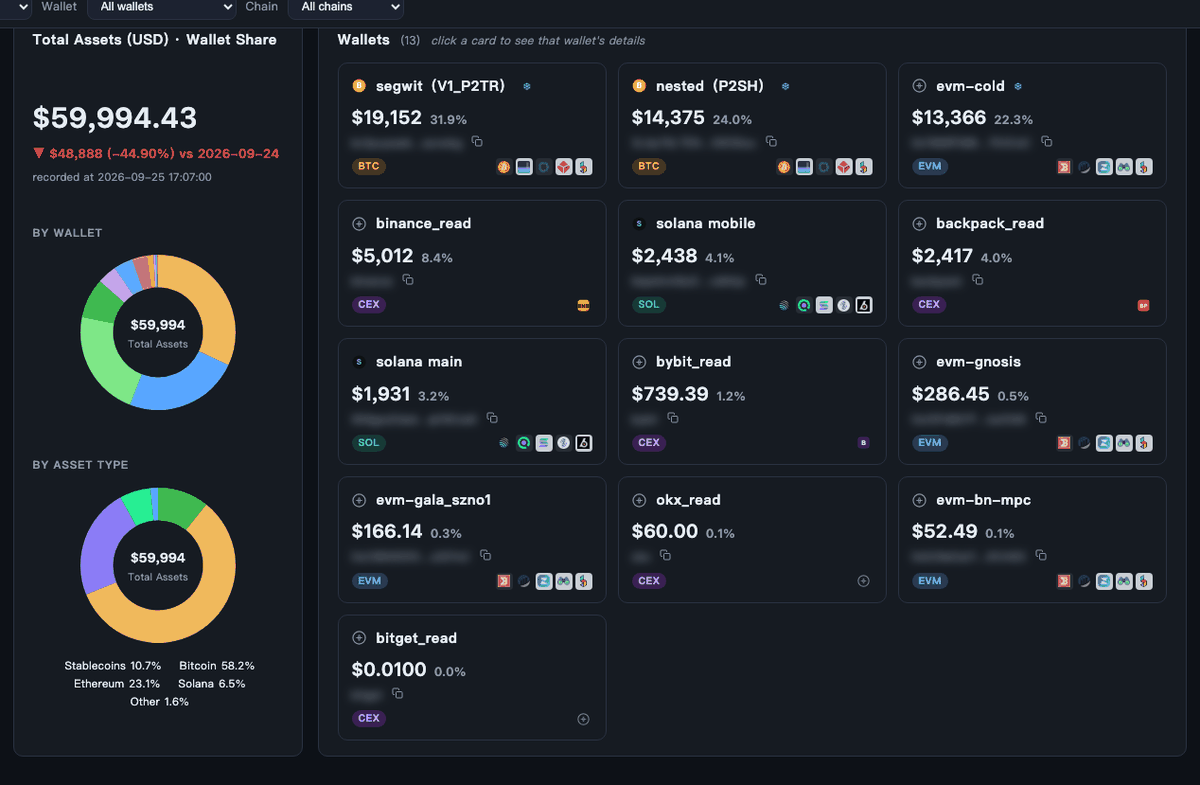
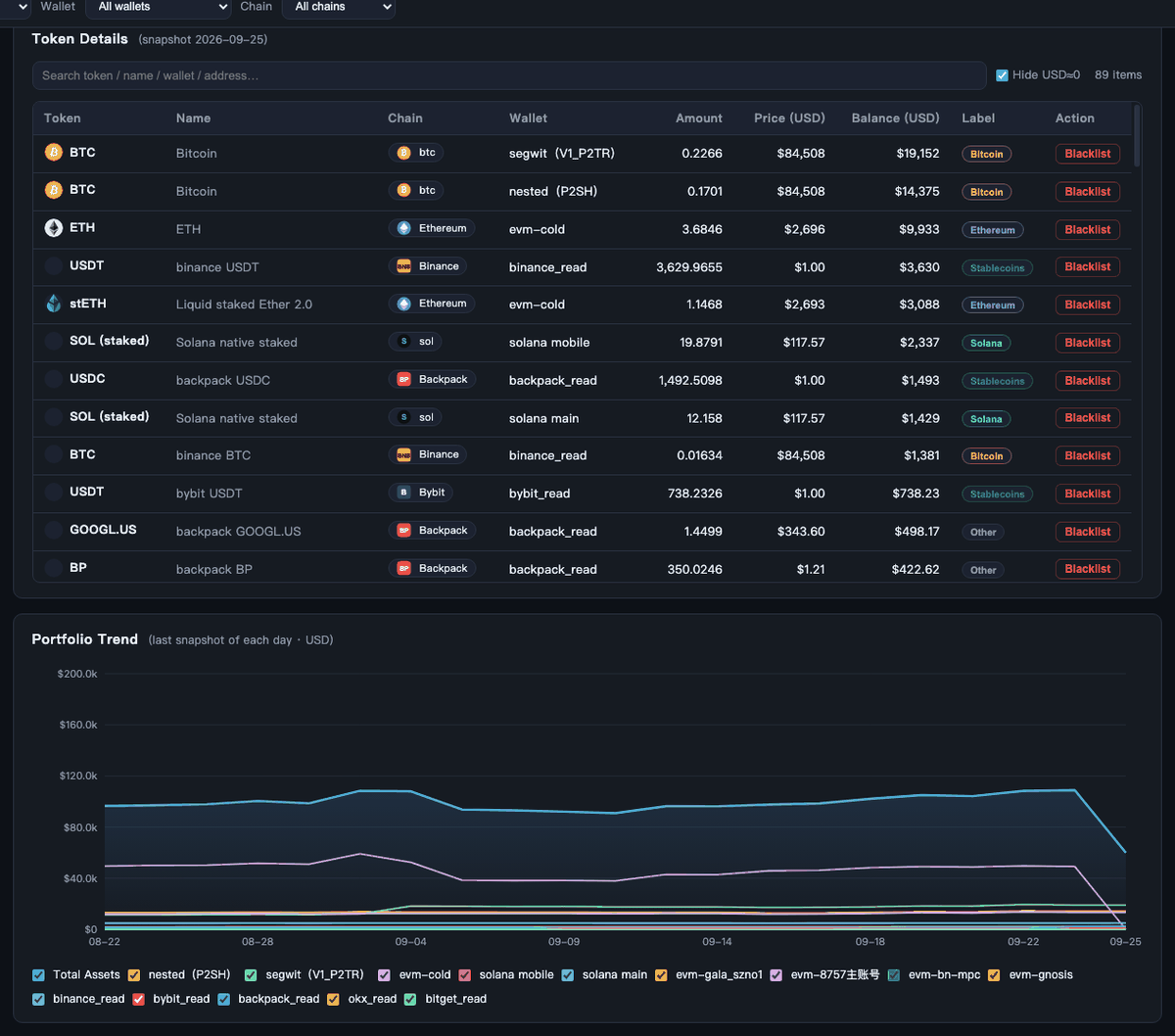
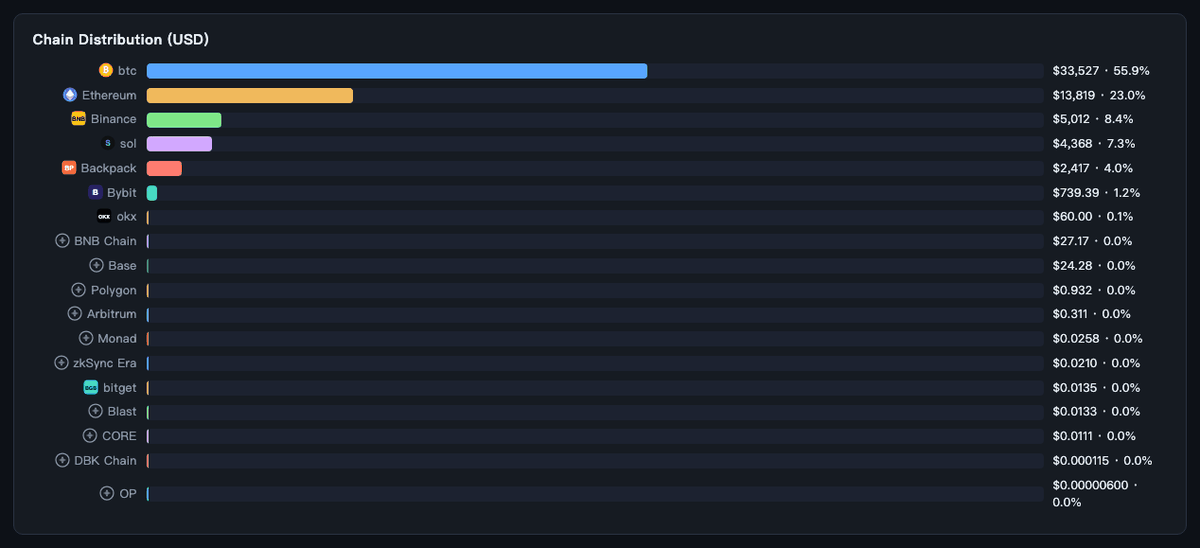
Unofficial project, independently developed and maintained by community members.
Why it exists / The pain points
I built it because the pain points are real.
1 · My money lives in seven places, and checking the total means opening six pages
EVM assets in DeBank, SOL and staking on-chain, BTC in a block explorer, plus Binance / Bybit / Backpack / OKX / Bitget — each with its own app. Checking "how much do I actually have" meant hopping between six pages, and it was easy to miss a wallet along the way.
This plugin puts all of it on a single screen.
2 · Assets that block explorers can't see
Some money is genuinely invisible: native Solana stake accounts (getParsedStakeAccounts misses them), Hyperliquid L1 staked HYPE and spot balances, exchange earn/funding accounts. None of these are plain SPL/ERC-20 tokens, so ordinary tools never read them.
This plugin digs them out and prices them into your total — including the 12.1 SOL staked in the account above and the ~318 HYPE staked on Hyperliquid.
3 · Dust coins and phishing tokens inflate the numbers
DeBank lists plenty of fake tokens — ETHG, for example, is a phishing token with a manipulated price that once inflated one account by $570K.
One-click blacklisting: every token you blacklist is removed from totals, trends and historical snapshots instantly.
4 · "How much did I have last week?"
Without history there's no peace of mind.
Every refresh saves the last snapshot of the day (SQLite, deduplicated by day); over time it draws a trend line that is uniquely yours:
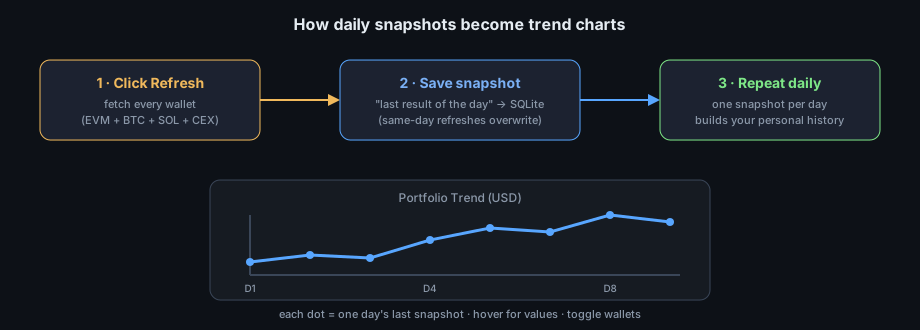
What it does
- A zero-dependency web dashboard, launched from a real DSH plugin. No framework, no CDN — Python stdlib + vanilla JS.
- Covers BTC / EVM / Solana / Dogecoin / Cardano / Hyperliquid L1 / CEX. DeBank's 73 chains, BTC P2SH+P2TR, native Solana staking, Dogecoin (BlockCypher), Cardano (Koios, incl. stake addresses), Hyperliquid's official API (staked HYPE + spot + perp equity + vault equity), and read-only CEX keys (named
<exchange>_read). Five exchanges are supported (Binance, Bybit, Backpack, OKX, Bitget). Read-only CEX keys cover spot, OKX's funding sub-account and Backpack's futures collateral account, including tokenised equities; on Bitget the spot account is summed with the real futures accounts and theS*demo products are skipped, so play money never enters the total. - Global filters. Category (BTC / EVM / Solana / Dogecoin / Cardano / CEX), wallet and chain dropdowns drive every panel — total, wallet-share pie, trend, chain distribution, token table.
- Up to five block explorers per wallet. Each wallet card ends in a row of explorer icons — the provider this app actually reads from comes first (DeBank · bitaps · Jupiter · Dogechain · Cardanoscan), then the other mainstream explorers in popularity order (Etherscan, mempool.space, Solscan, Blockchair, CExplorer, …). Dogecoin shows three and Cardano four, because that is how many credible explorers those chains have. CEX rows show the exchange mark instead, since an exchange account has no explorer page.
- Free + paid data sources, clearly labeled. EVM uses DeBank with two providers: paid
debank-pro(badged "PAID", with a registration link) and free keylessdebank-publicfallback; CEX rows always show Binance/Bybit/Backpack/OKX/Bitget with "get API key" links to each exchange (OKX and Bitget also take the key's passphrase). Each source displays when it last succeeded. - Automatic API failover. Each source has several providers (prices: CoinGecko → Binance → Coinbase → OKX; BTC: blockchain.info → mempool.space; multiple Solana RPCs; Hyperliquid dual endpoints). A dead provider is skipped and the last working one is remembered.
- Scheduled daily refresh. Every profile can auto-refresh at a local time (server-side daemon; closing the browser page does not stop it); per-source last-success timestamps are shown in Settings.
- Multi-profile configs. The
defaultprofile ships with public template wallets (vitalik.eth, genesis BTC, public SOL, public DOGE, public ADA) and empty keys; each profile can be renamed — its snapshots move with it — and keeps its own daily refresh time; your private wallets and keys live in a separately named profile with its own snapshot history. - Local-first by default. The API binds to
127.0.0.1and masks API keys in its responses; writes are refused for cross-site requests (Sec-Fetch-Site: cross-site, foreign or opaqueOrigin, non-JSON bodies) and refresh is rate-limited to one run per minute. Snapshot history is kept as a 90-day window plus one per month, so the database does not grow without bound. - Asset labels. A second donut breaks the portfolio down by asset label, and the system detects stablecoins / bitcoin / ether / SOL / HYPE on its own (bridged, wrapped and staked forms included). Every token table row carries a one-label control, and you can define your own labels in Settings — a custom label gets its own slice and colour, and your rules always beat the built-in wildcards.
- Asset health. A panel above the token table grades the portfolio on the three questions that matter, one card each: volatility risk (stablecoins · bitcoin · everything else, scored on the volatile share), concentration (largest single wallet, drawn as a gauge with both thresholds marked) and storage security (cold · hot · exchange custody). Every row shows its balance and its share, and each failing check adds a plain sentence. All three thresholds are editable in Settings (per profile, validated, with the storage pair inverted) and the figures are derived from the same blacklist-filtered snapshot the dashboard shows. Mark a wallet cold in Settings and the storage verdict follows at once — the class is read from the live wallet list, with the snapshotted value as the fallback for wallets that have since been removed.
- Share card. A Share button next to Refresh opens a dialog with a live preview of a 1200×630 PNG — total, day-over-day change, top holdings aggregated by symbol, the asset-label donut and the three health verdicts. Download it, copy the image, copy the generated text, or send it straight to X / Facebook / WhatsApp / Telegram. Drawn by hand on a canvas: no
html2canvas, no CDN, and no wallet address in the image. - Author links + tip jar. The settings footer carries the author's socials (X / Discord / GitHub) and a Buy me a coffee dialog with a tip.md badge and a Binance Pay QR — the badge is vendored locally, so the page still makes no third-party requests.
- Linkable pages.
#pageSettingsopens Settings and#pageSettings/secWalletsopens one section, so a refresh (or a bookmark) returns you to the same place. - Themes & i18n: light/dark theme toggle, EN / 中文 (English by default), chain/exchange logos throughout.
Every box in the diagram is a real data pipeline:
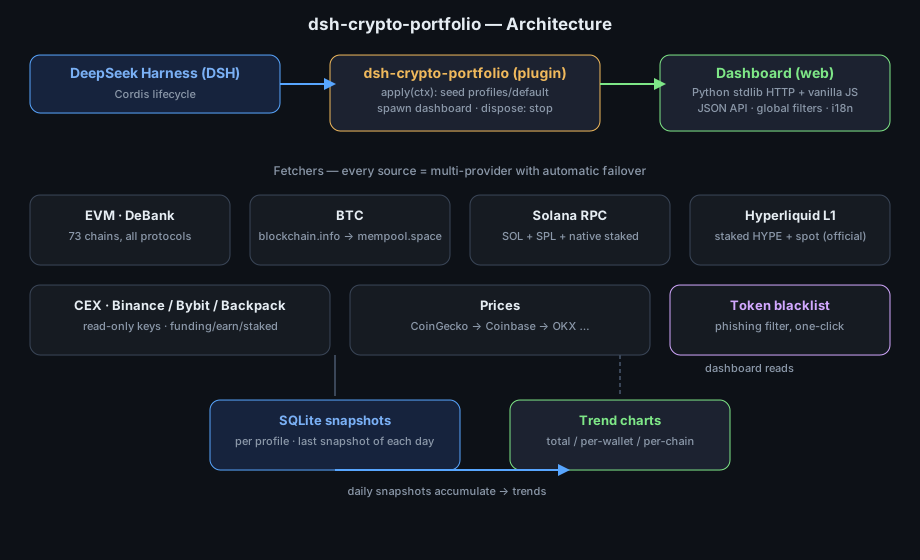
How it integrates with DSH
Not a wrapper — a real plugin:
- Declares a
dsh.bundlemanifest (cordis.patch.yml), so it installs withdsh plugin add. apply(ctx)hooks into the Cordis lifecycle: seeds user-localprofiles/defaultfrom public templates on first run, spawns the dashboard as a child process, and stops it cleanly onctx.on('dispose').- Exposes JSON APIs (
GET /api/refresh,/api/history,/api/tokens, ...) that an agent can call directly, in addition to the web UI.
Privacy (important)
This repository contains no private keys, no private wallets, no balances — tracker/config.py ships with WALLETS = [] and empty keys. All private configs live in git-ignored local profiles/. Clone it, review it, run it with confidence.
Install
Requirements
dsh0.1.1-rc.2(or a compatible release within the same pre-release line) and Node^22.19.0 || >=24.0.0— the range DSH itself declares.Python 3.9+ with two pip packages:
pip3 install requests pynaclThese are ordinary runtime dependencies, not vendored, so
pipcan pick the build that matches your platform.
From npm (recommended)
Installs prebuilt code and needs no build permission:
dsh plugin --profile demo add dsh-crypto-portfolio
dsh --profile demo
From a tarball (offline / air-gapped)
pnpm pack                                    # produces dsh-crypto-portfolio-0.1.0.tgz
dsh plugin --profile demo add ./dsh-crypto-portfolio-0.1.0.tgz
From GitHub
dsh plugin --profile demo add github:0xRabit/dsh-crypto-portfolio#<commit-sha>
This package is plain JavaScript + Python with no build step, so its
prepare is a no-op and pnpm does not need you to allowlist a build script —
unlike plugins that ship TypeScript sources. Pin a commit SHA anyway, so a
later push cannot change what runs on your machine.
Verify the layer before booting
dsh --profile demo --dump-config # look for: # == dsh-crypto-portfolio
If that line is missing, the bundle did not activate — the package installed as a
plain dependency instead. Re-run the add and check the warning it printed.
Override the port
A patch replaces the whole config of a row, so restate every key you need.
Put this in $DSH_HOME/profiles/demo/cordis.patch.yml:
- id: portfolio-tracker
  name: dsh-crypto-portfolio
  config:
    port: 8199
    host: 127.0.0.1
Or set PORTFOLIO_PORT in the environment.
Standalone (no DSH)
python3 run.py --init-template --port 8080 # seeds profiles/default from public templates
Layout
profiles/default/   sources.json + wallets.json (public template, auto-seeded)
templates/          public example configs (no secrets)
tracker/            backend fetchers (debank/btc/solana/hyperliquid/cex/prices)
static/             web dashboard (vanilla JS, no external deps)
run.py / fetch.py   web server / CLI snapshot
Releasing
One command from the maintainer's working tree (the release scripts live there, not in this published bundle), and the flow is deliberately split in two:
scripts/sync_public.sh --push                 # publish code — the version does NOT move
scripts/sync_public.sh --push --release       # bump + tag + refresh every market listing
| Action | Version | Changelog | Tag | Market listings |
|---|---|---|---|---|
--push |
unchanged | unchanged | — | untouched |
--push --release |
bumped | [Unreleased] stamped |
vX.Y.Z |
branch pushed, PR prepared per market |
- A push is not a release. Publishing code leaves
package.jsonexactly as it is, so installed users see no update until a version is cut on purpose. - A release refreshes every listing. The wording for each market lives here, under
market/, so it is versioned with the code it describes and always matches the version being shipped. A market whose text did not change is skipped instead of getting an empty pull request.
| Market | How it is fed | What the release does |
|---|---|---|
| awesome-dsh-plugin | one YAML file per plugin | market/awesome-dsh-plugin.yml → data/plugins/0xRabit__dsh-crypto-portfolio.yml |
| awesome-deepseek-harness | curated bilingual tables | market/awesome-deepseek-harness.json → the row in each language's 🧩 Tools, Workflows & Presets table |
| awesome-dsh-hub | hourly scrape of the dsh-plugin topic |
nothing to submit — the release only verifies the entry is present and current |
License
MIT — see LICENSE.
Links
More in this category
Tencent/WeKnora#dsh-weknora★ 32318
Four read-only tools over a WeKnora knowledge base: list knowledge bases, hybrid passage search, reassemble one document's chunks in order, and WeKnora's own cited RAG or ReAct-agent answer with a resumable session id.
superdesigndev/treg★ 4452
Tool catalog for agents: search ~2,600 external endpoints (SEO and SERP, backlinks, social, people and company enrichment, ad libraries, scraping) by the task you want done, read each one's parameters and per-call price, then call it with the credential injected server-side. Ships the skill plus an MCP row that stays disabled until TREG_TOKEN is set.
TencentCloudBase/CloudBase-AI-Toolkit#dsh-plugin★ 1132
Tencent CloudBase backend for DeepSeek Harness — scaffold and deploy full-stack apps from chat, render query results as table cards with paging, sorting and CSV export, preview a deployment on its domain, and call the CloudBase MCP toolset (`mcp__cloudbase__*`) with device-code login.
gitroomhq/postiz-agent#dsh-postiz★ 504
Connects DeepSeek Harness to Postiz over MCP: list connected social media channels, fetch per-platform posting rules, and schedule, draft, or publish posts to X, LinkedIn, Instagram, Facebook, Threads, TikTok, YouTube, Reddit, Bluesky, Mastodon, Discord, Slack, Telegram and more; adds a postiz workflow skill.
EthanYoQ/Invoice-Downloader#dsh-invoice-downloader★ 496
Local IMAP invoice download, OCR, archive, and Excel reimbursement summaries for DeepSeek Harness.
anysearch-team/anysearch-dsh★ 447
AnySearch-powered real-time web and vertical search provider for DeepSeek Harness.
Community comments
Comments are public GitHub Discussions. Loading them connects to GitHub and Giscus; a GitHub account is required to post.