Authentication gate for the DeepSeek Harness Web UI: the login gate covers pages, /api, /plugins and WebSocket upgrades; PBKDF2 password hashing, HttpOnly SameSite session cookies and IP-based login lockout; invite-code registration; two-factor login with TOTP or passkeys (WebAuthn: several keys per account, phone enrolment by QR, username-less sign-in, and a password or second-factor step-up before any login factor is added or removed); a user-management settings panel (users edit their own profile and manage their own TOTP and passkeys, admins add or remove users, reset passwords, manage invites and clear the passkeys of a lost device); admin-only model and API-key configuration guards; per-user isolation on the REST/list APIs and on the WebSocket event streams; session persistence across restarts; a JSONL audit log; and a fail-closed gateway. Runs on both DSH transport lines (0.1.1-rc.2 legacy and 0.1.2+ modern) with no configuration; passkey login needs a localhost or HTTPS origin because browsers require a secure context.
Install
# from npm (prebuilt)
dsh plugin --profile web add dsh-ui-auth
# from a prebuilt release tarball
dsh plugin --profile web add "https://github.com/0QwQ0/dsh-ui-auth/releases/download/v0.6.5/dsh-ui-auth-0.6.5.tgz"
# from GitHub (first run asks for allowBuilds approval — follow the hint, retry)
dsh plugin --profile web add github:0QwQ0/dsh-ui-auth
Any plugin you install runs third-party code with your own permissions — it can read your files, use your credentials, and reach the network, and tool approvals don’t sandbox it. GitHub-sourced plugins also run build scripts at install time — pnpm blocks those until you allow them, so an install can stop with ERR_PNPM_GIT_DEP_PREPARE_NOT_ALLOWED or ERR_PNPM_IGNORED_BUILDS; dsh prints the exact key to add under allowBuilds in your profile’s pnpm-workspace.yaml, and the install works on the next run. Allowing a build is a trust decision: only install sources you trust, and pin a commit (github:owner/repo#sha).
README
This plugin publishes its README in Chinese only.
**面向:**首次接触本插件的用户。
🔴 兼容性提示:legacy 版本(DSH 0.1.1-rc.2)的支持已于 v0.7.0 结束
v0.7.0 起本插件只跟随 DSH 的新版本开发(目标版本 0.2.0-rc.2),
legacy 传输线(dotted /api/<a>.<b> + apiProxy)的代码已完全移除:
宿主未提供现代传输能力时插件会 fail-closed(认证网关不建立、面板不可访问并输出明确错误),
不会退回旧传输线,更不会降级成无门放行。
若 DSH 后续架构有大变动,我会提前声明该版本的支持结束时间,不会突然中断。
仍在使用 0.1.1-rc.2 的部署请在此之前按 DSH 版本兼容性 一节规划升级。
给 DeepSeek Harness(DSH)的 Web UI 加一道用户名 / 密码登录门:未登录时无法访问任何页面、 API 或 WebSocket 通道;登录后可管理用户、邀请码、两步验证(TOTP)与通行密钥(Passkey), 并按登录用户隔离会话数据。
适用场景:把 DSH 面板暴露到内网或公网时,需要一个前置认证层,并希望不同使用者之间互不可见。
文档导航(按角色)
本 README 只讲怎么装、怎么登录、怎么用。更深的主题按你的角色分流(完整清单见 docs/INDEX.md):
| 你的角色 | 去哪读 |
|---|---|
| 第一次用,只想跑起来 | 本文往下读即可 |
| 负责部署与运行 | 运维手册(环境变量、备份、升级、排障) |
| 做安全审计 | 安全模型 + 验证证据 |
| 要升级 DSH / 做集成 | 0.2.0 兼容性 |
| 想读代码 / 提 PR | 架构 + 贡献指南 |
特性一览
- 全接口拦截:在 DSH 路由分发之前包装其 HTTP 服务器,覆盖
/api/*、/plugins/*、HMR、 SPA fallback 与 WebSocket 升级通道,没有旁路。未登录时页面请求 302 跳登录页、API 返回 401、 WS 升级直接断开;登录后原请求原样透传。 - 登录页与注册页:中文 / English 双语,跟随 DSH 的语言设置自动切换(见多语言); 登录成功写入会话 Cookie(HttpOnly、SameSite=Strict、12 小时滑动续期),Cookie 名按实例唯一 (同机多实例不会互相踢下线);注册需邮箱 + 用户名 + 密码 + 有效邀请码,注册成功自动登录并引导绑定 TOTP。
- 用户管理:所有用户可改自己的昵称/邮箱/密码并管理自己的 TOTP 与通行密钥;管理员可增删用户、 重置密码、切换角色、生成/撤销邀请码、清除某人的通行密钥。任何人都无法查看他人的当前密码。
- 两步验证(TOTP):RFC 6238,可用 Google / Microsoft Authenticator 扫码绑定,也支持手动输入密钥; 启用后登录需「密码 + 动态码」(账号未绑定 TOTP 时,第二步改用通行密钥)。
- 通行密钥(Passkey / WebAuthn):用指纹、面容或设备 PIN 代替密码登录,一个账号可绑定多个 (本机密钥 + 手机密钥)。支持不输入用户名的一键登录;手机可用浏览器显示的二维码扫码绑定。 私钥永不离开用户设备,服务器只保存公钥。
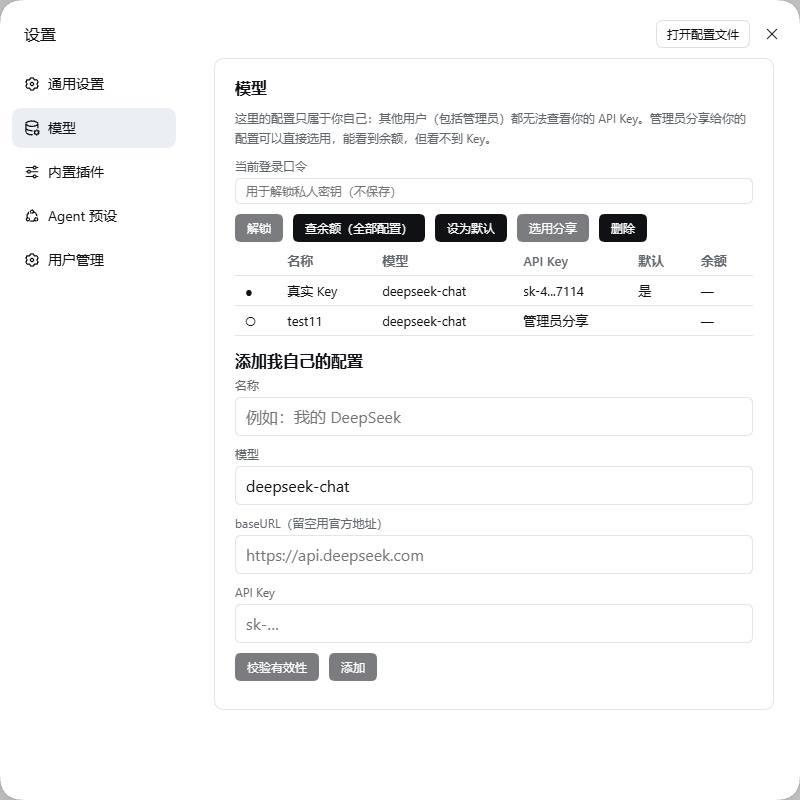
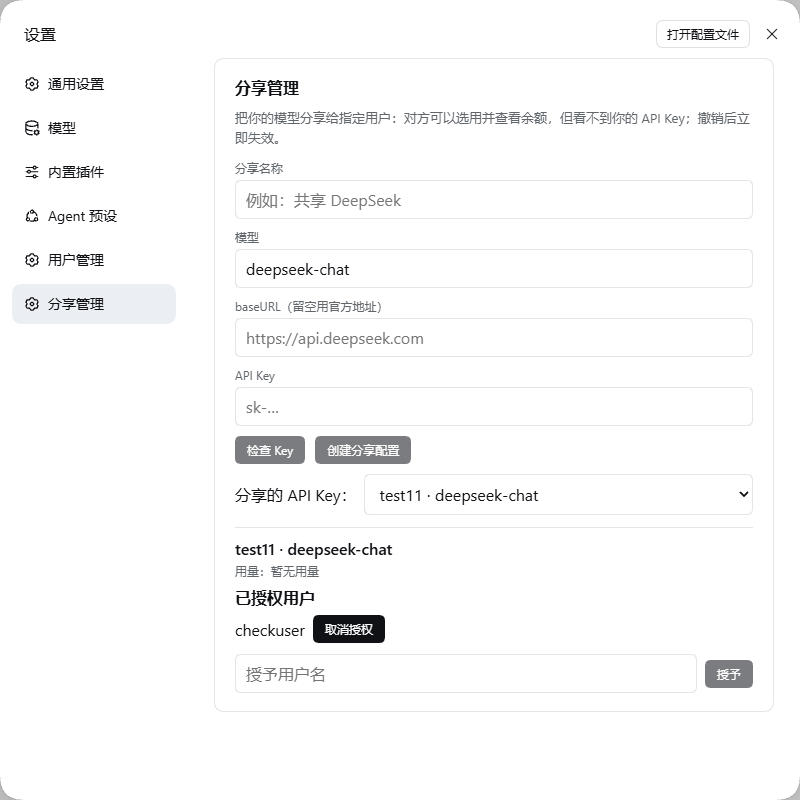
- 模型与 API Key 按用户隔离(v0.7.0):每个用户在【设置】→【模型】里管理只属于自己的 provider/ 模型/Key;私有 Key 用口令派生密钥信封加密(服务端在未解锁时无法解密),管理员在任何情况下 都读不到他人的私有配置。管理员可把自己的模型分享给指定用户——对方可选用、可看余额、看不到 Key, 撤销立即失效。未配置即阻断(不回退部署级)。
- 按用户隔离:会话与工作区在创建时记录归属;普通用户的会话/工作区列表只显示自己的, 直连他人会话返回 403,管理员不受限。 直播通道(WebSocket):0.2.0 客户端把它当作主连接通道且普通用户也需要,因此网关校验会话后 把升级转交宿主;该通道上的逐帧按用户过滤尚未实现,互不信任的多用户部署请先读已知边界。
- 登录防护:密码 PBKDF2-HMAC-SHA256(每用户随机盐、60000 轮、常量时间比较)、
密码策略「≥8 位且至少两种字符类型」、按来源 IP 的失败锁定、认证响应一律
Cache-Control: no-store; 通行密钥使用一次性短时挑战、严格的来源/RP ID 校验与签名计数器回退检测。 - 修改密码(引导式):需先通过「当前密码」校验才解锁新密码输入;新密码实时给出强度三档 (红/黄/绿 + 荧光),确认框在强度达标后解锁并实时比对。
- 多语言(i18n):界面文案中/英双语,跟随 DSH 的 locale 服务即时切换(客户端订阅
locale/change, 服务端渲染页按Accept-Language),详见多语言。 - 会话与审计:会话可跨重启恢复(磁盘只存 Token 的 SHA-256 哈希);管理员操作与越权尝试
追加写入
dsh-ui-auth-audit.jsonl(JSONL 审计文件)。
环境要求
| 项 | 要求 |
|---|---|
| DSH | >=0.2.0-rc.2 <0.3.0(web profile)。v0.7.0 起只支持 0.2.0 线——legacy 的 0.1.1-rc.2 传输线已移除,失去现代传输能力时插件 fail-closed(面板不可访问并打印明确错误),详见兼容性矩阵 |
| Node.js | `^22.19.0 |
| 运行时依赖 | qrcode(生成 TOTP 二维码)、ws(流式通道)与 @simplewebauthn/server(通行密钥服务端校验),安装时自动获取,无需手动构建 |
| 浏览器 | 通行密钥需要 Chrome / Edge / Safari / Firefox 等支持 WebAuthn 的现代浏览器;不支持时其余功能不受影响 |
通行密钥对访问地址有硬性要求(浏览器规则,插件无法绕过):
| 访问地址 | 通行密钥 | 说明 |
|---|---|---|
https://你的域名 |
✅ 可用 | 推荐的生产部署方式(反代终止 TLS) |
http://localhost:3080 |
✅ 可用 | 本机使用请用 localhost,不是 127.0.0.1 |
http://127.0.0.1:3080 |
❌ 不可用 | Chrome 拒绝 IP 地址作为通行密钥域(RP ID);面板会提示改用 http://localhost:3080 |
http://内网IP:3080 |
❌ 不可用 | 明文 HTTP 不是安全上下文,且 IP 不能作为 RP ID;需域名 + HTTPS |
安装
本包是标准的 DSH profile bundle(声明了 dsh.bundle.patch 与 dsh.client),
dsh plugin 会自动把它加入 profile 的 bundle 名单:
# 从 npm 安装
dsh plugin --profile web add dsh-ui-auth

# 或固定到某个 GitHub 发行版本
dsh plugin --profile web add github:0QwQ0/dsh-ui-auth#v0.7.0

# 或从本地目录安装(离线 / 二次开发)
dsh plugin --profile web add <本插件目录的绝对路径>
安装完成后重启一次面板生效(bundle 层在启动时应用)。
首次登录
用户表为空时,插件会自动创建管理员 admin,随机密码同时输出到两处:
- 面板控制台日志(以
[dsh-ui-auth]开头); - 面板进程工作目录下的
dsh-ui-auth-bootstrap.txt。
打开面板会跳转到 /auth/login,用 admin 与上述随机密码登录。
登录后请立即在【设置】→【用户管理】中修改密码;任意用户改密成功后,引导文件会自动删除。
使用指南
设置面板 → 用户管理
- 所有用户:修改自己的昵称、邮箱、密码;绑定/移除自己的 TOTP 令牌;添加/重命名/删除自己的 通行密钥;开关两步验证。
- 管理员:新增/删除用户、重置他人密码、切换角色、生成与撤销邀请码(可查看每个码的 已用次数与剩余次数)、移除任意用户的 TOTP、清除任意用户的通行密钥(设备丢失时救援)。
- 保护规则:不能删除或降级最后一个管理员,不能删除自己;改密或删除用户后,其其他会话立即失效。
修改密码(引导式校验)
【用户管理】→ 修改密码:先输入当前密码,离开该输入框时自动校验;通过则边框变绿(2px 向外荧光) 并解锁下面两个输入框,失败则变红且保持锁定。新密码实时评估强度:不满足=红、刚满足=黄、很强=绿; 只有在至少黄色时才解锁「确认新密码」,并实时比对(不匹配红、匹配绿)。注册页采用同一套规则。
注册与邀请码
注册入口在登录页的「注册账号」。新用户需要管理员事先在【用户管理】→【邀请码管理】中生成的有效邀请码; 每个码可设置 1–100 次的注册次数,可随时撤销。邮箱目前只做格式填写、不校验真实性,注册后可在用户管理中修改。
两步验证(TOTP)与通行密钥(Passkey)
两步验证可以用两种因子满足:TOTP 动态码或通行密钥。绑定任一种后即可在 【用户管理】→「两步验证」用开关启用;开关打开后,登录方式如下(通行密钥始终可直接登录, 与两步验证开关无关):
| 账号状态 | 可用的登录方式 |
|---|---|
| 两步验证关闭 | 用户名 + 密码;通行密钥 |
| 两步验证开启,已绑定 TOTP | 用户名 + 密码 + 动态码;通行密钥 |
| 两步验证开启,只绑定了通行密钥 | 用户名 + 密码 + 通行密钥;通行密钥(可不填用户名) |
0.6.4 起移除了「免密 + 动态码」登录:只有动态码、没有密码的登录请求一律被拒绝。 免密入口统一收敛到通行密钥。
TOTP:在【用户管理】→「两步验证(TOTP)」生成密钥,用验证器 App 扫码(或手动输入密钥 / otpauth 链接)后输入 6 位动态码完成绑定。动态码错误同样计入失败锁定;移除令牌需要当前动态码, 管理员可移除任意用户的令牌。
通行密钥:在【用户管理】→「通行密钥(Passkey)」中添加,同一个账号可以绑定多个:
- + 本机通行密钥:使用这台电脑的 Windows Hello / Touch ID / 设备 PIN;
- 📱 手机扫码添加:浏览器会显示二维码,用手机相机扫码后在本机完成绑定(手机无需与面板处于同一网络, 也不需要手机能访问面板);
- 绑定后登录页会出现「🔑 使用通行密钥登录」,点击即可不输入用户名与密码直接登录; 也可以照常输入用户名密码,在第二步提示时用通行密钥完成验证。
安全约定:通行密钥的私钥永不离开设备,服务器只保存公钥与名称等公开信息;添加、重命名、删除 通行密钥都需要先确认当前密码(两步验证开启时还需动态码或一次已有通行密钥的确认); 为避免账号被锁死,两步验证开启且只剩一个通行密钥时不允许删除它——请先绑定 TOTP 或先关闭两步验证。 设备丢失时,管理员可在【用户管理】中「清除通行密钥」救援。
普通用户能看到什么
同一套权限策略在服务端逐端点生效,界面只是它的呈现:
| 设置页 | 普通用户 |
|---|---|
| 用户管理 | ✅ 完整可用(改自己的资料/密码、TOTP、通行密钥、两步验证;管理员额外有用户与邀请码管理) |
| Agent 预设 | ✅ 可查看预设清单、查看本会话所用预设、为自己会话选择预设;创建/删除预设仅管理员 |
| 插件 | ✅ 可查看本部署已安装插件的清单;安装/卸载/启停插件、单个插件的设置与密钥仅管理员 |
| 通用设置 | 可查看;写入部署级设置仅管理员 |
| 模型 | ✅ 管理自己的模型与 API Key(私有、服务端不可解密);管理员分享的可选用并看余额,看不到 Key |
需要放开某项的部署,可由宿主插件通过 uiAuth.registerPolicy() 逐条登记,见
docs/DSH-0.2.0-COMPATIBILITY.md。
数据隔离
DSH 本身按单用户设计(会话、工作区是机器级数据)。本插件按登录用户隔离:
- 会话/工作区创建时记录归属;列表与搜索接口在响应侧过滤(含工作区内会话与归档会话);
- 直接访问非属主对象(如他人的会话内容、重命名、提示词)返回 403;会话导出仅限属主;
- 会话/工作区的 REST 与列表接口按属主过滤——普通用户读不到他人会话(
session/list只回自己的,直连他人 403); - 直播通道(WebSocket):0.2.0 客户端以其为主连接通道且普通用户也需要,故网关校验会话后转交宿主; 该通道上的逐帧按用户过滤尚未实现(旧的自研 mux 与 0.2.0 协议不兼容,已停用),详见已知边界;
- 管理员可见全部数据;插件启用之前已存在的旧数据默认归管理员。
模型页与密钥(v0.7.0 实际行为)
普通用户在【设置】→【模型】里管理只属于自己的模型与 API Key:
- 表格化:名称 / 模型 / API Key(掩码
前4...后4)/ 默认 / 余额;行可点选。 - 单组按钮:解锁、
查余额(全部配置)(一次请求内顺序查询全部配置,整批只节流一次)、 设为默认、选用分享、删除、添加;另有校验有效性在保存前探活当前填写的 Key。 - 未解锁时:私有 Key 用口令派生密钥加密,服务端无法解密,因此余额列显示 「需先解锁」 (而不是误导性的"未选择配置");解锁后即恢复数字。
- 管理员分享:被授权者可选用、可看余额、看不到 Key;撤销立即失效。
管理员在【分享管理】里创建分享、按用户名授予/撤销,并查看每条分享的授权用户列表与用量; 所有分享 Key 收进下拉菜单,选中后才展开该 Key 的授权列表。
界面预览
| 登录页(含通行密钥入口) | 注册页 |
|---|---|
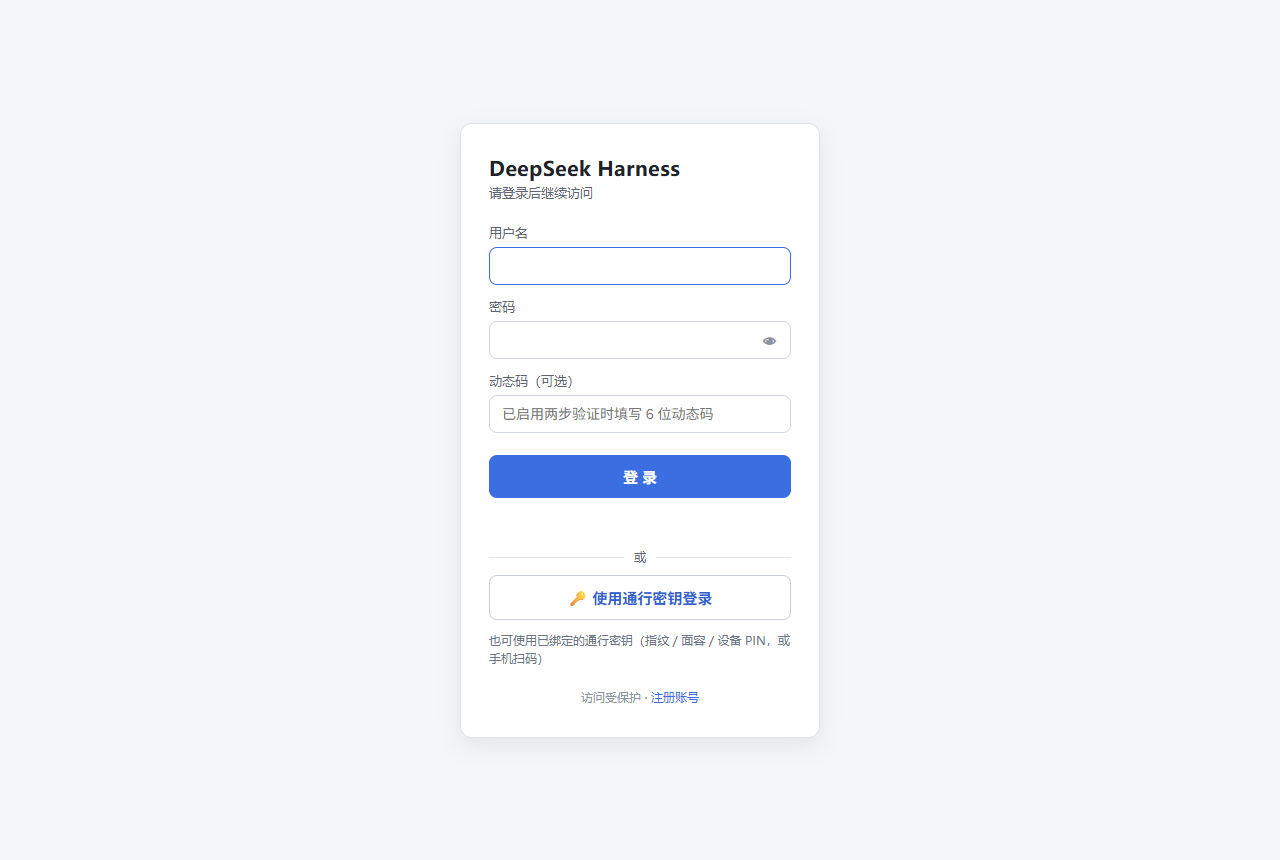 |
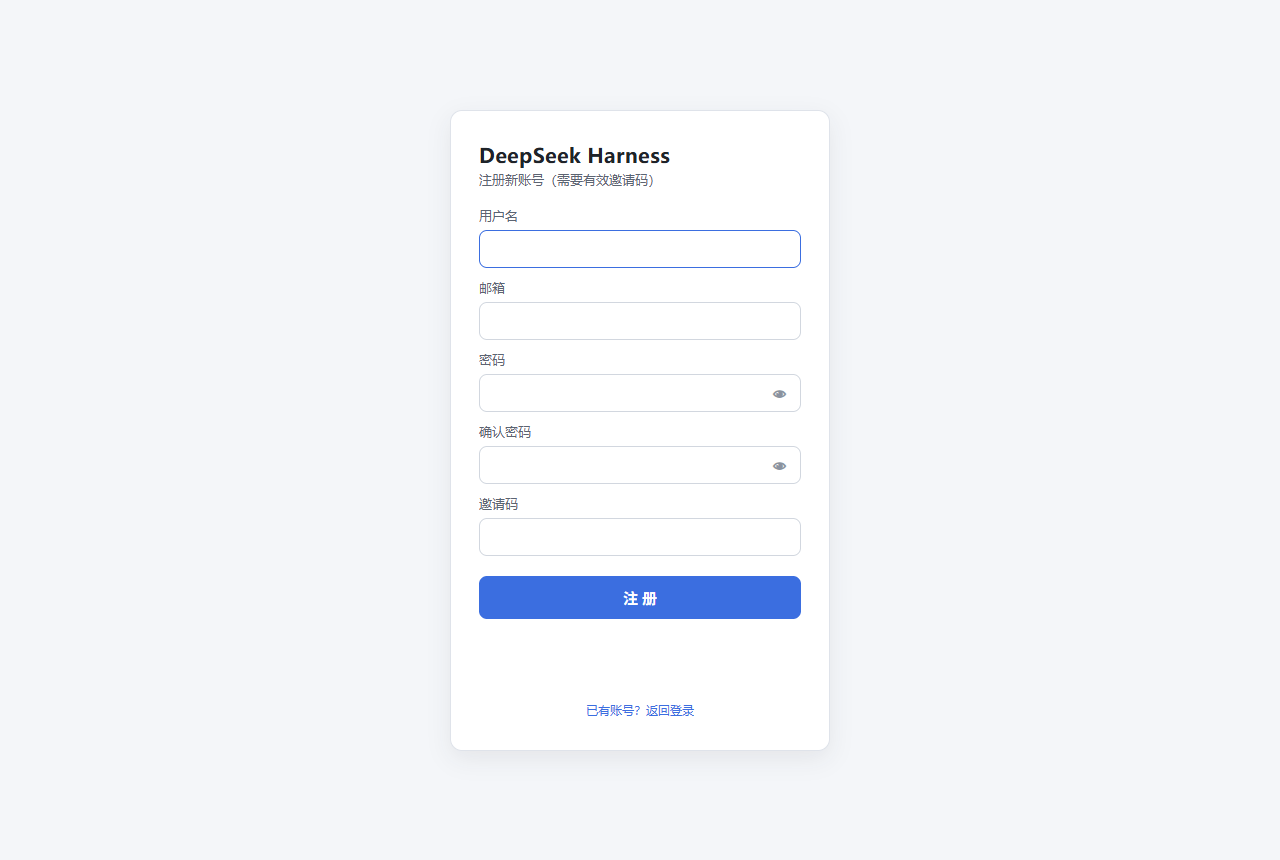 |
| 通行密钥(Passkey)卡片 | 用户管理页 |
|---|---|
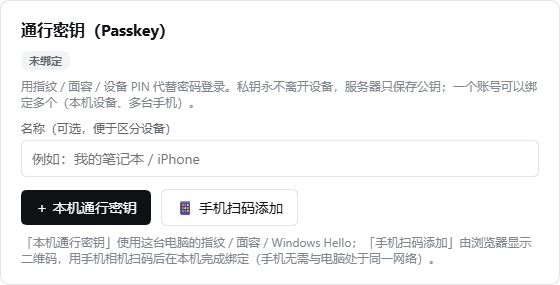 |
 |
| 注册成功引导页(绑定第二个因子) | 模型页(按用户,v0.7.0 表格化) |
|---|---|
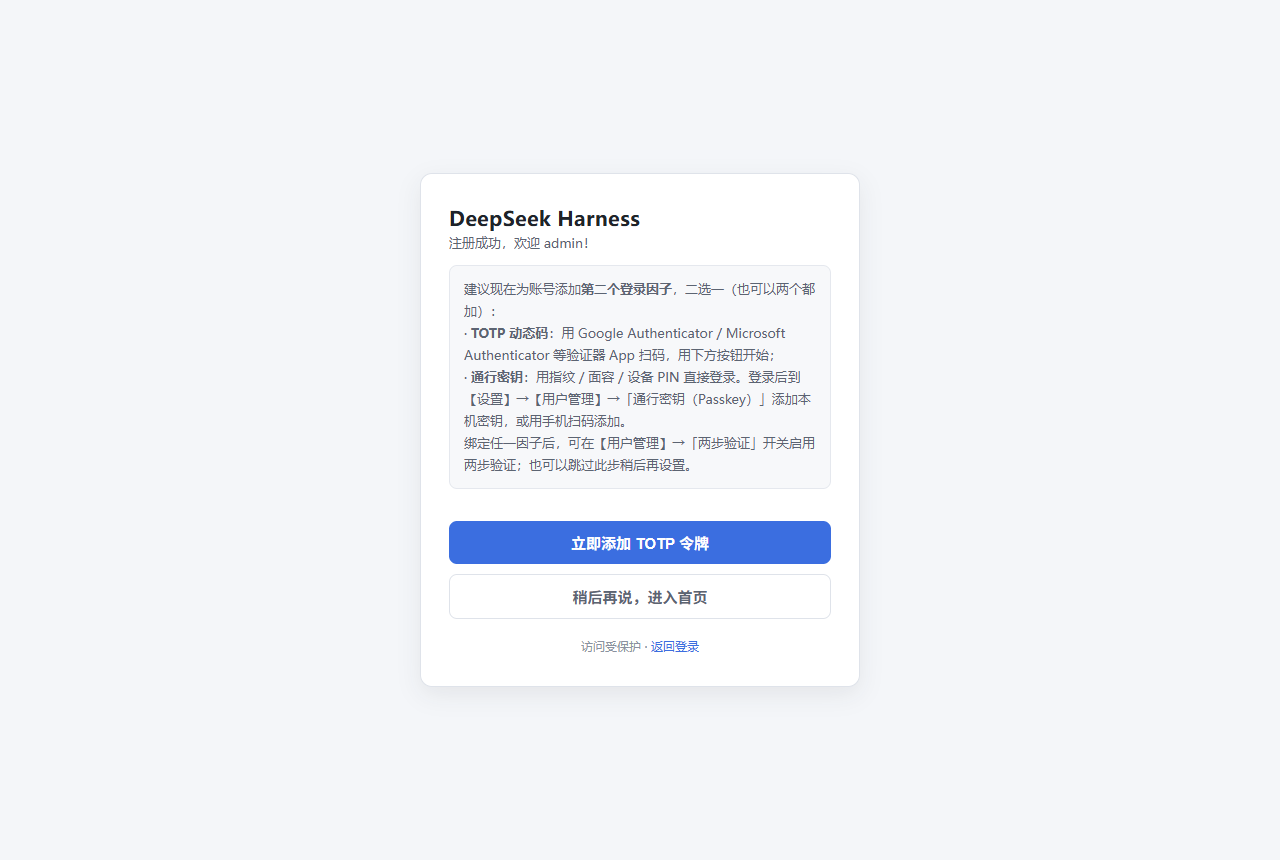 |
 |
| 分享管理(管理员,v0.7.0) |
|---|
 |
截图由
node test/shot.mjs(基础页)与node test/shot-features.mjs(模型页 / 分享管理)在一次性实例上生成(见脚本头部的环境变量说明), 因此图中不含任何真实账号数据。通行密钥相关界面必须在localhost或域名 + HTTPS 下才会完整渲染。
卸载
dsh plugin --profile web remove dsh-ui-auth
# 重启面板后网关、设置面板与客户端模块全部消失;profile 的依赖与 bundle 名单自动还原
卸载不会删除账号数据(防误删);如需一并清空,见上一节。
安全说明与已知边界
- 密码与会话:PBKDF2-HMAC-SHA256(随机盐、60000 轮、常量时间比较);密码策略为 「≥8 位且至少两种字符类型」;会话 Token 仅以 SHA-256 哈希落盘,登出、改密或删除用户后相关会话立即失效。
- Cookie:会话 Cookie 为 HttpOnly + SameSite=Strict,且名字按实例唯一(
dsh_auth_<DSH_HOME 短哈希>, 因为浏览器 Cookie 不区分端口,固定名会让同机多实例互相踢下线);在 TLS 直连或(仅在信任反代时)X-Forwarded-Proto: https的通道下自动追加Secure。 - 公网部署建议:放在 HTTPS 反向代理之后,由代理终结 TLS 并保留 Host;DSH 自身可监听
127.0.0.1或内网。反代场景请按上文开启DSH_AUTH_TRUST_PROXY=1,否则限流会按代理 IP 聚合。 - 会话持久化带来「记住登录」:未过期的会话在面板重启后自动恢复;若你的安全要求是每次重启都必须重新登录,
可在停止面板后删除
dsh-ui-auth-sessions.json。 - 升级提示:从 0.5.1 之前的版本升级时,旧版明文会话记录不再恢复,所有用户需要重新登录一次。
- 与 DSH 自带机制的关系:DSH 对
/api的 DNS-rebinding 信任栅栏明确不是认证; 本插件才是前置认证层,两者叠加使用。 - 隔离强度的上限:本插件按登录用户隔离 DSH 的会话/工作区数据;它不改变 DSH 自身的进程权限模型, 也不能隔离第三方插件自己的数据。多租户级别的强隔离需要 DSH 侧的支持。
- 更完整的安全分析(威胁模型、用例矩阵、残余风险与部署加固清单)见 SECURITY.md。
已知边界(v0.7.0):DSH 0.2.0 的客户端把
/api/remote.mux(WebSocket)当作主连接通道, 普通用户也需要它,因此网关在校验会话之后把升级请求交给宿主处理—— 代价是这条通道上的逐帧按用户过滤尚未实现(旧的自研 mux 与 0.2.0 客户端协议不兼容,已停用)。 其余通道(REST/列表接口、/plugins/events)仍按会话与属主把关; 需要在 mux 上恢复逐帧隔离的部署,请勿在此版本把面板暴露给互不信任的用户。
v0.7.0 实测发现并修复的问题(均已在真实实例上验证): 凭据键语法错误会让宿主起不来、R1-ii 三处接线问题、余额 fetcher 从未注入、 WebSocket 升级被自研 mux 接管导致设置页一直「重新连接中」、跨实例会话 Cookie 同名互相踢下线。 详见
CHANGELOG.md的 0.7.0 条目。
已知边界(v0.7.0)
- mux 逐帧隔离:0.2.0 的客户端把
/api/remote.mux(WebSocket)当作主连接通道,普通用户也需要它, 因此网关在校验会话后把升级交给宿主;这条通道上的逐帧按用户过滤尚未实现(自研 mux 与 0.2.0 协议不兼容,已停用)。 其余通道(REST/列表、/plugins/events)仍按会话与属主把关。互不信任的多用户部署请暂勿暴露面板。 - 会话 Cookie 按实例唯一:以
DSH_HOME短哈希为后缀(实例内稳定、实例间互不干扰)。 注意:该修复在 v0.7.0 生效;同机上仍在跑 0.6.x 的实例其 Cookie 名仍旧式,跨版本仍可能互相踢。 - 查余额需要解锁:私有 Key 为口令派生密钥加密(E2E),服务端在未解锁时无法解密,故按设计提示「需先解锁」。
多语言(i18n)
界面文案支持中文 / English,跟随 DSH 的语言设置自动切换(无需重启面板):
| 层 | 取语言的方式 |
|---|---|
| 客户端界面 | 用 DSH 的 locale 服务:ctx.locale.register/bind 注册并绑定词典,订阅 locale/change 即时重渲染 |
| 服务端渲染页(登录 / 注册 / 注册成功) | 用户偏好缺省时按 DSH 的规则交给浏览器,即读取请求的 Accept-Language |
| 服务端消息(RPC 错误等) | 与页面同一套词典,在统一出口处翻译 |
实现要点:
- 词典分两层:语义键(
src/i18n.ts,用于逐点t())与短语表(src/i18n-phrases.ts,约 320 条), 后者按「中文原文 → 英文」做子串替换,因此能覆盖拼装式文案(如当前登录:+ 用户名); - 客户端替换只作用于我们自己的区域(
.dshua面板与设置对话框),不触碰宿主其它界面,且记住原文可双向还原; - 替换按长键优先,避免短词吃掉长词;未收录的文案保持中文原文,可增量补充而不会出现空白;
- 语言探测以 DSH 绑定的
t()为准(最权威),快照与documentElement.lang仅作兜底,且每次替换前即时探测: DSH 的 locale 同步可能晚于插件加载,缓存会导致用错语言。
自检:node test/i18n.test.mjs(词典完整性 / 替换行为 / Accept-Language 解析)与
DSH020_URL=... node test/live-i18n-check.mjs(真实实例上切 en 再切回 zh 的端到端检查)。
配置与运维
环境变量、数据落盘位置、备份恢复、升级回滚与排障,全部收在 运维手册(面向部署者)。
这里只强调两点:首次启动生成的 dsh-ui-auth-bootstrap.txt 用完即删;
宿主缺少现代传输能力时插件会 fail-closed(面板不可访问),这是有意设计而非故障。
DSH 版本兼容性
v0.7.0 起只支持 modern 传输线(DSH 0.2.0-rc.2 线),legacy 传输线已完全移除。
下表按"目标版本 / 中间版本 / legacy"三档给出实测结论(表格随每次实测更新):
| 档位 | DSH 版本 | 结论 | 说明 |
|---|---|---|---|
| 目标 | 0.2.0-rc.2 |
✅ compatible | 唯一的目标版本;启动即硬前置校验,端点面与页面均按此版本实测 |
| 中间 | 全部已实测:0.2.0-rc.1、0.1.7-rc.2、0.1.7-rc.1(✅ 38/38);0.1.6-alpha.2(37/38)、0.1.5-rc.3、0.1.5-rc.2、0.1.5-rc.1(34/38,缺 0.2.0 独有端点,属能力收窄);0.1.6-alpha.1 ❌ 宿主自身无法启动(上游缺陷) |
见左 | 中间版本不会因为缺能力而放行:缺失现代传输能力即 fail-closed;端点缺失只表现为该页不可用(404) |
| legacy | 0.1.1-rc.2 |
❌ 已移除 | 缺失 connection.authorizeIndex 时fail-closed:认证网关不建立、面板不可访问并输出明确错误,绝不降级为无门放行 |
注意:宿主未提供现代传输能力时,插件不会退回旧传输线,而是以"明确拒绝"的方式停摆 (宁可不可访问,也不能无门暴露)。这也意味着升级到 v0.7.0 前请先确认 DSH 版本。
普通用户在 modern 线上的可达面同样按用户裁剪:模型与 API Key 各自独立(见
按用户隔离的模型与 API Key),不能创建 workspace(属部署方能力),
也不能写入任何设置命名空间;需要放开时可由宿主插件通过 uiAuth 接口登记策略。
端点清单、收紧项与验证证据见 docs/DSH-0.2.0-COMPATIBILITY.md。
常见问题
忘记管理员密码怎么办?
删除 ~/.dsh/.credentials.yaml 中 dsh-auth/admin(及其对应的哈希记录),重启面板后会重新生成 admin
与新的随机密码(原账号的 TOTP、通行密钥与资料会丢失)。其他用户的密码可由管理员在用户管理中重置。
删掉的用户想用同一个名字重建,提示「用户名已存在」? 这是有意设计:被删除的用户名会写入永久墓碑,同名账号不能重建,避免新账号继承旧账号留下的 会话归属、邀请码记录等历史残留。请换一个用户名,或按上面的方法清空整张用户表后重新引导。
绑定的通行密钥设备丢了怎么办?
两个办法:① 若该账号还绑定了 TOTP,用「密码 + 动态码」登录后在【用户管理】里删除丢失的通行密钥;
② 请管理员在【用户管理】→ 对应用户行点「清除通行密钥」。管理员自己的通行密钥若全部丢失且未绑定 TOTP,
只能按上一条重置 admin 记录(这也是「两步验证开启时不允许删除最后一个通行密钥」的原因)。
通行密钥按钮不可用 / 提示改用 localhost?
浏览器不允许把 IP 地址当作通行密钥域。请用 http://localhost:3080 打开面板,或给面板配一个域名并走 HTTPS。
面板会直接给出应该使用的地址。
手机扫码绑定后,手机上也能直接登录面板吗?
可以。手机通行密钥是「可同步/混合」凭据:手机浏览器打开同一地址(必须同样是域名或 localhost)即可用
指纹/面容直接登录;无需电脑在场。
重启面板后需要重新登录吗? 不需要。未过期的会话会自动恢复;只有在从 0.5.1 之前的版本升级时,旧会话记录会失效一次。
普通用户看不到「模型」页,是故障吗? v0.7.0 起不是这样:每个用户在【设置】→【模型】里管理自己的模型与 API Key。 若你看到的是旧行为(提示"仅管理员可访问"),说明插件版本低于 0.7.0。
登录限流把所有人都算成同一个来源?
说明面板前面有反向代理。按上文开启 DSH_AUTH_TRUST_PROXY=1,限流将按真实客户端 IP 计数。
邀请码用完了 / 想关闭注册? 注册必须持有效邀请码,因此不生成邀请码即等于关闭注册;管理员可随时生成或撤销。
可以只要认证、不做数据隔离吗?
当前版本始终启用按用户隔离。需要自定义策略的部署可通过宿主插件调用 uiAuth 接口(见兼容性文档)。
开发
源码为 TypeScript,构建产物一并提交(DSH 直接读取仓库,因此运行与安装不需要构建):
npm ci                 # 安装开发依赖
npm run typecheck      # 宿主(tsconfig.json)与客户端(tsconfig.client.json)两套严格类型检查
npm run build          # src/*.ts → lib/*.js,并构建客户端 bundle(内含契约自检)
npm test               # 全量回归(构建 + 安全套件 + 策略/加解密 + 冒烟 + 登录页/端点)
npm run verify:clean   # 校验 lib/ 与 src/ 一致(改源码后必须提交重新构建的产物)
常用的针对性检查:
| 命令 | 用途 |
|---|---|
npm run store:check |
商城契约门禁(依赖声明、权限信号、打包内容) |
npm run test:compat:0.2.0 |
真实 DSH 0.2.0 实例端到端(38 项) |
npm run test:compat:matrix |
多版本兼容矩阵(逐版本起一次性实例) |
npm run test:i18n:live |
语言切换端到端(en ↔ zh) |
npm run docs:matrix |
由安全套件的 JSON 结果重建安全报告 §2 |
模块职责与测试分层见 架构文档;开发环境、提交纪律与文案规范见贡献指南。 (README 不再重复模块表,避免两处漂移。)
Links
More in this category
toby-bridges/api-relay-audit★ 876
Runs local security audits of AI API relays and LLM proxies from DeepSeek Harness, producing Markdown reports for prompt injection, model substitution signals, tool-call rewriting, error leakage, stream integrity, and profile-gated Web3 risks.
SeaOf0/dsh-redteam-model★ 685
Authorized-security DSH collection: nine work modes (redteam coordinator, pentest, code audit, binary analysis, attack-defense, AV evasion, incident response, cloud security, CTF solving) and fifteen runtime plugins, managed from a settings page with one-click deploy, install, update and uninstall.
howmp/dsh-pentest★ 607
Authorized pentest mode for DeepSeek Harness — exploration chain, assets and findings with a Web view.
PerryLink/dsh-auto-review★ 234
Second-model auto-review on the approval answerer chain: a read-only reviewer subagent returns structured allow/deny verdicts with reasons, fail-closed by default.
NanmiCoder/dsh-auto-mode★ 164
Adds an Auto permission preset between Workspace Write and Full access: routine work stays in the official workspace-write sandbox while the current session model reviews escalation and destructive calls, granting one exact wider access once, asking when the intent is ambiguous, and denying critical paths.
ADWMC/helm-d#helmd★ 151
Single-bundle reverse-engineering and pentest security plugin: first-turn tool narrowing, domain routing, and 33 tools covering APK, web, native binary, protocol, malware and LLM samples — with unpacking, license-bypass and anti-analysis case playbooks, an H-CoT evaluation engine (semantic routing, /hcot command), a web workbench with a ledger-driven tool shelf, an on-disk case workflow (auto-persisted evidence chain, E-numbered validated findings, post-compaction resume), GitHub-based external tool discovery, and 361 on-demand reference docs.
Community comments
Comments are public GitHub Discussions. Loading them connects to GitHub and Giscus; a GitHub account is required to post.